







































Are you a streamer? We have some software that can help!
Thursday, April 29, 2021 by Tatiora | Discussion: Stardock Blog
If you had told me twenty years ago that the world would get to a point where thousands of people could tune in and watch people play a video game live just about anytime you want, I’d have called you crazy.
And I definitely would have been wrong.
When I pause to consider online streaming and all that it’s become, it really does just sort of leave me awestruck. I can’t believe how “on demand” things are now, from video and movie streaming services, all the way to streaming as a more general rule - not just for video games, but for other things like art, cooking, or “slice of life” vlogs.
If you had told me six or seven years ago that I’d be able to do streaming as a piece of how I’d make my living, I definitely would have thought you were blowing smoke out of you-know-where. The odds of making it “big” on a streaming platform are astronomical.
Again, I’d be wrong.
I haven’t made my whole life all about streaming so that I make my entire living off it or anything, but I picked up streaming almost as soon as I came to Stardock and it’s become an integral part of my job over the last five years. In addition to doing it at work for all of our major releases, I sometimes stream some of my favorite games that I play during my leisure time, just for fun.
Because streaming is something I do often in both my work and home life, I’ve picked up a few tricks and things that help my experience run smoothly for both myself and my viewers. Specifically, a few pieces of software that make my life a lot easier - let’s take a look at them!
I talk about Groupy a lot, but it’s because it deserves to be talked about! I don’t have the space or the resources to have three or four monitors on my desk - I have two. Obviously, one of those monitors needs to be dedicated to running the game itself; the problem that I have is that I need to be able to view too many different things than can comfortably fit on that second monitor.

I need to be able to monitor the chat on my Twitch channel (or in the case of streaming for work, the chat on Steam). At the same time, I need easy access to my X-Split so that I can change scenes or make adjustments to my sound or troubleshoot any other stream problems. Depending on what I’m playing, I might need a guide open or have to occasionally reference an outline so I remember all of my talking points. I also tend to keep Discord open, especially if I’m playing a team-oriented game and need to be on voice chat with my friends.

Cramming all of this on one monitor without having to waste a bunch of time squinting at my task bar (my eyes are getting old) and trying to find the right thing to maximize from a minimized state is impossible! Enter: Groupy. It makes my life so much easier and allows my streaming process to run smoothly. I can easily switch through my tabs using hotkeys, or trail my mouse over there to click on the one that I need to look at. If I need to grab an asset for my stream, like an animation or an image, Groupy’s organization makes it so much easier to find.
Fences is another program I talk about a lot, and that’s mostly because it has really helped me personally. I have never been great at organization (both on my PC and off of it!), and Fences makes it possible for me to organize in a visual way that I find appealing and easy to navigate.

While Fences doesn’t serve the same practical “in action” purpose that Groupy does for my streaming, the work it does is still essential to my sanity. I have all of my frequently used programs organized into specific Fences on my desktop, which includes a fence for gaming (it contains mostly games and game-adjacent programs, like Battle.net) and also a fence for streaming.
I know right where everything is because they are neatly categorized (and even colored differently), so when I’m ready to sit down and stream I don’t have to spend a bunch of time hunting down everything I need - it’s all right there ready to go!
I only have one PC here at home that I use for streaming. I built it a few years ago, and although it’s probably due for some upgrades, we designed it specifically so that it could handle the load of running a game and the streaming software, plus other things, all at once. Some people don’t have that luxury, though, and that’s where Multiplicity comes in!
With Multiplicity, you can have one PC do the heavy lifting of the processing and running the streaming software while the other focuses on the game. You can control it all easily with one keyboard and mouse, so you don’t have to fight with a bunch of hardware covering your desk.

If you have a laptop, Multiplicity can create a “docking station” for it, so that you can utilize it easily while you stream. Being able to pull up a Twitch chat or stream preview on the laptop without having to lean over and use its keyboard or mouse pad is a luxury I enjoy whenever I use it myself. Above, I'm showing my buddy Spencer's setup, since it's shinier than mine (and I don't want to clean my desk off for a pic right now  ).
).
These programs have worked great for me for a number of years and are now an integral part of my streaming process, especially at home where I have more limited space and resources.
Do you stream games at all? Share a link to your channel with me in the comments! If you’re interested in seeing what I stream during my leisure time, feel free to toss me a follow over on Twitch.
Microsoft is Looking for their Next Default Font
Thursday, April 29, 2021 by Island Dog | Discussion: Personal Computing
Microsoft has commissioned five new custom fonts that could be the new default font going forward.
"Calibri has been the default font for all things Microsoft since 2007, when it stepped in to replace Times New Roman across Microsoft Office. It has served us all well, but we believe it’s time to evolve. To help us set a new direction, we’ve commissioned five original, custom fonts to eventually replace Calibri as the default. We’re excited to share these brand-new fonts with you today and would love your input. Head over to social and tell us your favorite. And don’t worry if the font you love best isn’t chosen as the next default; all of them will be available in the font menu, alongside Calibri and your other favorite fonts in your Office apps in Microsoft 365 and beyond."
Read more here: Beyond Calibri: Finding Microsoft's next default font - Microsoft 365 Blog
They are going to be evaluating them over the next few months and getting feedback from their social channels to decide what the next default font will be. It seems they will all be available to use, and it looks like they can already be downloaded and used now.

AMD Ryzen 9 5900X Dominates CPU Sales on Amazon
Trouble for Intel?
Wednesday, April 28, 2021 by Tatiora | Discussion: Personal Computing
I haven't been looking into building a new computer or upgrading the one I have recently, but that doesn't mean I haven't been hearing the buzz about all of the hard-to-find CPUs that have hit the market over the last year or so.
I know, for instance, that AMD's Ryzen 5000 series has been fairly impossible to find. A few of my friends have been looking and the only luck they've had locating it is with a pretty inflated price tag attached. These processors have been around for a little while now, with its mid-range and high-end CPUs powering popular desktop PCs like the Alienware R10 Ryzen Edition or gaming laptops like ASUS ROG Zephyrus Duo SE.

TechRadar, Hot Hardware, and other sites all report that AMD's sales of this particular card are extremely high on Amazon. Despite it selling for $800 USD - which is well above the MSRP of $549 - it has reached the number one sales spot on the online retailer's site, proving just how much demand there is for this particular card.
According to Tech Radar, this could spell some bad news for Intel, which finds itself out of the top six sale spots on Amazon's CPU best seller's list. All of the spots are dominated by AMD chips, and only three spots in the top 10 happen to be Intel processors. Intel's most popular CPU on Amazon at the moment is the Intel Core i7-10700K, a 10th gen 8-core processor that sells for around $319 USD.

Historically, Intel has dominated the market on places like Amazon, so it's a bit of a surprise to see AMD doing so well in one of the largest retail markets in the world. Their lead could slip as time goes by, since Amazon's best-seller list is constantly changing, but it does seem to bode well for the Red Team right now.
Tech Radar has a pretty thorough review on the Ryzen chip here. I have been trying to learn more about the tech lately - I admit that a lot of this is above me since I don't really live in PC hardware on the daily - so I'm curious about the experience of all the PC enthusiasts out there. What CPU do you use, have you been thinking of upgrading? Where does this chip fall on your priority list? Share with me!
Check Out the Latest WindowBlinds Skins from 2 of 3!
Tuesday, April 27, 2021 by Island Dog | Discussion: WinCustomize News


Check Out These Electric Tangerine Skins!
Monday, April 19, 2021 by Island Dog | Discussion: WinCustomize News
 A couple of weeks ago I wrote about a trending color called Electric Tangerine. I think it's a beautiful spring and summer color, and I think at least a few of you agreed. 2of3 and don5318 have released WindowBlinds skins that have some of that color integrated in the design.
These are both fantastic skins so be sure to check them both out!


Thanks for taking time to create and share these skins with the WinCustomize community!
Spring Cleaning for your Windows PC
Thursday, April 15, 2021 by Tatiora | Discussion: Stardock Blog
I don’t worry too much about constantly tidying and organizing my PC - until it gets annoying, anyway. By then it’s too late, and I spend all sorts of time sorting icons and renaming folders. I’ll admit that I am pretty much the same way with my house - the idea of ‘a place for everything and everything in its place’ has never really resonated with me.
This creates a special sort of chaos, which is fine - until it isn’t. I know that if I had a system in place for where everything goes and just followed it, I wouldn’t have to do frantic cleaning later when I have company coming - or when my disc drives start screaming at me that they’re getting too full.
I’ve discussed my love for Fences and how essential it is in some previous blogs over the last year, and I’ll be honest - it’s gone a long way toward preventing massive bouts of “Where the heck did I put that file!?” that I used to be prone to rather frequently. Even with an organizational system in place, the occasional “spring cleaning” is still called for - let’s take a look at what can help with that!
I’m sure it comes as no shock, given the above paragraph, that this powerhouse of an app is the first one on our list. At face value, creating fenced in areas on your computer to organize your icons is useful enough, but did you know that you can customize and sort icons automatically?
You can! In the Fences settings, you can actually dictate which fence certain types of files filter into. All of the images I save on my computer filter automatically into my “Pictures and Media” fence, while any documents go to another fence that I am setting up for my Spring cleaning binge.

Your Fences can also become Folder Portals, which lets you see all of the files you need at just a glance, but won’t clutter up your desktop with tons of unsightly folders. Being able to roll up my fences also makes for a clean desktop. You can control how fences snap and resize when you move them, too. I don’t get too nitpicky with my settings personally, but the point is - if you want to, you can!
Although I sung the praises of Fences first, this is probably where you should start for your PC spring cleaning! Using SpaceMonger, you can scan, map, and manage your computer’s storage.
When I built this PC with my friend Gus a couple of years ago, I repurposed some of my old hard drives. The C drive, however, is small - which is different from what I was used to. Previously, I would just save everything to my C drive and never really saw any space issues. This isn’t the case now, and my computer started yelling at me about limited space a few days ago.

I pulled up SpaceMonger and used it to determine exactly what was taking up so much darn space. SpaceMonger made it easy for me to isolate the major offenders and move them to other drives to free up some space. You can click on the categories that are to the left of the pie chart in order to bring up a list of all those types of files at the bottom of the screen.
In addition to running SpaceMonger, I also remembered to go into my Windows 10 settings and change where my files and folders default download to, so I should hopefully be able to alleviate any space issues before they even happen.
Another great way to make sure you get the most out of your desktop space is by using Tiles. If you’re unfamiliar with the software, Tiles lets you create multiple desktops of related programs, files, and links through the use of a customizable sidebar on your Windows desktop. You can drag programs onto the sidebar by holding the shift key, then it will create a thumbnail of that application so that you can find it more easily.
This program works pretty well in conjunction with Fences and actually completely interfaces with Groupy (another one of my favorite workflow organization tools). You can adjust the settings in Tiles so that certain Tiles categories show only maximized or minimized Windows, as well as customize where you'd like the Tiles bar to appear on your screen.

Tiles is made to help manage apps that you’re running - which, while it doesn’t help the overall organization of your apps and icons on your PC, still goes a long way toward feeling more organized overall, especially when you’re multitasking and trying to do a lot at once.
I have made no secret of the fact that I really dislike the Windows 10 Start menu interface. I feel like I can’t find anything half the time - so that’s why I installed Start10. It lets me choose a Windows 7 or Modern look, making it much easier for me to find what I need.
It interfaces directly with Fences, too - it will show all of your Fences (and the colors you’ve assigned to them!) right in the Start menu. Custom searches also make for a much more organized feel for your PC, because even if all of your files and folders are organized, sometimes you just can’t remember where you put something - so just search for it right within the Start menu. Start10 and Fences, specifically, are absolutely indispensable for me.
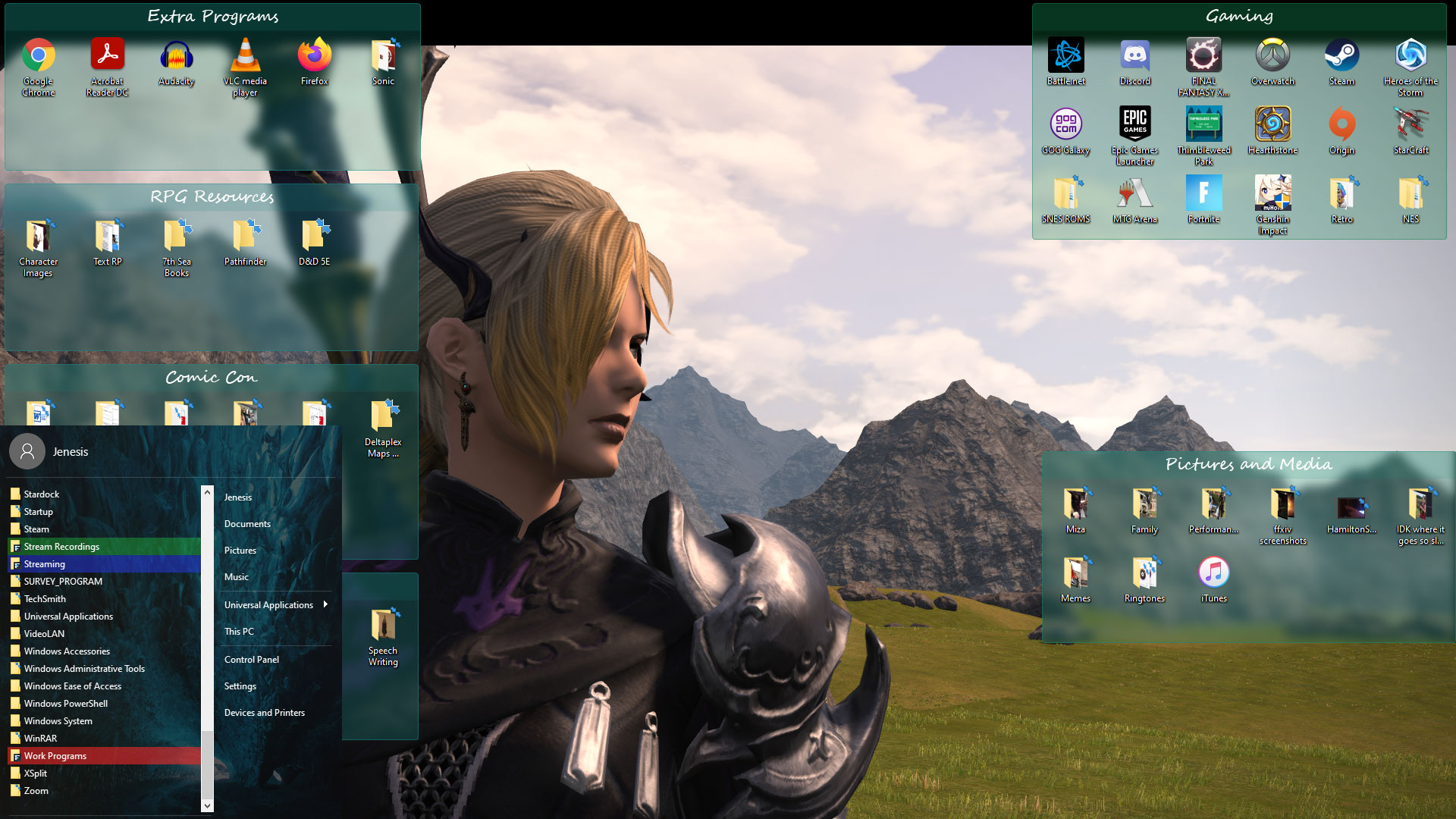
All of the programs I mentioned above are available individually on our website, or all together along with several other awesome apps in our Object Desktop suite.
How often do you “clean up” your PC? What are some of your favorite organizational programs? Share with me!
Mars Ingenuity Helicopter's First Flight to Occur Soon
NASA says it will launch no earlier than April 14th
Wednesday, April 14, 2021 by Tatiora | Discussion: Life, the Universe and Everything

Image courtesy of NASA
Back in February, NASA's Perseverance rover landed on the surface of Mars. Perseverance is equipped with all sorts of amazing tools and gadgets - including the first ever Mars Helicopter, Ingenuity.
Originally, the helicopter was scheduled to attempt its first flight early Monday morning, but data that NASA scientists received late last week have caused them to postpone the flight to no earlier than April 14th (that's today - wonder if we'll get an update soon?). In any case, whenever this little 4-pound helicopter does attempt its inaugural flight, you'll be able to watch via NASA's livestream.
Last week, scientists at NASA located a spot on the surface that was flat enough and free of obstructions and plopped Ingenuity there to prepare for its first flight. Mission controllers have spent the last several days making final adjustments to prepare, including a test of the motors and the releasing of the helicopter's motor blades.
The JPL team will transmit flight instructions to Perseverance, which will then relay the info to Ingenuity. There were many factors that could potentially delay the flight - including high winds or other inclement weather - but according to NASA's press release, there was a different reason for holding off on the launch.

Image courtesy of NASA
"During a high-speed spin test of the rotors on Friday, the command sequence controlling the test ended early due to a “watchdog” timer expiration. This occurred as it was trying to transition the flight computer from ‘Pre-Flight’ to ‘Flight’ mode. The helicopter is safe and healthy and communicated its full telemetry set to Earth," NASA said in a release on their website.
"The watchdog timer oversees the command sequence and alerts the system to any potential issues. It helps the system stay safe by not proceeding if an issue is observed and worked as planned."
During a press conference, Ingenuity operations lead at JPL Tim Canham said that we should expect about 40 seconds worth of data. Ingenuity is equipped with a downward facing camera that will snap photos during the flight, snapping images about 30 times a second. The camera, in addition to documenting the flight, will serve as an altimeter to help mission planners localize the chopper's landing spot. The Perseverance will also attempt to capture images of the test flight via its Mastcam-Z camera.
Assuming the flight goes well, this the first time in history that NASA - or any other space agency - has successfully attained power controlled flight on an alien planet. The success of this mission could introduce an entirely new dimension to exploration of the Red Planet.
If you want to make sure you don't miss the test flight, you can keep an eye on NASA's official schedule here. I know I'll be keeping an eye on it - how about you? Science is cool!

A concept art piece of Ingenuity in flight. Image courtesy of NASA
Spring Themes for a Seasonal Desktop!
Monday, April 12, 2021 by Island Dog | Discussion: WinCustomize News
We've mentioned spring desktop wallpapers recently, but of course there's much more you can do for spring than just change your wallpaper.
One of my favorite skins to use for spring is from don5318 called Simple Green. This is a nice WindowBlinds skin that has an overall minimal design, but with beautiful touches of spring colors sprinkled in.

Not specifically designed for spring, but Reality by LightStar has a perfect color scheme that matches well with a bunch of spring and nature themed wallpapers.

There's no shortage of spring animated wallpapers for DeskScapes, but one you should definitely check out is Spring Falls from AzDude which has a beautiful waterfall scene.

Stardock's Virtual Trivia Night
We're all still at home, so we decided to have some friendly competition online!
Thursday, April 8, 2021 by Tatiora | Discussion: Stardock Blog
There’s a light at the end of the tunnel! Vaccinations are rolling out and we’re all one step closer to being back together in person at the office. I know I don’t just speak for myself when I say that we’ve missed each other so much.
We’re still not quite ready to gather in person yet, so we’ve been taking our game nights online for the last year or so. A couple Fridays ago, we hosted an online trivia night using Discord. We offered a $20 Amazon gift card as a prize, worked on the honor system that no one would use Google (or any other search engine, for you loop-hole searchers!), and had a grand old time. I teamed up with Raeann, our awesome administrative assistant, and together we wrote the questions, chose the categories, and organized the entire affair.
The Tools
As I mentioned above, we used Discord for voice chat. Back at the start of the pandemic, we created a company server where we hosted other virtual game nights for things like Jackbox, Among Us, and plenty of games on Tabletop Simulator. Discord is nice because it has a huge room capacity, so we didn’t have to worry about anyone being left out, and Raeann was able to stream her screen with the trivia software (more on that next) easily to everyone in the room.
We needed a way to keep track of the score, the timing, and have everyone be able to answer and participate. We discovered a website called Kahoot!, which is used commonly by teachers for class trivia and quizzes. Raeann and I wrote all of the questions in a shared Google doc and then she spent the time (thanks, Raeann!) putting the questions into Kahoot for the trivia night.
The Trivia
First, we came up with categories about two weeks in advance and just filled in a question or two here and there as we thought of them or had free time. Then, about 2 days before trivia night, we discovered that we had completely avoided categories like Math that we both wanted nothing to do with. We figured, why write questions for a topic we hate? New topic! So we added a second miscellaneous category and ran with it.
There’s about a ten year difference in age between Raeann and I, which I found really entertaining to see when we got to any questions about pop culture - it was like two different worlds! It was also fairly obvious by the time we got to trivia night which questions I had written - I can’t help it, I’m wordy!
The Team Building
We had a lot of fun together that night. The competition was friendly, the jokes were abundant, and the laughs were nonstop. Even though some of the questions were total misses - as in, no one got it right! - there was usually a question at least one person knew the answer to.
In the end, Sarah from our dev team absolutely dominated the night with an impressive total score of 29,680 and around a 70% answer rate. Second place was another member of our dev team, Xander, with a score of 19,278. Sarah took an early lead and held onto it with an iron grip - it was inspiring to see how much trivia she knew!
Let’s Have a Little Fun
I want to share a smattering of trivia questions with you. There are no prizes, no big to-do, and nothing to stop you from using Google, but I encourage you to try to answer these in the comments without looking up an answer. I will post the answers in the comments (or let you know when you're right!) next week. I’m picking some of my favorites from each category - I hope you all enjoy guessing as much as we enjoyed writing!
CATEGORY 1: MISCELLANEOUS

1. What do Noodlers catch with their bare hands?
2. This number, one of the first 20, uses only one vowel (4 times!)
CATEGORY 2: TV & MOVIES

1. The Electric Mayhem band was a regular mainstay on The Muppet Show, which aired for 120 episodes from 1976-1981. Name 3 of its 5 members. Bonus if you can name all of them!
2. Which video game franchise had frequent segments on The Super Mario Bros. Super Show?
CATEGORY 3: VIDEO GAMES

1. Video game sound design can often lend itself to finding sound sources in some unusual places! The Ghast enemies in Minecraft were portrayed with sounds from what real-life animal?
2. Any video game fan will tell you that a game’s music is one of the most important aspects of immersion. Composer Christopher Tin is the first musician to win a Grammy for a song written specifically for a video game. Which game was the song written for? BONUS POINT: What was the name of the song?
CATEGORY 4: SCIENCE

1. Humans aren’t the only beings who have been to space - they brought man’s best friend with them, too! The first animal to go to space was a dog, aboard Sputnik 2 in 1957. What was her name?
2. Which jungle animal, when in a group, is known as an “ambush”?
CATEGORY 5: GEOGRAPHY

1. Vienna is the capital of which European country?
2. What is the only New England state with no Atlantic coastline?
CATEGORY 6: LOGOS
1. Identify the company this logo is from.

2. Name the company this logo belongs to.

CATEGORY 7: TECH

1. What does "NFT" stand for?
2. What was the name of the very first computer virus?
CATEGORY 8: HISTORY

1. What piece of technology did IBM develop in 1973 that they nicknamed Winchester?
2. What was the name of the first social networking site launched on the internet in 1994?
CATEGORY 9: MORE MISCELLANEOUS

1. In the movie The Princess Bride, the characters Wesley and Inigo Montoya duel with rapiers on a cliffside. During the battle, both confess the same secret to one another: what is the secret?
2. What race of Star Wars creatures originate from the planet Kashyyyk?
CATEGORY 10: LITERATURE

1. This book series, which started in 1984, features iconic fantasy characters like Tanis Half-Elven, Raistlin Majere, and Sturm Brightblade, among many others. The books began as a Dungeons and Dragons Campaign. What is the series?
2. In C.S. Lewis’ The Lion, The Witch, and the Wardrobe, the White Witch offers Edmund hot chocolate and a sweet treat when she finds him standing alone in the cold. What did Edmund eat?
I am looking forward to hearing your answers. Have fun!
Beautiful Spring Color - Electric Tangerine
Wednesday, April 7, 2021 by Island Dog | Discussion: OS Customization
I get a lot of emails from creative and design websites, but this one caught my eye because orange is a favorite color of mine and I like this one. Creative Market is calling this the "color of season" for spring, and I think it would be a nice choice for some skins and themes.
HEX: #FF825C
RGB: 255, 130, 92
"A mid-century revival with a bright red undertone and high chroma, Electric Tangerine feels both vintage and futuristic. Nostalgic and hopeful. This punchy hue captures the renewal energy many are starting to feel."

I think a Curtains themes would look great with some of this color incorporated into it. What do you think about this color? Would you like to see some themes with this?