






This Week in Skinning - March 9th
Skin Roundup for 3-9-07
Friday, March 9, 2007 by Island Dog | Discussion: Community
This week has been a little slow in some areas, and a bit more active in others, but there is always something interesting that is uploaded to the galleries. I always count on member input, so if you see something you think should be featured, always feel free to drop an e-mail to me.
Now on to the picks!
Blue NrG in DesktopX Themes
by sViz
There have been so many DesktopX themes coming out lately it's almost hard to keep up. sViz has created a blue version of of the NrG theme, and this theme is clean, well designed, and makes a perfect addition to anyone who uses DesktopX themes.
Electric Colors Light Show in Dreams
by AzDude
This is a very cool animated wallpaper. It might be a little busy for some people, but everyone who has seen this running thought it was "cool". Very nice work.
EXOTIC in Wallpapers
by DEZIN
This wallpaper immediately stood out to me. Not something I would usually use, but the colors are stunning and this fits very well with some darker Windowblinds skins. Beautiful work.
Vista Bug in Windowblinds
by jazzymjr
I'm a fan of darker skins, but sometimes they are hard to pull off, but this skin is just right. It's part of a larger suite, so be sure to check the download page for links to other matching skins.
Tritan in Windowblinds
by vStyler
This is a visual style that vStyler has ported over, and I'm glad he did. A great theme that is easy to work with, and works great in a minimalist desktop. Nice work.
Great selections this week and be sure to drop by the skinners page and tell them what you think. Also, don't forget the St. Patrick's Day Icon contest we have going on here at WinCustomize. I'm really looking forward to see the icons that are created. See you next week!
The State of Skinning 2006
My editorial on where skinning has been and is going
Wednesday, March 7, 2007 by Frogboy | Discussion: OS Customization
It's been awhile since I've done one of these but this is certainly a pivotal year in skinning. The term "skinning" has really expanded in what it means. In the beginning, it simply meant changing the graphical elements of an application (such as Winamp) or of a character in a computer game (like Quake).
Today, skinning is loosely used to describe customizing in general. From phones, to PDAs, to computer caess, skinning has become an all purpose term. Heck, I read on a car forum somoneone "skinning" their car interior. But for our purposes, we're going to stick with customizing the user experience of personal computers (primarily PC and Macintosh). This article will give a head's up on where I think, in my highly biased way, things stand and where I think they're going.
Before we begin, I should probably introduce myself since according to Google Analytics, 93% of February's unique visitors were first time visitors. My name is Brad Wardell. I run a PC software company called Stardock which makes a set of utilities for Microsoft Windows that allows users and companies to change the way their computer looks and feels.
Much of the software we make is free. Some of it isn't. But as you can imagine, we are very into skinning and watch carefully its trends.
The Community: Who are we?
In the case of WinCustomize.com, we get over 2 million unique visitors monthly according to Google analytics. We've used other measurements in the past that gave higher results but we have a higher degree in confidence in Google's numbers. Past numbers have tended to double-count visitors so we would get counts of over 20 million visitors per month. By that measurement, we're now at over 40 million visitors. But we really are interested in unique visitors for our purposes.
When we first started using Google analytics this past July for measuring traffic, we were getting around 1.7 million visitors each month (even though July has 3 more days than February). So traffic is definitely up (but it usually goes up in the Winter anyway so we won't be able to measure whether it's truly growing significantly until we've had a full year on Google analytics).
But what people in the community really want to know, how many people are really in our community? For instance in February, of that 2.1 million or so visitors, 1.6 million people came once and never returned. Maybe they found us through a search engine or link. The real question therefore are the number of people who came back over and over. Say, more than 9 times in a given month. That number is 361,000 or so.
Okay, then how many different people visit WinCustomize say on average 4 or more times each day? The true hard core? That number is around 63,000.
And it is that number that we have to be very conscious of. When we enforce a site policy or create a new one, we try to keep the vocal regulars in mind, but we have to also try to think how the 63,000 people who visit the site several times each day but just don't post but are reading the comments and forums.
What's not commonly known is that the comments on a given skin are read a lot. The analytics data indicates that skins with a lot of comments will get a lot of repeat visitors who don't download the skin. Which implies strongly they're reading the comments.
Of the couple hundred people who regularly post in the forums and such, there's literally 62,000+ people lurking. This is probably something that's always been true on the Internet but just wasn't able to be measured.
The Community: Where is it going?
A long time ago when the first skinning sites (Customize.org and Skinz.org) came into being it was a relatively small group. I remember hanging out on those sites and you literally knew every skinner and sometimes every forum user. I'd chit chat with Doreen or craeonics or Shoggot or Mian or Toasty and any number of other people with interesting handles. And if a skin got a hundred downloads in a single day, it was a big deal. I remember thinking about a skin that got 500 downloads and saying "Wow, that's more people than were in my high school class!"
Today, thousands of skins, themes, icons, wallpapers, gadgets, widgets, etc. are made each week and submitted to various places. The most popular ones can see tens of thousands of downloads in a day or two.
The people making the skins are from all over the world. It has gotten even more diverse. In the GUI Championships, skinners from China dominated for instance. It's truly an international phenomenon.
Of course, this has some consequences. If a major chunk of the new skinners speak a non-English language as their first language, it changes the dynamics considerably in terms of written interaction of the community.
It's not that there's fewer English speaking people getting into skinning, it's just that it's gotten so much bigger. You've got the aforementioned Chinese skinners, you've got Japanese skinners (WindowBlinds, DesktopX, IconPackager, etc. are all sold in Japan at retail in Japanese -- and sell very well), as well as from Europe, South America, Australia and elsewhere.
The Tools of Skinning
Windows Vista will be a difficult transition. The more we get into it, the tougher it's going to be for us and we're paid to do it. For the freeware authors and hobbyist developers, you're going to see some die off as well as new programs being made. So let's talk about this:
Big fish eats medium fish eats small fish
 Every once in awhile you'll see some users argue that they wish the OS vendor (Apple or Microsoft typically) "build skinning into the OS 'natively'". They think that if the OS vendor develops it and bundles it with the OS that it will, by magic, be better.
In reality, what happens is that it kills off the specialists. Once upon a time, there were two programs called DesktopX on the PC and Konfabulator on the Mac. Apple included Dashboard with the Mac. Then Yahoo bought Konfabulator. And despite Yahoo's massive traffic and the re-christened Yahoo Widgets being cross-platform, the "widgets" over on Yahoo typically only get a couple thousand downloads.
Meanwhile, on Windows, Microsoft has included the Sidebar. Will Microsoft support the Sidebar any better than Apple has supported (or not) Dashboard? It's hard to say. But the effect in both cases has been devastating to the world of gadgets and widgets. Over at Yahoo, only 7 new widgets were released between February 21 and March 2. That's less than one per day. Not that the makers of DesktopX (Stardock) can crow. Only 15 widgets were made in that same period for it and 6 of them were weather widgets and they get even fewer downloads.
But then again, Konfabulator and DesktopX pretty much wiped out the mini-skinnable application universe. Before their were widgets, there were tons of little applications that were skinnable. Rainmeter and Rainlendar have survived along with a few others. But in general, the specialist skinnable applets died as widgets became popular
Side note: Rainmeter is actually thriving -- it got 11 new skins for it in the same period mentioned above and they don't exactly have Yahoo's clout (kudos to Rainy!).
Meanwhile, I'd tell you how well Microsoft's Gadgets are doing on MicrosoftGadgets.com but their gallery doesn't display things like dates with the submission but Apple's getting around 50 widgets a week of..various quality (but don't display the # of downloads).
I guess one thing I feel safe in saying that there's only one thing worse for people who like skinning than the OS vendor including it as part of the OS and that is the OS vendor also providing the site to get more content. Oye.
- Dashboard Widgets (Apple) (about as sterile as it gets -- no ratings, comments, download numbers, or anything. Take your stuff and go)
- Microsoft's Gadget Gallery (Microsoft Live) (I'm in hell, but at least the actual individual items let users comment and rate them once you manage to sift through the site)
- Yahoo Widget Gallery (Yahoo) (The Konfabulator design lives on - still the best looking gallery with lots of easy to use features on the net. Arlo Rose is still the best web designer in the world IMO)
- DesktopX Widget Gallery (Stardock) (not as pretty as Konfabulator's IMO but you make the call).
The lesson learned, don't hope the OS vendor includes it. Or you may end up one of those people still looking for Active Desktop content (and if they do include it, hope they don't try to be the place to get more stuff).
So where do things stand with the applications?
The GUI Changer Status
On the GUI Skinning site, Windows XP still has two basic ways to skin it.
Option #1 remains that you can use a program that hacks Microsoft's built in skinning engine to allow users to use unsigned msstyles which has the advantage of generally having equal compatibility to what Windows XP's skin gets assuming the skin is well made but the disadvantage that you've had to hack your system files and hope Microsoft doesn't update the OS and break what you've done.
I'm personally still a grump about the uxtheme patchers because the most vocal advocates were so full of..crap about what they were doing using terms like "native" and trying to get people to ignore the fact that they were basically patching out digital signing protection and then use patched luna.msstyles files that were renamed. It was only one step above redistributing user.exe files back in the Windows 3.1 days IMO. But it works decently as long as you're not a casual user. It was the ones trying to make money doing this that (again IMO) gave capitalism a bad name -- it's like paying someone to make a CD crack for your favorite game and having them imply they also made the game.
Option #2 is that you can get a program that has its own skinning engine to change the look of Windows. Pre-XP, there were several of these but Windows XP killed off all but one -- WindowBlinds which, at the risk of letting my bias shows, is absolutely superior to patching uxtheme at this point in terms of memory use, performance, and quality. It's main downside remains that poorly designed skins (and WindowBlinds skins will let the skinner hang themselves) can cause problems.
In my opinion, it really took until WindowBlinds 5 to put away the uxtheme patchers. There's still the zealots who aren't aware that you can use .msstyles with WindowBlinds by converting them via SkinStudio and hence say "I don't like WindowBlinds skins". But overall, I feel safe in saying that the GUI skinning wars on XP are pretty much settled.
On Windows Vista, things are a bit more in flux. On Vista, if you are willing to patch several files, you can then resource hack the binary .msstyles file to change things since the Start button. So far, the results are nothing like they were on XP. You're talking just replacing individual graphic items.
WindowBlinds on Vista is working but it will probably take awhile to nail down all the issues since Vista itself currently has issues. I suspect a lot of people are waiting for SP1 on Vista and for the video drivers to get updated. I'm going to write about my own Vista experiences soon. The short story is that some of my machines have Vista but my main "gotta get work absolutely done on" machines remain XP. I suspect this will change in the coming weeks as issues in Vista and in third party software get resolved.
But that doesn't mean someone else won't come up with something. Remember, before Windows XP, there were several independent GUI skinning programs. Now that the uxtheme/msstyles thing on Vista really isn't practical, it might open the door for others to try to develop their own GUI skinning programs again. Who knows.
And if I haven't mentioned it before, UAC is incredibly annoying.
The Shells
Shells are programs that can replace the entire desktop interface. The shell Windows comes with is called "Explorer". There have traditionally been three major ones out there -- Litestep, Talisman, and Aston. I realize there are others out there but these are the three biggies as far as I know.
As far as I know, Aston doesn't support Windows Vista yet (at least according to their page). The last Talisman update was in October and doesn't officially support Windows Vista either according to their page. But that doesn't mean they won't work on Vista in the future. Vista is still new.
The last, Litestep, seems to have stopped development. I'm not sure what it's status is. For awhile, replacing Explorer with a new shell was a pretty popular thing. There were shell replacements such as Hoverdesk, GeoShell, and numerous others that were very promising. Windows XP took out some of them as Explorer got "decent" enough and I have a feeling that Windows Vista may finish the job for all but the most niche uses (that new search in the Start menu is very nice in Vista)
But your mileage may vary. If someone has more up to date news and info, please feel free to comment.
Icon Changing
Changing icons is something that has gotten more popular and yet fewer and fewer programs actually do it.
I hope people will forgive me if I say that at this point, Stardock's IconPackager is the defacto standard in this. If there's another way to change all the icons on Windows Vista in one swoop I don't know of it other than IconPackager.
But the news on Vista isn't completely rosey:

Look carefully at this screenshot and weep. Because Windows Vista has a new type of folder called "Live Folders". It also adds a bunch of new folders types that are very prominent:

Check out closely this screenshot above. Windows Vista folders automatically will show what's in the folder. Here, let's zoom in on those folders:

Do you see what I'm getting at? ALL (as in 100%) of existing icons created in the past decade that attempt to change the folders will no longer work because Live Folder icons replace the traditional folder because these folders are generated dynamically.
In addition, there's tons of new icons (those greenish ones) that no icon package out there currently replaces. In time, IconPackager will get better at mapping them out. But that won't change that there's simply some new ones (Saved Games, Searches, Contacts).
And see the ones that look too small? Icons that don't support 256x256 end up looking small like you see the ones above that are small. Which means LOTS more work for icon artists (remember when 32x32 sized icons were enough?). To put things in perspective, 256x256 is about the full screen resolution of a Commodore 64. You're now talking about some serious artwork.
And even then, what about those live folders? So icon packages will have to be updated to handle live folders.
IconPackager 3.2 will include icon packages that support all the new stuff on Vista (thanks to Alexandrie and Treetog who have both joined Stardock full-time this year).

Above is an icon package Treetog recently released that supports Vista.
It'll be very interesting to see how this problem is resolved. Will skin authors update their icon packages? Or will we end up having to have some sort of system where there is some sort of icon packages..packages (where users can apply the base icon package and then a vista updated package created by someone else). Who knows what will happen there. But I can say without the live icon folder icons, an applied icon package doesn't seem the same to me.
And any serious icon changing utility has to support this stuff and I can say, it's non-trivial to do this kind of thing without resorting to some ugly hacking (did I mention that dynamic folders are dynamically generated)?.
Logons
Logons remain very popular. On Windows XP there are a number of different ways to change your logon screen. Stardock makes LogonStudio which we made because people were literally distributing logonui.exe's around (In America, that's called piracy).
On Windows Vista, LogonStudio Vista is out and it's pretty straight forward so far. You can't really design your own logon yet like you can on XP. There just haven't been enough resources available to go and decipher Microsoft's cryptic "format" for their logon screens. And we also don't know the repercussions if we did (as in, we don't want to have a situation where people could hose their systems with a logon screen).
Dreams
For Windows Vista Ultimate users, obviously one big new addition that has made quite a splash has been animated wallpapers which we call .Dream files. Microsoft includes a Windows Vista Ultimate Extra called Windows DreamScene. For Ultimate users, Stardock has developed DeskScapes which extends that Ultimate Extra to support .dreams which can do all kinds of amazing things as animated wallpaper.
I think as time goes on, animated wallpapers may turn out to be the "biggest new" thing to come to skinning in a long time. It's something that a lot of people can get into that has a very large impact. And the early results have been surprising - what many (myself included) skeptically thought might be tacky and distracting has been done in a way that is classy and interesting. I think Dreams are here to stay.
The Mainstreaming of skinning
 A few years ago, pioneering skinners got together and started Pixtudio and Skinplant and started making premium skins. This led others to start making skins professionally for movie studios and major corporations.
In the past year, Stardock has brought in much of the talent from Pixtudio and SkinPlant to form Stardock Design. In just a few months, two huge projects were won from Microsoft and Dell.
For Microsoft, the aforementioned work to create animated wallpapers for Windows DreamScene was launched and completed.
And for Dell, the single largest skinning initiative in history. By teaming up with colleges, sports teams, and more, end users have started to be able to purchase themed desktops of their favorite teams.
You'll be hearing a lot more about this as the year progresses and this project really starts to ramp up. By combining the talents of the top skinners into a single organization, skinning is about to come to "the masses" in a huge way. Not bad for something that's just got started
The Skinning sites
The skinning community is no longer one tight monolithic group. It has long since splintered into all kinds of forms.
Our friends at deviantART still support skinning but the site has gone on to focus on art in general and become immensely successful in that endeavor.
Some of the classic sites of old have gone down. Others exist on seemingly endless life support. But others, like Customize.org are on the verge of a revolution of new technology and improvements that I think will inspire other sites (including WinCustomize.com) to improve further. SkinBase continues forward with a tightknit community (for users who find WinCustomize "too big" I highly recommend Skinbase, it's a friendly place with lots of good features and a good loyal community of regulars).
As for WinCustomize, this is the year that it and Stardock make good on repairing the failings of 2006 that were previously discussed. The new site is a good first step but there's much more work to be done. This is, in many respects, the most exciting year in skinning ever and the community's growth and activity indicates that many people agree with that assessment.
General Thoughts
The same trends we've seen previously continue to evolve. Skinning, which started out as a niche in which people would ask "Why would you want to do that?" gets more mainstream.
At the same time, Windows Vista, even more than XP before it, is culling skinning applications by breaking them outright. Will programs that were on life support get one last surge? Or will they go the way of the eFX's and Chromas or Illumination that were broken by the OS and never updated again and faded.
Community interaction will largely come from the skinning sites in the community implementing increasingly better and more powerful tools to allow for people to collaborate together. You already see a bit of this now but I think you'll see more and more of this over time.
Not everything is rosey. I think 2007 will be a rough year. With Windows Vista, you're going to have a lot of time spent just getting things working at all on them. The time spent getting stuff working will be time not spent making things work better or adding new stuff. And we don't know yet how hard Vista will be for getting stuff to work well. Still, I'm pretty excited about the horizons.
Overall, I haven't been this excited about skinning in a long time. Excited enough anyway to write this novella that I hope you've found interesting and useful!
Cheers!
Have You Made the Vista Switch Full-Time?
Or are you still dual-booting?
Tuesday, March 6, 2007 by Island Dog | Discussion: Windows Vista
Well Windows Vista has been out for a little while now, and several us have written about our experiences at the beginning. I have read probably hundreds of forums posts across many communities about peoples experience with Vista, and how some are using Vista as their main OS, and some just using it as a secondary on a dual-boot system. The reactions have been very mixed, but the biggest complaints seem to be hardware compatibility, especially in the video card area that is stopping people from running it full-time.
I recently built a new PC and tried to run Vista as my
primary OS, but with my printer not working with Vista, and a few other
incompatibilities I had to partition off some space and go back to dual-booting
again. Now I have been reading many posts here at WinCustomize and have
noticed a few people who have purchased Vista, so I was interested in knowing
how many members here are using Vista full-time, or are dual-booting still.

Pantheon Premium Suite Walkthrough
Video of the Pantheon premium suite!
Monday, March 5, 2007 by Island Dog | Discussion: OS Customization
The Pantheon suite includes:
- Visual style
- Stylish icons
- Matching wallpaper
- Logon screen
- Boot Screen
- Clock, calendar and weather gadgets
The Pantheon premium suite requires Object Desktop or IconPackager, WindowBlinds, and Theme Manager to be installed, and there is a discount for Object Desktop subscribers.
So instead of showing you the suite with a bunch of screenshots, I made a video walkthrough to give you a good idea of how the Pantheon suites looks "in action".
This Week in Skinning - March 2nd
Skin Roundup for 3-2-07
Friday, March 2, 2007 by Island Dog | Discussion: Community
It's March already? The time is flying by and so much is going on, but there is always time for "This Week in Skinning". I wanted to remind you that when you create your desktop with whatever combination of skins you like, to post them in our monthly desktop screenshot thread. Well as I said in previous weeks the submissions have been fantastic, and this week is no exception.
Terranove for CursorXP
by TYCUS
This is a really awesome cursor with smooth and cool animations, but still very usable. If you have CursorXP, you need to download this.
SD Tasks Scheduler for DesktopX Widgets
by Vad_M
This widget will allow you to executive system commands, open urls, and more. It's a great addition to the rest of the series. Nice work.
Leuchturm for DeskScapes
by peter22
When I saw the preview for this Dream I wasn't sure what to expect, but after I tried it out, it will stay on my Vista desktop for a while. It's a very nice, seamless animation of a lighthouse over the water. It looks very cool on the desktop.
All Night Long Logon for Logons
by boss0190
A nice looking logon for Windows XP. The wallpaper is also available on WinCustomize, and it's a great choice as well. Nice work.
Ambre (blue version) in Wallpapers
by Richard Mohler
This one is kind of hard to describe, but that doesn't matter because it's a great pick for this week. There is also another color version available. Good job!
Y.S.T for Windowblinds
by lypnjtu
A nice clean skin that works well with a variety of wallpapers. Be sure to check this one out.
Remember if you would like to recommend a skin please feel free to e-mail and let me know why you think it should be featured. Thanks again to all the skinners for their hard work, and we all look forward to more great submissions. See you next week!
DeskScapes Status Report: March 1
v1.01 in development
Thursday, March 1, 2007 by Frogboy | Discussion: Animated Wallpapers
Stardock is working on DeskScapes 1.01 which is now internally being tested. The next public release will include dynamic and triggered content with it to help get the ball rolling on that kind of content.
Stardock will also be releasing an updated DreamMaker which will make it easy (full GUI) to create your own triggered DREAMs.
Regarding Microsoft's Windows DreamScene, we don't have any official word but Microsoft is aware that some users have run into problems when the default MPEG encoder has been replaced by a different one due to installation of third-party video players. This should not be a problem in the final version of Windows DreamScene.
Also, we should also mention that Microsoft will be releasing a number of DreamScenes when Windows DreamScene is officially released. We don't have any official dates from Microsoft on the official release of Windows DreamScene.
For dynamic content, Stardock DeskScapes will still require that Windows DreamScene is installed. In our tests so far, dynamic content (at least the type we've created) is using less than 4% CPU on average on a mid-range PC.
DeskScapes 1.01 will be available in beta hopefully within the next week or so for users of Object Desktop via Stardock Central. Stardock will also be releasing a premium DREAM on Stardock Central for Object Desktop users as well.
Once 1.01 has been tested, it'll be released with the updated DreamMaker and Dynamic Dream SDK including source files to create your own dynamic content.
If you have any questions, feel free to comment here and we'll do our best to answer them.
Windows Sidebar: Quick Tour
First impressions of Windows Sidebar
Wednesday, February 28, 2007 by Island Dog | Discussion: Windows Sidebar
Windows Sidebar in Vista has had a lot of attention over the past year or so. Some people seemed to hate it, and some people seemed to love it. Some are even using DesktopX to create their own version of Sidebar so it they can use it on Windows XP. I never personally liked it much during the testing process, but I believe that was due to the fact that I had a smaller monitor and that it just took up too much desktop real estate for my liking.
 Now
that I have widescreen monitors I have grown to like the Sidebar more, and with
the ability coming for
DesktopX 3.5 to export to Sidebar Gadgets, I find myself using it quite
often now. My biggest complaint so far is there is no way to auto-hide the
Sidebar. It would be nice to be able to activate it on mouse-over, but
that is not a feature available, and Microsoft told me there is no immediate
plans to do so.
I think most people know what the Sidebar in Vista is, but if not it's basically a pane on the side of your Vista desktop to keep your gadgets organized, and gadgets are mini-applications that can display information such as weather, CPU usage, news feeds, etc. We have already added a couple of galleries to WinCustomize for the Windows Sidebar, one for Sidebar Gadgets and one for Sidebar Styler. Sidebar Styler lets you customize the appearance of the Windows Sidebar.
Adding a Gadget to the Windows Sidebar is pretty simple. Gadgets have the file extension .gadget, and the two best places to get new gadgets is from WinCustomize.com or the Microsoft gallery. Once you download a gadget simply double-click to install, and it should show up immediately in your Sidebar. If you click the "+" button at the top of the Sidebar it will bring you to your installed gadgets, and from there you can search, add/delete, or find out more information about an installed gadget.

I just wanted to give a quick tour of the Sidebar, and I will visit it again after more extensive usage, and I'd also like to hear your views on it as well. So what is your opinions of the Windows Sidebar? Do you use it, and do you plan on creating some gadgets for it?
Animated Wallpapers: First Impression
My First Impressions of Dreams
Monday, February 26, 2007 by Island Dog | Discussion: Animated Wallpapers
When I first learned of DreamScene and Stardock DeskScapes I was pretty excited, but I also had some reservations about it. The idea has always been around for a while, but nothing ever practical came out of it until now. At first thought an animated wallpaper sounds cool, but will it hold up under daily use, or interfere with my productivity?
Those were just a few of the questions I originally had, and after being able to work with DeskScapes for a while, I have to say I was quite impressed. My first original concern is that an animated wallpaper would be too distracting, but after working with it for a few days straight, the answer was a definite no for me. While a few of the Dreams I tried could be considered very "busy", I tried to stay with animated wallpapers that were more subtle in nature.
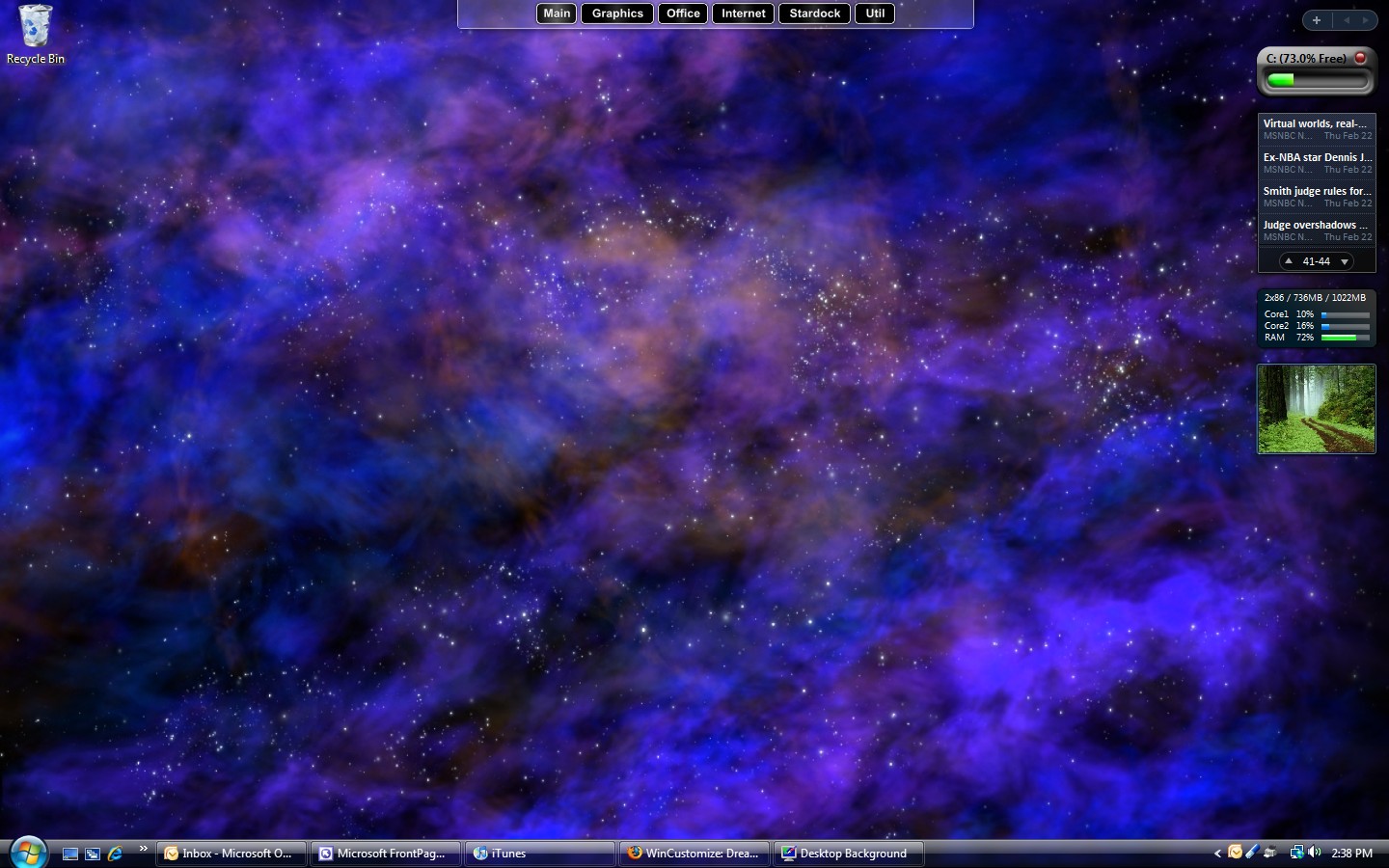
The first one I used was Nebula by Stardock Design. This is a very subtle animated wallpaper with a beautiful space scene complimented by "twinkling" stars. This image is great as a static wallpaper, but the simple animation really brings it to life.
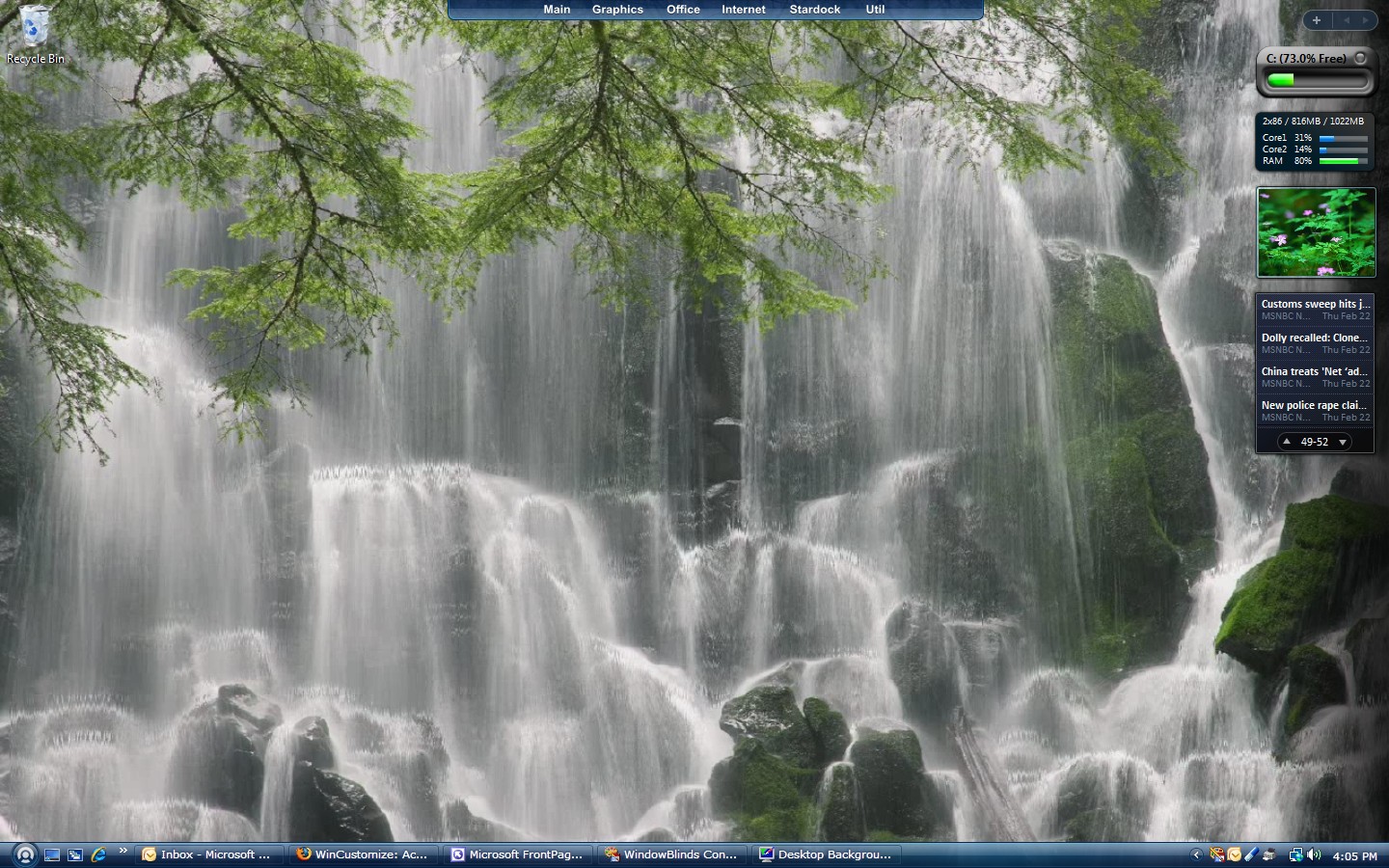
Next up I tried Wasserfall by peter22. This is a very relaxing scene of a waterfall with the water animated. This is a little more busy than something like Nebula, but it fits right into the desktop and has been one of my favorites.
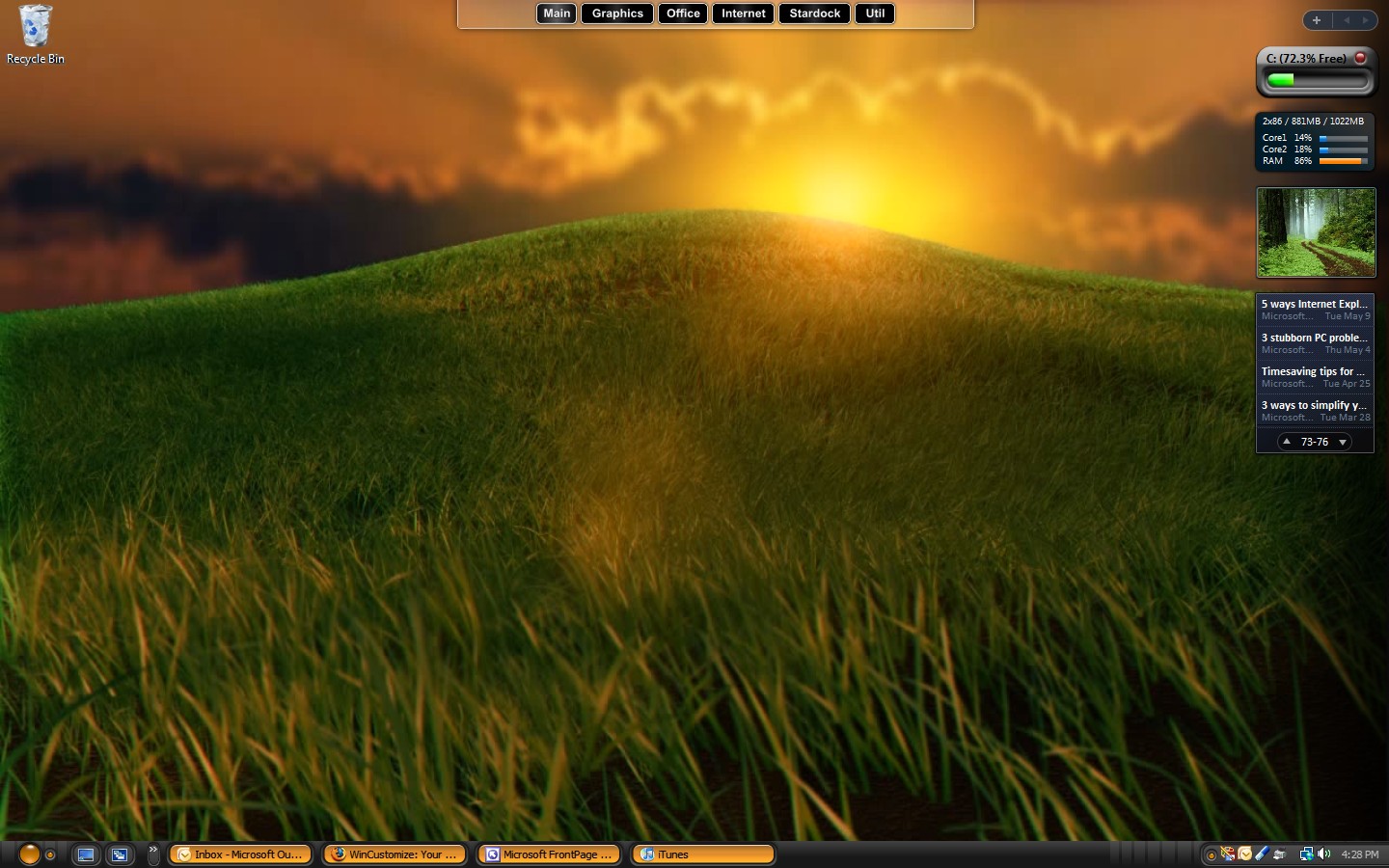
Next was Blissful Sunset by Stardock Design. Grass swaying in the wind as the sun sets in the background, very nicely done. This is another "relaxing" Dream that you really need to see for yourself. This was very easy on the eyes without any distraction, so this was my favorite so far.
After working with DeskScapes over the past week I am pleased to give it a big thumbs up. I had used Dreams here and there for a while, but never worked with them on a full-time basis. My real first impressions were very positive, the animated wallpapers looked good, and they work quite well on my system. Now I'm waiting for the next step which will be dynamic content and triggers in DeskScapes. I think those alone will take animated desktops to a whole new level.
Why Vista? Why 64 Bit? The Answers Are in the Questions!
Sunday, February 25, 2007 by Gideon MacLeish | Discussion: Personal Computing
The question was asked on another blog about why anyone would insist on 64 bit computing at this time when the technology is so new and computers are problematic. The same question, honestly, could be asked about Windows Vista, as a replacement for XP, which is a capable operating system, despite what I may usually think about it.
Now the question may be valid for the average end user, but for IT pros, it's a no brainer. The simple truth is, while you may make purchasing suggestions, usually it is someone else who ultimately makes the decisions, and if you're not on top of the game, you'll find yourself pretty quickly obsolete. There are a lot of business owners who haven't forgotten the insane 90's when a computer was obsolete as soon as it popped out of the box. They don't want to repeat that debacle with their networks today, and as soon as a contemporary mentions the hottest buzzword, they are asking questions, questions an IT pro needs to be able to answer.
As a support technician, my workplace has not upgraded to Vista. If I didn't have a working computer elsewhere (school) loaded with Vista, I'd be drawing a blank when users call in with Vista related questions. End users don't HAVE a choice in operating systems, or at least not one they are aware of, when they purchase their computers. They basically get whatever the manufacturer loads, and you can't find manufacturers loading their machines with XP. Getting a new machine loaded with LINUX is actually easier than getting a new one loaded with XP.
Because I've used both operating systems, I can make an informed decision. The same can be said of 64 bit computing. If you haven't worked with it, it's hard to give the kind of decision that a manager n eeds; the kind of decision that will give them confidence in decisions that you make in the future.
By the end of the year, I should have a home network with at least 5 computers (and hopefully a server...we're in negotiations...lol!) I hope to run a variety of platforms, and a variety of different hardware configurations, from my "dinosaur" PIII Linux machine on up to my TRS-80 case mod (it's gonna be HOTT! Man!). As I peruse IT employment sites, I see a lot of demand for cross platform experience. And I intend to meet that demand (but Mac still sucks! LOL!)
Learning DX Step-By-Step - #3
Tutorial #3 - Attack of the Clones
Thursday, February 22, 2007 by RomanDA | Discussion: DesktopX Tutorials

 |
|||
| Step-by-Step Tutorials |
#3 - Attack of the Clones |
||
|
A series by RomanDA |
|||
|
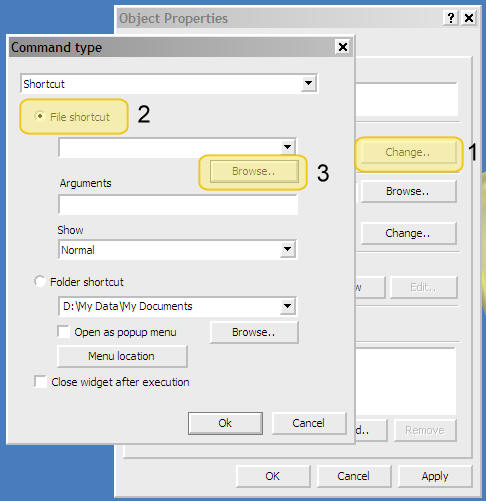
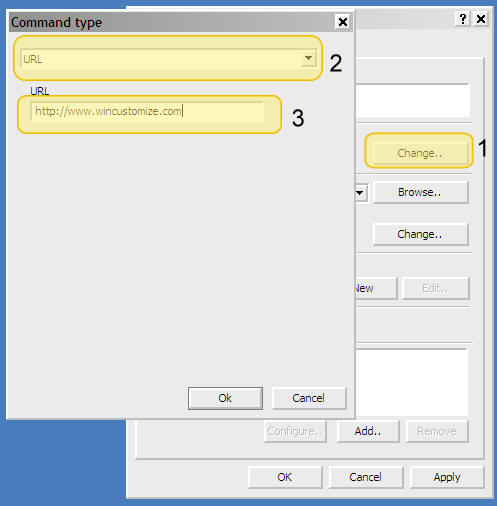
Listing of other DX Tutorials: Click here Today's Lesson: "Attack of the Clones" In this lesson we will cover how to create a clone from an object, so we can have multiple items on the screen linked to a Folder, a Program and a web URL. In order to use this tutorial, you will need to first go thru Tutorial #2 (and download the zip file from there as well). I will assume you downloaded the zip of the png files, followed the Tutorial #2, and are ready to take your Lightbulb and make a new one that will point to a Program and another to a URL. For this and all the Step-By-Step DX Tutorials you will need to purchase DesktopX for $14.95 from Stardock. Lets get started. |
|||
| STEP 1 - Cloning the Lightbulb | |||
Again, I know this is
redundant but you need to have completed Tutorial #2 before you attempt
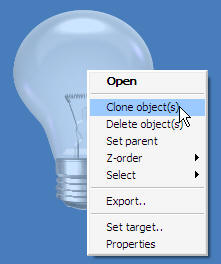
this one. That said, we will take our lightbulb and make a clone:
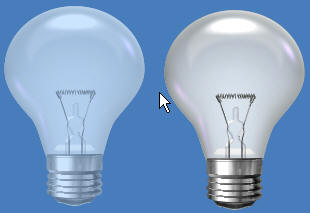
You have just created a CLONE!! *** Repeat this step one more time so that you end up with 3 lightbulbs *** |
|||
| STEP 2 - Point your Clone to a Program | |||
|
|||
| STEP 3 - Adding a TOOL-TIP to these so you know which one is which | |||
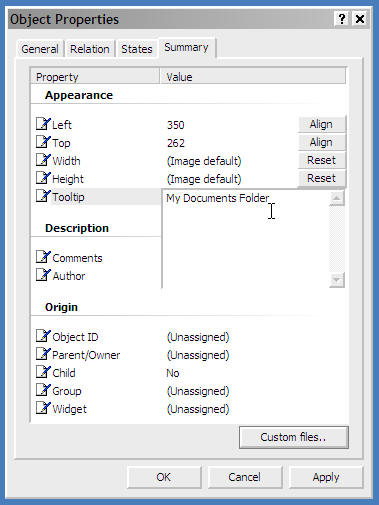
Ok, you have 2 identical
(well 3 really) clones on your desktop. So that you can know which
one does what, we are going to add a TOOL-TIP (the text that shows up
when you mouse over something) to each.
|
|||
| STEP 4 - Making a URL Linked Object | |||
|
|||
| CONCLUSION | |||
|
Ok, That wasn't hard was it? Ok, yeah so now you have these 3 HUGE lightbulbs on your desktop, and they suck, well make your own images, and change them! Changing them is simple, go back to Tutorial #2, look at step #3 and just pick your own images for "mouse over" and "mouse away" states. You can even download from the MISC Icons library and use them for these states. Check back as I add new Step-By-Step Tutorials on how to make this a link to a folder, web-site, or just about anything you want! I hope you have enjoyed this step into DX, and look forward to the next installment..
|
|||