
































This Week in Skinning - Sept. 28th
Skin Roundup for 9-28-07
Friday, September 28, 2007 by Island Dog | Discussion: Community
It's the last Friday of the month, and October is nearly here. I have been very pleased that the skinning activity has dramatically picked up in the past month, and some phenomenal works have been hitting the galleries. As you might have already seen, I placed a question out to skinners asking if they planned on creating any Halloween skins, and I see several of you have already started submitted some Halloween inspired works.
I will be creating a Halloween skin guide in the next couple of weeks, so be sure to stop by that thread and post your works, and let us know if you are working on some new Halloween skins.
Now for this weeks picks!
 |
Surf's up 2 for Bootskins By Hog56 This bootskin caught my eye because it's a great skin for a kids computer, and adults as well. Great job. |
 |
Skull 'n' Candles for DesktopX By buzzh58 This is a very cool Halloween widget. Click the candles to ignite the flames, and click other parts for various sound effects. |
 |
Poubel Tafiti v1.0 in Dreams By brenopoubel Brenpoubel has been releasing some fantastic .dreams lately, and this rendered .dream is another to add to the list. Very nice work. |
|
|
The Mayan Civilization in IconPackager By knightpan This icon package won first place in the most creative in the 2006 GUI Champs. This is truly a unique and creative icon pack and is definitely deserving of it's title. |

 |
October Tabbed & Side Docks for ObjectDock By WebGizmos WebGizmos has created a great set of matching dock backgrounds for Night Trains "October" WB skin. |
 |
Arileen Full Suite in Suites By Quentin94 Full suites for Theme Manager is something we unfortunately don't see much of, but it's a great way to distribute your suite. This suite includes the WB skin, logon, bootskin, CursorXP theme, Icon pack, and much more. |
 |
Vienna 2 - Spectrum in WindowBlinds By vStyler In a follow-up to the ever popular Vienna WB skin, vStyler has released "Vienna 2" which adds a bit more color this time. Definitely check this one out. |
Great job to everyone, and I look forward to seeing more great submissions next week. Don't forget about our "What are you working on" thread where you can show other members of the community a preview of any projects you are working on. See you next week!
WC Wiki Week - Day 4: Tutorials & CerebroJD
Thursday, September 27, 2007 by Zoomba | Discussion: OS Customization
 Day 4, and the Wiki week draws close to its end. So far this week we've focused heavily on tutorials on the WC Wiki, and that's because that sort of user content is the site's greatest strength. Tutorials transform a piece of software from some intimidating and obtuse application to a tool that someone can use to create great content. The best tutorials tend to come from users who know the applications best and use them on a near daily basis. That's why SK Originals and sViz were featured this week.
Today, I want to make sure everyone knows there's a grand index of tutorials on the Wiki. This page automatically updates when new tutorials are written, so whenever you're looking for a new how-to, be sure to hit up the Tutorials Index.
And today's featured Wiki contributor is CerebroJD. Along-side of Bebi, JD was one of the early contributors to the Wiki project and helped give it shape. He provided a lot of help on deciding early layouts and what information to show on the front page.
So todays thanks to CerebroJD!
WC Wiki Week - Day 3: DesktopX Tuts & sViz
Learn to be a code monkey in just minutes a day!
Wednesday, September 26, 2007 by Zoomba | Discussion: OS Customization
Yesterday I talked about the WindowBlinds tutorials by SK Originals and held them up as a great example of how to write help content for the Wiki. But that tutorial is for the visual artist. What if you're a code monkey trying to make a desktop gadget? Sure there's art involved, but there's a lot of coding too, and that takes a completely different sort of tutorial. Pictures illustrating steps help, but they're not the whole story. You need code examples, and writing code that's understandable and being able to explain it in plain English is a rare talent.
So today we're shining the limelight of attention on sViz and her DesktopX tutorials. Specifically DesktopX: Scripting Time Displays (Beginner)
sViz is one of our most active contributors to the Wiki and a wealth of knowledge when it comes to DesktopX. Her tutorials are well documented and clearly explained. With the Time Displays tutorial, it takes you through the process of adding a time display to a DesktopX widget/gadget from start to finish. And this is only one out of many tutorials she's contributed to the site.
If you're interested in learning DesktopX, hit up sViz's outstanding tutorials on the WC Wiki!
ObjectDock: Configuring and Using Flyout Menus
Flyout Menus in ObjectDock Plus
Wednesday, September 26, 2007 by Island Dog | Discussion: ObjectDock
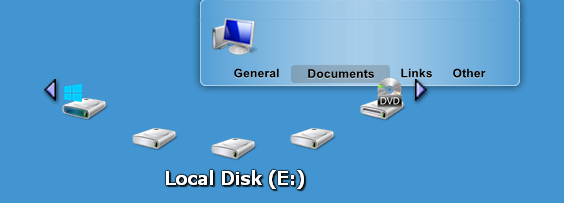
One of the coolest features in ObjectDock is the ability to create Flyout Menus. Many of you have already seen this already with the new ReadyView™ weather flyouts that were introduced in ObjectDock. You can add these menus to either a tabbed dock or a "zoomer" dock.
Get ObjectDock now for just $4.99
They are a great way to have quick access to commonly used folders, applications, and pretty much anything else you can put into ObjectDock. One of my favorite uses is to have a flyout menu of web links that I use very often, such as WinCustomize.com, or a flyout menu to quickly browse a folder of images.
To get started with a flyout menu, just right-click an empty space in your dock and select "add entry". From there you will be presented with a list of docklets, shortcuts, and other entries that you can add to ObjectDock, but for now you need to select "New Custom Flyout Menu".

You should now have your new flyout menu on the dock, and the configuration window open. Here you can custom configure the flyout menu with a list of commonly used folders, or create a custom flyout menu with a variety of options such as folders, shortcuts, docklets, etc. It's very customizable and you add your own custom icons as well.

Once you have your menu configured, clicking the icon will expand the flyout menu with the items you have selected. As you see below, I setup my flyout menu to open my wallpapers folder, which then expands to the sub-folders so I can browse through my wallpaper collection, and then click the image I want to open in my image viewer.
Learn more about ObjectDock here!
What Galleries Would You Like Added to WinCustomize?
We want to serve current skinner and user interests better
Tuesday, September 25, 2007 by Zoomba | Discussion: OS Customization
This year so far we've added 11 new galleries to WinCustomize in an attempt to make sure we're keeping up with what's going on in the wider world of Windows Customization. Here's the full list for 2007 to date:
 Avatars
 Dream
 Emoticons
 LogonStudio Vista
 Maxthon
 ObjectBar 2
 Google Gadgets
 Vista Sidebar Gadgets
 Sidebar Styler
 SoundPackager
 Xion


 Maxthon


 Vista Sidebar Gadgets
 Sidebar Styler
 SoundPackager

Now, some of these galleries have done well, others have not. Probably the two most successful on that list are Dream and Xion. Dreams skyrocketed in popularity with the release of Windows Vista, and in general have done very well even as the Vista hype started to die down. I really think Dreams are going to be one of our cornerstone galleries in the years to come as people get more into putting video and dynamic content on their desktop.
The other example of a successful gallery addition was Xion. It may be one of our fastest growing skin libraries on the site right now. Community reaction to the addition was fantastic, and in fact the app was added at the request of many skinners.
Obviously, the success of a gallery depends on how much the community REALLY wants it or is interested in it. So far this year, we've not had the best track record at anticipating demand. So now I'm calling out to the community. What's out there that you're skinning for that you feel would be a great addition to WinCustomize? Are we missing out on some skinning or computer graphics related area that just can't be ignored any longer? I want to hear from you!
Post your thoughts here with any relevant links so I can take a look.
WC Wiki Week - Day 2: WindowBlinds Tutorial & SK Originals
Tuesday, September 25, 2007 by Zoomba | Discussion: OS Customization
Day two of WC Wiki Week brings us to one part of the new site that's really the key aspect of the Wiki: User-provided documentation in the form of tutorials and how-tos. A user manual is one thing, it tells you what buttons do what, and where to find various bits of info, but it doesn't really tell you how to fully use the software. This is especially true with creative tools such as Skin Studio and Photoshop when creating a WindowBlinds skin. So today's featured page is appropriately a tutorial on creating a Start Panel for a WindowBlinds Skin.
Check out the article here.
It's part 1 of a two part series on skinning the Start Menu in Windows using Skin Studio and Adobe Photoshop. It's packed with screenshots to illustrate the process, and if you go through both part 1 and part 2, you'll end up with a completely skinned Start Menu. It's one of the better user-created tutorials currently on the wiki.
So it's fitting that today's featured contributor would be SK Originals, the author of the Start Menu tutorial. SK Originals has contributed a lot to the wiki in addition to his tutorials, providing edits and content on a number of product pages and other tutorials. He was one of our earliest additions to the wiki project and has been a great help in bringing in content focused on teaching others how to skin. This is exactly the sort of activity we were hoping for when launching the wiki.
Thank you to SK Originals for your ongoing contributions!
WC WIki Week - Day 1: WindowBlinds & BebiBulma
Contributors & Their Contributions
Monday, September 24, 2007 by Zoomba | Discussion: OS Customization
The Wiki project started many months ago after review of community feedback on Brad's "How Stardock Failed the Community" article from the start of the year. The single biggest complaint was a lack of good resources for documentation and helpful information on the plethora of skinning products Stardock has built over the years. Our decision was to provide a site and framework for the community to contribute their knowledge of the tools and software available. The idea was that while a developer knows how the application works from a functional perspective, it's the artists and everyday users who have the deep knowledge of how to really use the tools in a practical sense, and are likely much better than we are at explaining things.
When we began the project, one of the very first pages created to be used as a template for what to include and how to format software pages was the Wiki page for WindowBlinds
It's one of the best places to look for consolidated WindowBlinds information as it has links to relevant external sites, helpful tutorials. It also has a brief history of the application and major changes introduced at several versions. If you're curious about WindowBlinds or are looking for help in skinning, this page is a good place to start from.
Also from the beginning of the project, several members of the community stepped in and really made the project their own. Without the effort of these folks, the project never would have gotten off the ground, and they made sure that this was a community effort from the start. Probably the most active contributor at the start of the project was BebiBulma. She was critical in corralling other contributors and wrote and helped with formatting for a lot of the initial pages on the Wiki.
Remember, all you need to do to contribute to the Wiki is create an account and start editing/creating pages. It's open to everyone.
Object Desktop Overview
The benefits of subscribing to Object Desktop
Tuesday, September 18, 2007 by Island Dog | Discussion: Customization Software
I have been receiving a lot of messages lately asking me about the advantages of the full Object Desktop suite from Stardock, and what exactly is included when you purchase an Object Desktop subscription. I thought it was time to give people a brief overview of Object Desktop, and what applications are included with it.
Let me start off by saying when you purchase a subscription to Object Desktop, that subscription will remain active for one year. During that time period you will receive all updates and any new additions to OD (Object Desktop). If you choose not to renew (but why would you) you can archive the current applications and use them for as long as you wish. Some people believe that when your subscription ends, you can no longer use the software, and that is just not true.
Renewing your subscription is the way to keep your applications updated, and a discount is available when renewing your subscription. An upgrade discount is also available to people who have already purchased a product such as WindowBlinds or IconPackager.
So what exactly is Object Desktop anyway? Well it's basically a suite of desktop applications designed to enhance and elevate your Windows experience.
 Let's start with an essential part of OD, which is the Stardock Central application. Stardock Central is an enhanced download manager that lets users install and manage software and games from Stardock. It also allows users to communicate with other members through IRC, forums, and you have the ability to download skins and themes from it.
Some of the essential components of Object Desktop are:
WindowBlinds: WindowBlinds is probably the most notable application in Object Desktop. It will allow you to completely change the visual style of Windows Vista and XP. Using WindowBlinds skins you can easily change the look of the taskbar, start menu, windows borders, and more, without modifying or hacking your system files.
IconPackager: IconPackager allows you to change nearly all the Windows icons with a single icon package. You don't have to worry about changing individual file icons (although you can with IconPackager), you can change them all in just a few clicks. IconPackager also supports Windows Vista Live folders.
DesktopX: DesktopX lets users create and use widgets/gadgets (mini-applications), and complete desktop environments. DesktopX 3.5 will also let users create widgets that are exportable as Windows Vista sidebar gadgets.
SkinStudio: SkinStudio is an application that lets you create visual styles, or "skins" for Windows that you can use with WindowBlinds to change the look of Windows.
ObjectBar: This application will allow you to create your own Windows interface. You can create custom start menus, docks, program launchers, etc., and it's compatible with DesktopX widgets for more flexibility.
RightClick: With RightClick you can design and apply your own right-click menu. With this you can add your own custom shortcuts, system commands, and it also supports DesktopX widgets too.
TweakVista: For the Vista users out there, TweakVista is the ultimate tool for "tweaking" Windows Vista in areas such as resource management , memory optimization, security handling, and much more. It's designed for both casual and advanced users.
SoundPackager: SoundPackager (currently in beta) allows you to change Windows system sounds with "packages" of sounds. Users can also easily create their own sounds and package them to share with the community.
This is just an example of some of the applications that come with your subscription. There are several other including Keyboard LaunchPad, IconDeveloper, IconX, ObjectEdit, WindowsFX, and more. The full list of applications included can be found here.
Another benefit of subscribing is having early access to betas. Currently, Object Desktop subscribers have access to the WindowBlinds 6 and SkinStudio 6 betas before they are officially released. Many of these applications are available as stand-alone products as well, but the best value is to purchase the subscription so you can receive all the applications mentioned above.

For more information visit the Object Desktop home page.
Halloween Skins!
Are You Working on Any?
Monday, September 17, 2007 by Island Dog | Discussion: Community

October is rapidly approaching and that means Halloween is also around the corner. Over the past few years we have had an abundance of Halloween-inspired skins submitted to WinCustomize. These range from everything from animated "creepy" cursors to some fabulous wallpaper designs.
Around the second week in October or so, I am going to start compiling this years edition of the Halloween Skin Guide. While there are plenty of skins already to use, I'm hoping to see a fresh batch of skins that could be added to this years list.
I was curious to see how many of our members were planning on creating some Halloween skins for this year. The "What are you working on" thread is also a great place to post a peek at a new skin, or get advice from other skinners about a project you are working on.
I have one or two Halloween projects I'm hoping to get done, so is there anyone else with plans for a Halloween inspired skin?
This Week in Skinning - Sept. 14th
Skin Roundup for 9-14-07
Friday, September 14, 2007 by Island Dog | Discussion: Community
We have some holidays approaching such as Halloween, so does anyone have any Halloween or Fall inspired skins in the works. Don't forget we have the "What are you working on" thread in the forums, where you can give other members a sneak peek at upcoming works.
Now for this weeks picks!
 |
Pink Cadillac for CursorXP By Drill'n Boss As others mentioned, this is a very creative CursorXP theme based on the "pink Cadillac". Great job. |
 |
Colour Swatch Manager in DesktopX Widgets By thomassen This is a very useful widgets that helps you manage your color schemes. More updates are planned for this, so be sure to keep an eye on it. |
 |
Poubel Hill in Dreams By brenopoubel Brenpoubel has shared some fantastic .dreams with us recently, and this one is no exception. It's a very subtle .dream that fits well with many skins. |
 |
Baseball for SoundPackager By Stardock Design If you are an Object Desktop subscribers, and have downloaded the new SoundPackager beta, then be sure to grab this baseball sound theme as well. |
 |
Zenith recycle bin in Misc. Icons By patrick24 Patrick24 shares with us a well designed and cool looking recycle bin icon from the Zentih series. I look forward to the rest of this series. |
 |
Stranded_wide_plus in Wallpapers By Richard Mohler Great design, beautiful color, and a wide variety of resolutions. No reason not to check out this wallpaper. |
 |
Vista Plus Version 3 for WindowBlinds By adni18 Vista Plus has been a very popular skins on WinCustomize, and now its been updated for WindowBlinds 6 and Vista. Definitely check this one out. |
A big thanks to all the skinners who share their works with the community. Be sure to leave comments on their works, and pass the word about the great skins you have seen. See you next week!