
































2008 Community Wallpaper
Saturday, May 3, 2008 by Matchbook | Discussion: WinCustomize Talk
That was about 4 years ago. Many skinners have since either quit, lost interest, moved onto greener pastures or just got bored. New ones have emerged and shown great promise, so I feel it's time for another community wall, akin to 2004's, just newer.
What do you think?
I've made a very suitable background for it but I shant post it until I know others are interested in getting in on this.

Let me know if you're keen on the idea.
Check out the old one
Cutoff for new tags in effect
I will now finish this long overdue little project.
Thanks, everyone, for your submissions and subsequent patience in waiting for this.
Much love!

Some thoughts on Hyperdesk
Friday, May 2, 2008 by Draginol | Discussion: OS Customization
When it comes to skinning the OS, I'm a fanatic. I've been into changing the look and feel of the OS for nearly 15 years now. From Object Desktop on OS/2 to working on the very first GUI skinning program on Windows, skinning is a passion of mine.
Over the years, I've seen a lot of programs, companies, and ideas come and go. On the software side, there's been great programs like eFX and Chroma (to name two) along with the ubiquitous WindowBlinds. On the content side, there's been teams of artists who have created some cool stuff like Pixtudio, The Skins Factory, SkinPlant, LIghtStar, and so forth.
When Windows XP came out, all of the third-party skinning engines went by the wayside except for WindowBlinds. WindowBlinds had an advantage in that Windows XP came with a skinning engine called uxtheme that was essentially a derivative of WindowBlinds 2 (i.e. they function the same way, have very similar formats, etc.). So rather than being hurt by XP, WindowBlinds got a free boost.
So back in 2001, the skinning world kind of branched into two groups. You had those who used WindowBlinds to skin Windows XP and you had those who used uxtheme to skin Windows XP. Each solution had its own pros and cons.
WindowBlinds costs money ($19.95) but had a much wider variety of skins and was a superset of features of uxtheme.
On the other hand, uxtheme was free but to use it, users had to apply a patch to crack the theme protection. Microsoft didn't want people making skins for uxtheme so they added digital signing protection to their skins. To get around that, hackers patched out that check and allowed the creation of third-party skins for it called msstyles.
So the division in groups largely rested on whether the 20 bucks for WindowBlinds was a sticking points. The people who went with WindowBlinds would say that they have a lot more skins, could use any msstyles skin converted to WindowBlinds and had a lot more features. Users of uxtheme rationalized their choice by pointing out it was free and it wasn't hard to patch the file.
And so for 7 years the two skinning communities developed on a parallel course. WindowBlinds, being a commercial product, continued to be developed over that time. uxtheme, of course, remained unchanged. Some companies began making skins for money. The first were Pixtudio, The Skins Factory, and Skinplant. They all made skins for WindowBlinds. But others made pro skins for uxtheme such as LightStar.
In 2006, Stardock, the makers of WindowBlinds had a new idea for skinning called MyColors. The idea was that Stardock would create a new group called Stardock Design and go out and partner up with major brands starting with sports teams and universities to sell branded themes. These themes would have the necessary software embedded in them. To make this happen, Stardock Design would also need artists.
The existing studios such as Pixtudio, The Skins Factory, and Skinplant simply couldn't produce enough content per year. Instead, Stardock Design went out and brought in house the skinners who made up these studios. All of Pixtudio and Skinplant work at Stardock.
This is where things get interesting...
The owner of The Skins Factory saw Stardock Design as a competitor and relations between the two soured. Moreover, The Skins Factory made it clear that it was going to work to create its own skinning solution rather than rely on Stardock's solution so that it wasn't dependent on what it perceived as a competitor.
Since The Skins Factory was (and still is) a one or two man shop that contracts freelance artists, the steady work at Stardock Design in creating content for major brands led some of the free lancers to join Stardock full time which further soured things with The Skins Factory.
Thus "HyperDesk" was born. Hyperdesk was discussed on WinCustomize considerably so I won't go into all the technical details here. Since it isn't released at the time of this writing, I have to go by informed speculation. It is essentially a uxtheme patch combined with a theme manager that will apply icons, wallpaper, along with specific support for applying skins to specific applications (like Winamp or Media Player). The problems with patching system files are well known, particularly the long term viability of patching uxtheme.dll from a consumer point of view.
Now for the commentary:
Hyperdesk and MyColors are similar in that the idea is to let people buy a "theme". You want your desktop to look have a complete look? Don't want to mess with a bunch of programs to do it? Then just buy the theme and with the press of a button Hyperdesk or MyColors will apply it.
Hyperdesk seems to go with the longstanding Skins Factory tradition of quality over quantity. Ironically, because they're stuck with uxtheme, they're very limited on the GUI skinning (it's no coincidence that their teasers are limited to shots of the media player as the few hints of the actual skins are pretty typical 8+ year old msstyles based tech which is pretty bland now). They will be hard pressed to approach the quality in their existing portfolio. That's because their existing portfolio was based on the technology that serves as the precursor of MyColors.
MyColors, by contrast, is powered by something that can offer better quality but the need for quantity to get serious distribution attention has spread Stardock Design thin. This means that there just isn't the marketing bandwidth to spend the time to create an incredible web presentation.
The presentation of say the Hyperdesk Sony Ericson skin absolutely blows away the presentation for MyColors themes.
For example:
MyColors Mustang vs. Hyperdesk Ericson
But you'll notice that they aren't showing very much. They show one icon (which ironically was made by someone who works at Stardock) and just bits of GUI. But the presentation if first rate. The MyColors Mustang page, by contrast, looks like an Amazon.com page or something.
Because Hyerdesk hasn't been released yet, I can't comment on the actual quality of the Ericson suite. I can point out some facts that The Skins Factory has made public. First, it won't support Vista which, in 2008, is pretty catastrophic. The number of people so into skinning that they'd pay money for premium themes but have stuck with XP is not very large. Secondly, unless Hyperdesk gets a miracle soon, there won't be any significant distribution channels. The uxtheme patching means he won't be getting it preloaded (not to mention the lack of Vista support) and he has no native channels to get started in which has relegated to him to having to post "teasers" in forums. In fact, this article is probably the most significant publicizing Hyperdesk has received so far.
The thing about selling these all-in-one themes is that it's based on conversation rates. That is, N% (where N is typically less than 2%) of people exposed to it in a significant way will actually buy something. So if you get 1,000 people to download and try Hyperdesk (or MyColors) you might get 10 to 20 of them to pay for it.
A decent theme made by non-slave labor costs tens of thousands of dollars to make. Let's say $10,000 to break even on a minimal theme. If you sell your theme for say $12.95 you're probably netting around $10. This is assuming it's an inspirational theme (i.e. has no royalties attached to it). To break even, you have to sell 1,000 of them. That means you have to have a channel that can get 100,000 people exposed to it. That's a lot of people - just to break even. And I'm being cheap on the cost. It costs Stardock Design more than that to produce a suite once you count associated costs.
Worse for Hyperdesk, even if they somehow get a uxtheme patch solution for Vista, the msstyles format on Vista is completely different and doesn't have a nice editor like XP msstyles did. At the very least, it would require creating a whole new msstyles for Vista which would increase the cost. So now you're probably closer to $20,000 to produce a single theme -- and this is if it's purely original work. If you were doing, say a Disney based theme, you would have royalties and upfront payments and approvals involved which drive up the costs even further.
The Business Model
Now everything I mentioned here were things we considered when doing MyColors. The only way MyColors succeeds is if it gets massive distribution. That means getting preloaded or doing special distribution deals with major brands. That's why MyColors uses WindowBlinds OEM technology (its skin format is a bit more restrictive to ensure maximum compatibility). It's also why it includes gadgets. Gadgets can be branded and remote control any media player instead of having to make a skin for a specific media player.
Over the past year, Stardock has signed on several major distributors and PC makers to begin phasing in MyColors distribution. So by end of this year, MyColors will be on millions of computers. But this was only possible because a) MyColors doesn't tamper with system files and  MyColors has a library of hundreds of themes. Those were the two pre-requisites because most distributors aren't that interested in distributing something that brands them as much as finding ways to generate measurable increases in revenue using their massive distribution.
And that combination is what I think will be the death blow to Hyperdesk. You can argue I'm biased or whatever but you can look at the facts for yourself:
- Companies with big distribution channels aren't that interested in increasing their "brand awareness" with a skin because they already have massive brand awareness because they have big distribution channels.
- The above companies generate additional income by selling things through their massive distribution channels
- These companies will only include things likely to make a lot of money which in this case means a large library of content
- These companies will not tolerate support issues from what they bundle. Hence, something that patches system files is DOA to them. People will flame WindowBlinds but the reality is, it has a long successful history of enterprise-level robustness when the content for it is provided by professionals.
- These companies will want to support the current version of Windows (obviously).
Without the above criteria satisfied, Hyperdesk can't get massive distribution. And without that, he's stuck selling to the hobbyist community - except Hyperdesk doesn't have a community to sell into. Posting on a personal page on deviantART isn't going to cut it and deviantART isn't going to get into the business of trying to sell a handful of premium themes on their site any time soon.
Now, does that mean you, the reader, shouldn't buy a Hyperdesk theme? Oh no. If it's good stuff, you should buy it. I will probably seriously consider buying Hyperdesk themes if I like the themes. I can, after all, always convert the msstyles to WindowBlinds to avoid patching anything and then I get to run it on Windows Vista.
Animated Wallpapers: April '08 Edition
Animated Wallpapers from April '08
Friday, May 2, 2008 by Island Dog | Discussion: OS Customization
April saw another good month for .dreams, with many submissions from our "regular" .dream makers, and a couple of new faces as well.
Now for this months video!
To use .dreams (animated wallpaper) you need to have Windows Vista and Stardock's DeskScapes (free) installed. If you are an Object Desktop subscriber, you have beta access to DeskScapes 2.0 which will run on virtually any version of Vista.
The .dreams featured in this months video can be found at the links below.
-
The Rift by TheMasterBaron
-
the_rose by muckyman
-
Trader Harbour by AlexMorgan
-
Aphrodite's Necklance by TheMasterBaron
-
Fireplace by CarGuy1
-
Trippin by TheMasterBaron
-
Sunny Beach by AlexMorgan
-
Cosmos by PixelPirate
Keep Your Data Safe with KeepSafe 2.0
Don't get caught in a data disaster
Thursday, May 1, 2008 by Island Dog | Discussion: Personal Computing
Have you ever been writing that important report for your boss and suddenly, Word just "unexpectedly" stopped working? Or maybe the spreadsheet you have been working on for weeks gives you that strange corrupt file error? Regardless of the reasons, I'm sure it's safe to say all of us have had some type of similar experience regarding losing important data.
Backing up data is always one of the first things people tell you to do, but lets face it, many of us just forget or don't make a steady routine of it. So what do people like us, or anyone for that matter, do to ensure our data is kept safe and can be easily restored if needed?
First thing you need to do is grab yourself a copy of KeepSafe. KeepSafe is an application from Stardock that provides real-time backup of your data, and provides an easy to use interface for managing and restoring your saved data. You can choose to backup specific document types, or entire folders, and KeepSafe will only backup when the files are changed, saving disk space.
Once installed, KeepSafe will present you with a wizard for a quick and easy setup of commonly used files. You can always select more, and have access to more options in the full configuration window.
|
|
|
KeepSafe wizard |

The main configuration window is where you can add and configure more file types, and also specify directories for backup. It's not just for backing up document and spreadsheet files, you can select it to save nearly anything including media files.
|
|
|
Configuration window |

One new feature in KeepSafe 2.0 is the ability to set a secondary backup location to an external hard drive or USB drive. save to local storage temporarily and copy to secondary drive when connected. There are also many different configuration options that lets you choose how often, or specify a backup size, allowing you to save even more space if needed.
|
|
|
Storage location settings |

If you are one who likes to keep tabs on what is being saved, and how much space it's taking, then don't worry as KeepSafe also has an easy to read Statistics section. This section gives a variety of options to view all your KeepSafe statistics.
|
|
|
KeepSafe Statistics |

In the event that you do lose some of your data, getting it back is what really counts. Another new feature in KeepSafe 2.0 is newly designed user interface of the recovery wizard. This makes recovering any of your lost data a snap. You can search through saved filed by time, file type, name, and more. Once you find your file you then have the option to open or save it.
|
|
|
Recovery window |

KeepSafe works with both Windows Vista and XP. A free trial is available and you can find more information at the Keepsafe website.
Link: KeepSafe 2.0
WinCustomize SkinCast and Skype
Wednesday, April 30, 2008 by Island Dog | Discussion: OS Customization
You have heard a lot of Skype lately, mainly due to the fact that we use it to record the WinCustomize SkinCast. It's a great way for people across the country, or world, to communicate and participate in podcasts. While Skype has some advanced features, it's really easy to get the basics setup, and within just a few minutes you can be online.
Once you get it installed, just signup for your account, add some contacts, and you are pretty much set. You do need some type of microphone and a broadband connection to use Skype.
If you would like to participate in one of our SkinCasts, or would just like to leave a voice question or message for the show, then just PM me, e-mail me at sscott [at] stardock.com, or add me as a friend on Skype. We can then arrange something from there.

Link: Skype
Stardock Forum Update - 4/29/08
Tuesday, April 29, 2008 by Zoomba | Discussion: Internet
As you've probably already noticed, we put out an update to the central Stardock Forum system today that comes packed with fixes, plus a handful of very useful new features. Instead of letting you guess randomly at what's new and how it works, I thought I'd give everyone a quick run-down of the new features.
- Forum Announcements
- Return of the Report Button
- Go to Top of Thread Button
- The New Karma System
Forum Announcements
In the past, we've been unable to let everyone know when there's a major bit of system maintenance coming up. If it was important enough, we'd run around to all the sites and make a front page news posting about it and hoped that people would see it.
Now, we can set a broadcast message that appears at the top of ALL forum pages. We can set these on a site-by-site basis.

Clicking on the Read More link will open a message with further details (if available).
Beyond the announcements, you'll notice a bunch of new buttons on forum comments...

Return to Top Button
Every comment has this little arrow now. Clicking it will return you to the top of the page.
Report Post
The report post feature returns. It is limited to logged in users only, and you must provide a detailed reason for the report. We'll know if you're spamming it, and we will hurt you if you do!
Give Karma
 This is a completely new feature for the forums. In the past, we had the "Insightful" and "Informative" buttons, but in actuality, they didn't do anything (rather, they had once long ago, but not in the last 2+ years). So with the new forums we decided to add a real karma system. Now, you can give comments a rating if you found them particularly good or helpful.
Karma Points are shown under your user picture on the left of your posts along with your user number and online status.
See that little number? You can click on it to see a report on when you received karma, on which posts, and why people gave you the rating.

As you receive more points, the list will grow. You'll see your overall stats at the top with score and number of ratings received.
It's important to note that there is no way to rate someone DOWN. You can only give kudos to folks so it's a 100% positive system.
Here are the limitations on giving karma:
- The number of points you can assign is limited by your access level. Citizens can give +1, Apprentices +2 etc.
- You can rate the same person no faster than once every 10 minutes. Want to give Jafo a +1? See another post of his you want to give a +1? You have to wait 10min between ratings.
- You must provide a reason for your rating. It will be recorded on the reporting page. We also keep track on the back-end who gives what comments so we will find you if you're mean.
The points themselves don't DO anything yet, but there are ideas being kicked around on what we can do with these points. For now, it's a nice way to recognize people for their contributions on the forums.
So those are the major updates for the forums for April. If you have any questions, let us know!
April 28th Skin Thoughts and Reviews
my addiction knows no bounds!
Monday, April 28, 2008 by wulfn1 | Discussion: Community
I thought I'd talk a little about some of the other program skins available at Wincustomize , this week.
So today I loaded one of my right click skins I've been using Earth Hour Wb by Remolacio, despite it's freakish similarity to Alienware Xenomorph by Stardock Design ( available only as part of a suite). It's one of the few recent dark skins that include a contrast text on dark backgrounds., I just wish the dark background and contrasting text were applicable in all text windows. and not just on the skin's colored areas alone.*Sigh* wouldn't that be nice? ... but.... I digress.
Rummaging through my right click skins , I came up with Blue Glass by Buzzzh58. It matches nicely with the whole look. including the rounded edges and cyan colored neon glow. The style integrates nicely and almost looks part of the Earth Hour skin. Almost.
I'm only just learning all the ins and outs of Rightclick. So be patient with me here, I can give only brief descriptions of the skins themselves till I understand what RC can do, and how different skins react with those features.
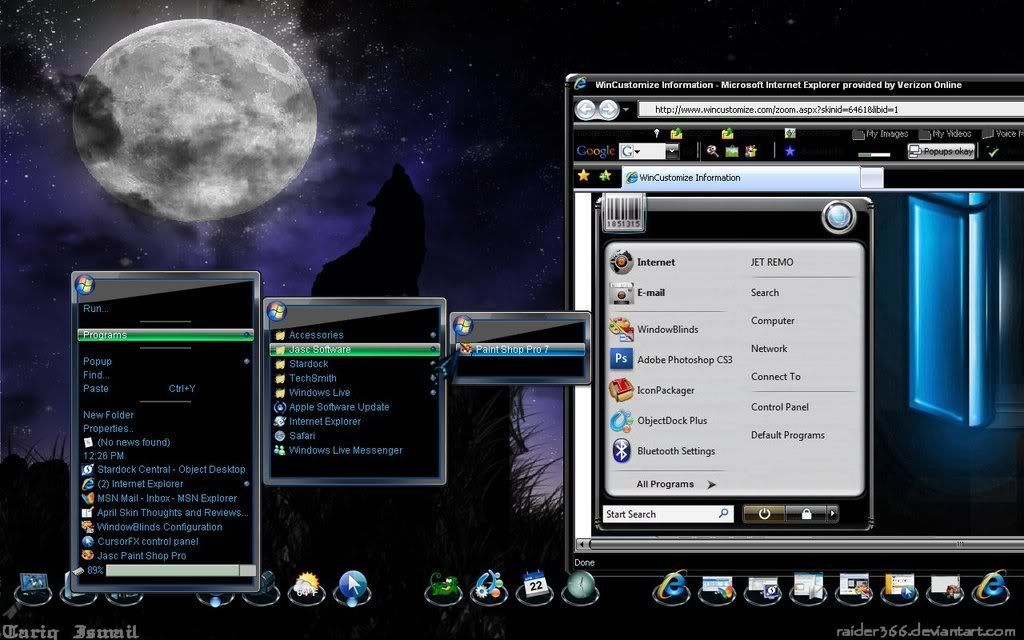
For the cursor, I chose Rexa by tycus I recolored to match my skins. The triangular shape gives the impression of being curved within the middle, sort of like a pencil eraser, but actually it reminds me of those jets that fly by occasionally, with the exhaust coming out the back in a blue color. I recolored that blue to match the windowblind more closely.
Tregetour by zakai1369 is the style I chose for Object Dock. I used the tile-tr style of that background. The silver and black compliment this dark theme with an almost twisted metal look to the borders. I like also the way it tilts up slightly to the rear of the icon,making it seem like each one is on a serving platter, or a flying saucer ready to zoom up at my slightest mouseover.

Continuing my trend in matching schemes to wallpapers, I found this new paper Stalked by Frankief to be really intriguing, it looks much like a cactus, sea anemone, or fern the way it fans out but has a network of "arms" within.
I usually shy away from skins with the word "white" in them because they have a tendency to hurt my eyes, but I decided to try White System v 1.0 by 1mrpaul1 I darkened it down a bit in windowblinds config, and adjusted the hue till the blue matched part of the wall just right.
I dug out Earth fx big by Javier Aroche for my cursorfx , the coloring again works nicely with this wall. and the animation is clean and interesting. The icon Pack I chose, was ROUNDer by AndrawDay the almost lozenge like look of these icons was attractive with the look as a whole.
I thought it needed just a bit more to make it look really sharp, so I opened up Sexy right click by Messiah1 a blueish clean looking skin that I have used previously because it looks so pretty.

When I saw On chesapeake bay by kenwas I had to have it. Living on the Delmarva peninsula, we are really a part of the chesapeake, and the history of this area is rich with sea tales,pirates and new beginnings.
While I thought Sunken Treasure by KittyMalone was really the perfect wb to go with this blind, I felt I should include some names I haven't used lately, and so I traveled thru the time warp of the libraries and found Driftwood by Dangeruss. It's a darker, brown wood grained skin, with bolts and metal accents on the edges. This skin works well with the wall, but there are a couple areas where it's difficult at best to view some text.
Nautical mile by 47songs is the IP I chose to use, for obvious reasons. It just fit nicely with the ship's wheel and spyglass and porthole themed icons.
It took me a while to find just the right cursorfx theme, but eventually I settled on oxide by TYCUS. The style and coloring look nautical and remind me of some features on boats and ships.
I tried to get rightclick to use the windowblinds skin I am using, but it always chooses the same skin when I click that choice. So I hunted and found an oldie but goodie that works ok with this combination, 1000 B.C. by codysan. The rock coloring, and font, goes well with the look as a whole.
Over all, a very rustic,bayside look that I think I will keep on hand for those days like today when it's rainy and miserable.
This Week in Skinning - April 25th
Skin Roundup for 4-25-08
Friday, April 25, 2008 by Island Dog | Discussion: OS Customization
Yes, the week is finally over! I have spent a bit more time in the galleries this week than usual, and I saw some really good stuff come through this week. Now I get to share some of that with you, and always feel free to link to skins that caught your eye this week.
Now for this weeks picks!
|
|
Bluerr in Bootskins by sydneysiders Change that plan default image to something really cool, like this "blue" boootskin by sydneysiders. Very nice. |
|
|
Clockwork for CursorFX by Artur Berk A "clock from inside" is how Artur describes this, and that's a pretty accurate description. This is a really cool so be sure to check it out. |
|
|
Grey Matter in DesktopX Themes by Richard Mohler Richard Mohler brings us a DX Theme week, and this theme has a slick sidebar, and several other matching widgets. Fantastic theme! |
|
|
the_rose in Dreams by muckyman This .dream of a "spinning fractal" is a great addition to the .dream gallery, and works well with a wide variety of themes. |
|
|
Star Trek LCARS in ObjectDock Backgrounds by J-Nius LCARS skins are always cool, now we have an ObjectDock background to add. Great job on this. |
|
|
Alpha Centauri SMX for SysMetrix by windoe Here is a SysMetrix skins made to match his new WindowBlinds skin. Be sure to check that out as well. |
|
|
Galactic Spectrum in Wallpapers by Bebi Bulma Bebi says she spent about a week on this one, and it shows as it's come out looking fantastic. |
 |
TransFactor for WindowBlinds by Themerboy Themerboy shares a new WindowBlinds skin with us, which has a really cool and sleek design. This is for XP, and hopefully a Vista version is coming. |


Lots of good stuff this week, and thanks to all the skinners who contributed. See you next week!
MyColors Introduction Screencast
Thursday, April 24, 2008 by Island Dog | Discussion: OS Customization
Here is the screencast to accompany the article I wrote recently, which gives users an introduction to MyColors from Stardock.
The existence of for-pay stuff doesn't hurt you
Tuesday, April 22, 2008 by Draginol | Discussion: Personal Computing
I read a news announcement about a new freeware program that does some cool stuff. I check it out and it is vastly superior to an existing freeware program. Yet when I read the comments, the new, superior freeware program is being flamed. Why? Because the guy making it also offers a for-pay version that has more features.
I check out the forums of a game I enjoy playing. Normally people are singing the praises of this game. Now, the forum is full of flaming and angst. Why? Because the developer started offering optional premium content for players if they want.
Let me tell those complainers a truth about life: Money is exchanged for goods and services.
Before the current generation of l33t-speaking complainers became the norm on the net, we had a concept called shareware. Someone would make something cool and offer a version of it to try. This version might time out or it might have fewer features or it might just work on the honor system. If users liked it, they bought it. End of story.
Nowadays, we have it better. People make free stuff and release it. No nags. No missing features when compared to other "free" competitors. No time outs. But the developers will also release an even better version. And the complainers get vocal.
What annoys me is that the whiners are attempting to bully people from making stuff that many people like me want. I don't live with my mom in her basement. I don't begrudge paying a few dollars to someone who made something I want. I recognize that I already pay $80 a month for my cell phone and $60 a month for cable so bitching about paying $9 to $20 for something I want is pretty ridiculous.
And I certainly recognize that the mere existence of premium stuff doesn't hurt me. If I want it, I'll pay for it. If I don't, I won't.
Let me give you two examples:
The program ObjectDock is the best dock out there. We make it so I'm biased but it has far more features than any dock out there. It's also free. You want a cool dock on Windows, this is what you get. But there is also ObjectDock Plus. It's $20 but adds a ton of features like tabbed docks. And so what do people say? They'll say that ObjectDock is "payware" or "crippleware". Why? Because a non-free improved version exists.
Similarly, I love Team Fortress 2. It is a great game. And you know what? If Valve created a new character I could play as for say $10 I'd buy it in an instant. I want more characters in TF2 to play as. But you know the reaction they'd get. They'd probably get flamed because the parasite-class would argue that they should get that for free because buying something once to them means that the developers are perpetual slaves to them after.
I understand that we all want to keep from getting nickled and dimed but one assumes that we can make our own judgments as to whether something is worth it or not and allow others to make the same judgment.