
































Object Desktop 2008 Info Guide
Tuesday, April 22, 2008 by Draginol | Discussion: OS Customization

Take Windows to the next level
A look at how to completely transform your Windows experience.
Executive Summary
Object Desktop is a suite of desktop enhancement utilities that can completely transform the Windows experience. Once installed, a user can literally remake Windows to fit their specific needs. Its capabilities include the ability to alter the Windows GUI, icons, display animated wallpaper, create and use widgets, and much more.
What’s new from Object Desktop 2007
Historically, there has just been Object Desktop. But over the years, the number of programs and features in Object Desktop grew to the point of being intimidating to new users. This year, Stardock took the path of creating two versions of Object Desktop:
- Object Desktop ($49.95)
- Object Desktop Ultimate ($69.95)
Object Desktop provides the core components of the suite to allow users completely customize the desktop experience. It does not include the various editors and utilities that Object Desktop Ultimate includes.

Figure 1: Object Desktop makes it easy to control the Windows experience
Specifications
Title: Object Desktop 2008
Publisher: Stardock Corp.
Price: $49.95, $34.95 to renew access to new features after 1-year.
Website: www.objectdesktop.com
Requirements: Windows XP, Windows Vista
Hardware: 1 GHz Processor or faster with at least 512MB of total system memory.
The Windows Experience: A Primer
If you wanted to change the Windows experience, what would you need to change? How would you do it?
First, you would need to consider the different pieces of your desktop experience:
- You have the Windows graphical user interface (the GUI). This would be the windows themselves, the start bar, the buttons, and other standard controls you see.
- You have the icons like folders, the Start menu icons, the recycle bin, and the dozens of default file types. As Apple has demonstrated, nice looking icons can significantly enhance the perceived “polish” of the desktop.
- You have the wallpaper which is typically static but in an age of 3D accelerated video cards can now be animated without slowing down the computer. Windows doesn’t support animated wallpaper out of the box, however.
- You have the sound scheme. That is, the start up sound, the logoff sound, and optionally sounds for virtually any activity on the desktop you may want.
What Object Desktop does is provide 4 programs to change each of those 4 pieces. In addition, it also includes a program called DesktopX (the X stands for eXtend) for users who want to extend their desktop with new features like widgets or sidebars and such).
And lastly, it includes a program that lets those 5 programs work together to apply premium themes created by professional designers.
With Object Desktop, there are, literally, thousands of free icon packages, WindowBlinds skins, DesktopX widgets and themes, and so forth. Plus there’s the professionally created MyColors themes. For users who are looking for the ultimate desktop experience, Object Desktop is a one-stop solution.
The Components
Object Desktop comes with 6 components. Each program is designed to allow users to customize a certain aspect of the Windows experience. These components are:
 |
WindowBlinds – WindowBlinds applies new visual styles to Windows. A visual style can change the title bar, title bar buttons, push buttons, radio buttons, scrollbars, the Start bar, and much more. New controls can be added to the user interface of Windows such as roll-up buttons, always on top buttons, media player controls, and more. |
 |
DeskScapes – Give Windows Vista animated wallpapers. DeskScapes supports both video as animated wallpaper as well as dynamic animated wallpaper. |
 |
IconPackager – IconPackager can apply “packages” of icons. A user who wants to change all their icons in one click would simply download a package of icons and apply them. |
 |
MyColors – Apply premium MyColors themes to change your entire desktop experience in a single click. Object Desktop comes with several MyColors themes with additional ones available for purchase. |
 |
DesktopX – Suites include all of the above into a single file called a .suite file. When a suite is applied your GUI can be changed, your desktop changed, your icons changed and gadgets added to your desktop to give your Windows experience a complete makeover both visually and functionally. |
 |
SoundPackager – Windows no longer allows users to easily exchange different sound schemes. SoundPackager makes it very easy for users to exchange packages of sound schemes. |
WindowBlinds

Figure 2: WindowBlinds lets users change the Windows GUI (title bars, push buttons, Start bar, etc.). Thousands of free skins are available to choose from.
WindowBlinds allows users to change the Windows graphical user interface. It works by applying a new “skin” to Windows XP or Windows Vista. It’s not commonly known but the default Windows XP and Windows Vista looks are actually “skins” that replace the “classic” look of Windows. WindowBlinds works by extending the “skin engine” of the operating system to support additional features including enhanced hardware acceleration, additional buttons, animations, free form borders, and much more.
Highlights of WindowBlinds:
- Enables users to add more visual styles to Windows.
- Can change the color or brightness of a visual style on the fly.
- Allows additional title bar buttons to be added (roll-up, always on top, MP3 player controls, etc.).
- Allows users to change their Internet Explorer and Explorer toolbar icons.
- Allows users to change their Windows progress animations.
- Supports hardware acceleration in nVidia and ATI cards to improve system performance.
- Right mouse click on title bar can be used to minimize applications.
- Supports different visual styles for different programs.
- Can skin non-theme aware applications.
- Supports animated Start menus

Figure 3: A WindowBlinds skin with an animated Start menu. Explorer background is semi-transparent.

Figure 4: WindowBlinds can move buttons, add buttons, add new functionality to the Windows GUI.
IconPackager
IconPackager allows users to change all their Windows icons at once by applying different sets of icons called “icon packages.” It also lets users create their own icon packages to save for later or distribute to others.

Figure 5: IconPackager allows users to apply packages of icons that can change virtually every icon in Windows.
Highlights of IconPackager:
· Can change icons on both Windows XP and Windows Vista
· Supports live-folder icon changing on Windows Vista (only program available that does this)
· Allows users to change the colors of icons on the fly.
· Will automatically upscale older icons to support the new Windows Vista icon format
· Thousands of icon packages available on the Internet for free.

Figure 6: A complete icon package can alter the Windows experience dramatically

Figure 7: Users can add effects and alter icons on the fly with IconPackager.
SoundPackager
SoundPackager is a program that makes it easy for users to manage various Windows sound schemes.
For years, sound schemes were very popular with consumers in the Windows 95 or 98 time line. When Microsoft went with the Windows NT code-base with Windows XP, the easy sound scheme support of the Win9x builds disappeared.
SoundPackager restores this functionality and takes it a step further by making it easy for users to package and customize their own sound schemes.

Figure 8: SoundPackager UI
DesktopX
DesktopX does what its name implies – extends the Windows desktop. The previous programs of Object Desktop customize existing elements of the Windows experience. DesktopX is there to let people take Windows a step further.
DesktopX is arguably the most powerful desktop enhancement program in existence. It can create user interfaces that exist virtually anywhere. Docks can be made with it. Sidebars. Entire new shells. Even video games have used DesktopX for creating their UIs (including the award-winning Galactic Civilizations and The Political Machine).
DesktopX breaks down user interface creation to its fundamental component: Objects. These objects can be put together to create things like widgets or to build entire desktops:

Figure 9: Individual objects

Figure 10: Objects can be given functionality and combined together to create widgets

Figure 11: Or objects can be put together and used to build entire Windows desktops.
Object Desktop 2008 includes DesktopX 3.5 which can even create Windows sidebar gadgets!

Figure 12: An individual object
DesktopX works by extending Windows support true desktop objects. A user can create a new object onto their desktop and then assign what it looks like to different states. Users can use Javascript or VB Script to give the objects functionality and DesktopX supports animation as well. When done, users can export their creations as either a widget, a Sidebar gadget, or a desktop depending on what their goal is.
If this seems too much for the casual user that’s because it is. Most users will simply make use of the thousands of objects, widgets, and desktops created by other users that are available on WinCustomize.com (Stardock’s customization website). But other users who are interested in dabbling in development or just want to create something cool can do so as well.
MyColors

Figure 13: MyColors allows the components of Object Desktop to work together by applying MyColors themes.
MyColors is a new feature of Object Desktop whose themes contain everything the user needs. A user of Object Desktop will receive at least 4 free MyColors themes over the course of a year after purchase with additional premium themes available for purchase (typically for $8 apiece unless it’s licensed content).
MyColors uses the various parts of Object Desktop (WindowBlinds for the GUI, IconPackager for the icons, SoundPackager for the sounds, DesktopX for the gadgets, DeskScapes for animated wallpaper) to apply MyColors themes.
MyColors provides a great way for users who don’t want to hunt down quality content to simply press a button and have the desktop they want. Put another way, MyColors lets users who only care about the themes to focus on that.
Impulse
Impulse is Stardock’s next-generation digital distribution client. It will not be formally launched until June 17th but Object Desktop users are able to make use of it now.

Figure 14: Impulse in action
Impulse allows Object Desktop users to download updates and new features to Object Desktop as they are made available. It takes care of installing and configuring for the user. It can even keep track of themes.
Having Impulse available to Object Desktop users before the rest of the world is one of the hallmarks of Object Desktop – it lets users see the future today. Impulse also allows users to access features of Object Desktop that are still in beta if they so choose.
On June 17th, 2008, Impulse will be made available to the general public and allow users to purchase software from most of the major PC game publishers as well as a growing number of utility and application developers and publishers. It includes community support, blogging, live chat with the Stardock team and much more.
Frequently Asked Questions
Here are questions we receive from reviewers and end users on a regular basis.
Q: Will Object Desktop slow down my system?
A: In general no. In most cases it should make Windows perform faster thanks to extended use of hardware acceleration.
However, some content is designed for more of a visual punch and that can come at the cost of performance. For instance, DeskScapes supports playing video as an animated wallpaper. But playing video as your wallpaper will affect performance some since the video has to be decoded.
Q: What do I get when I purchase Object Desktop?
A: Object Desktop includes all of its components, plus a full year of updates, along with any new programs added to Object Desktop during that year. At the end of the year, users can renew their access to new updates and new components at a discounted price of $34.95.
Q: MyColors is new, I don’t like the idea of paying for themes.
A: An Object Desktop user can turbo-charge their Windows experience without having to pay for any content. However, for those users who want professionally designed themes, MyColors premium themes are an option. Object Desktop users get 4 premium MyColors themes for free each year.
Q: Impulse is the new distribution client, what about the old one? Stardock Central?
A: Existing users of Object Desktop can continue to use Stardock Central to manage their digital content. It will be supported for the foreseeable future.
Q: Does Object Desktop support 64-bit Windows Vista?
A: Yes.
Q: What about Object Desktop Ultimate?
A: Object Desktop Ultimate targets power users. It costs $20 more but adds programs such as IconDeveloper, Keyboard LaunchPad, ObjectBar, SkinStudio, TweakVista, and WindowFX.
MyColors: The Public Launch
Tuesday, April 22, 2008 by Draginol | Discussion: OS Customization

After a full year of effort, Stardock has officially launched MyColors to the general public.
Users in the skinning community are already familiar with MyColors but to recap:
MyColors makes applying premium suites a snap. A MyColors theme includes everything a user needs to completely transform the Windows experience - a new Windows GUI, a new set of icons, gadgets, wallpaper, etc.
MyColors includes all the technology needed to apply the theme and the technology itself is provided for free. Instead, the focus is on the actual content -- the MyColors themes. The NBA, NHL, Ford, General Motors, the NCAA, and others have teamed up with developer Stardock to create premium MyColors themes.
Now available on CNET, MyColors includes the "Diamond theme" which gives Windows XP and Windows Vista users a glimpse at Aero Diamond (one of the concepts Microsoft considered for Windows Vista before going with Aero glass). Diamond includes a completely new icon set, gadgets and more.
Users who already have WindowBlinds or Object Desktop can still download MyColors and get the Diamond MyColors theme, it will simply install the component parts into the appropriate locations.
The Diamond MyColors theme is free and MyColors itself is freeware. For those who don't want to purchase additional themes, at the very least you get an outstanding stand alone suite at no cost that gives Windows XP users the Windows Vista look and Vista users a glimpse at how Aero might have been done.
Screenshots:


Download: mycolors.stardock.com
Twilight of the Arnor is coming
Monday, April 21, 2008 by Frogboy | Discussion: PC Gaming

Stardock is pleased to announce that Galactic Civilizations II: Twilight of the Arnor has gone into final gamma testing. The expansion pack to the critically acclaimed space strategy game, Galactic Civilizations II: Dread Lords, completes the Dread Lord saga with the return of the powerful Precursor civilization, the Arnor.
Arguably the most comprehensive expansion pack in strategy game history, Galactic Civilizations II: Twilight of the Arnor has more new features and content than Galactic Civilizations II had over the original.
A labor of love, Twilight of the Arnor is nearly complete. This week, we are putting it through final gamma testing as lots of content and goodies that were held back during the public beta are integrated in, tested, polished, etc.
Amongst the new features includes unique technology trees for each of the 12 major civilizations. This also means unique weapons, ships, planetary improvements, and much more for each civilization. This has allowed us to greatly expand the story of each civilization. Moreover, a new victory condition has been added called Ascension in which players can take control of the Ascension crystals (introduced in the campaign) for victory. The graphics of Twilight of the Arnor have been completely revamped to bring the game's visuals to 2008 standards. Check out the screenshot below to get an idea.
We have set the launch date to be April 30th (late afternoon Eastern Standard Time) for the digital release. Twilight of the Arnor does require the first expansion pack (Dark Avatar) to run. A bundle of the entire saga is available at a discount. The final expansion pack to the most highly rated space-strategy game of all time is nearly here...

The Graphics Difference:
 vs.

April 21st Skin Thoughts and Reviews
Monday, April 21, 2008 by wulfn1 | Discussion: Community
One of the things I want to stress prior to continuing this article, is , there are some elderly skins that seriously dislike new technology. It is with a stern warning to back up your stuff first, I give you this week's reviews.
Having said that, I want to tell you there are some really neat skins in the libraries that no one see's anymore.Some of those skins will work just fine on your system with the newest windowblinds build. (I also warn, I have XP sp2 , don't know what happens on Vista). Though if you go beyond 2000, you'll find skins listed as uis1 these will NOT work with your current version.
So having said that , I travelled through time this past week and uncovered some treasures I thought I'd share with you .
One of Blinds I downloaded was ruinedinc vr2 all ruinedinc stuff here , by ruined%20inc. This blind is a real treasure to those of us who have difficulty viewing some text in other blinds. It's a "lumpy" high contrast dark skin, with light text on dark background. The colors are a bit out of the ordinary, Midnight blue and Neon green. I paired it with the Vista Glass tiles dock background which has the identical color borders.(thank you wizard1956 for the tip!) This skin just begged for a vlad wall. I had to oblige! I chose Cant sleep by vlad can be found here Shrek Cursors by Benjiman cursor found here seemed to fit the blind to a Tee. Mrnomust by thinkcear worked the best for me with this blind. It's simple and cartoony and the colors blend nicely.
When you're using an elderly blind, some of the transparency features are lost. Thankfully, this one still has a transparency so all is not lost by using old.
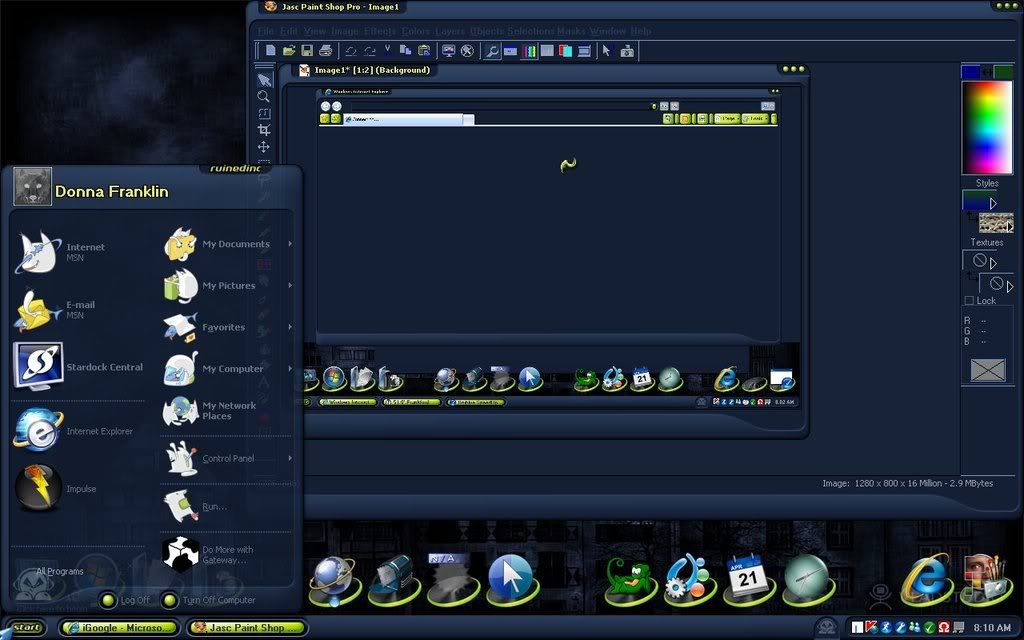
Have you tried any of the older skins by ^^Gabriel?
If not you should! They are minimalistic, sleek and run fast on systems even with minimal ram. I dragged out an oldie but goodie today just for fun and my computer wore x360 by ^^Gabriel. I chose the fun but simple IP to go with it Mrnomust by thinkcear. Again the cartoony style and flat look compliments this skin nicely.(who'da thunk it! ) I played for a while with different cursor packs and chose platinum by stardock design for it's simple sleek style. It really works well with this skin.
Some skins that are Vista only are meant to be Vista only. Case in point, KittyMalone's (now called Jeckyll!) Rise of the Mezanine. I love Kitty's Goth skins, they really speak to my darker side, and I decided I had to try this last skin. Well, it doesn't like XP at all, sad too because I really love the "please wait" medallion. It hinted at a really well detailed skin.
But xp hates it and breaks the start menu in wierd ways. I had to uninstall this one so I wouldn't use it again. *Thankfully Kitty took pity on us XP users there is an xp version so we can use it too. Of course I didn't know this at the time and was bummed out.* ( I will include in next week's reviews the MezanineXP skin)
To make myself feel better, I opened Kitty's Wednesdays nightmare skin. I did feel better !! Though it's a bit purple-y to me, the graphics are really detailed and fun. cjshadow_ghost by cjshadow IP package really likes this WB and plays well with it, making the Goth theme look sweet. I used the cursor azul3d by the AVMAN recolored to match the skin.I wanted something that looked caged and that cursor fit the bill. I also tried Blade 50 by Rycher it had that goth feel to it that complimented the skin, though the I bar really didn't suit me as it changed bright colors.
For the wall, I used pollen by inception8 , recolored to match the colorscheme. Also looked ok greyscaled.
This is another of the skins I have that doesn't work well with my hourly wallpaper change , as many of my walls don't look as nice with it.
I apologise for the lack of links and screenies beyond the first review. I had already written up the others and at that time didn't have a screen shot or all the links for those skins. I promise to do better next review!
This Week in Skinning - April 18th
Skin Roundup for 4-18-08
Friday, April 18, 2008 by Island Dog | Discussion: OS Customization
Friday is finally here, and it took way too long to get here. I'm starting to see a slight slowdown in skins, so I hope that is just something temporary.
Now for this weeks picks!
|
|
Maja Pearl CXP for CursorFX by Xiandi Xiandi gives us another great looking cursor theme this week. Great job. |
|
|
Rogue Proton Meters in DesktopX Widgets by philmar83 Here is a set of meters that are made to match the very popular Rogue Proton WindowBlinds skin. |
|
|
Aphrodite's Necklace in Dreams by TheMasterBaron This is another unique, but beautiful .dream from TheMasterBaron. Be sure to download this one. |
|
|
MB-AesTeK for IconPackager by ModBlackmoon Icon packs are starting to roll in again, and here is another fantastic addition by ModBlackmoon. |
|
|
Conspiracy My Computer in ObjectDock Icons by J. Aroche This is a new series J. Aroche is working on, and I can say it's off to a great start. Check the galleries for more of this series. |
|
|
The Lighthouse in Wallpapers |
|
|
Underwater 4 in Wallpapers by vlad This wallpaper looks so good on the desktop. I really would like to see something like this as a .dream. |
 |
Rogue Proton G for WindowBlinds by I.R. Brainiac You should know what to expect from an I.R. Brainiac skin....nothing but pure creativity. This XP skin has several colors available, and several matching accessories as well. |


Be sure to check the skinners personal sites on WinCustomize for more of their works. Great job to everyone who submitted work this week. See you next week!
April 17 Skins reviews
Some looks that I've tried this week
Thursday, April 17, 2008 by wulfn1 | Discussion: Community
Here are a few of the skins I've tried in the last week. I've documented them each day I used and saved the information to post to you here in one lump sum.
Well I felt kind of beachy today. It's sunny and I live close to the beach, and I can smell the salt in the air today. Very invigorating!
I decided today I was going to hunt through my skins for something I've already downloaded, and found seadream by Cathe Well Iconpackager was having some issues and I figured I'd redownload the package and freshen up a bit. I was dissapointed to find that the package is no longer available!! It was a cute little theme , with beach toys in a nice ocean blue , sunny yellow and keylime green hue. Well, I was going to tell you how well this package works with Sequel , by navigatsio. But since its no longer available, and my IP is acting up, things have changed.
Sequel is pretty all the way through, as navigatsio skinned all the menus to have a button look, this looks sharp on my computer and reminds me of some of the nextstart ( or was it nextstep?)menus I liked when I first started skinning my computer. It makes the list look like individual items instead of a long line of text to slog thru finding what you are looking for.
For the cursor, I had used microzoa by chuckeye for cursorfx. The colors work well with this grouping, and the animations are really detailed. Though it does get confusing sometimes when the little bugger turns upside down while trying to click on something, you have to get your bearings all over again.
Now , because of the missing IP , I had to redo and find a nice beachy IP package to go with this grouping. So I slogged through the IP libraries on WC and found Bluewhales by nichoLU. its also a cute theme and works well with the other skins I'm using, but I wish the original package I chose was still available!! I chose the Beachy sound package by k10w3 to go with the look. Beachy needs more sounds though. It almost seems like it didn't get finished. all in all, I just needed waves and sun tan lotion to complete the feel!
Goes to show you , if you download alot, back stuff up!! you never know when you have to reinstall something that isn't available anymore.
oh well, see ya tomorrow!
Wulf
With all the things I've been reading lately about Rogue Proton by I.R.Braniac , I just had to find out for myself. I had downloaded the original and used it for a week to see how it "felt", well I found it not to my tastes. So I decided to give this updated skin a second look and am glad I did, while it's not my usual taste, it worked well with the grouping I created.
I loaded the lime substyle , and I paired it with a quirky IP called Secret Garden by KerLoong, Looks quite cool! I Found that protozoa again by chuckeye works pretty good with this color scheme and skin style. Only drawback is it's size, it's a large cursor, but fits with the large style skin.
I found some greenish walls that I had and selected them for my change wallpaper themes, Those skins are , Pollen by inceptiona8, Pirate treasure by atomnet, Hear The Full Moon by tammitatum (this one I just really liked the dark moon look.),and Creamware by boxxi.
I chose those walls because of the similar colors and compliments they give the rogue proton WB. I have to say it was a pain to have to re click every single wall in my WB wall changer, but the look really needed it. Maybe for future builds the creators will consider modifying that feature for easier selection. (I have walls for different seasonal holidays and such that don't always get selected.)
Though this is a very dark skin, I have found that it doesn't cause problems trying to view things , like some dark skins do. The backgrounds for text are just light enough to be easily readable. If you like dark skins, this one isn't bad at all, and the substyles have some nifty rich jewelcolored looks. Something that can actually be made slightly girly if you like, or quirky , like I like! I used sounds of the rainforest by robjk which gave it a nice earthy feel.
I'll let ya know what I find next.
Wulf
Tried Nutshell by thewer today. I like the color combination , except the text areas are very dark and difficult to see, but over all very pretty, rich looking. Really liked the left hand buttons on the window frames! nice to see something out of the ordinary.
I used the MUKU icons by celldrifter. You would have thought I would go strictly with wood look since it's a wood skin , but wood looked kind of boring. The Muku look is very asian and simple. I used a simple wall of a tree leaf xrayed, so it was a black n grey look. Very nice compliment. I did use Wooden Claw by TOMCpl for my cursorFx because it fit so well with the theme.
while there are several really nice wood look object dock backgrounds, I wanted to stick with the asian theme so I opted for tile Woody by jimmyyy . I used wood5 tiles, they have a dark wood disk, surrounded by what looks like black laquer. Very sleek.
All in all, I would love this WB if it weren't for the fact that things show up so dark in all the text boxes.If you like this style, you'll have to mess with the windowblinds settings to get the text areas to come up a little. I added Ambient echoes by robjk for my sound packager. works pretty good.
See ya next time,
Wulf
I tried out the Dark Knight blind by Dr Zeus, though it reminded me of a halloween blind or a batman fan blind, I figured I should download it just in case I forgot about it come halloween time. I like the colors and the textures used in this blind, though I was sorry that the pretty copper color that the "please wait" screen's bat had , wasn't a part of the blind itself.
The bats are a gold color which is also pretty but I think it would have been much prettier with the copper. There are parts of the blind that show just black, making it look less than perfect, but they don't distract from the whole unless you have your start menu open all the time. Wierd thing (I used the xp and the vista . both had this problem) the tray at the bottom right only had the time in it, all the other icons dissapeared. while this is very pretty, I wish there were a way of making them show when you want them to,... like maybe a mouse over feature. Because I was just trying it out, I didn't match icons and cursors to it. Maybe I'll do that at halloween.
Wulf
Managing Social Networks
Wednesday, April 16, 2008 by Island Dog | Discussion: Internet
If you spend any amount of time on the Internet then I would probably bet you have be subjected to some form of talk about social networks. Heck, even here on WinCustomize and JoeUser I regularly talk about the usefulness of such networks. We have a growing group on Facebook about desktop customization, and several of us use Twitter as well.
With all these current networks, and more popping up all the time, it can be difficult to keep track of them all. I use quite a few of these networks for both personal and work use, and I wanted to share a few tips on how I manage some of the more popular ones.
- FriendFeed is one of the hottest new sites around, and it's generating quite a buzz. FriendFeed lets you keep update to date with the happening of all your subscribed friends, favorite bloggers, etc. It will pull updates from services like Flickr, Twitter, YouTube, Digg, and a bunch more. It also allows users to comment on your postings, and see updates posted from your friends as well. You can see my feed here.
- Socialthing! is another website that does a similar function, but I think it has a much cleaner interface. Socialting! is still an invite only service, and I do have a couple of invites to give away if anyone is interested.
- TweetScan is for you Twitter users out there. It lets you search Twitter, and is a good way to find people with similar interests, or people that are just talking about you.
- Twhirl is an application powered by Adobe AIR. It's a Twitter client for your desktop, but the cool thing about this is it will also post to your Pownce and Jaiku accounts as well. It's also available for both PC and Mac, but my personal Twitter client of choice is Witty.
- Alert Thingy is another new application also powered by Adobe AIR. Instead of Twitter, this app focuses on keeping you updated of your FriendFeed feeds, and it also allows you to post messages to Twitter.
So those are a few of my top choices on how to make managing your social networks a little bit easier. If you have any tips or tricks, I would definitely like to hear how you manage yours.
Gnomedex: The $600 Blogger Conference!
I'm poor :(
Wednesday, April 16, 2008 by Zoomba | Discussion: Virtual Communities
 Now, I'll admit that I'm definitely on the outside looking in of the blogging/web 2.0 community. While I manage very large sites with a ton of users and reach, I'm still on the periphery. Why? Well, I live in Michigan. Not exactly a state known for it's thriving IT industry. If you go beyond IT services that support manufacturing companies, you can probably count on one hand the number of companies doing anything significant with online communities or digital media.
Yes, I'm a bit of a victim of geography here, and even though it's all online now, it's all IM, Twitter, email and blogging, proximity is still important. So when I see events like Gnomedex coming up, I'm interested because it could be one of the few opportunities I have this year to actually network with other people working in my field. And in this nebulous profession, professional networking is king.
Gnomedex struck me as an interesting conference to attend with its focus on blogging, podcasting and other personal media, the stuff that's really sweeping the 'net at the moment. The really interesting tech and approach to information distribution that will become pretty standard for regular users in 5 years is what this conference focuses on now. And there are some pretty impressive names attached too, with folks from CNN, Amazon's AWS initiative, Google and a selection of people to know around the blogging world.
I'd love to go. It would be a wonderful opportunity to meet people, get some new ideas for JoeUser/WinCustomize/ImpulseDriven. Plus I think it would be a blast.
But I won't be going. Why?
It costs a damn fortune!
The conference, just to get in the door, costs $600 (if you've attended a Gnomedex in the past, you get a $50 discount). Now, that's a pretty hefty price to begin with, but what if you're from out of town? Well, then you have to factor in plane tickets and a hotel. I just did some quick checking via travelocity, and looked over the hotel list close enough to the conference so I wouldn't have to rent a car...
Leave August 21st, return August 23rd:
- Plane Ticket: $373
- Hotel: $389 (before tax, this was one of the cheap ones)
That brings the base cost of the conference to $1,362. Funny enough, that's how much I paid in taxes this year.
Unfortunately this doesn't include the incidental costs like dinners, drinks with folks you meet at the conference, or anything you may need to pick up while there. From what I've been told about Seattle, and about these sorts of conferences, I could probably safely add another $300 or so to the bill. So now at a conservative estimate I've passed $1,600.
Of course I could do things like find someone to split a hotel room with, and probably just not do the dinner/drinks thing, but after a point the cost cutting gets in the way of what these conferences are about: meeting folks in the field.
I could probably swallow the travel costs if the conference pass didn't virtually double the cost. It almost seems like the pricing is setup to keep out people who aren't either on that side of the country already, or who don't have a corporate card to cover the costs.
Maybe someday there will be a tech conference here in the midwest....
Yeah, right.
Jing 1.5 (Windows)
Wednesday, April 16, 2008 by Island Dog | Discussion: Windows Software
I have talked about Jing before, and it's one of my favorite free apps for capturing screenshots and video of your desktop. TechSmith released an updated version for Windows users yesterday.
Updates include:
- Capture selection should start more quickly
- History should be open more quickly
- Memory 'leaks' cleaned up
- Over all memory usage decreased
- Automatic selection of 'sub windows' restored
Download: Jing 1.5
MyColors: Introduction Walkthrough
Change your desktop with MyColors from Stardock
Monday, April 14, 2008 by Island Dog | Discussion: Customization Software
MyColors from Stardock is something you probably have been reading a lot about recently. The new MyColors Theme Manager has a slick new interface, and should now work seamlessly with other customization components such as Object Desktop. A question I am often asked is..."what is the difference between MyColors and something like WindowBlinds?"
Well are are some fundamental differences, but remember that MyColors uses the technology from products like WindowBlinds and IconPackager. The real big difference is MyColors is basically an all-in-one solution for customizing your desktop. Whereas with applications like WindowBlinds and IconPackager, you use each application independently and pick and choose the themes and skins you want to use. This is not a bad thing at all, but MyColors offers an ease of use, especially for people who do not want to have to install multiple pieces of software to personalize their desktop, or are not that familiar with desktop customization.
MyColors includes all the skinning technology, so all you have to worry about is which themes you want to use. MyColors themes typically include a new visual style, icon package, wallpapers, and several gadgets like media players and weather displays.
|
|
|
MyColors Theme Manager |

You can check out MyColors by downloading the MyColors Theme Manager with the free Quest theme. As you see in the screenshot above, MyColors has an easy to use interface which shows you a list of your installed themes, and a large preview area where you can apply the selected theme in your list.
To add a new theme to MyColors simply click the "Add Registration" button, and enter your e-mail and registration code in the box seen in the screenshot below. You can get new themes by browsing the MyColors library. Once entered, your new theme should show up in your list.
|
|
|
Adding registrations to MyColors |

Need more skins? Not a problem. Click the "More Themes" tab and browse some of the sample themes, or click the "View More" button and that will open a link to the full gallery page where you can choose from the many themes that are available. There are themes that are licensed by the NBA, NHL, and Collegiate sports teams. In addition there are holiday, automotive, and "Inspired" themes for you to choose from.
|
|
|
MyColors "More Themes" |

If you need to return to the default Windows desktop, it's as simple as selecting Windows Desktop in the list and applying it.
One of the best features about MyColors is it will notify you, and automatically update both your MyColors theme manager, and the installed themes. So if there is an application update, or a fix or addition to a theme, MyColors will update it for you. Best of all, MyColors is based on years of desktop customization technology, and does not hack or patch your system files, so you don't have to worry about your themes not working when Windows updates are installed.
|
|
|
MyColors Aquamarine Theme |


For more information on how to easily transform your desktop into how you want it to look and feel, then visit the MyColors web site.
Link: MyColors