









































SSD Tips and Tweaks
Come, share your tips!
Wednesday, April 25, 2012 by RedneckDude | Discussion: Personal Computing
Guys, I know a few of us have SSDs. I'm pretty sure more do than we know.
What say we all share any tips or tweaks we might have so we can all benefit from each other's knowledge.
Or maybe we can ask a question, someone else may have the answer.
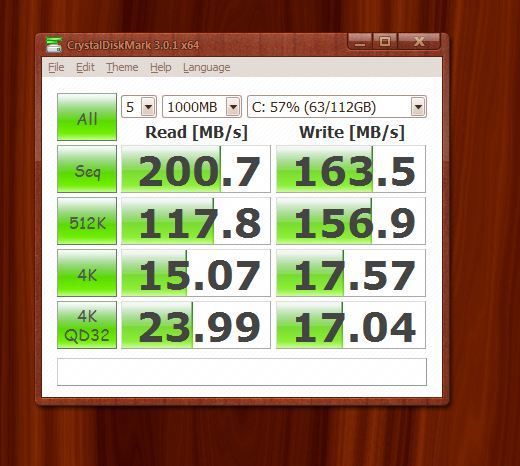
I'll start by saying I have an OCZ Vertex Plus 120 GB. Sata II on a Sata II Mobo.
Currently, I get the following stats when testing. I wonder how this compares with yours and if it can be tweaked.
 |
|
Page 3 of 7 | |
|
|---|

Reply #42 Thursday, April 26, 2012 11:31 AM
I've never been able to tell a performance difference (or even benchmark) between IDE and AHCI.
Reply #43 Thursday, April 26, 2012 12:29 PM
RND.....check this first BEFORE you do ANYTHING....
There...
Thanks for the effort Jafo! I had already read it. Some of these screenshots suggest that I may not see that much difference anyway. 
Reply #44 Thursday, April 26, 2012 12:33 PM
Brand new mobo in a brand new system I just built. But look as I might, I haven't been able to find it.
I'm not sure Biostar is the best mobo to have bought. If I had bought a better board, I could possibly unlock the 4th core on my triple core cpu.
I bought a mobo/cpu combo.

Reply #47 Thursday, April 26, 2012 2:12 PM
i see no option to enable ahci in the bios for that board. unfortunately, biostar has yet to update that board's bios. advice: in the future, stick with asus or gigabyte. some may add msi but their customer service sucks. as-rock supposedly makes nice boards too but i've never used any by them.

Reply #48 Thursday, April 26, 2012 2:30 PM
Difference is slight, probably not very noticeable in real world usage unless you are heavily multitasking. AHCI does support Native Command Queuing (NCQ), which IDE mode does not. This frees the CPU to do other tasks while the SSD has several operation in queue, for instance.


Reply #50 Tuesday, May 1, 2012 7:29 PM
you may also switch your browsers download folder to another drive and maybe take a look how you can redirect the temp folder so it wont store unnecessary data on the c: drive i did something but don't remember it anymore
Reply #51 Tuesday, May 1, 2012 9:56 PM
I moved the temp files to a platter drive, page file as well.
Reply #52 Wednesday, May 2, 2012 12:34 AM
Ah, come on, you really don't need to do that and it kind of defeats the purpose of having an SSD.
My temp files and page file are all on my SSD RAID. Each of the three drives in the RAID array has over 19,400 power on hours (that's more than 2 years), had almost 5 TB written to it and still shows only 97% in the SMART media wearout indicator attribute (100% is a brand new drive).
Reply #53 Wednesday, May 2, 2012 1:07 AM
This is why I made this thread.
Jorge, I'm not in raid and only have 120 GB ssd.
Reply #54 Wednesday, May 2, 2012 1:15 AM
Guys, I know a few of us have SSDs. I'm pretty sure more do than we know.
Currently, I get the following stats when testing. I wonder how this compares with yours and if it can be tweaked.
Reduced 94%Original 520 x 466
I dont have a Super Star Destroyer, why didnt someone tell me they were being sold?
Reply #55 Wednesday, May 2, 2012 1:37 AM
Same thing. With normal usage your SSD will last about 5 years. When was the last time you kept the same hard disk for 5 years?
Defrag is a no-no for SSDs because it moves a *lot* of data around with *zero* benefits on SSDs. Other than that, just use your SSD as you would any other disk drive, and enjoy the speed benefits. 
Reply #56 Wednesday, May 2, 2012 11:49 AM
So let the page file, and temp files take up space on a small SSD?
Hibernation too, I guess.... 
Reply #58 Wednesday, May 2, 2012 12:56 PM
well its not about the usage of the ssd JcRabbit its just to avoid filling the drive with junk that is not needed-( im not doing it for the warranty or for the lifetime that i suspend/freeze ) it´s up to you if you want to have it there but i use the www and travel a lot of different pages a day last time i checked my temp drive and my ContentIE folder had about 6 gigs of JUNK in it...that is just a suggestion not a must do trick- of course you should use your ssd but keeping it clean is part of having a working Cputer 
Reply #59 Wednesday, May 2, 2012 6:42 PM
Yes, temp files and the page file do take up disk space - however, they are also the files that benefit the most from living in an SSD.
Think about it: when is the page file used? All the time! When an application is minimized, after a while part of that application's memory space is paged out to disk, even on systems with lots of memory. When you return to the application, that data that was written to the page file must be paged into memory again.
Ever run a game and then ALT-TABBed back to Windows on a system with limited RAM? If you have, you will know exactly what I am talking about, the system 'stutters' and the desktop slowly redraws while things are being moved into and out of the page file. This is because hard disks are *slow*, and this is where SSDs *really* shine!
As for temp files, these obviously benefit from being written to an SSD too. Provided you regularly 'clean up the house' using Disk Cleanup - as you should with hard disks too - you'll benefit more from leaving them on the SSD than otherwise.
Unless your PC is a web server with a database that is hammered by many thousands of users every day (that could indeed kill a consumer grade SSD in a short time), my advice is to treat the SSD just like you would a normal hard drive - just don't do things to it that were conceived with hard disks in mind and that have zero benefits for SSDs (Defrag, file position optimizations, etc...).
Reply #60 Wednesday, May 2, 2012 6:47 PM
and an SSD will start to noticeably lose its speed once it becomes more than half full so why put temp files and such on it? that's not my opinion, that came from Corsair and OCZ.
Please login to comment and/or vote for this skin.
Welcome Guest! Please take the time to register with us.
There are many great features available to you once you register, including:
- Richer content, access to many features that are disabled for guests like commenting on the forums and downloading skins.
- Access to a great community, with a massive database of many, many areas of interest.
- Access to contests & subscription offers like exclusive emails.
- It's simple, and FREE!
|
|
Page 3 of 7 | |
|
|---|
Reply #41 Thursday, April 26, 2012 8:50 AM
If you're still using IDE mode, read THIS before switching or you risk not being able to boot into Windows afterwards.
There...