





































SSD Tips and Tweaks
Come, share your tips!
Wednesday, April 25, 2012 by RedneckDude | Discussion: Personal Computing
Guys, I know a few of us have SSDs. I'm pretty sure more do than we know.
What say we all share any tips or tweaks we might have so we can all benefit from each other's knowledge.
Or maybe we can ask a question, someone else may have the answer.
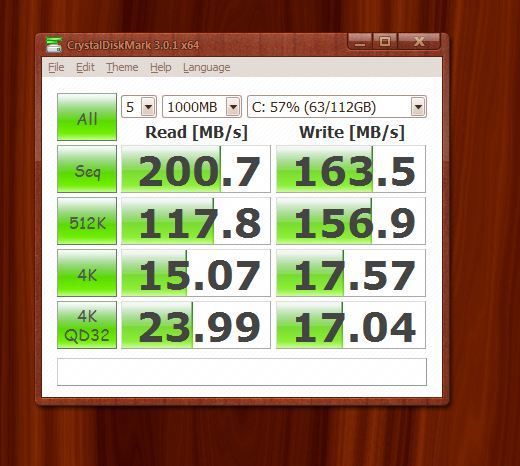
I'll start by saying I have an OCZ Vertex Plus 120 GB. Sata II on a Sata II Mobo.
Currently, I get the following stats when testing. I wonder how this compares with yours and if it can be tweaked.
 |
|
Page 2 of 7 | |
|
|---|

Reply #22 Wednesday, April 25, 2012 12:29 PM
Ehehe, sorry, already promised to my girlfriend. 
A RAID 0 array, besides multiplying read/write speeds, also multiplies capacity. For instance, each of my three Intel SSDs has 80 GB. As such, the OS sees them as a single 240 GB drive (3x80 GB).
Sure, I do it frequently! That will clean up temporary files that are no longer needed, etc... Nothing to do with defragging a drive.
Reply #23 Wednesday, April 25, 2012 12:33 PM
I was fairly sure you didn't turn 3 80's into more than 3 times 80. It read like turning 3 80's into 3 160's...lol.

Reply #24 Wednesday, April 25, 2012 12:43 PM
Yes. But I have my CCleaner set to not use the Wipe Free Space, not Wipe Free MFT Space and only use the normal delete option. Secure delete options aren't necessary on an SSD and I've read that they can damage an SSD. Oh, and I don't use CCleaner as often on my SSD as I used to on my mechanical drive (I think has something to do with the limited number of writes). I clean the crud out once every couple of weeks or so.
Bugger!



Reply #26 Wednesday, April 25, 2012 3:15 PM

I installed windows 7 directly to the drive but i made one mistake i installed it while i had 3 extereals attached to my rig what caused the system to make an extra D: drive with 100mb backup thats for windows itself - it has a solid letter normally that drive or that partition is hidden but its not...
I tweaked the drive with the tool that came with it samsung magican tool it was easy to use while it wasnt able to disable the index thing
( so i did that manually ) Computer drive C : removed the index this drive for windows applyd and i was good...
The drive is running and was installed in AHCI Raid1 im a bit carefull with raid0 since i care a bit about the data stored on my C:\ drive
While you can use crystal disk to view the speed its mostly not correct i have seen my disk on 470 and then after a view minutes i had 503 and 507-Mb/s
its changing...maybee thats normal i dont know also its not recommended to do the tests to often since it is stressing the drive but if you buy one you also want to use it so screw that lol- ohh And if you use Tuneup make sure to update to the latest version since there was some trouble with other versions that did defrag your ssd... >Drive is a Samsung 830 120G connected via Sata6
@ RND i also had lower speeds when i had the drive connected via the second slot ( Sata and not the first ) you can try to switch it to improve speeds i improved mine when i set it next to my Samsung HDD in Raid 1 before that i had speeds round about 350mbs switched it and now iam at 500 i also tryd the grey SATA6G input on my board thatr is made for SDD but for some reason it didnt work on that slot
Reply #27 Wednesday, April 25, 2012 3:20 PM
Reply #28 Wednesday, April 25, 2012 3:29 PM
Nice! Happy with the Samsung 830 so far?
At first I was undecided between getting a couple of Samsung 830 SSDs or Intel 520's, but I don't want to go near anything with a SandForce controller, even with Intel's name behind it. The Samsungs are fast, have their own controller made in-house, and they seem to be at least as reliable as the Intel drives, if not more so (a lot of OEMs are choosing Samsung SSDs for their builds).
The only thing that can still put a dent on my plans is Intel's adding RAID 0 TRIM support to the next release of Rapid Storage Technology. v11.5 alpha release notes stated they would, but that was back in November 2011 and then... not a peep more.

Reply #30 Wednesday, April 25, 2012 6:09 PM
That's where I am at, looking down the road at a future upgrade to an AM3/SataIII/DDR3/USB3.0 setup.(Hey, all 3's, lol) I'm still very happy with what I have now, if you don't count the almost 3 minutes it takes to get to my desktop.  I shut my PC off more often now to save on energy bills and the boot times are a real drag. I have services and start-up programs at a minimum, so I think only an SSD will help much. Buying a SATAIII unit sounds like the smart money.
Reply #31 Wednesday, April 25, 2012 6:50 PM
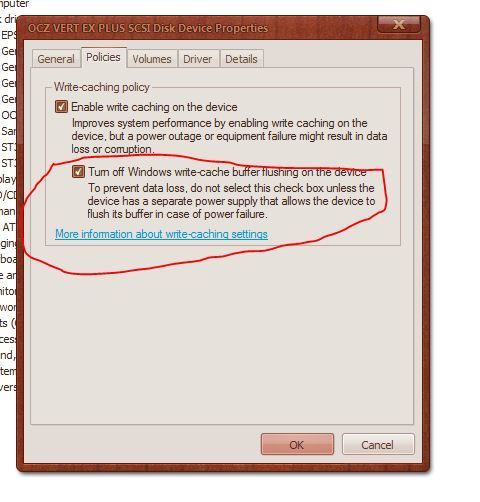
Ouch. Turn off the second option - otherwise you risk data corruption if the power goes off suddenly or the system spontaneously reboots.
Trust me, I know because I had that option enabled before, figuring I was safe because of my APC UPS. Then my 5970 graphics card started going bad and spontaneously rebooting my PC... nearly lost the contents of my Outlook data file because of it (thank God for backups!).
The second option is intended for systems where the drive has some kind of capacitor or battery that enables it to commit pending data in the cache in case of a power failure.
Reply #32 Wednesday, April 25, 2012 8:09 PM
Quoting JcRabbit, reply 10Make sure AHCI mode is enabled instead of IDE mode, it's faster. If you're still using IDE mode, read THIS before switching or you risk not being able to boot into Windows afterwards.Maybe I'm dense, but that reads like it's advice only for Intel chipsets. Mine isn't.
it stands for Advanced Host Configuration Interface, the main reasons to use this are that
1 it allows drives to queue mange the requests (ie data request from track 20, 70, 30, 120, 50 would actually execute 20,30,50,70,120 saving stepping time (ssd not applicable as ALL data is electronically accessed no moving parts)
2 it allows hotswapping.
there are other reasons to use also, but these two are the main ones.
ide mode dates BACK to the days of 20MB ide interface hdds to replace the older MFM & rll controlloer/SEPERATE drive sets from the 80's & very early 90's
harpo
Reply #33 Wednesday, April 25, 2012 8:10 PM
jupp second option should be turned of you can leave it on the hidden partition
the samsung is fast and like you said they have their own controllers so far im happy with it it looks good and seems to be a stable robust build
havent tryd raid 0 yet but as soon as i get my hands on a thunderbold drive i will try it and give feedback the only problem i noticed so far on the samsung is that they seem to slow down on boot time if external drives are connected i guess thats more a windows problem since its loading all the required data and checking the usb drives on startup AHCI takes about 5 seconds to check the ssd im still running rev1 bios and the latest is 7 but i dont like flashing it because of known problems
Reply #34 Wednesday, April 25, 2012 9:02 PM
it stands for Advanced Host Configuration Interface, the main reasons to use this are that
Anyone care to advise me as to how to enable AHCI, or send me a link to the info?

Reply #35 Wednesday, April 25, 2012 9:33 PM
OCZ Vertex EX3 in IDE MODE:

The OCZ is connected to a Marvell 91xx SATA 6G controller. I'm running in AHCI mode.

As you can see, in this case, AHCI doesn't seem to help things.
I don't have any specific tips. I just like seeing how different SSD's perform.

Reply #37 Thursday, April 26, 2012 12:56 AM
I can find it in device manager, but not sure that is what I need to set.
Reply #38 Thursday, April 26, 2012 6:54 AM
usually it is set in the advanced section of the BIOS, again usually with the MODE for the sata ports(often the choices are ide/ahci/raid), but all windows before vista either expected ide mode OR you had to load drivers to access the hard drive to install the os, so on old hardware might not have been available.
harpo


Please login to comment and/or vote for this skin.
Welcome Guest! Please take the time to register with us.
There are many great features available to you once you register, including:
- Richer content, access to many features that are disabled for guests like commenting on the forums and downloading skins.
- Access to a great community, with a massive database of many, many areas of interest.
- Access to contests & subscription offers like exclusive emails.
- It's simple, and FREE!
|
|
Page 2 of 7 | |
|
|---|
Reply #21 Wednesday, April 25, 2012 12:22 PM
Should one run disk cleanup on an SSD?