









































WindowBlinds 7 Beta Bug reports
Thursday, June 4, 2009 by ZubaZ | Discussion: WindowBlinds
The new WindowBlinds beta has been released. This build focuses on working with Windows 7 (and maintaining functionality in Vista and XP).
Known issues:
- Compact start menus are right out.
- Paint and Write titlebars are . . not right.
Post anything that looks odd. Make sure to give us your WB system information from the WB app, your OS (including 32 or 64 bit), and if it's hard to explain (or even if it isn't) a screenshot.
WindowBlinds v6.80.TBD (New BETA Build) 9/21/2009 - Coming MONDAY
- Windows XP toolbar and animations settings are back under Settings.
- Windows Vista sidebar skin settings are back under Settings.
- Windows Explorer backgrounds tab has been added for Windows XP, Vista AND 7.
- NEW! COOL! Textures tab added!
- Allows users to apply a textured effect to your skins titlebar, taskbar and startmenu.
- For skin authors, there are now three new sections in the skin to easily apply a texture to frames, taskbar or the startmenu without worrying about cutting it up and aligning it correctly.
- Now skins can also include their own textured versions to show in the skin list.
- Added support for enlarged menus on Windows Vista and Windows 7.
- Some additional skin sections added for Vista / 7 including a new shadow section.
- Fixed a bugs where the start button was clipping on multiple monitor Windows 7 boxes.
- A feature that allows users to drag wallpapers to the large preview area and it will copy them into the wallpapers folder
Kirk Windisch
Software Development
 |
|
Page 5 of 5 | |
|
|---|
Reply #82 Thursday, July 16, 2009 8:03 AM
I have a current ObjectDesktop Ultimate subscription that expires on 5-8-2010, and Impulse continues to tell me that my registration is not valid for the WB7 update.
WindowBlinds version : WindowBlinds 6.4 (build 73 x86)
WindowBlinds is installed correctly on this PC
WindowBlinds appears to be activated on this PC
Your machine supports per pixel borders on WindowBlinds skins.
(HP vs17 flat panel monitor) 1 is attached to Intel(R) 82945G Express Chipset Family
Wblind.dll 2009/03/24 14:04:20
Wbsrv.dll 2009/03/24 14:04:58
Wbconfig.exe 2009/03/24 14:04:20
Wbload.exe 2009/07/16 04:17:14
Wbhelp.dll 2009/03/24 14:04:07
Wbui.dll 2009/03/24 14:04:05
Tray.dll 2009/03/24 14:04:21
Screen.exe 2009/03/24 14:04:09

Reply #83 Thursday, July 16, 2009 9:23 AM
Windows blind 7 is now missing from My Software on Impulse. Before you ask yes show pre release versions is checked in settings.
I was going to give it a try again since they just updated fences a few days ago to see if Fences, Cursor FX and WB 7 are playing well together, on W-7 RC-1 64 bit OS that I am running
Reply #84 Wednesday, July 22, 2009 11:36 AM
It is now back on impulse after being missing in action for a couple of days. I loaded WB 7 and Cursor FX and Fences now seem to be playing well together. I have fond though that some WB Vista skins do not work well, Sometime I will oad one and try to bring up Cursor FX all I get is a screen, where different cursors are is totally Black the title bar is about the only thing that appears, now this is not happening with all Vista WB skins just some. I am currently using Rock Angel which is working fine
Reply #86 Thursday, July 23, 2009 11:33 AM
I had a problem with Razor X . I do not believe it is the blind/s. I play around with changing colours in Personalization along with changing the font sizes in Personalization. I also some times change the System font in WB to something other than the the Skinned font.

Reply #87 Wednesday, July 29, 2009 9:21 AM
It appears that the latest update, which I installed this morning, has fixed the start button issue.
No more half start buttons! Yay! 
Reply #88 Wednesday, July 29, 2009 9:31 AM
Something I've noticed for a while is this strange problem with how WB7 on W7 draws the trackbars.


Reply #89 Saturday, August 1, 2009 12:53 AM
 Why is it that all the explorer windows just show a menu when you right click on them (instead of rolling up). All other applications appear to work fine, right click, roll up. Right click, roll down. Explorer windows show a menu, then whatever you click, they roll up. Same with roll down.
I'm using win7 and the leo, carbon or diamon skins (haven't tried the others).

Reply #90 Saturday, August 1, 2009 10:22 AM
hello,
with wb7 beta and vista business right border of adobe acrobat or foxit reader maximized is not correctly shown (empty space left),
such empty space (or empty streak) on the right window border is shown in foxit reader with the every skin, in adobe acrobat only with leo skin
Adobe acrobat maximized window:

Reply #91 Saturday, August 1, 2009 10:30 AM
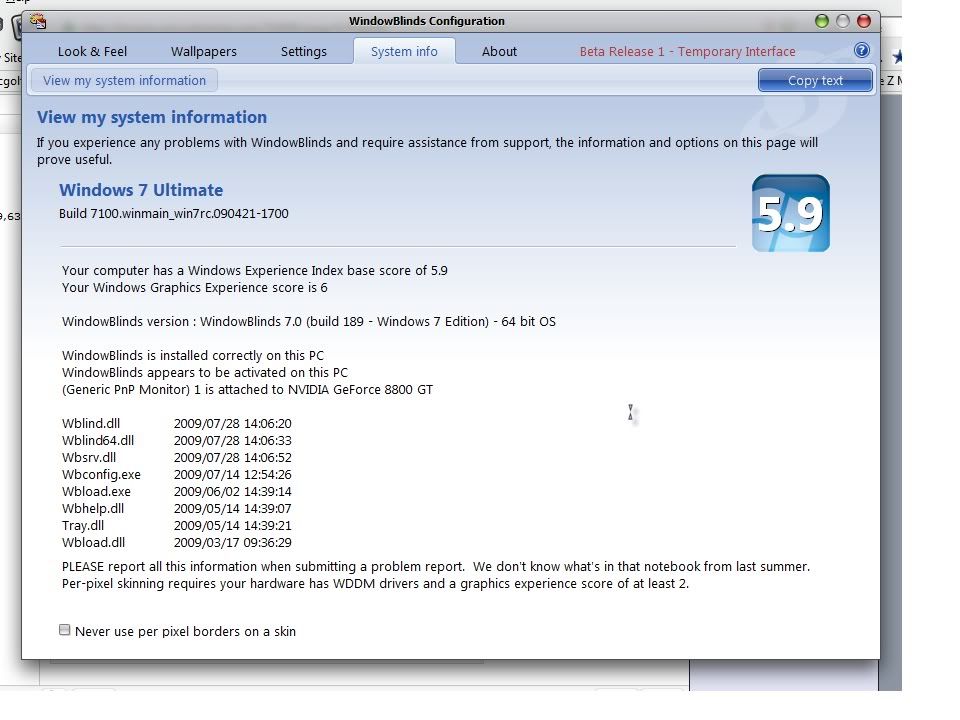
Your computer has a Windows Experience Index base score of 3.7
Your Windows Graphics Experience score is 3.9
WindowBlinds version : WindowBlinds 7.0 (build 176 x86 - Vista Edition)
WindowBlinds is installed correctly on this PC
WindowBlinds appears to be activated on this PC
(ThinkPad Display 1280x800) 1 is attached to Mobile Intel(R) 4 Series Express Chipset Family
Wblind.dll 2009/06/25 18:39:20
Wbsrv.dll 2009/06/25 18:39:33
Wbconfig.exe 2009/06/17 23:52:02
Wbload.exe 2009/06/02 21:39:14
Wbhelp.dll 2009/03/25 00:04:07
Tray.dll 2009/03/25 00:04:21
Wbload.dll 2009/03/17 16:36:28
Screen.exe 2009/06/04 19:48:09
Reply #92 Saturday, August 1, 2009 10:41 AM
What is even more interesting, with the the leo skin you can drag opened .pdf file window anywhere as if this was not maximized. same behavour with Irfanview program window...
other skins seem do no do that way...
Reply #93 Saturday, August 1, 2009 8:24 PM
Nevermind. It's still happening.
That was short lived. 

Reply #94 Tuesday, August 4, 2009 10:23 AM
Have another thread on WB 7 beta related problems that just seems to have died:
See https://forums.wincustomize.com/359798
Also, have read other threads that say a way to fix this get-nothing-but-windows-classic problem is to select Aero and then select a different skin. Well, since my machine doesn't support Aero, that does nothing either.
Sent email to Stardock support over a week ago, have received nothing back, not even a reply.
BTW, installed WB 7 on the same machine in the Vista OS (machine is dual-boot) and it works great. So, it's related specifically to Windows 7.
So, that's it now? I'm simply out my purchase?

Reply #95 Tuesday, August 4, 2009 12:16 PM
With a member number as low as yours,you should know how betas work by now. To refresh your memory,they build,we test,they fix it,we test some more,repeat until ready for release.
Reply #96 Tuesday, August 4, 2009 2:29 PM
With a member number as low as yours,you should know how betas work by now. To refresh your memory,they build,we test,they fix it,we test some more,repeat until ready for release.
Yeah, I know how betas work -- have been involved in lots of them. And in other cases, when you participate in the testing effort, and you go to the trouble to send a trouble report (in this case, an email) to the support folks, you at least get the decency of a reply.
And, while I don't expect anyone to drop everything they're doing to jump on this and fix it -- at least a response indicating that they got my email, whether or not it's a know problem (and if there's a fix in the works), and what additional info they need from me -- would have been nice.


Please login to comment and/or vote for this skin.
Welcome Guest! Please take the time to register with us.
There are many great features available to you once you register, including:
- Richer content, access to many features that are disabled for guests like commenting on the forums and downloading skins.
- Access to a great community, with a massive database of many, many areas of interest.
- Access to contests & subscription offers like exclusive emails.
- It's simple, and FREE!
|
|
Page 5 of 5 | |
|
|---|
Reply #81 Wednesday, July 15, 2009 1:10 PM
Thanks neil for fixing the scrollbar button states (you may have already been aware of it)