









































WindowBlinds 7 Beta Bug reports
Thursday, June 4, 2009 by ZubaZ | Discussion: WindowBlinds
The new WindowBlinds beta has been released. This build focuses on working with Windows 7 (and maintaining functionality in Vista and XP).
Known issues:
- Compact start menus are right out.
- Paint and Write titlebars are . . not right.
Post anything that looks odd. Make sure to give us your WB system information from the WB app, your OS (including 32 or 64 bit), and if it's hard to explain (or even if it isn't) a screenshot.
WindowBlinds v6.80.TBD (New BETA Build) 9/21/2009 - Coming MONDAY
- Windows XP toolbar and animations settings are back under Settings.
- Windows Vista sidebar skin settings are back under Settings.
- Windows Explorer backgrounds tab has been added for Windows XP, Vista AND 7.
- NEW! COOL! Textures tab added!
- Allows users to apply a textured effect to your skins titlebar, taskbar and startmenu.
- For skin authors, there are now three new sections in the skin to easily apply a texture to frames, taskbar or the startmenu without worrying about cutting it up and aligning it correctly.
- Now skins can also include their own textured versions to show in the skin list.
- Added support for enlarged menus on Windows Vista and Windows 7.
- Some additional skin sections added for Vista / 7 including a new shadow section.
- Fixed a bugs where the start button was clipping on multiple monitor Windows 7 boxes.
- A feature that allows users to drag wallpapers to the large preview area and it will copy them into the wallpapers folder
Kirk Windisch
Software Development
 |
|
Page 1 of 5 | |
|
|---|

Reply #2 Friday, June 5, 2009 4:51 PM
It has been 6 months since I had WB installed last so I am not up to date but the toolbars in IE8 and tabs are not getting skinned. Is this a known bugfeature or new?
Also.. Is Skinstudio ready for WIn 7 before I install it?

Reply #3 Friday, June 5, 2009 5:06 PM

Reply #4 Friday, June 5, 2009 5:08 PM
Thanks. I suppose I can wait. The unskinned toolbars aren't so bad on my ispire skin. 
* Menu bars in IE8 flash the correct color but then change to unskinned menubars but the menu bars look fine in Explorer.
Your computer has a Windows Experience Index base score of
Your Windows Graphics Experience score is 7.9
WindowBlinds version : WindowBlinds 7.0 (build 170 - Windows 7 Edition)
WindowBlinds is installed correctly on this PC
WindowBlinds appears to be activated on this PC
(Generic PnP Monitor) 1 is attached to NVIDIA GeForce 8800 GT
(Generic PnP Monitor) 2 is attached to NVIDIA GeForce 8800 GT
Wblind.dll 2009/06/04 15:30:20
Wbsrv.dll 2009/06/04 15:31:19
Wbconfig.exe 2009/06/04 15:49:02
Wbload.exe 2009/06/02 14:39:14
Wbhelp.dll 2009/05/14 14:39:07
Tray.dll 2009/05/14 14:39:21
Wbload.dll 2009/03/17 09:36:29
Screen.exe 2009/06/04 12:48:09

Reply #5 Friday, June 5, 2009 5:40 PM
anyone else not have a logoff/power button on the start menu when using the win7 subskin for leo? i get it when using the vista sub but not the win7 sub
Reply #6 Friday, June 5, 2009 7:57 PM
Hi, add me to this list of not renewing OD without XP x64 support.
http://img41.imageshack.us/img41/1072/wb7xp64.jpg

Reply #7 Friday, June 5, 2009 8:36 PM
Windows 7 32 bit - Look & Feel no longer has the "Explorer backgrounds" option. I trust that will return. 8)

Reply #8 Friday, June 5, 2009 8:44 PM
XP 64 bit support is no longer, not enough of a user base for Stardock to continue support for it, I believe last version that supported XP 64 bit was 6.2.
It is there for me, running XP Home. In fact, my settings stayed the same after updating.
Reply #9 Saturday, June 6, 2009 12:09 AM
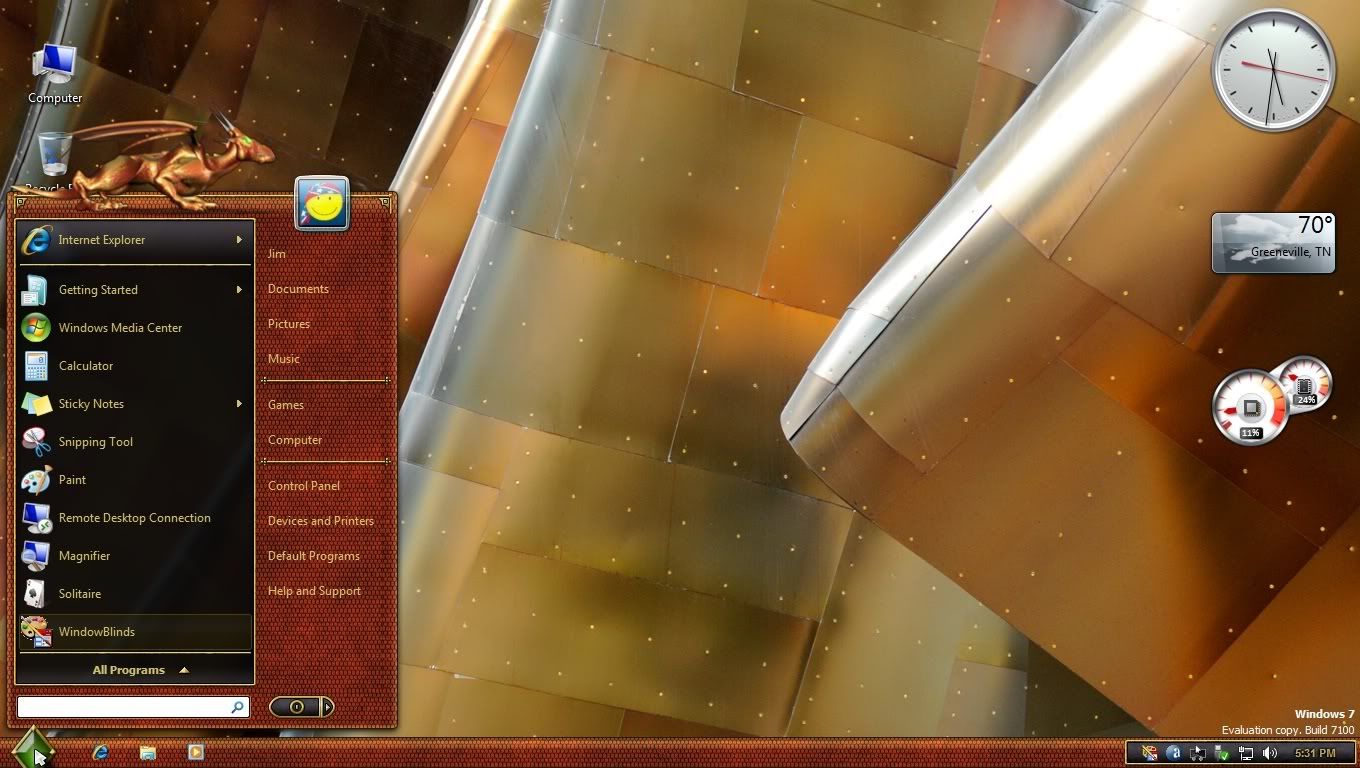
While hovering over the windows button, the button is cut.

If clicked or if I move out, the button is drawn complete
Edit: Tested with "Aero Metal" and "Diamond". With "Leo" the button is always drawn correctly
Your computer has a Windows Experience Index base score of 3.4
Your Windows Graphics Experience score is 3.4
WindowBlinds version : WindowBlinds 7.0 (build 170 - Windows 7 Edition) - 64 bit OS
WindowBlinds is installed correctly on this PC
WindowBlinds appears to be activated on this PC
(ViewSonic VG2030m) 1 is attached to NVIDIA GeForce 8500 (GF 8400 + GF 8200)
(Generic PnP Monitor) 2 is attached to NVIDIA GeForce 8500 (GF 8400 + GF 8200)
Wblind.dll 2009/06/04 15:30:20
Wblind64.dll 2009/06/04 15:31:44
Wbsrv.dll 2009/06/04 12:48:52
Wbconfig.exe 2009/06/04 15:49:02
Wbload.exe 2009/06/02 14:39:14
Wbhelp.dll 2009/05/14 14:39:07
Tray.dll 2009/05/14 14:39:21
Wbload.dll 2009/03/17 09:36:29
Screen.exe 2009/06/04 12:48:09
Reply #10 Saturday, June 6, 2009 12:32 AM
I am a subscriber to object desktop ultimate and still couldn't find it. Where is it at? 
EDIT: Nevermind, I had to set the option to show the prerelease software. Sorry about that.
Reply #11 Saturday, June 6, 2009 1:06 AM
"It is there for me, running XP Home. In fact, my settings stayed the same after updating."
I edited that this was Windows 7 (32 bit) to make my note clearer. Thanks.
Reply #12 Saturday, June 6, 2009 1:22 AM
The bug that I found here is just that this thing works correctly for me. Is this a known bug?


Reply #14 Saturday, June 6, 2009 8:27 AM
Quoting Teknojunky,
reply 6
If XP x64 support does not come very soon, I will not renew Object Desktop any more.
Hi, add me to this list of not renewing OD without XP x64 support.
http://img41.imageshack.us/img41/1072/wb7xp64.jpg
I am sorry to say WindowBlinds 7 will not be supporting Windows XP 64 bit Edition.
It will be supporting Windows XP 32 bit edition (and will probably work on 32 bit Server 2003 too), Windows Vista 32 bit and 64 bit and Windows 7 32 bit and 64 bit.
The user base of XP 64 bit is simply too small to justify the additional testing and development costs.
Reply #15 Saturday, June 6, 2009 8:29 AM
If clicked or if I move out, the button is drawn complete
Edit: Tested with "Aero Metal" and "Diamond". With "Leo" the button is always drawn correctly
What build of Windows 7 do you have installed?


Reply #16 Saturday, June 6, 2009 8:41 AM
When I updated, WB7 was working well. Then I updated MyColors, and ended up with "Windows Classic". I then had to verify installation and re-update WB7. Now all appears to be working well. I see the "shared file" issue still exists, and forgot to mention, Impulse updated before I installed WB7.
Your computer has a Windows Experience Index base score of 3.1
Your Windows Graphics Experience score is 3.1
WindowBlinds version : WindowBlinds 7.0 (build 170 x86 - Vista Edition)
WindowBlinds is installed correctly on this PC
WindowBlinds appears to be activated on this PC
(Generic PnP Monitor) 1 is attached to NVIDIA GeForce 8400M GS
Wblind.dll 2009/06/04 15:30:20
Wbsrv.dll 2009/06/04 15:31:19
Wbconfig.exe 2009/06/04 15:49:02
Wbload.exe 2009/06/02 14:39:14
Wbhelp.dll 2009/03/24 17:04:07
Tray.dll 2009/03/24 17:04:21
Wbload.dll 2009/03/17 09:36:28
Screen.exe 2009/06/04 12:48:09
Reply #17 Saturday, June 6, 2009 9:00 AM
The start button issue is with all skins. Build 7100.
The unskinned toolbars and menubars is all skins.
Reply #18 Saturday, June 6, 2009 9:01 AM
Pls tell me how to install windowsblind 7, i see t by impulse but can't update do i need to buy it extra??
Reply #19 Saturday, June 6, 2009 12:36 PM
I have my background set to change every 5 minutes. If I am at my PC working all is fine. If I go away long enough for the background to change Internet explorer opens in windows classic mode. I close IE and reopen and it is skinned as should be. This does not happen when the background changes if I am doing aanything at my PC. It's only when I leave it idle for a bit.
When it switches to classic mode the menubars, toolbars, and tabs in IE are skinned classic colors basd on the skin settings. When I close and reopen IE8 the menubars, tabs, etc. switch to unskinned but the rest is skinned properly.
in case it helps...
Reply #20 Saturday, June 6, 2009 1:11 PM
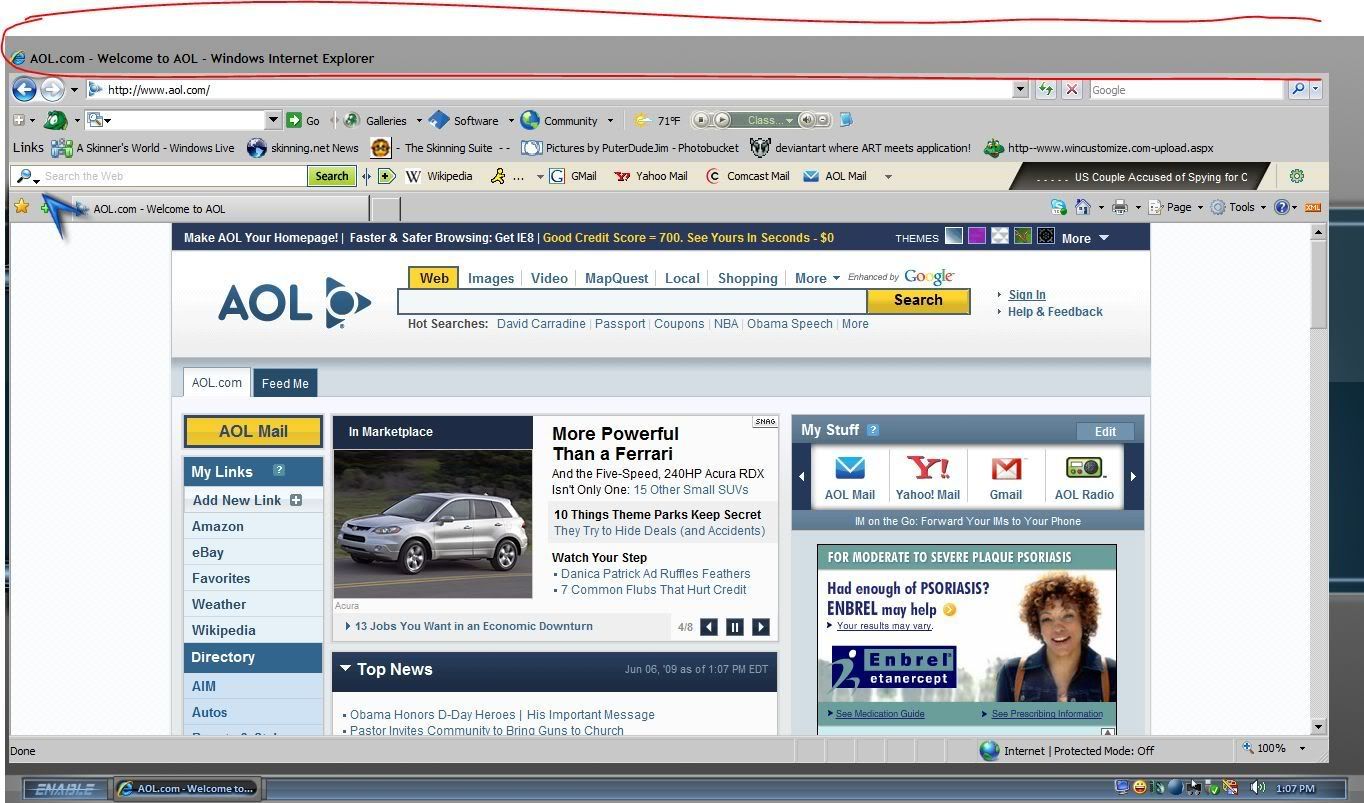
This may be covered already, but I have no titlebar.
Your computer has a Windows Experience Index base score of 4.4
Your Windows Graphics Experience score is 4.9
WindowBlinds version : WindowBlinds 7.0 (build 170 x86 - Vista Edition)
WindowBlinds is installed correctly on this PC
WindowBlinds appears to be activated on this PC
(Generic PnP Monitor) 1 is attached to NVIDIA GeForce 9400 GT
Wblind.dll 2009/06/04 15:30:20
Wbsrv.dll 2009/06/04 15:31:19
Wbconfig.exe 2009/06/04 15:49:02
Wbload.exe 2009/06/02 14:39:14
Wbhelp.dll 2008/04/28 12:35:07
Tray.dll 2008/04/28 12:35:21
Wbload.dll 2009/03/17 09:36:28
Screen.exe 2009/06/04 12:48:09
Please login to comment and/or vote for this skin.
Welcome Guest! Please take the time to register with us.
There are many great features available to you once you register, including:
- Richer content, access to many features that are disabled for guests like commenting on the forums and downloading skins.
- Access to a great community, with a massive database of many, many areas of interest.
- Access to contests & subscription offers like exclusive emails.
- It's simple, and FREE!
|
|
Page 1 of 5 | |
|
|---|
Reply #1 Friday, June 5, 2009 4:06 PM
Take two.