









































WindowBlinds 7.3 Released!
Wednesday, October 12, 2011 by Island Dog | Discussion: WinCustomize News

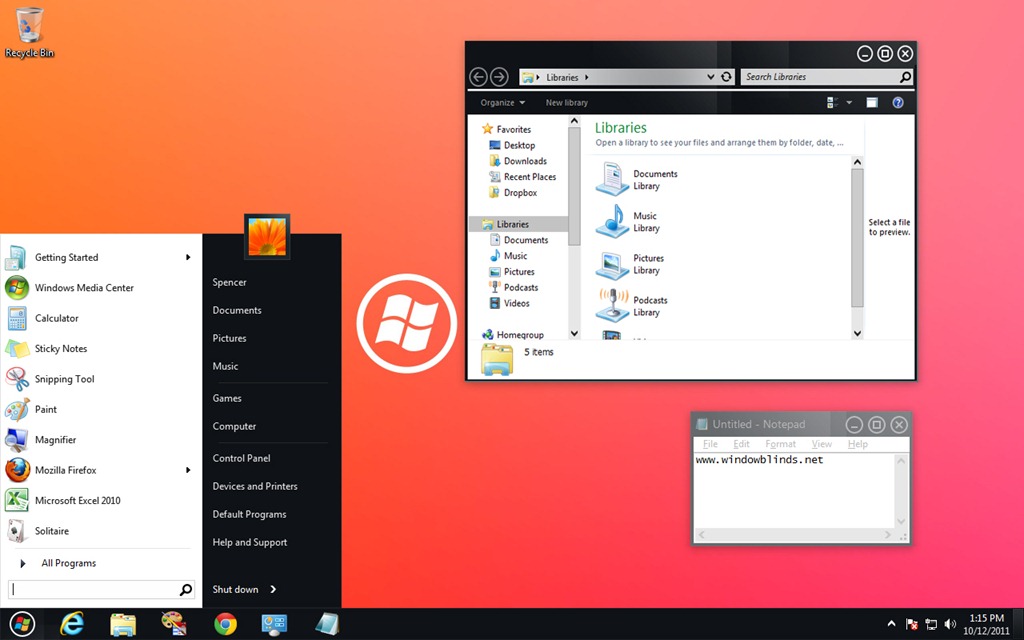
WindowBlinds is a program that allows users of Windows 7, Vista, and XP to totally change the look and feel of the Windows GUI to anything they'd like by applying any of the thousands of free skins available. WindowBlinds 7.3 adds a Windows 8 skin along with a Metro skin (for registered users) as well as enhancing skinning support for Office 2010, bug fixes, and a number of other updates.
The enhanced version, which allows on-the-fly recoloring of skins and access to more enhanced skins is $19.95 or can be purchased as part of Object Desktop, Stardock's flag-ship suite of desktop experience utilities for $49.95.
Users can download WindowBlinds 7.3 at www.windowblinds.net.
 |  |
 |
|
Page 4 of 4 | |
|
|---|
Reply #62 Tuesday, October 18, 2011 8:33 PM
this new WB version doesn't work correctly. crashing my explorer in win7 64bit

Reply #63 Thursday, October 20, 2011 4:40 PM
Yeah, I had so many of my programs crash I just deleted everything except cursorFX. It seemed expecially bad after I tried to opened Skin Studio 7 to adjust the horizontal button position to use Vista style positioning on a couple of blinds. Skin Studio wouldn't open and after that I got all of these errors so I just uninstalled everything and tried again. Same result.
Maybe consideration should be given to operating system specific installation instead of trying to incorporate changes for upcoming operating systems which seem to screw the pooch. It has to be difficult as internet browsers and mail programs seem to always be changing their interface plus having to allow for several operating systems in both 32 and 64 versions. Still, I'm gonna take a break for a while.
Reply #64 Thursday, October 20, 2011 8:38 PM
Yeah, I had so many of my programs crash I just deleted everything except cursorFX. It seemed expecially bad after I tried to opened Skin Studio 7 to adjust the horizontal button position to use Vista style positioning on a couple of blinds. Skin Studio wouldn't open and after that I got all of these errors so I just uninstalled everything and tried again. Same result.
Maybe consideration should be given to operating system specific installation instead of trying to incorporate changes for upcoming operating systems which seem to screw the pooch. It has to be difficult as internet browsers and mail programs seem to always be changing their interface plus having to allow for several operating systems in both 32 and 64 versions. Still, I'm gonna take a break for a while.
It sounds like you had a skin with a coding error in it. WB 7.3 became more sensitive to a coding problem but this should be resolved in the next update to WB which I think is going up this week.
Reply #65 Thursday, October 20, 2011 8:41 PM
Cool Dani! I hope it works with WB 7.2 since until I find out somehow why 7.3 alters my screen brightness I'll be stuck with 7.2
And sorry guys...everything else works fine...it's just 7.3 that caused that...so it has to be something with that since it fixed itself after rolling back.
Based on the lack of other people reporting similar things and my knowledge of how WB works I believe your issue was just chance it happened with the WB update. It could be you have an app running at startup which changes the brightness settings, but in that case I would expect to see a crash dialog if WB were crashing it before it could change your settings.
Reply #66 Thursday, October 20, 2011 8:41 PM
Change your skin to another one and disable recolouring and see if that helps.
Reply #67 Thursday, October 20, 2011 10:57 PM
An updated 7.30.047 version is available via the My Accounts page on the Stardock store. I will see about updating the Impulse build on Friday. There are a couple of specific compatibility fixes and a bunch of updates to the Win8 Metro skin (Windows XP and Office 2007 oddities in particular).
Reply #68 Friday, October 21, 2011 3:59 AM
Thanx for the new version.
My issue with Deskscapes 3 is solved.
Reply #69 Friday, October 21, 2011 9:26 AM
Is it possible to force skin IE9 buttons and tabs?
Please login to comment and/or vote for this skin.
Welcome Guest! Please take the time to register with us.
There are many great features available to you once you register, including:
- Richer content, access to many features that are disabled for guests like commenting on the forums and downloading skins.
- Access to a great community, with a massive database of many, many areas of interest.
- Access to contests & subscription offers like exclusive emails.
- It's simple, and FREE!
|
|
Page 4 of 4 | |
|
|---|
Reply #61 Tuesday, October 18, 2011 5:35 PM
Cool Dani! I hope it works with WB 7.2 since until I find out somehow why 7.3 alters my screen brightness I'll be stuck with 7.2
And sorry guys...everything else works fine...it's just 7.3 that caused that...so it has to be something with that since it fixed itself after rolling back.