









































WindowBlinds 7.3 Released!
Wednesday, October 12, 2011 by Island Dog | Discussion: WinCustomize News

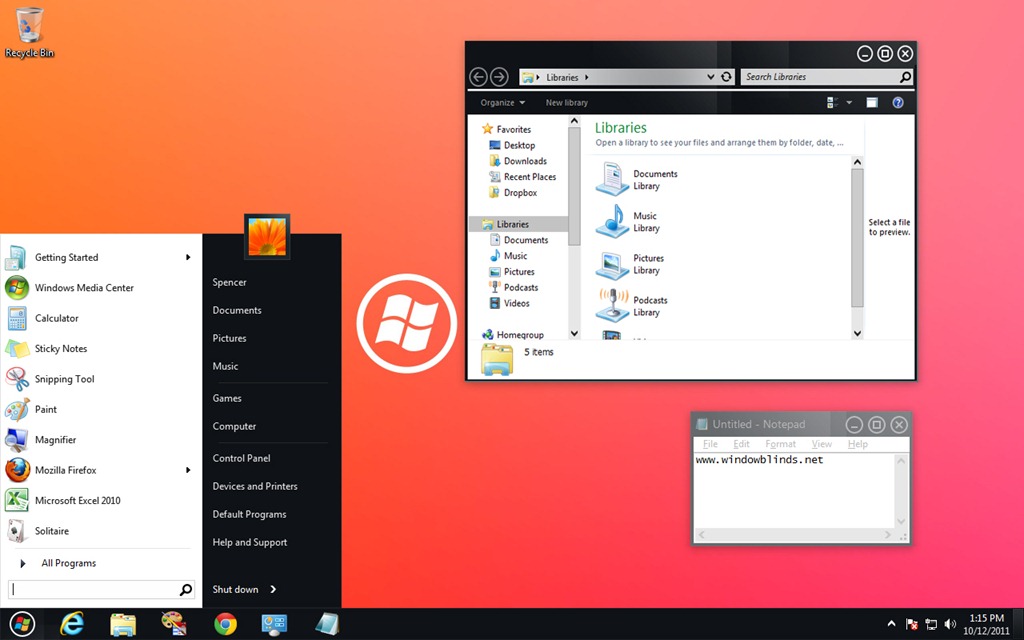
WindowBlinds is a program that allows users of Windows 7, Vista, and XP to totally change the look and feel of the Windows GUI to anything they'd like by applying any of the thousands of free skins available. WindowBlinds 7.3 adds a Windows 8 skin along with a Metro skin (for registered users) as well as enhancing skinning support for Office 2010, bug fixes, and a number of other updates.
The enhanced version, which allows on-the-fly recoloring of skins and access to more enhanced skins is $19.95 or can be purchased as part of Object Desktop, Stardock's flag-ship suite of desktop experience utilities for $49.95.
Users can download WindowBlinds 7.3 at www.windowblinds.net.
 |  |
 |
|
Page 3 of 4 | |
|
|---|
Reply #42 Thursday, October 13, 2011 2:28 PM
OK, today comes a new update, but the problem with deskscapes3 is not gone.
Roll back to WB 7.2 and it works perfect, why not with WB 7.3 ?
Reply #43 Thursday, October 13, 2011 2:49 PM
Every time if i apply a WB skin, my animated background freeze and i must open deskscapes and apply my dream again. Sorry for my bad english.
Roll back to WB 7.2 and it works perfect, why not with WB 7.3 ?
If Deskscapes stops then typically a wallpaper has been applied.
Reply #44 Thursday, October 13, 2011 2:53 PM
Deskscapes stops and applies the dream you were running as a wall. Deskscapes does not pause, it stops and is no longer running. Right clicking does not give the resume link, and the pause link is greyed out.
Reply #45 Thursday, October 13, 2011 3:09 PM
Yeah, that´s it, but with WB 7.2 i can apply a WBskin and Deskscapes don´t stop.

Reply #46 Thursday, October 13, 2011 3:47 PM
OK, I renewed my OD subscription 
I had windowblinds installed through Impulse. Is it best to uninstall all and start fresh? 

Reply #47 Thursday, October 13, 2011 4:16 PM
Probably. But use the individual installers from the Stardock Store My Accounts page, not Impulse.

Reply #48 Thursday, October 13, 2011 7:16 PM
Don't know Neil...all I know is when I updated it thats what happened...when I rolled it back it fixed the problem.

Reply #50 Thursday, October 13, 2011 7:43 PM
Whatever put it off the rails, sounds like your rig got well-borked. 
Hava  on me.

Reply #51 Thursday, October 13, 2011 8:05 PM
I agree with windoe, Looks like UI has gone backwards in time.
We need more skins from the likes of DanilloOc, JJ.Ying, Mike Bryant, Essorant, vStyler  Where did they go ? (not so much vStyler, seen his recent work and it's amazing like always).


Reply #53 Thursday, October 13, 2011 10:40 PM
{quote]It occurs to me to ask you to post a screenshot. Some monitors have terrible rendering of light colours and so off white and white look identical and in some themes the line colour and the document colour may be closer than in others.[/quote]
Well for some reason today, the gridlines are clearly rendered using ignore or don't ignore mode. However, when allowing WB to skin Excel 2010, the minimize, maximize and close buttons don't work so I set ignore back on for now. Oh wait, I did change the blind I'm using so your theory may be correct, As a matter of fact I used Skin Studio to affect amsall chnage to Ravens Wood once before to make it more readable. I'm using Bell, Book and Candle now (both by Casperrr).

Reply #54 Thursday, October 13, 2011 11:40 PM
Awesome-
As I went right from XP to W7 - I would never had figured it out.
Best

Reply #55 Friday, October 14, 2011 2:19 AM
Impulse update was fine.
The dark Metro skin is beautiful. Dani? Use it for awhile. The effects are subtle. Love it. 
Reply #56 Saturday, October 15, 2011 12:11 AM
Updated through my store account works great! I love the dark metro blind..I'm using it with Omnimo for rainmeter and it looks amazing!
Reply #57 Saturday, October 15, 2011 12:28 AM
We need more skins from the likes of DanilloOc, JJ.Ying, Mike Bryant, Essorant, vStyler Where did they go ? (not so much vStyler, seen his recent work and it's amazing like always).
Dunno about the others, but JJYing, I think, works for HP and probably has a full plate.
He has his own site too.
http://iconmoon.com/about.html
Reply #58 Saturday, October 15, 2011 12:50 AM
Essorant & vStyler remain very active skinners here. Haven't seen any work from Mike in a long time. Too long... very talented skinner.

Reply #59 Saturday, October 15, 2011 10:32 AM
I'm right here, I'm back working at Stardock and in fact I did this two skins ( thought the original design direction is from Microsoft).
I'm working some really cool stuff at SD and have some new (original) skins coming too, i hope you like it 

Please login to comment and/or vote for this skin.
Welcome Guest! Please take the time to register with us.
There are many great features available to you once you register, including:
- Richer content, access to many features that are disabled for guests like commenting on the forums and downloading skins.
- Access to a great community, with a massive database of many, many areas of interest.
- Access to contests & subscription offers like exclusive emails.
- It's simple, and FREE!
|
|
Page 3 of 4 | |
|
|---|
Reply #41 Thursday, October 13, 2011 11:35 AM
Just updated with impulse. After restart a WB DLL problem appears in a window. Windowsblind icon in tne tray was not working. Problems appear with some programs (not from Stardock). I tried to roll back with Impulse on an older WB but it failled. I rolled back (by windows restore) and every thing is OK. This new version seems to have some problems. Be careful before installing ...