









































WindowBlinds 7.3 Released!
Wednesday, October 12, 2011 by Island Dog | Discussion: WinCustomize News

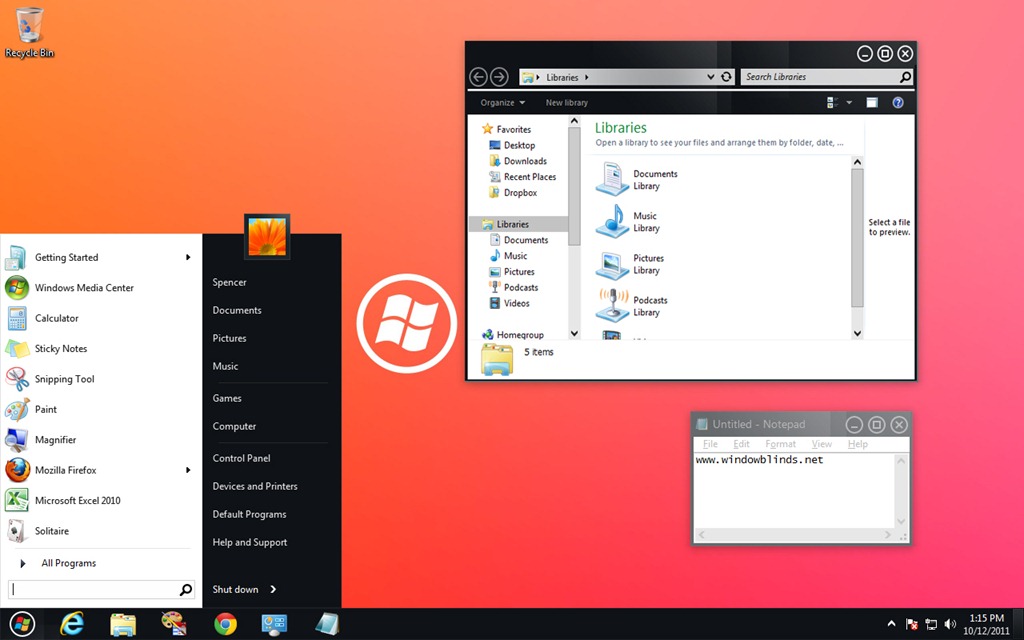
WindowBlinds is a program that allows users of Windows 7, Vista, and XP to totally change the look and feel of the Windows GUI to anything they'd like by applying any of the thousands of free skins available. WindowBlinds 7.3 adds a Windows 8 skin along with a Metro skin (for registered users) as well as enhancing skinning support for Office 2010, bug fixes, and a number of other updates.
The enhanced version, which allows on-the-fly recoloring of skins and access to more enhanced skins is $19.95 or can be purchased as part of Object Desktop, Stardock's flag-ship suite of desktop experience utilities for $49.95.
Users can download WindowBlinds 7.3 at www.windowblinds.net.
 |  |
 |
|
Page 2 of 4 | |
|
|---|

Reply #22 Wednesday, October 12, 2011 5:34 PM
To renew,you can go herehttps://www.stardock.com/products/odnt/purchase.asp; You're in luck, it's on sale.

Reply #23 Wednesday, October 12, 2011 5:48 PM
I will have to wait until funds are availiable in paypal just made transfer now, 3-5 days before funds are available, To bad you cannot do ACH from my bank account

Reply #24 Wednesday, October 12, 2011 6:27 PM
Nice to see the new version is at least stable, lol not like the previous beta releases ( i know i know, beta's have bugs) The new Windows 8 skins are decidedly boring though.

Reply #25 Wednesday, October 12, 2011 6:49 PM
i just bought the object desktop for 34.95 as a upgrade now i have to download and install 7.3 great. also does anyone know a killer windows blind for halloween.
Reply #26 Wednesday, October 12, 2011 6:49 PM
i just bought the object desktop for 34.95 as a upgrade now i have to download and install 7.3 great. also does anyone know a killer windows blind for halloween.
Reply #27 Wednesday, October 12, 2011 6:56 PM
Take a look here. https://forums.wincustomize.com/412652

Reply #28 Wednesday, October 12, 2011 6:58 PM
https://www.wincustomize.com/article/412652/
Make sure you uninstall Windowblinds 7.2 first. I did mine through add/remove programs in control panel, reboot then install WB7.3, reboot again and the link up top is for some killer WB's for Halloween. Welcome to the WC scripttron75
Dang Wizards ... always get the drop on stuff. Hi Wiz...lol

Reply #29 Wednesday, October 12, 2011 7:38 PM
Ya I renewed early too. now I'm good through 12/12

Reply #30 Wednesday, October 12, 2011 8:32 PM
Has the color settings+transparency bug been fixed? (ticket #EEM-354368)
Reply #31 Wednesday, October 12, 2011 8:47 PM
That does not sound like anything WindowBlinds should be causing as it does not contain code to alter the screen brightness.

Reply #32 Wednesday, October 12, 2011 9:20 PM
WB 7.3 is ignoring the per application "ignore" settings. I turned it off for Excel 2010 because of the statement that it had better support for Office 2010. It was worse. So I turned ignore back on and it's still causing problems. All my grid lines are invisible so the entire spreadsheet, even a blank one looks like it's on plain white paper. Toggling the gridlines on and off does nothing. Ignore is also failing for cmd.exe.
Guess I'me reverting back to the previous version when I get a chance.

Reply #33 Thursday, October 13, 2011 2:51 AM
I didn't do that at all. I simply installed 7.3 overtop of the last beta and rebooted. Worked just fine.

Reply #34 Thursday, October 13, 2011 3:06 AM
SOrry for the moronic question, but I just purchased WB about 5 weeks ago, was running the beta, but when I go to About WindowBlinds, in the config, it reads windowblinds 7.3 build 307. Is that the correct one, or am I missing how to update to newest one?
Reply #35 Thursday, October 13, 2011 3:30 AM
I have just renewed my Object Desktop subscription and i dont see anywhere in my account downloads a link for Window Blinds 7.3 the latest one there is 5.5 i have window blinds 7.2 currently installed which i used to update through impulse but i can no longer use impulse now can anyone tell me how the get the link for 7.3.
Reply #36 Thursday, October 13, 2011 5:24 AM
Try it at the Stardock Store. Login there and check your account if you haven't already.
Reply #37 Thursday, October 13, 2011 6:29 AM
Guess I'me reverting back to the previous version when I get a chance.
It occurs to me to ask you to post a screenshot. Some monitors have terrible rendering of light colours and so off white and white look identical and in some themes the line colour and the document colour may be closer than in others.
Reply #38 Thursday, October 13, 2011 7:01 AM
https://store.stardock.com/login.aspx?ReturnUrl=/myaccount/products

Reply #39 Thursday, October 13, 2011 8:01 AM
i'm still having the issue of all transparency gone after a reboot. it doesn't matter what skin i use. if it has transparency, it's gone after a reboot. i always have to reapply the skin. all drivers are up to date.
on another note, whatever happened to greenreaper?

Reply #40 Thursday, October 13, 2011 9:17 AM
Please login to comment and/or vote for this skin.
Welcome Guest! Please take the time to register with us.
There are many great features available to you once you register, including:
- Richer content, access to many features that are disabled for guests like commenting on the forums and downloading skins.
- Access to a great community, with a massive database of many, many areas of interest.
- Access to contests & subscription offers like exclusive emails.
- It's simple, and FREE!
|
|
Page 2 of 4 | |
|
|---|
Reply #21 Wednesday, October 12, 2011 5:28 PM
I want to renew my Object desktop subscription early, it expires in November 11/16/11 I think what web page do i go to
Please provide link