









































Put some XP back in 7 and Vista
Classic shell can do what MS didnt.
Sunday, March 21, 2010 by I.R. Brainiac | Discussion: Personal Computing
What many pc users didnt like most about Vista was the way MS changed some of the functionality in the UI.(seemingly just to make sure you knew it was different)
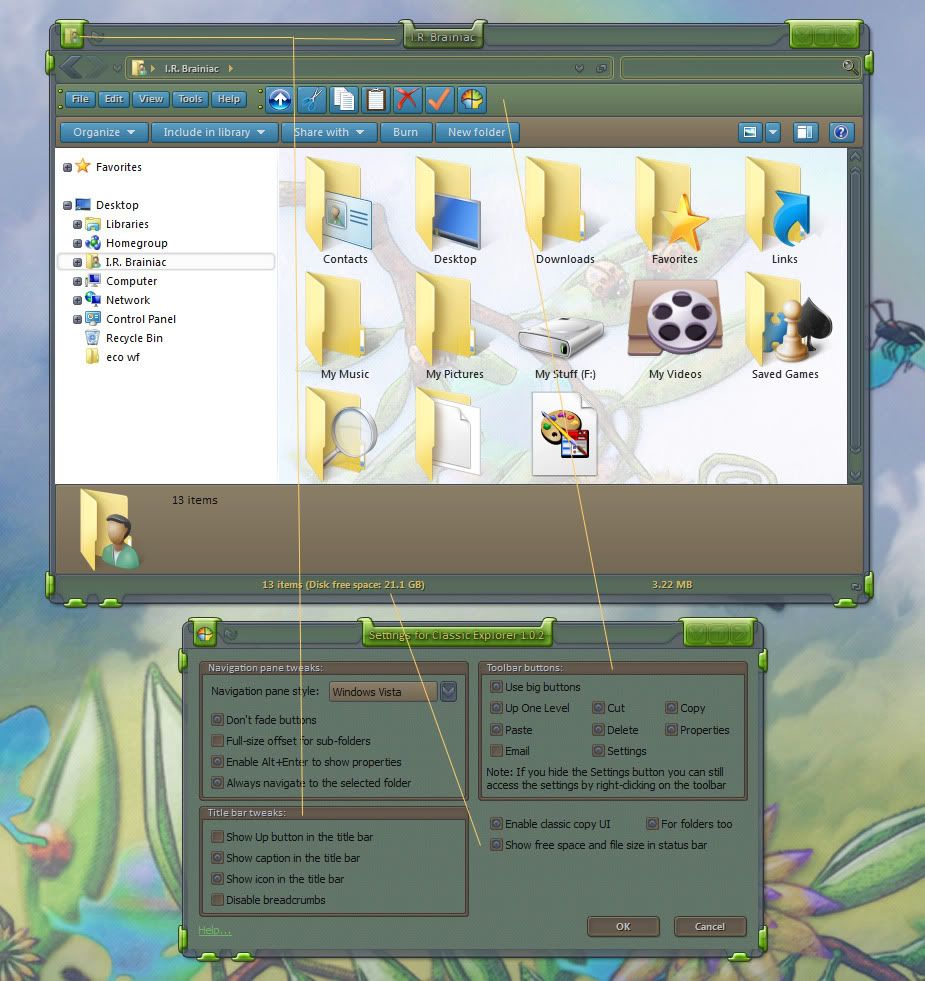
Most annoyingly the UP and DELETE buttons were gone and we were left with a non-configurable command bar with a bunch of near useless commands.
A developer at source forge,Ibeltchev,has made a FANTASTIC toolbar addon that fixes a lot of what I hated about the changes.
You can even add the icon and titlebar text back.The status bar sometimes shows more info than the MS info pane.HAH!
TIP:...dont put the up button next to the back/forward buttons...it looks like doodoo...just use the one on the toolbar.
I'm using it on 7 and its made me a happier user.  http://sourceforge.net/projects/classicshell/
 |
|
Page 3 of 3 | |
|
|---|

Reply #42 Sunday, April 4, 2010 7:35 PM
Not a huge deal I admit...but...I dont have to pick it out of the breadcrumbs and I dont have to READ an up arrow. 
Reply #43 Sunday, April 4, 2010 7:42 PM
Also...I love keyed shortcuts in something like photoshop...makes life easier...but I am not a touch typer so I have to usually take my eyes off the screen to use a keyboard.
I have several mental and physical limitations that make a mouse easier,if less efficient.My brain,big as it is,has Kelley Bundyitis.It will only hold so much before something falls out.
Changing focal depths from screen to keyboard with 50 year old eyes is a bitch.
So now does everybody see why I liked this? (cause I can splain more if ya dont get it) 
Reply #44 Sunday, April 4, 2010 7:43 PM
be warned...my middle finger is well rested...


Reply #46 Wednesday, April 7, 2010 11:27 PM
I could learn them all I want, but if my keyboard in not accessible, whats the point, My Keyboard is under a glass desk with a musical keyboard on top of it, always has been, always will be..
I sit with one hand on my mouse and the other (in my pocket) ..no  , under my chin with that elbow firmly planted on my desk.
The thinking man's position one might say..  Only time the KB gets pulled out is when I type.
Keyboard shortcuts are moot to me, and I can almost guarantee I can click my way to doing everything I need just as quick as u can keystroke it.
 Peace and love


Please login to comment and/or vote for this skin.
Welcome Guest! Please take the time to register with us.
There are many great features available to you once you register, including:
- Richer content, access to many features that are disabled for guests like commenting on the forums and downloading skins.
- Access to a great community, with a massive database of many, many areas of interest.
- Access to contests & subscription offers like exclusive emails.
- It's simple, and FREE!
|
|
Page 3 of 3 | |
|
|---|
Reply #41 Sunday, April 4, 2010 7:30 PM
1 more time...this post wasnt about how to do these things with your KEYBOARD...not about programmed mouse buttons...its about UI functionality put back into the GUI where I(ME) want it...not the way MS wants it.
If you dont get that then this post wasnt for YOU.
I use...buttons,breadcrumbs,keys...the stars and constellations...whatever gets me where I want the easiest at that moment.
An up button just goes up and up and up without moving the mouse...but more important to me ...the delete button...I would have installed the whole thing just for that.
The titlebar text was a bonus...actual use of empty space.
This thing saves me a lot of right-clicking...something I just dont like to do...I need to save the strength in my middle finger for flippin' off smartasses.