





































Put some XP back in 7 and Vista
Classic shell can do what MS didnt.
Sunday, March 21, 2010 by I.R. Brainiac | Discussion: Personal Computing
What many pc users didnt like most about Vista was the way MS changed some of the functionality in the UI.(seemingly just to make sure you knew it was different)
Most annoyingly the UP and DELETE buttons were gone and we were left with a non-configurable command bar with a bunch of near useless commands.
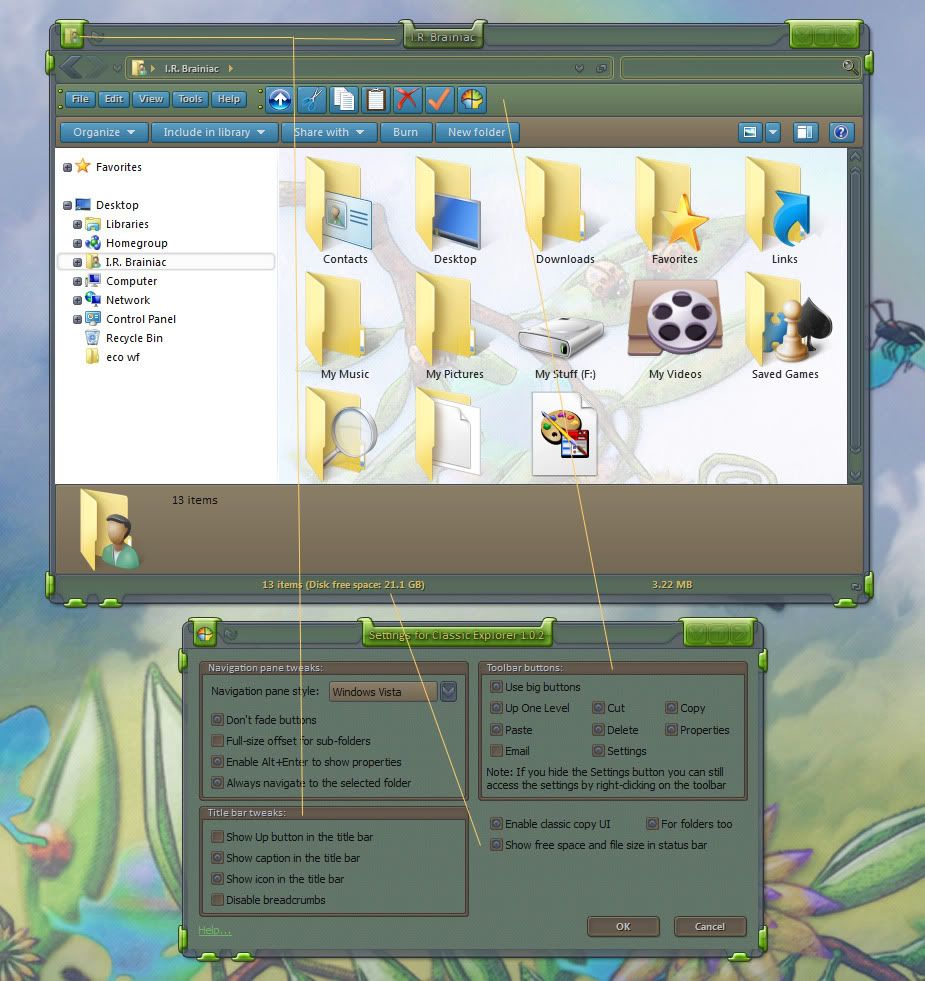
A developer at source forge,Ibeltchev,has made a FANTASTIC toolbar addon that fixes a lot of what I hated about the changes.
You can even add the icon and titlebar text back.The status bar sometimes shows more info than the MS info pane.HAH!
TIP:...dont put the up button next to the back/forward buttons...it looks like doodoo...just use the one on the toolbar.
I'm using it on 7 and its made me a happier user.  http://sourceforge.net/projects/classicshell/
 |
|
Page 2 of 3 | |
|
|---|

Reply #22 Sunday, March 21, 2010 6:53 PM
i'm OK with just using the back button within explorer. No big deal.

Reply #23 Sunday, March 21, 2010 7:02 PM
I never really used Win 7's Explorer window.....just as I never really used XP's Explorer window....just as I never really used Win 2000's Explorer window....just as I never....
Powerdesk Pro....then Explorer Plus....now Directory Opus....

Reply #24 Sunday, March 21, 2010 7:03 PM


Reply #25 Sunday, March 21, 2010 7:12 PM
some of us actually use our PC's 

Reply #26 Sunday, March 21, 2010 8:04 PM
Powerdesk Pro....then Explorer Plus....now Directory Opus....
'Windows Explorer'?! Whassat? (I've used Norton Commander and later Total Commander since 1996)
Back button? Wtf is that?! (Hint: use backspace and/or alt+left arrowkey.....)
Eks-pee?????? That ancient POS?
No thanks......
Reply #27 Sunday, March 21, 2010 8:55 PM
It adds an up button, not a back one 

Reply #28 Sunday, March 21, 2010 10:39 PM
this post isnt about how to nav without gui buttons...its about getting back UI functionality. 

Reply #29 Sunday, March 21, 2010 11:02 PM
wow nice now only to bookmark that link for later 

Reply #32 Tuesday, March 23, 2010 1:40 AM
no need for apalogies Kona...I aint mad at nobody 


Reply #34 Sunday, April 4, 2010 5:34 AM
The side buttons on my Mouse work just fine for forward and back in browser pages and folders in Windows Explorer. 
Reply #35 Sunday, April 4, 2010 4:14 PM
Yes,but will they go up a level,delete a file,add the text back to the titlebar,give you properties,cut,copy,paste,more info in the statusbar or put the icon back in the left upper corner?
Didnt think so..................


Reply #37 Sunday, April 4, 2010 6:38 PM
Default setting on my Logitech G15 does.
Um... I do believe I have a button on my keyboard for that
Um... never been missing that, unless it's removed by a WB.
Alt+enter
Even more standard Windows shortcut keys
etc etc etc...
hehe

Reply #38 Sunday, April 4, 2010 6:40 PM
What's the big need for an 'Up' button? Just click the parent directory in the address bar and it goes there.
Reply #39 Sunday, April 4, 2010 6:52 PM
Some of us dont use keyboard shortcuts, some of our keyboards are under our glass desks, so some of us are not benefitting whatsoever from some.. of the posts.
Purball, when you have been using toolbar buttons for as long as some.. of us have..year in year out.. things get engrained, one of those things, for some.. of us.. is an up bupponi 
secondly, the breadcrumb bar in vista\7 is a complete bastard imo.

Reply #40 Sunday, April 4, 2010 7:19 PM
You need to learn keyboard shortcuts if you don't use them. They will save you weeks of your life.
Please login to comment and/or vote for this skin.
Welcome Guest! Please take the time to register with us.
There are many great features available to you once you register, including:
- Richer content, access to many features that are disabled for guests like commenting on the forums and downloading skins.
- Access to a great community, with a massive database of many, many areas of interest.
- Access to contests & subscription offers like exclusive emails.
- It's simple, and FREE!
|
|
Page 2 of 3 | |
|
|---|
Reply #21 Sunday, March 21, 2010 5:53 PM
Thank you sir very nice!!!