




































Some things I'd like to see for ObjectDock
Wishfull thinking....
Friday, November 9, 2007 by messiah1 | Discussion: ObjectDock
1. I know I can set my tabs to be different colors and have different fonts...however, what I'd like to see is a way to have different color fonts for active/inactive tabs. For example, the active tab has a white font, the inactive tabs has a gray or black font.
2. Blurring! I'd love to see the same option that WB6 now has where you could turn on blurring for the docks...say you have a clear dock and where you can see through it is slightly blurred. That would rock.
3. Docks that can be curved. I know I can make curved docks...but how sweet would it be to have the icons follow the curve of the dock?
Ok, your turn.

 |
|
Page 7 of 9 | |
|
|---|

Reply #122 Tuesday, November 11, 2008 12:20 PM
I made these suggestions elsewhere (http://forums.impulsedriven.com/329638), but I figure it can't hurt to add them here too. 
Read the above link for a more indepth description of the features I'd like to see.
The short version is;
- Subtabs. Would improve greatly on the existing tabbed dock.
- Rollodex like transition when switching tabs. It'd look awesome.

There goes, now reply and say you want it too, specially item 1, it would rock my world.
I seem to be very happy today... Didn't realise that until now. 
Reply #123 Saturday, November 22, 2008 3:17 AM
Bug: Unable to change font size of icon names. Font remains at default size.
Open the ObjectDock Properties dialog box. Press the "Miscellaneous Options" button. Go down toward the bottom to "Label Fonts." changing the values here will change the font sizes for your icons.
If this is not working for you, you might want to contact Stardock Support.
I greatly appreciate the help, but that's for zooming docks only. 

Reply #124 Saturday, December 6, 2008 9:48 AM
I think it would be cool if there were a dock editing program; kind of like Skin Studio for WB's and the RightClick skin editor.
Of course, I think the skinning set up is fine now, but why not streamline it a little more?
Maybe this would be a good idea anyway, with some of the new features (like reflections) being added...

Reply #125 Saturday, December 6, 2008 10:07 AM
There's a skin editor for RightClick??!!

Reply #126 Saturday, December 6, 2008 12:30 PM
SILENCE!  'Tis a secret made manifest only to the elite!

Reply #127 Wednesday, January 14, 2009 1:02 PM
i'm not sure if it was mentioned before in this thread, but i would like to have a feature within object dock settings to have a tabbed dock locked center, right, or left side....eveytime i run an app that blows up my resolution...when i get done using the app my tabbed dock is always off-centered...the single docks always pop back into place....thanx i hope this can be an added feature...please...pretty please
Reply #128 Wednesday, January 14, 2009 1:10 PM
I would think that is on the agenda as that feature is available for regular docks. Making both kinds of docks have the same functionality (with the exception of the tabs ofcourse...) should be an aim.
In addition I'd like to have an option to center the icons on the dock, I find it annoying to have all icons on the side of the dock in the tabs that has less icons than some other...
Reply #129 Sunday, February 1, 2009 3:10 PM
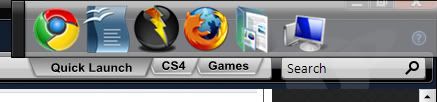
I was reading through the posts in this thread when i happened to want to google to wincustomize (yeah i know, create an icon) and i was instantly surprised by the search bar on my tabbed dock! I thought i knew all the possible places a docklet could go when this search one appeared!
It wasnt untill i had entered my term that i realised it was infact the search bar from impulse (LOL!)
But wouldnt that be great? when your wee tabs are just about poking out in the top of your screen you could google your heart away! talk about bringing the internet to the desktop!
Thats what i want to see, a search docklet in the tabs space!
And what about circular docks? You could hide them right at the bottom of your screen with say a start bit in the middle and 8 mini icons round it, mouse over and it expands a layer! it would be really handy and mouse efficient!
Also a built in icon shadower would be awesome, one where it would just stick a shadow identicle to the one under the impulse icon under any icon - would certainly be great for firefox etc.
Reply #130 Sunday, February 1, 2009 4:50 PM
That would be cool!
Less people whining about things that they think are broken in the current version, in light of the fact that 2.0 is on its way. 
Reply #131 Sunday, February 1, 2009 6:45 PM
Less people whining about things that they think are broken in the current version, in light of the fact that 2.0 is on its way.
The only thing broken is promises made... Unfortunately I've learned not to trust what they say, and stick to being happy about what's delivered. I don't hold it against them though, they are only human. I'm quite confident that they are doing what they can to get things together.
I'll REALLY be pissed if they charge me for a 2.0 upgrade though, as they did promise future 64bit support when I bought it.
Reply #132 Monday, February 2, 2009 12:08 AM
I would count on it. It'll be a whole new version of the program, not just an upgrade.
Reply #133 Monday, February 2, 2009 9:21 AM
charge me for a 2.0 upgrade
I would count on it. It'll be a whole new version of the program, not just an upgrade.
The question isn't really about if they charge for it or not, it's more about if the charge ME. I'm not afraid to state my case to the salespeople, I hope they see it my way. No point in getting pissed before anything actually has happened.
Reply #134 Monday, February 2, 2009 5:17 PM
Right you are, and it always pays to stand up for yourself in situations like these... or at least they won't put up the cost

Reply #135 Thursday, February 12, 2009 8:07 AM
I'm posting this from another thread as suggested....
What about having the contents automatically resize the dock length according to the amount of Icons? Then you won't have all that extra space making it look stupid. Then also, if there becomes too many icons, you can specify, say after 10 icons, either create a new row or put in the left/right buttons...
what would be sweet is that if there's too many icons to be displayed and you need a left and right button... why not make it so that when you hover over towards the left the icons automatically move to the right (and same in reverse)... kind of like in Flash with scrollable thumbnails across the bottom... it would save a few clicks...
I might also add that it might not be a bad feature to have the tabs automatically come into focus by mouse hover... just some thoughts...
Reply #136 Thursday, February 12, 2009 11:16 AM
Hi I have a little problem on objectdock_freeware.
I made the install a month now I have the calendar
docklet is lost.
I try to reinstall but still the same thing so I decide
to look in C: \ Program Files \ Stardock \ ObjectDock \ docklet \ Calendar
I find a file calendar.dll and an image calendar.png
i have search on Google but I find nothing
So Please can you help me set this problem?
as soon as possible! emergency
thank you in advance! : yes:: pen:
Reply #137 Thursday, February 12, 2009 11:33 AM
I made the install a month now I have the calendar
docklet is lost.
I try to reinstall but still the same thing so I decide
to look in C: \ Program Files \ Stardock \ ObjectDock \ docklet \ Calendar
I find a file calendar.dll and an image calendar.png
i have search on Google but I find nothing
So Please can you help me set this problem?
as soon as possible! emergency
thank you in advance! : yes:: pen:
Put this in an ObjectDock support thread. 

Reply #138 Sunday, February 22, 2009 6:20 AM
There's just too much to read through so count this as a +1 if its already been asked:
The "When a shortcut is run, if program is already running bring it to the foreground only" option in "Miscellaneous Options", would be must more useful if it was available on each shortcut, or at least on each Dock/Tab.

Reply #139 Sunday, February 22, 2009 6:54 AM
i want the option to remove the objectdock icon from the system tray


Please login to comment and/or vote for this skin.
Welcome Guest! Please take the time to register with us.
There are many great features available to you once you register, including:
- Richer content, access to many features that are disabled for guests like commenting on the forums and downloading skins.
- Access to a great community, with a massive database of many, many areas of interest.
- Access to contests & subscription offers like exclusive emails.
- It's simple, and FREE!
|
|
Page 7 of 9 | |
|
|---|
Reply #121 Monday, October 13, 2008 12:28 PM
just an idea, don't know if this is possible, but... for the idea of a curved dock with icons that follow the curve, would it be possible to have a dock editor program in OD where you could trace a path that you want the icons to follow in the dock? That way you wouldn't be constrained to a default curve angle. Just an idea.