





































OK BRANIAC NOW WHAT??
Monday, February 5, 2007 by ToxicTranceChamber | Discussion: WindowBlinds
K I downloaded it  so now what should I do?
 so now what should I do?
 |
|
Page 5 of 7 | |
|
|---|
ToxicTranceChamber
Reply #82 Wednesday, February 7, 2007 8:56 PM

Reply #82 Wednesday, February 7, 2007 8:56 PM
Ok so once I figure out what I want and do what u said then is this the one I'll me slicin up and puttin back together?
I.R. Brainiac
Reply #83 Wednesday, February 7, 2007 8:57 PM

Reply #83 Wednesday, February 7, 2007 8:57 PM
Yes,you will turn off the background color so that just the start menu is there on a transparent background.Select all>new>paste onto a transparent background and now you have an image you can slice.
Check your settings at photobucket,I cant resize your images,the little yellow bar is missing from the top.
I saw a setting checkbox for that when I was there.
Check your settings at photobucket,I cant resize your images,the little yellow bar is missing from the top.
I saw a setting checkbox for that when I was there.
ToxicTranceChamber
Reply #84 Wednesday, February 7, 2007 9:09 PM
Reply #84 Wednesday, February 7, 2007 9:09 PM
Well thats b/c I made it smaller with code u know height="??" width="??" would u like me to put up the whole image?
I.R. Brainiac
Reply #85 Wednesday, February 7, 2007 9:10 PM
Reply #85 Wednesday, February 7, 2007 9:10 PM
From now on yes,use full resolution images.They should have the resize bar for viewing biggerized. 
Once you slice it into the 5 sections...open Skinstudio and replace each section either by opening each in photoshop and putting your new piece over the old and deleting the old layer.Old image dimensions must be changed to the new image dimensions first.(edit>image size)
The more programs arrow is actually 3 versions of the More Programs background image.2 exactly like the More programs image and 1 that is used during the mouseover.(you go back to your main PS document and create a slightly different More programs area(glowy,raised,whatever) and use it for the mouseover state.

Once you slice it into the 5 sections...open Skinstudio and replace each section either by opening each in photoshop and putting your new piece over the old and deleting the old layer.Old image dimensions must be changed to the new image dimensions first.(edit>image size)
The more programs arrow is actually 3 versions of the More Programs background image.2 exactly like the More programs image and 1 that is used during the mouseover.(you go back to your main PS document and create a slightly different More programs area(glowy,raised,whatever) and use it for the mouseover state.
I.R. Brainiac
Reply #86 Wednesday, February 7, 2007 9:21 PM
Reply #86 Wednesday, February 7, 2007 9:21 PM
The more programs graphic is actually completely covered by the arrow graphic. 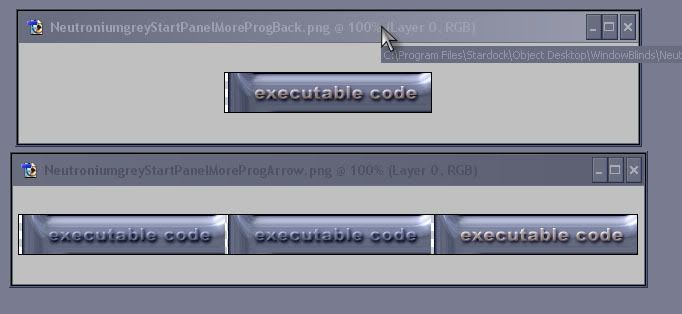
I.R. Brainiac
Reply #87 Wednesday, February 7, 2007 9:28 PM
Reply #87 Wednesday, February 7, 2007 9:28 PM
Easiest way to make a graphic 3 times wider is to start with your More programs image and go to image>canvas size>width=300 percent(not pixels)
Dont change the heighth.
Dont change the heighth.
ToxicTranceChamber
Reply #88 Wednesday, February 7, 2007 9:32 PM
Reply #88 Wednesday, February 7, 2007 9:32 PM
Ok this will we my homework! LOL I will work on it a lil before I go to bed tonight, and tomarrow and hopefully all will turn out well thanks to you!! 


I.R. Brainiac
Reply #91 Thursday, February 8, 2007 1:29 AM
Reply #91 Thursday, February 8, 2007 1:29 AM
Well Erk,hopefully others are following this rather long winded tutorial. 

I.R. Brainiac
Reply #92 Monday, February 12, 2007 1:56 AM
Reply #92 Monday, February 12, 2007 1:56 AM
Hows it coming FO?You have been mighty quiet.
Skinned Alive
Reply #93 Wednesday, February 14, 2007 2:22 AM

Reply #93 Wednesday, February 14, 2007 2:22 AM
Hey Brain?
Could you repeat that all over again one more time from the beginning for me?
Just kiddin' you 'ole Brainster.
Oh by the way, if she wants, there's a program that's suppose to be very close to being just like PhotoShop out there. It's even suppose to be able to use all of PhotoShop's Plugins.
And best of all, it's free!
You may of hear of it. It's called GIMP.
Acronym for GNU Image Manipulation Program.
Here's the Link to the site from where it can be downloaded.
GIMP's Website
Could you repeat that all over again one more time from the beginning for me?
Just kiddin' you 'ole Brainster.
Oh by the way, if she wants, there's a program that's suppose to be very close to being just like PhotoShop out there. It's even suppose to be able to use all of PhotoShop's Plugins.
And best of all, it's free!
You may of hear of it. It's called GIMP.
Acronym for GNU Image Manipulation Program.
Here's the Link to the site from where it can be downloaded.
GIMP's Website
Erk.
Reply #94 Wednesday, February 14, 2007 2:34 AM
Hope she hasn't cut 'n' sliced more than just the images.
...you should know how SkinStudio can push one over the edge.
Reply #94 Wednesday, February 14, 2007 2:34 AM
How's it coming, FO? You have been mighty quiet.
Hope she hasn't cut 'n' sliced more than just the images.
...you should know how SkinStudio can push one over the edge.
I.R. Brainiac
Reply #95 Thursday, February 15, 2007 4:20 AM Skinstudio works very well...until you try something stupid.(or something WB wont apply)
You know...I've never given the gimp a try...PS7 here tho,so,well,you know.
Reply #95 Thursday, February 15, 2007 4:20 AM
Skinstudio works very well...until you try something stupid.(or something WB wont apply) You know...I've never given the gimp a try...PS7 here tho,so,well,you know.


ToxicTranceChamber
Reply #99 Thursday, February 15, 2007 12:53 PM
Reply #99 Thursday, February 15, 2007 12:53 PM
Ok, I've decided to use paint shop instead, b/c I find it easier. So do I need to have a certain amount of layers?


Please login to comment and/or vote for this skin.
Welcome Guest! Please take the time to register with us.
There are many great features available to you once you register, including:
- Richer content, access to many features that are disabled for guests like commenting on the forums and downloading skins.
- Access to a great community, with a massive database of many, many areas of interest.
- Access to contests & subscription offers like exclusive emails.
- It's simple, and FREE!
|
|
Page 5 of 7 | |
|
|---|
Reply #81 Wednesday, February 7, 2007 3:22 PM
If you turn off everything but those 2 shapes and turn off the style effects on them you can see just the flat shapes.
You can alter them by adding or subtracting from them with the selction tool or just create new shape layes...rectangles,rounded rectangles..etc..
I'll be back in a hour or so...looks like your getting a handle on it.