





































OK BRANIAC NOW WHAT??
Monday, February 5, 2007 by ToxicTranceChamber | Discussion: WindowBlinds
K I downloaded it  so now what should I do?
 so now what should I do?
 |
|
Page 1 of 7 | |
|
|---|
ToxicTranceChamber
Reply #2 Monday, February 5, 2007 3:56 PM

Reply #2 Monday, February 5, 2007 3:56 PM
He's gonna help me to learn how to skin 

I.R. Brainiac
Reply #3 Monday, February 5, 2007 4:11 PM

Reply #3 Monday, February 5, 2007 4:11 PM
hehe,Braniac...BRAINIAC! 
FO,if you want a start menu photoshop file to work with and cut up go here https://www.wincustomize.com/skins.aspx?skinid=878&libid=18
You dont have to use it,but it might give you some photoshop pointers and speed things up.
You can change colors,textures,shape...anything you like.
Let me open Neutronium in Skinstudio and I will be right back.

FO,if you want a start menu photoshop file to work with and cut up go here https://www.wincustomize.com/skins.aspx?skinid=878&libid=18
You dont have to use it,but it might give you some photoshop pointers and speed things up.
You can change colors,textures,shape...anything you like.
Let me open Neutronium in Skinstudio and I will be right back.
ToxicTranceChamber
Reply #4 Monday, February 5, 2007 4:20 PM
Reply #4 Monday, February 5, 2007 4:20 PM
Ok, but just so you know, I really don't know too much about anything,just a little bit of code to make web pages are you sure you really want to get into this? LOL
HEY LOOK HE SPELLED IT WRONG TOO! LOL Ok now I don't feel so stupid
HEY LOOK HE SPELLED IT WRONG TOO! LOL Ok now I don't feel so stupid

I.R. Brainiac
Reply #5 Monday, February 5, 2007 4:31 PM
Reply #5 Monday, February 5, 2007 4:31 PM
First you need to get Skinstudio setup if you havnt already.
Open Windowblinds config window and go to 'change how my applications look'...delete the default skinstudio exclusion if you see one and add your own exclusion for Skinstudio.exe
The default one dosnt work right and you dont want WB skinning Skinstudio while your working.It will show you your current classic colors tho so thats cool.
Next go to Skinstudio's menubar and drop down the tools menu and open the preferences dialog.Set your name and email etc...
Put photoshop as the first image editor.
Open Neutronium and go to file>save as>...enter the name you want for your WB.
Open your new WB and look at the info panel to the right.(section attributes)...if the author information etc... is wrong,put in your info and then save the skin.(file>save)
Now its YOUR skin
Go to tools again and windowblinds>normalize image file names.Apply the skin and see if it is still working.(apply button next to import)
You should be ready to start making your start menu.
Open Windowblinds config window and go to 'change how my applications look'...delete the default skinstudio exclusion if you see one and add your own exclusion for Skinstudio.exe
The default one dosnt work right and you dont want WB skinning Skinstudio while your working.It will show you your current classic colors tho so thats cool.
Next go to Skinstudio's menubar and drop down the tools menu and open the preferences dialog.Set your name and email etc...
Put photoshop as the first image editor.
Open Neutronium and go to file>save as>...enter the name you want for your WB.
Open your new WB and look at the info panel to the right.(section attributes)...if the author information etc... is wrong,put in your info and then save the skin.(file>save)
Now its YOUR skin

Go to tools again and windowblinds>normalize image file names.Apply the skin and see if it is still working.(apply button next to import)
You should be ready to start making your start menu.

I.R. Brainiac
Reply #6 Monday, February 5, 2007 4:35 PM
Reply #6 Monday, February 5, 2007 4:35 PM
I have to go setup an image shack account in case I need to insert images here.BRB

I.R. Brainiac
Reply #9 Monday, February 5, 2007 4:58 PM
Reply #9 Monday, February 5, 2007 4:58 PM
Wb config(where you change skins)...'change the look of a particular application'
delete the default Skinstudio exclusion. Add it back manually.
delete the default Skinstudio exclusion. Add it back manually.
ToxicTranceChamber
Reply #10 Monday, February 5, 2007 5:01 PM
Reply #10 Monday, February 5, 2007 5:01 PM
Ok I opened Neutronium, but when I click on file there is no save as in the drop down menu  it has open and import and I opened window blinds but what should I delete? I had already deleted a few skins when I 1st got it...
 it has open and import and I opened window blinds but what should I delete? I had already deleted a few skins when I 1st got it...
ToxicTranceChamber
Reply #11 Monday, February 5, 2007 5:04 PM
Reply #11 Monday, February 5, 2007 5:04 PM
Ok I deleted the exclusion, but I add mine for skin studio where do I find it?
I.R. Brainiac
Reply #12 Monday, February 5, 2007 5:10 PM
Reply #12 Monday, February 5, 2007 5:10 PM
In that same wb config window...'add per application setting' a navigator window will open,go to the Skinstudio application folder and click on sknstdio.exe...check the box that says 'ignore this app and do not skin it'(first checkbox)
This way WB dosnt try to skin Skinstudio
This way WB dosnt try to skin Skinstudio
I.R. Brainiac
Reply #13 Monday, February 5, 2007 5:13 PM
Reply #13 Monday, February 5, 2007 5:13 PM
Skinstudio menubar(top left)...file>save as...just above zip for distibution
Just curious,what version of SS do you have?
should say at least 5.0.1 build 1112
Just curious,what version of SS do you have?
should say at least 5.0.1 build 1112
ToxicTranceChamber
Reply #14 Monday, February 5, 2007 5:20 PM
Reply #14 Monday, February 5, 2007 5:20 PM
Ok I checked ignore this app...
And I see the save but no save as but its not highlighted So what did'nt I do now LOL
And yes thats which ss it is...
And I see the save but no save as but its not highlighted
So what did'nt I do now LOLAnd yes thats which ss it is...
ToxicTranceChamber
Reply #15 Monday, February 5, 2007 5:29 PM
Reply #15 Monday, February 5, 2007 5:29 PM
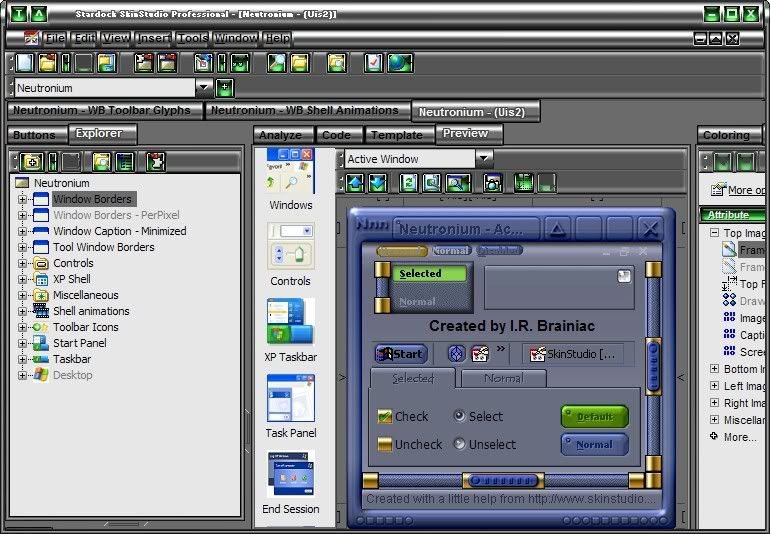
This is what I have open, is this right?
I.R. Brainiac
Reply #16 Monday, February 5, 2007 5:30 PM
Reply #16 Monday, February 5, 2007 5:30 PM
Maybe because its got my info in the attributes section.try changing the author info and email then see if save as works...I will try it with someone elses wb. 

I.R. Brainiac
Reply #17 Monday, February 5, 2007 5:33 PM
Reply #17 Monday, February 5, 2007 5:33 PM
File>save as...works here when I open Ares...(Mike B314)
Close and reopen Skinstudio,reopen Neutronium and try again.
Close and reopen Skinstudio,reopen Neutronium and try again.
ToxicTranceChamber
Reply #18 Monday, February 5, 2007 5:34 PM
Reply #18 Monday, February 5, 2007 5:34 PM
I did change that
This is how I feel, lol
Ok I'll try again
This is how I feel, lol

Ok I'll try again
I.R. Brainiac
Reply #19 Monday, February 5, 2007 5:35 PM  Just saw your image...Skinstudio should not be skinned.Who is hosting your images?
Try using the hotkeys ctrl shft s
Reply #19 Monday, February 5, 2007 5:35 PM
 Just saw your image...Skinstudio should not be skinned.Who is hosting your images?
Try using the hotkeys ctrl shft s
ToxicTranceChamber
Reply #20 Monday, February 5, 2007 5:39 PM
Reply #20 Monday, February 5, 2007 5:39 PM
Yeaaaa! Ok I got it, when I put in the email and name I did'nt click each apply button under each line just the one at the bottom
Please login to comment and/or vote for this skin.
Welcome Guest! Please take the time to register with us.
There are many great features available to you once you register, including:
- Richer content, access to many features that are disabled for guests like commenting on the forums and downloading skins.
- Access to a great community, with a massive database of many, many areas of interest.
- Access to contests & subscription offers like exclusive emails.
- It's simple, and FREE!
|
|
Page 1 of 7 | |
|
|---|
Reply #1 Monday, February 5, 2007 3:51 PM
c) IR Braniac? Or braniacs in general?