





































OK BRANIAC NOW WHAT??
Monday, February 5, 2007 by ToxicTranceChamber | Discussion: WindowBlinds
K I downloaded it  so now what should I do?
 so now what should I do?
 |
|
Page 6 of 7 | |
|
|---|
I.R. Brainiac
Reply #102 Friday, February 16, 2007 2:16 AM

Reply #102 Friday, February 16, 2007 2:16 AM
Sorry I took so long ,I was busy skinning. 
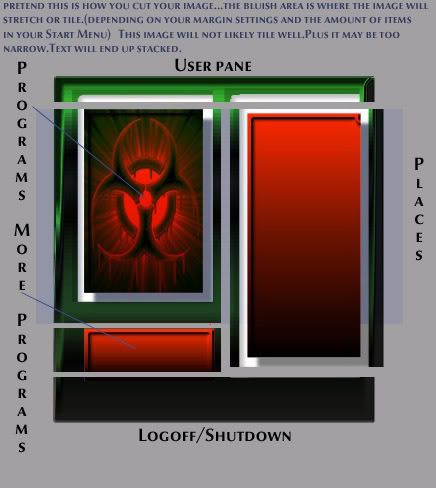
You could use what you have,but I dont think your gonna like how the 2 middle sections look after you set your margins for tiling or stretching.
Middle areas should (in a perfect world)have some portion that looks the same no matter how large or small the start menu gets.
Stretching some images that have detail distorts them badly...tiling just repeats whatever is between the margins.
Your making progress...cut the image and try it...you will see what I mean...you can always change it if you dont like it.

You could use what you have,but I dont think your gonna like how the 2 middle sections look after you set your margins for tiling or stretching.
Middle areas should (in a perfect world)have some portion that looks the same no matter how large or small the start menu gets.
Stretching some images that have detail distorts them badly...tiling just repeats whatever is between the margins.
Your making progress...cut the image and try it...you will see what I mean...you can always change it if you dont like it.
I.R. Brainiac
Reply #103 Friday, February 16, 2007 2:40 AM
Reply #103 Friday, February 16, 2007 2:40 AM
If you want to use the radioactive symbol in your start menu,move it to the lower portion of the places section and set your margins above the top edge of the symbol...that way it wont get distorted.
tawoods
Reply #104 Friday, February 16, 2007 7:41 AM

Reply #104 Friday, February 16, 2007 7:41 AM
The picture is worth a thousand words....the blue area in reply 102 is the part I have been fighting with...the left programs side and the top left edge are close but no cigar...Thanks IR for taking the time to do this...there are others watching
Skinned Alive
Reply #105 Friday, February 16, 2007 11:35 AM
Anytime Alicia
Ah heck TA, it's finally getting to the point of having to use reference numbers.
Next we'll be using articles, sections, and paragraphs.
Uhh look at Reply 1215, Article 7, Section 2, 3rd paragraph, and you'll see herein...

Reply #105 Friday, February 16, 2007 11:35 AM
And thank you Skinned Alive I was using paint shop, but I downloaded that free program to try it out too!
I was using paint shop, but I downloaded that free program to try it out too! Anytime Alicia
The picture is worth a thousand words....the blue area in reply 102 is the part I have been fighting with...the left programs side and the top left edge are close but no cigar...Thanks IR for taking the time to do this...there are others watching
Ah heck TA, it's finally getting to the point of having to use reference numbers.
Next we'll be using articles, sections, and paragraphs.
Uhh look at Reply 1215, Article 7, Section 2, 3rd paragraph, and you'll see herein...

ToxicTranceChamber
Reply #107 Friday, February 16, 2007 8:09 PM

Reply #107 Friday, February 16, 2007 8:09 PM
Ok now I'm gonna sound real stupid, but how do I cut it up??
tawoods
Reply #108 Friday, February 16, 2007 8:34 PM
I have been waiting patiently for you to ask that so I wouldn't have to
Reply #108 Friday, February 16, 2007 8:34 PM
Ok now I'm gonna sound real stupid, but how do I cut it up??
I have been waiting patiently for you to ask that so I wouldn't have to

I.R. Brainiac
Reply #109 Friday, February 16, 2007 11:24 PM
Reply #109 Friday, February 16, 2007 11:24 PM
Copy the image as a whole to a new image.(no extra layers,just the entire menu as a single image)(select all,copy merged)
On your new image Use the selection tool and select the part of the image you want to use for the User Pane and right click ans goto new layer via cut.
Repeat with all the pieces you need and you have each section on a separate layer
Open SS and hit edit for the piece you want to change...place the appropriate layer from your cut document into the section you are working on and delete the original image layer.That leaves only your new layer.
You will have to resize the image you are replacing to the new images size first.
Save it,but leave it open in case you want to change it.
Go back to SS and set your margins for tiling or stretching.
Do all the others and you will be ready to do the More programs arrow,Item mouseover and logoff buttons.
git 'r' done
On your new image Use the selection tool and select the part of the image you want to use for the User Pane and right click ans goto new layer via cut.
Repeat with all the pieces you need and you have each section on a separate layer
Open SS and hit edit for the piece you want to change...place the appropriate layer from your cut document into the section you are working on and delete the original image layer.That leaves only your new layer.
You will have to resize the image you are replacing to the new images size first.
Save it,but leave it open in case you want to change it.
Go back to SS and set your margins for tiling or stretching.
Do all the others and you will be ready to do the More programs arrow,Item mouseover and logoff buttons.
git 'r' done

I.R. Brainiac
Reply #111 Saturday, February 17, 2007 4:05 PM
Reply #111 Saturday, February 17, 2007 4:05 PM
I forgot to say,while setting the margins also set the size parameters to match your graphic size...or the size you need it to be.Margins really come into play then.
me waves back a tawoods...hehe
me waves back a tawoods...hehe

tawoods
Reply #112 Sunday, February 18, 2007 8:23 AM
Reply #112 Sunday, February 18, 2007 8:23 AM
>>>(tripping in)...ok, who left the *$&#*& sehlat laying there???
Thanks for your help on the cutting job
Thanks for your help on the cutting job

ToxicTranceChamber
Reply #114 Monday, March 12, 2007 5:30 PM
Reply #114 Monday, March 12, 2007 5:30 PM
Ok here is what I got, will this work ok? I'm gonna go cut it up now


ToxicTranceChamber
Reply #115 Monday, March 12, 2007 5:37 PM
Reply #115 Monday, March 12, 2007 5:37 PM
Ok I realized that I needed to make it biger so I had room to cut for the shut off log off...


ToxicTranceChamber
Reply #116 Monday, March 12, 2007 5:44 PM
On your new image Use the selection tool and select the part of the image you want to use for the User Pane and right click ans goto new layer via cut.
Repeat with all the pieces you need and you have each section on a separate layer
Ok I'm lost, what do u mean user plane and right click, I know what right click it but I'm confused of what it has to do with the start menu...
Reply #116 Monday, March 12, 2007 5:44 PM
On your new image Use the selection tool and select the part of the image you want to use for the User Pane and right click ans goto new layer via cut.
Repeat with all the pieces you need and you have each section on a separate layer
Ok I'm lost, what do u mean user plane and right click, I know what right click it but I'm confused of what it has to do with the start menu...
vStyler
Reply #117 Monday, March 12, 2007 5:55 PM

Reply #117 Monday, March 12, 2007 5:55 PM
you two get a room
JK..its great to see more female skinners
JK..its great to see more female skinners
ToxicTranceChamber
Reply #118 Monday, March 12, 2007 5:56 PM
Reply #118 Monday, March 12, 2007 5:56 PM
How's this, I saved it as layers, thats right is'nt it??


ToxicTranceChamber
Reply #119 Monday, March 12, 2007 5:56 PM
JK..its great to see more female skinners
Well thanks
Reply #119 Monday, March 12, 2007 5:56 PM
JK..its great to see more female skinners
Well thanks
I.R. Brainiac
Reply #120 Tuesday, March 13, 2007 3:33 AM
Reply #120 Tuesday, March 13, 2007 3:33 AM
you cut it fine...load the pieces into SKS...Where your gonna have trouble is with the image stretching on the programs image and the places image...it will work but you may not like the results.
It all depends on how many programs you have in your start menu.
It all depends on how many programs you have in your start menu.
Please login to comment and/or vote for this skin.
Welcome Guest! Please take the time to register with us.
There are many great features available to you once you register, including:
- Richer content, access to many features that are disabled for guests like commenting on the forums and downloading skins.
- Access to a great community, with a massive database of many, many areas of interest.
- Access to contests & subscription offers like exclusive emails.
- It's simple, and FREE!
|
|
Page 6 of 7 | |
|
|---|
Reply #101 Thursday, February 15, 2007 5:44 PM