






WinCustomize 2007 Sneak Peak - Part 1
A quick glance at the slick new look-and-feel of WC
Friday, October 20, 2006 by Zoomba | Discussion: Virtual Communities
 A
little while ago, Brad started talking up the upcoming refresh to WinCustomize.
He mostly talked about features and some cool stuff you could expect from the
new site, but so far, all you've had are lines of text, nothing to really sink
your teeth into. Seeing as how we're all about the visual aspects of our
computers, I thought it might be nice to give you a little taste of what the
site is looking like at the moment. Overall, better usability, and a
slicker look and feel.
This is part one of the article series. Today we're looking at the front page and the gallery views. The next article will look at submitting work, and some of the personal page and account views.
Disclaimer:
This article won't even begin to address features or functionality since the
site is still being worked on. Even the visual elements and layout you
will see in the screenshots below are considered to be under development still
and are NOT FINAL. Something you see here in a shot may not actually be on
the site when it goes live. These screenshots are based off of our
internal test build of the new site and you shouldn't take anything you see here
as a promise of functionality or features.
In a few places, I'll put up a side-by-side comparison of the new site with the old site to give you an idea of how drastic the improvements are. For the most part you'll only be getting slices of the page at a time. Eventually we'll be posting full screenshots as things become finalized and our web devs sign-off on pages as "done" But until then, enjoy the little snippits below.
The Front Page
The first thing everyone sees typically when they come to WinCustomize is the main page. A lot has been changed in how the information is presented. Some people felt that the left and right navigation menus in addition to the header navigation links was just too much to keep track of. The new design does a lot to streamline the main page to make it as easy to scan and navigate as possible.

The current WinCustomize header navigation space. There are a lot of tabs
to click through

The new and improved header navigation space. A lot cleaner, and fewer
sections to have to navigate through
 |
 |
| Current Popular/Featured space on the main page | The new Popular/Featured space. A lot more information is accessible but it manages to look less cluttered |
 |
 |
| Current News Listing | New News Listing |
Gallery Views
Navigating the galleries on the site has always been a bit overwhelming. There's a lot of information to scroll through and some times you need to dig through multiple pages to find what you're looking for. The new gallery pages are designed to make it easier to quickly scan through what's available.
 |
 |
| Current WindowBlinds Gallery view. Notice how much space is taken up to show each skin, and how much information is tossed at you right off the bat | The new WindowBlinds Gallery view.
In less space than the old view, you see several times the number of skin
previews. Much better for quickly browsing a library
|
 |
 |
| Current Detailed view for an item in the library. A lot of whitespace and a blocky layout. | The new Detailed view. Cleaner, uses screen space better, makes it easier to spot the rating and the download link. Also puts comments on the detail view so you don't have to click a second link to view them like on the current site. |
So there you have it, your first glimpse at the new WinCustomize. Check back next week for another look at what nifty new things we're putting in.
iMac Core 2 Duo
My new home computer
Monday, October 16, 2006 by Leauki | Discussion: Desktops
Xerxes is its name and its bio id would say the following:
Intel Core 2 Duo 2.16 GHz w/ 4 MB L2 cache
2 GB RAM (3 GB is too expensive in the Apple Store)
500 GB hard disk
SuperDrive (DVD+-RW/CD-RW)
17" screen
USB 2/Firewire 400/Gigabit Ethernet/802.11b/Bluetooth
I also bought Parallels Desktop and pre-ordered Crossover Office Mac.
THE BAD
The new iMac doesn't have a built-in modem any more. I want a modem because it allows me to send and receive faxes and to wake up the computer remotely (also to check whether the computer is OK). I ordered a USB modem hoping it would work in the keyboard USB ports (I need the two available ports at the back of the computer for camera and PDA). But Apple decided not to send it. (They took my money though.)
As everybody and myself knew Classic programs do not run on the new Intel Macs. Two of my favourite games are Colonization and Alpha Centauri. Dang!
THE GOOD
The PowerPC runtime "Rosetta" is excellent. Much much better than I had even hoped. StarCraft works. Hexen II works. Quake 3 works. We played Quake 3 between the PowerPC G5 iMac and the new iMac and everything worked perfectly. Microsoft Office works.
Parallels Desktop is faster than Virtual PC (on an Intel machine) and allows for more configuration (I can add hardware). Windows XP installed without problems, the Parallels tools installed without problems. I installed Dark Forces II Jedi Knight to test it a bit and apart from general incompatibilities of Jedi Knight with Windows XP everything works fine. I also installed Visual Studio Professional (for work).
Crossover Office runs the odd Windows program, although I found it hard to find Windows programs (where do people get them from?). But apart from Microsoft stock software and Jedi Knight I found nothing I needed or wanted. And for the latter two Parallels and Windows XP is better.
I also downloaded and partly installed Mono (Novell's .NET VM and devtools) for Mac OS X Intel and Windows XP plus Visual Studio integration. No problems there.
I downloaded and installed Fink (Debian package manager for Darwin). Gimp downloaded and compiled. Everything works. I think I cannot easily run Windows and Darwin programs side by side as both use X11.app.
FrontRow is fantastic, as are the graphical effects Parallels uses for switching between operating systems. FANTASTIC! I could hardly have been more impressed.
Apple Xcode was not installed for some reason so I had to download it. But no problems since then.
THE UGLY
I couldn't install eComStation 1.1 in Parallels. It just wouldn't boot and the VM crashed. OS/2 Warp 4 installed and sits there without graphics drivers.
Parallels has no protection against user errors. I had to be careful. I am not kidding.
iChat fails with my firewall. I don't want to manually open over a thousand ports.
I originally wanted to replace my 5-year old iBook 600, but Apple's current laptops don't do it for me. And I love my iBook. It is the most stable and reliable computer I have ever had, and it has travelled with me everywhere (with "everywhere" being Germany, Ireland, and Israel).
Vista compatibility issues - By MM
application test on vista :)
Thursday, October 12, 2006 by MagedMedia | Discussion: Windows Vista
here i will write about the most common used programs and if there is errors in
installation , use ,.... etc
i have tried many programs and their different versions to try making a full
resource for you about compatibility issues so it took me a while after my
Vista New Features Review
First to Start with is the security programs to clear some points in that wide discussion
i have tested many programs of different Companies

1- Symantec Products as you see in the screen shot Vista refuses even starting installation
for any Symantec internet security and included products dated from 2003 to 2006

- and so i tried Symantec NIS 2007 .. now NIS was the one to refuse installation!!!

2- & for McAfee2006 Vista Refuses to install this version

- But in this screenshot Vista accepted the last version of McAfee security suite 2007

3- & "Trend Micro PC-cillin Internet Security 14" went with no problems all

4- and if we take a look about ad wares protection programs I have tried one program in that
field (well maybe i didn't try another program as I see adaware is doing all the job perfectly)
i simply didn't find any errors in SE version 1.05 & 1.06 installations
Let us enter another important field specially for the designers and skinners : the Graphics Programs

We Will talk about:
Adobe Photoshop CS2 , Paint Shop pro , ACD 8 Pro , WindowBlinds 5 & Skin studio

1- here i started with Adobe Photoshop everything was working perfectly here until i came to the update part
as u see from this screenshot there is an error in the PS update but for truth there isn't any other errors
except that update

2- in this screenshot here is my test for the Paint Shop pro well after setup version XI i launched the program
it said that this version is expired !!! and so after a little thinking i tried to right click
the program and choose run as admin (although i am really logged on using admin account )
and... it is done everything went right after that

3- and ACD while running installation and every time you will run ACD Vista will give warning about compatibility issues
but.... i have been testing it for a reasonable while and nothing happened every thing is working smoothly without any
errors
4- and the well Known WindowBlinds 5
Vista will give warning about compatibility issues i tried to pass this warningand continue installation but this time this didn't work at all

by the way skinstudio worked if you still wants to make skins for XP using Vista
and also we will Not forget the Internet related Products here
of course Vista comes with the great IE7 and i will not talk about it here (of course there isn't any compatibility issues here
but also if u still want to read about IE7 you can read my Vista Review you will find it here in the same site
and many other sites that is discussing Vista you will find it under the name of "Vista Review BY MM" )
and now but to the other products
Messengers:

1- well first to start with and the most strange is Microsoft Windows Live messenger yes it didn't work (at least in my test)
when you try to sign in it gives an error message as u see in the screen shot

- but when I run the troubleshooter it didn't find anything interfering with its connection !!!!

2- Google talk working perfectly
Browsers:

1- here is opera 9 without any problems

2- and the new growing FireFox without any problems too
well and as i thought for zipping programs there isn't any errors i have tried Winzip and Winrare and i think they don't
need screenshots we all know them well
a small tip: if you tried a program in Vista and it didn't work don't give up that ey
but take an extra moment trying to pass compatibility warning if there is any and
try also right clicking the lunch file (exe) and choose run as admin
that what i did with ACD & Paint Shop Pro
did i hear you saying that this will be a silly thing to do every time!!
well vista is doing such things due to a new feature that is called "user account control"
Microsoft thought this will be safer that vista will always ask your permission to do tasks
but you can easily turn this off from the user accounts in the control panel
and if you want to know more about Vista features you can read my review under the name "Vista Review By MM" you will find it
here too
at last thanks for your Valuable time reading my compatibility Review hope you enjoyed it and also wish i have answered many
of your questions
So..you want Microsoft to do it for you eh?
Never have the disinterested take over..
Thursday, October 12, 2006 by Frogboy | Discussion: Community
Every so often you will hear people loudly and broadly argue that such and such customization feature should be done by the OS maker instead of some "bloated, buggy third party app".
And as if to say "Your wish is our command" Microsoft has not only introduced gadgets into Windows Vista (yay?) but also created a skin site. I'd show you that skin site but it's down right now. Perhaps you can get to it when you read this: http://gallery.live.com. They have a developer's area too: MicrosoftGadgets.com.
Now, a couple years ago, mini-applications were the hottest thing. Konfabulator (now Yahoo Widgets) was getting a lot of press. Kapsules had just come out. .Widget was announced. AveDesk was in development and of course DesktopX was growing in popularity too. But then... well...
Apple came out with Dashboard and then Microsoft announced gadgets would be in the OS. Yay for users right? I mean finally, FINALLY real good stuff would be part of the OS and users wouldn't have to put up with that "bloated" third party bugfest crap. So..how has it worked out for users? Well, Apple Dashboard was used as a marketing bullet point, put into Tiger and then..well forgotten. Apple put up a...um, website for Dashboard widgets here.
But since this stuff is part of the OS, the incentive to keep innovating basically dried up. Remember how Konfabulator was being updated constantly? Well, since Yahoo got it, it released 3.0 and then 3.1 and that's about it. The featured widget on their page is...(wait for it) a media player. Not that Stardock should get cocky, a quick trip to the DesktopX widget area gives us...more weather widgets.
So what's the problem? The problem is that the OS vendor will never care about a niche as much as the people who live and breath that niche every day. So when the OS vendor puts in a niche feature like widgets/gadgets, they include enough features to suck out the bulk of the casual users (known as "low hanging fruit" in sales terms) that the incentive to keep innovating almost completely disappears.
It's even worse when the OS vendor puts up some gallery since it takes away traffic. WinCustomize.com will probably have a MS Gadgets section but talk about a lost opportunity. Microsoft's gallery is a solution to a problem that doesn't exist. It splinters the community up so that you can't quite get critical mass for good stuff to be made and the sites won't ever get the kind of budget or attention that a site that is dedicated to the topic is going to do.
The net result is that widgets/gadgets, which two years were the HOT item are basically dead, killed by Microsoft and Apple. Innovation has just about stopped. That doesn't mean that Yahoo Widgets or DesktopX and such are "dead". New stuff is being made for them (and I know DesktopX is being updated in a big way still). But it has definitely put a big wrench in the market and I doubt you'll see any new widget/gadget enablers. Which is a real shame.
So next time some user demands that Microsoft (or Apple) toss some niche feature into the OS, point out what has happened to widgets. If someone had said 2 years ago that widgets would basically be dying on the vine, I think most would laugh at that. And yet here we are, two years later, Yahoo Widgets basically in stasis. Dashboard in statis. Avedesk 1.3 (January 2006). The Kapsules site is currently down. DesktopX 3.2 was just released but I can tell you it's future is going to concentrate on creating stand alone gadgets (DesktopX Pro), building desktops, and providing libraries to make Microsoft .gadgets (so that hopefully it can generate more revenue to justify further development).
I submit that the worst thing that can happen to a niche customization community is for the OS vendor to put it in. What do you think?
Spam. I know it when I see it.
and you do too
Tuesday, October 10, 2006 by rabidrobot | Discussion: Internet
The spam watchdog group spamhaus.org was recently sued by "Bulk Emailer" e360Insight in an Illinois court. Because spamhaus.org is based in the UK, spamhaus.org simply did not "accept U.S. jurisdiction." As a result summary judgment was issued, to the tune of $11.7 MILLION dollars, and there is a chance that the judge may further punish spamhaus.org by forcing (or attempting to force) the powers that be to delete spamhaus' domain name.
I'm not a lawyer, certainly not an international law lawyer. I'm not British either, so I hope I am using this right when I say to spamhaus, "Bully for you!"
Not being a lawyer, I find much of the legalities too boring to get into. But the gist of the case seems to be, spamhaus.org called e360Insight, a company run by one guy, David Linhardt, a spammer. And in so doing blocked many of the millions of emails this creep sends out from reaching the mailboxes of folks like you and me.
U.S. Supreme Court Justice Potter Stewart once wrote an opinion on the difference between art and hard-core pornography, saying of porn, "I know it when I see it." Apparently he later realized that was not a tenable legal definition, but the basic idea still fits, especially for us laymen.
Linhardt claims his massive mailings are not spam. Well, again, I don't know the legal definitions. But here is a list of some of the emails e360Insight sends out.
And that, my friends, is spam.
Spammers claim that people want their mail. Yet they falsify their email headers and alter the email content constantly, in an attempt to get past our spam filters. If we wanted their mail, we wouldn't be trying to filter it out. So no, spammers, we don't want it.
I don't think I need to tell you all how irritating spam is. What a drain it is on the internet, sucking bandwidth from legitimate use. Remember, we are talking about billions of emails a day.
I hope that spamhaus.org eventually prevails, that the Judge in Illinois realizes he has no jurisdiction, and that David Linhardt is a spammer.
But I also wonder one thing. How do spammers make money? Who is out there buying penis enlargement creams? Who buys stock based on a misspelled multicolored gif stocktip? We should continue, as netizens, to encourage legislation to deter spammers. We should encourage grass-roots efforts like spamhaus.org. But I think we should also wonder, who the heck are these idiots who keep spammers in business, and how can we educate them.
Keep the faith, spamhaus.org. We're on your side.
I Met This Guy Online
Monday, October 9, 2006 by Island Dog | Discussion: Community
"I met this guy online". That is basically what we both had to explain to our wives last weekend. Let me explain.
Myself and RomanDA are both what you might call "regulars" on the #Stardock channel in IRC. Both #Stardock and #Wincustomize are two popular channels on IRC that people from the community basically get a chance to talk to each other, among other things. A few weeks ago RomanDA mentioned him and his family were coming down to the Orlando area for vacation, and that we should meet up.
Afer a few weeks of exchanging e-mails and chatting in IRC he was on his way to the great tourist trap we call the Orlando area. He called me on a Sunday and said "come on over". So I packed up two of my daughters and drove over an hour to see my friend whom I had an interesting time explaining to my wife. Taking my kids was a great idea because they could testify that I did see RomanDA and not some woman named Margarita (inside IRC joke there).
Well after a drive and getting lost in this massive resort I finally found myself at a large pool with lots of "scenery". You know, great landscaping and pool design. So for the next couple of hours we proceeded to talk about everybody at Wincustomize (it was all nice things I tell you), and just had a great time while his son and my daughters enjoyed the pool and water slides at this resort.
I really want to say I enjoyed myself , and I'm glad I actually had the chance to meet someone in person that I talked to in IRC almost every day. So I can honestly say I have made a great friend from Wincustomize. Him and his son were very nice and I want to thank them for inviting me and my daughters to spend some time of their vacation with us.
So if you dare, click below and take a look.
Should Windows Vista support skinning?
Skinning as part of the OS?
Saturday, October 7, 2006 by Frogboy | Discussion: Aero
With Windows Vista nearly here, the inevitable request to Microsoft for it to include built in OS skinning features has begun.
Putting aside the fact that vocal requests for skinning to be part of the OS didn't start up until third-party OS skinning programs started to come out, SHOULD they be part of the OS?
The first question is, how powerful should the skinning be? Should they basically be resource replacement type skins (i.e. change the graphics to other graphics?). Should said skins allow controls and title bars/border graphics to be replaced (ala Msstyles). Or should it allow for buttons to be moved, added, borders of independent thickness, animation, etc. (ala WindowBlinds).
Compatibility slides down as you allow for more sophisticated skinning. One thing most people don't realize is that skinning programs themselves are pretty rock solid at this point. But the SKINS themselves can cause problems for some people (i.e. slow downs, goofy graphical artificats, etc.).
So the more power and flexibility you give to users, the more rope you are giving people to hang themselves.
Over here:
http://shellrevealed.com/forums/thread/332.aspx there is a discussion on whether skinning should be in the OS.
The people there are vigorously arguing that it should. But what precisely is their reason?
From the discussion there it seems to me to be a matter of cost. That is, a third-party program might be just as good (or better) than what Microsoft would include but they don't want to pay $20. They unconciously want the millions of users who could care less about a feature to pay for the development and support.
There are 4 basic reasons I don't think such a feature should be part of the OS:
#1 Support. Buggy skins cause problems. We've seen that. Msstyles, which are pretty mild in skinning power, do cause problems. Most people don't even realize that the app that hung randomly or just disappeared did so because one of the graphical resources in the .msstyles they were using messed up a given program. WindowBlinds is no different in that regard. A badly made skin can cause compatibility problems. But as long as it's not part of the OS, Microsoft doesn't have to deal with the support from that.
#2 Branding. Microsoft is trying to have the Windows Vista experience be a specific brand. A specific look and feel. Putting skinning into the OS weakens that brand. Every Linux distribution could start including an Aero look and Microsoft's trade dress would be likely too weak to prevent that.
#3 ISVs. In the short-term many into skinning people would think it great if skinning were part of the OS. But in the long term, it would be to their detriment. It would eliminate the commercial market for skin engines. Now maybe you're thinkig "Good! Those scummy corporate bastards should get real jobs." Maybe that's even true.
But once they're gone, they're gone. At this stage in the game, it would be immensely difficult to pick up and create a new skinning engine from scratch. Note that zero third-party skinning programs were created in the past several years. None. WindowBlinds pre-dated Windows XP and so it was able to continue to evolve. Other programs, Style XP and what not are just patching uxtheme.dll to use Microsoft's msstyles engine.
The net effect is that from that point forward, users would be dependent on whatever scraps Microsoft chose to throw to the skinning community.
Stardock would be just fine in either case, it doesn't need the skinning market to thrive, it has lots of software. So some user thinking that my argument here is based on commercial viability need a reality check. The skinning market isn't THAT big. Enterprise software, PC games, are much more lucrative.
But you take away the ISV alternatives and you're left with whatever charity Microsoft is willing to hand out. And once those ISV alternatives are dead, they ain't coming back. The skinning market is simply not big enough to justify the effort to create something from scratch at this point (it's worth mentioning that it took 8 years from the release of Windows to even start getting third-party programs and they were slow and buggy for their first couple years).
#4 ROI. Return On Investment. How many people would actually use such a feature? .05%? .1%? Sure, in absolute numbers that's still hundreds of thousands of people. But the cost in developing and supporting that feature would in effect mean that the 99.x% of users are forced to subsidize a feature that only a small group wants.
And that small group can already get skinning -- from third parties. So it almost screams out "I want other people to pay for my hobby".
Not that I think there is something wrong with people requesting features to be part of the OS. If someone wants a feature, they should ask for it. I only start to object when people try to pass their desire for something for free as somehow being a principled stand when it's really just wanting to avoid having to pay for something or being inconvenienced by having to load up a third party program.
Before someone reads this and says "But third party programs add bloat" -- uxtheme.dll and WindowBlinds use trivial amounts of memory. The VDM in Windows Vista uses typically 70 or more MEGABYTES of memory and it's primary purpose in Vista right now is for Aero glass.
Vista review By MM
a simple review :)
Friday, October 6, 2006 by MagedMedia | Discussion: Windows Vista
using Vista RC1 Build 5600
i am really enjoying it
i think Microsoft made a master Piece with that OS
My Computer Specifications:
Intel Pentium 4 2 GHz
640 DDR Ram
Nvidia FX 5500 256 DDR
2 Internal Western Digital Hard Disks 160 & 80 G.B
VIA on Board sound
MY Windows Experience rate is 2.6
Vista is a real Powerful OS from Microsoft
i got it installed in about 45 minutes
i didn't face any problems except when it just finished installation and restarted to logon for the first time on vista it said it will measure my pc performance and freezed at this screen anyway i restarted it and every thing gone perfect
and here is my small review on Vista i will write some simple comments about the screenshots
that i have taken to the most inmportant "New look" places in Vista


1-Let us start with the redesigned "Start Menu"
as u see from the pictures there is no more submenu after another every thing is opened
in one place in the start menu itself
and on the top right of Start menu there is a small picture that changes depending on
what are the pointer on now

2-Then the new powerful sidebare wich u see on this screenshot vista comes with some really great Gadgets
about weather, currency , analogue Clock , headlines and even a puzzle for you to enjoy

3-oh and i have forgotten the welcome Center Screen that have links for many useful tasks

4-and finally we see the long waited IE7 i think microsoft is trying to get all their past
IE users back again the first thing that u can notice when u connect to the internet is
the imprvoved net speed in IE 7 the webpages loads faster than ever
i am currently mainly depending on IE 7 on any internet related task
of course they have added also the tabs which allows you to open many sites in the same window

5- and here is the improved security Center containing windows defender
6- well and now let us talk a little about Windows Aero theme well microsoft is giving you
all your needs with the vista release a great skin with great abilities and gadgets
and big 3D icons like desktop X so why yill u need any other customising program ?
i think Skinners will have a lot to do now to compete with that great skin

7-Microsoft is paying attention for every error report u send now as u see here they found a solution for an error
i sent about a simple hang for the windows explorer!!!! hope they continue
after releasing the official version paying attention to that error reports

8-is any one getting a good help form the windows help center here?????
here in vista u will find it very useful even for some taskes it shows u step by step how
to make what u want it can do every thing in real and u can keep just watching and learting
or it can tell u press here and then here and u do so by yourself

9-this screenshot shows the animation while minimizing and maxmizing windows

10-and what about the alt-tab function it is still there but they have added
an icon near the quick launch icons on the task bar which will make a 3D preview for
the opened windows with a live shot from them and so u can shoose wich one u want to make the idea clearer take
a look on the screenshot

11-In Vista it will rate your computer to see how much powerful is it
it measures your processor,ram , harddisk,....etc
performance and give u a rate for every thing
and at then get the smallest rate that a component gave
and make it a so called "base score"
this rating will help in some parts in vista
this operating system is intellengent it measure
your computer performance and give u what your pc
will work with
for example the windows theme itself
if u have a powerful pc it will load the new windows
powerful Aero theme featuring transparancy,great animation, etc...
even in Vista included game it requires a min rating of "1" to work smoothly but i think in the part of games it isn't so important for a powerful computer
what solitar,minessweeper ,..etc will need to work????
that is a simple ways vista needs rating in

12-here is a shot for the control panel

13-and another one for the greatly improved folder icons "thumbnails"

14-take a look here do u recognize the old my computer ? here is the new one i think
every new feature is clear here in this screen shot
well did anybody here missed the old bar here? it is completely changed
u will depend on the keyboard shortcuts ctrl+X, ctrl+c ,..etc
but many is used to the up bottun and they can't easily forget there times clicking it
well here u can take a look at the address bar well u can go up now by just click the
part u need from the address bar itself u will get used to it and u will find it more faster
and now finally i hope i have given u a good review on vista and cleared some of
its great functions too
i have been reading its news for about two years now since it was called longhorn
well i am really really waiting for it
hope you have enjoyed your time reading this small review
Skinner of the Month - October Interview
Wednesday, October 4, 2006 by Zoomba | Discussion: Internet
This month, we sit down and chat with icon artist, 47songs, about what exactly is involved in how she creates her icon sets, how she got started skinning, and a look at some of the interesting icons she's currently working on.
How did you get your start in skinning?
I honestly don’t remember what brought me here, or how or why I navigated online to Wincustomize.com. But I do remember that once I found it, I couldn’t leave. Like most, I started customizing my desktop with the different components of OD. Reading through some of the individual program descriptions and tutorials, the first set of instructions that I understood and thought were simplistic enough for me to work with were the ones about making your own icons. ID proclaimed you could take most any small graphic and make an icon out of it. So, that I did. My first icon was the Martin guitar icon (I’ve played the guitar for many years).

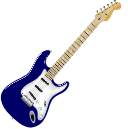
Then came the real challenge. In a forum thread, Koasati suggested I make a guitar icon from scratch. I thought it would be a great idea, if only I knew how. But before I could attempt what I thought was so daunting a task, I knew I needed to learn how to design and make simple default windows icons. It took a year, but I eventually got the first of the Les Paul type replica icons made. (tutorial to come soon)
Why icons?
I thought that making something so small couldn’t possibly be all that difficult. Plus, at the time, the program had the shortest tutorials.
How long have you been doing icons?
About 2 years.
What tools do you use?
I use CorelDRAW and Axialis Iconworkshop. I use CorelDRAW mostly because, well, mormegil said to. And also, because after viewing his tutorials, I found that, because I’m a teacher, I could buy this program at a bargain "education" price of $99 (much easier on the purse than Photoshop). I’ve tried Photoshop and Illustrator, and of course they are everything the biggest top selling graphics standards should be. But what I quickly discovered that I liked more about CorelDRAW was that it had tools that let you work and create effects interactively right on the screen canvas. In Photoshop, you create those same effects with graphs, tables, and numbers. Being more a visual person rather than a math or science person, DRAW is much easier for me to work with.
At first I used ID to turn my bitmaps and pngs into icons, but eventually purchased Axialis Icon Workshop at the advice of a friend. It has more options, but one in particular that appeals to me is that Axialis Iconworkshop allows you to convert your pngs into Windows and/or Macintosh icons. Plus, the screenshots are basically just that, screenshots. The only way I know how to make a screenshot of a pack of icons that I put together myself is to use the icons themselves against a backdrop. However, using that method means having the sizes of the icons added to the screenshot. Some of the smaller skinning web sites cannot handle the large sized files that Wincustomize can, so making your own screenshots lessons your likelihood of being able to upload at those sites.
Are you working on anything new at the moment?
I’m working on a couple of new pack ideas. One I might consider for the GUI Championship, one for Christmas, and one for the spring! I’ve just finished up on the Nautical Mile pack, which took me a long time to do. I’m an administrator at Skinartistry.com, and I’m working with bones2112 on producing a newsletter for the site. It’s not as easy as it might seem! Plus, I have a new private business venture that I’m working on that includes graphic design. Since it deals with graphics, I’ll be introducing it to the various skinning sites when it’s ready.
Can you provide a screenshot, or any concept work for it?
In Velvet Shadows, I used blends on the face of the folder to give it a rounded look. But making blends produces multiple objects so it increases the size of each icon and ultimately, the entire pack. This new folder (and pack), which is very much in its beginning stages, has no blending. I’m trying to go for a sharper, more techno look. It has a deeper perspective and a more 3Dish look to it than the earlier packs. I have no name for it. Right now I’m just calling it "Red."


This is a peak at a spring pack I’m working on. I wanted to do something with flowers or plants, in a kind of vibrant coming to life color and style, although I’m not sure if that’s what I’ve actually come up with! I’ve also started this xmas pack, but since it is at this point still a convoluted mess, it seriously might not get finished until next xmas!


How do you go about planning an Icon set?
I like to come up with a concept or an idea first. With comPewter, I was doodling in CorelDRAW and accidently crossed two paths from opposite sides of a rectangle that overlapped each other. That accident produced an effect that I thought looked very much like pewter. I just continued to developed icons (starting with the folder) based on that effect. The name came later. I like being influenced by different entities. To me it allows for more diversity in creativity. The idea for my first pack was the result of an accident.
The Velvet Shadows suite was a collaboration with boopish and teddybearcholla. I was asked by boopish to make some icons to go with the Velvet Shadows WB. I was looking for something new to start anyways and I liked the fact that her style was different than mine. It’s one thing to design a skin by applying your own style and acquired techniques, but quite another to collaborate on a project that requires applying someone else’s. Working on this suite provided me an opportunity to unearth more of CorelDRAW and to discover more of it’s capabilities. I really enjoyed it!
The last one? After making a couple of darkish feeling IP’s, I wanted to do something light and summery (summer was coming). To me that meant the sun, the beach, the ocean, and boats. Teddybearcholla and I sent many an email back and forth discussing the direction to take with this. There was the pirate concept, the fishing concept (rusty can of worms for recycle bin), the mermaid concept (coral reef, seashells), the Jimmy Buffet concept (houseboat, wasting away in Margarita Ville), and there was even a suggestion of combining the mermaid/Buffet concepts into one ("some people say that there’s a woman to blame," could have been the mermaid! hehe!), but ultimately we decided on the sailing concept. Thus was born Nautical Mile. For my part, Nautical Mile took some research. I needed to find ideas for nautical objects that I could make into icons that would represent the default Windows icons. That took much more time than the other packs. We really wanted a summer release, but unfortunately, because of several setbacks, including illness, the suite wasn’t released until just two weeks ago.
Who would you say is your favorite skinner in the community right now?
Paul Boyer (mormegil – brilliant technique), Dario Arnaez (the 3d wizard), Jairo Boudewyn (impeccable design).

Thank you to 47songs for taking the time to answer my questions, and for providing the icon artwork included in this article.
Have someone you think should be Skinner of the Month? E-Mail me at mikec [at] stardock [dot] com with the subject "SOTM Recommendation"
Liquidox Icon Tutorial - Alien Head Icon
A tutorial by skilled skinner, PixelPirate
Tuesday, October 3, 2006 by Zoomba | Discussion: Tutorials
Today, we launched the latest in our line of premium suites; Liquidox by PixelPirate and Stardock Design. To go along with the suite, PixelPirate was kind enough to write up a very detailed tutorial on how he created the cool 3D glassy Alien head icon. It's a great read for anyone interested in the icon creation process.
Be sure to download the files for this icon, here. Includes ico, png, ai and psd files
Liquidox Icon Tutorial - Alien Head Icon
By PixelPirateFor the launch of the suite, here's a little tutorial on how I made the icons - in case you wondered or in case you want to give it a try yourself. I used Adobe Illustrator CS2 (AI) and Adobe Photoshop CS2 (PS).
Start by creating a new document in AI, make it 512 px wide and 512 px high, RGB color. Then create the shape you want to turn into an icon with the Pen Tool or Elipse Tool or Rectangle Tool etc., in this case a green alien head.
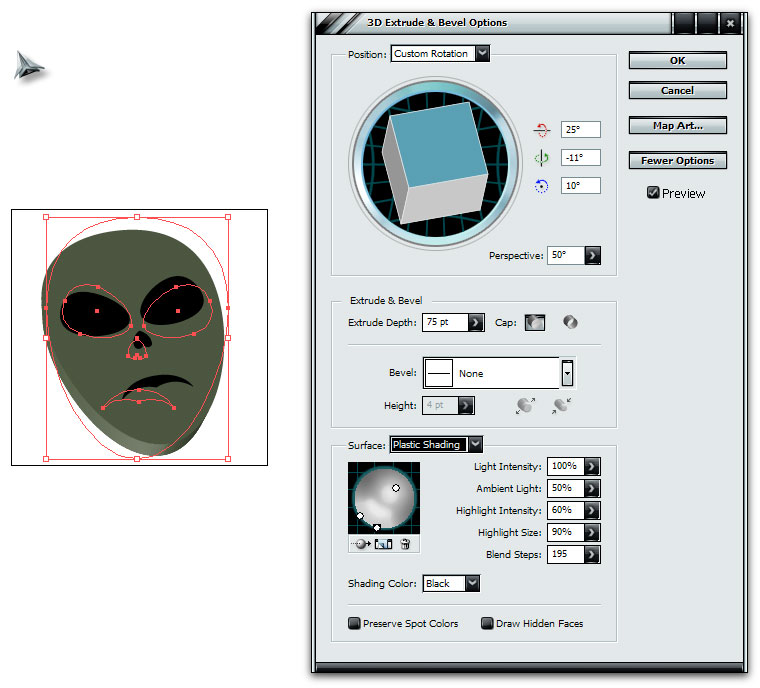
Now, we want to turn this into 3D by using the 3D Effect in AI. Make sure you select all objects on your artboard and group them by pushing ctrl+g. Then go to Effect - 3D and select Extrude & Bevel.
Click More options to expand the dialog shown below. Use the settings below, to further give the 3D look, make sure to use some perspective on your shape. Since the alien head has round curves, remember to increase the Blend steps, so the highlights gets smooth.
Now I have the base to continue to work with in PS. In AI, go to File - Export and save a .psd of the alien head. If you have multible layers, as I've had with some of the icons, remember to include layers in the .psd so you can work with those individually.
Now open the .psd up in PS so we can make it shine! The first thing you'll notice, is that the .psd isn't 512 px as it was in AI. Simply go to Image - Canvas Size and set both to 512 px. In your Layers palette, you now have a folder with the alien head. What I do, is create a white background layer, so I get a better idea of what the icon's gonna look like. I then use the Pen Tool to draw a shape under the head, that will be the shadow under the icon. Click the Path tab on the same palette, hold down control and click the path you just created to make a selection out of it.
Create a new layer on top of the white background layer and fill it with black. Go to Filter - Blur and select Gaussian Blur and use a proper value, in this case 4. Set the opacity of the layer to 75%, so the shadow isn't so dominating.
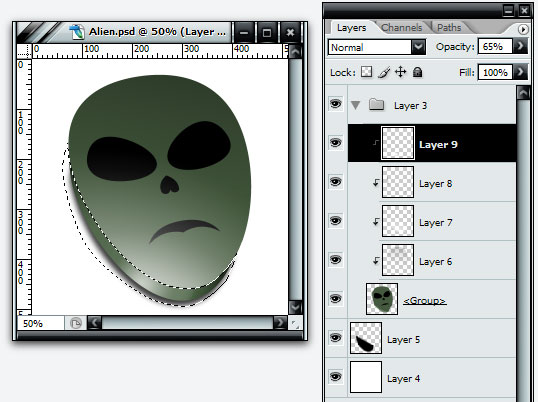
Now let's move on to the shadows and highlights of the alien. Use the Pen Tool again to draw on top of the alien to get a shape of the top surface. Create a selection of the path, create a new layer above the alien head in the folder in your Layers palette.
Select the Gradient Tool and select a black gradient that goes from 100% to 0% in opacity, and use the tool on your new layer from the top right of the head, to the bottom left. Then deselect by pushing ctrl+d. Mark your layer in the palette and push ctrl+alt+g to create a clipping mask to ensure that there aren't any pixels exceeding the shape of the alienhead.
Then create a highligt from the path as before on a new layer, set the gradient color to white and make it from the bottom left to the top right. The side looks a little flat now. The 3D effect in AI is limited to being very simple, so if you really want depth, we can add that in PS, so pick up the Pen Tool again, and draw a path that covers the side, use the gradients as before to create shadows/highlights on the side on new layers and remember to create Clipping Masks again on those layers. You should then have something like below:
Now let's move on to the glossy part. Make a selection of the path you created for the top surface, then select the Elliptical Marquee Tool. You can hold alt to substract from your selection or hold shift+alt to make an intersection on your selection, depending on where you need to place the glossy highlights. If you want to make the selection a couple of pixels smaller, go to Select - Modify - Contract. That way the glossy highlight doesn't go all the way out to the edge of the head.
Now I've created a bunch of highlight layers all over the alien's head and eyes to make it look like below. The selections are something you're gonna have to try out for yourself to fully understand how they work. For the highlights, I've used the Gradient Tool, white from 100% to 0% in opacity. You may want to alter the opacity on some of the layers, if you find the highlights you made to be too bright.
Now let's move on to the final part in PS, the sharp edge highlights. Use the Pen Tool to create strokes where you want highlights placed. I selected the parts as shown below:
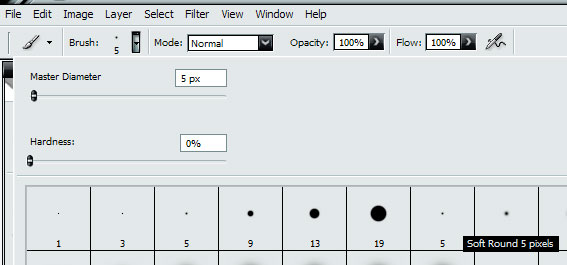
Before we continue, select the Brush Tool and set it to use the Soft Round 5 pixels brush and also make sure the color is set to white.
Now create a new layer, go to Paths, right-click the lines just drawn and select Stroke Path, then set it to Brush and check Simulate Pressure as below:
Now we have some pretty strokes all over the alien.
Then set the white background layer to be invisible by clicking the eye icon to the left of the layer in the palette and save a .png of the icon. Reopen the .png, go to Image - Image Size and set it to 256x256 px and save the .png.
All there's left to do now is convert the 256 px .png to .ico in your favorite icon creation software. I use Stardock's IconDeveloper for this and included 8 sizes; 16, 24, 32, 48, 64, 92, 128 and 256 px.
You can download the .ico, .png, .ai and .psd for this icon in the Misc Icons library here on WinCustomize to lurk some more on the creation phase.