ID's Stardock Trip: Day 3
Thursday, September 11, 2008 by Island Dog | Discussion: Personal Computing
Yesterday was the last day of my trip to Stardock HQ. It was a very productive day with a few meetings, and I’m happy to say that Zoomba and myself have nailed down the final plans for the GUI Champs ‘08, and a more “official” announcement will be posted in just a few days. While I missed my family, I was a bit sad to leave because I was having a great time and it was just awesome to get to know people better than I have in the last couple of years. I also have a lot of a cool stuff to talk about, so watch the front page of WinCustomize today for a big “teaser”.
I flew back to Florida late last night, which happened to be a very rough flight back, and now I’m just catching up on the last few days. Here are a few more pics from my trip.
Brad (Frogboy) and myself.

Hanging with Zoomba.

Stardock HQ.

ID's Stardock Trip: Day 2
Tuesday, September 9, 2008 by Island Dog | Discussion: Personal Computing
Well Day 2 was my first full day at Stardock, and let me first start off by saying the weather is just fantastic. I think it was around 60 degrees when I left the hotel this morning, and it felt really good. I got my own little cubicle to work out of, which is weird to me to be in an office with other people, but I enjoyed having people around.
Here’s me at my space catching up on some WinCustomize moderation.

Just about right next to me we have Zoomba peeking over to say hello.

The rest of the day was meetings, and more meetings. But I can’t wait to tell you what’s going on!
Lets start off with fdlafkdfj fadf adlfafdkfa d afkdjf adkfaldkfja ldkf adl akfjalkd fa d d dkfjdlfka dlkfa dlkfaj dlka dflkadfl kadf adlkfadlkfa dlka dfdflkadjl ldkjaf ldk fadlkfa dlkafdfadfkjd dflaadfkdfj lafk . Yeah, unbelievable right?
The most exciting thing is aldfkadjlf akd;fkd fa dflkad;lfakdj; faldkfj ;aldkfj; aldkf aldkfj;ldkfaj; ldkf a;dlkfjdlkfldkfja lkf a;ldfkdlfkd;l fka dflakdfjla dkfal;dkfaj; dlfak d;lfakd;lfakd flasd fsldfklkdf dlskfjldskfj dlfkjdslkf which is probably the greatest application ever!
There was some other stuff like dlfakdlfk dlfakdjf aldkfa dlkfjd lfkadfjlakd flakdfjlakd, but I won’t bore you with anymore details.
So tonight is my last night in Michigan, but there is still a bunch of stuff to do tomorrow. GUI Champs ‘08 is just about a month away, and hopefully we will have the formal announcement soon, but there is not reason to wait, get those skins started!
Example of WindowBlinds Layer Blending
Friday, September 5, 2008 by Island Dog | Discussion: OS Customization
In case you missed the news the other day, WindowBlinds 6.3 and SkinStudio 6.3 betas were released via Impulse and Stardock Central the other day. One of the most notable features was the layer blending feature, which opens up a bunch of creative possibilities for skinners. It allows you to create some high quality skins using layer blending, which saves some time and trouble. Layering in SkinStudio was a great feature, but it has now been enhanced by using features like Multiply, Screen, and Overlay modes.
Neil provided some images for me, and I wanted to post them to show you exactly what layer blending can do.
The first image here is an existing skin, with no layer blends at all.

These next two images are the same start menu. One has a layer blended on color pixels, and the other is blended on greyscale pixels. This was also done using the Multiply mode. All that was done was taking two tiling images and adding them in tiling mode as new layers.


For more information about WindowBlinds and SkinStudio, visit the websites below. If you don’t already have an Object Desktop or subscription, you can also get a special bundle with both WindowBlinds and SkinStudio included.
This Week in Skinning - September 5th
Skin Roundup for 9-5-08
Friday, September 5, 2008 by Island Dog | Discussion: OS Customization
Finally it’s Friday! So many skins this week, including a couple of Master skin releases in the WindowBlinds category. A quick reminder that the 2008 GUI Champs Starts in just over a month. You can get more details here, and there is plenty of time to get skins started. Now for this weeks picks!
|
|
Outer Limits for CursorFX |
|
|
Leatherbound DX for DesktopX Themes PuterDudeJim is cranking out these DX themes. I like the way he uses textures and styles to make unique themes. |
|
|
ecological meters widget for DX Widgets Another great addition to the set of accessories for the ecoLogical WB skin. |
|
|
Sea of Burning Dreams in Dreams This is a really beautiful .dream with a subtle animation. Looks great on the desktop. |
|
|
Wraith Tabbed Dock for ObjectDock This is one of several sets of dock backgrounds for the Wraith WindowBlinds skin. Great work! |
|
|
Srg138 in Wallpapers This wallpaper really caught my eye. It has a simple design that goes with many skins. |
 |
Wraith for WindowBlinds by SKoriginals The latest Master skin from SKoriginals is another winner. A great, black WB skin that is usable for everyday use. |


Great job to everyone featured, and thanks to everyone who submitted skins to WinCustomize this week. See you next week!
This Week in Skinning – September 5th
Friday, September 5, 2008 by Island Dog | Discussion: OS Customization
Finally it’s Friday! So many skins this week, including a couple of Master skin releases in the WindowBlinds category. A quick reminder that the 2008 GUI Champs Starts in just over a month. You can get more details here, and there is plenty of time to get skins started. Now for this weeks picks!
 | Outer Limits for CursorFX |
 | Leatherbound DX for DesktopX Themes PuterDudeJim is cranking out these DX themes. I like the way he uses textures and styles to make unique themes. |
|
| ecological meters widget for DX Widgets Another great addition to the set of accessories for the ecoLogical WB skin. |
 | Sea of Burning Dreams in Dreams This is a really beautiful .dream with a subtle animation. Looks great on the desktop. |
|
| Wraith Tabbed Dock for ObjectDock This is one of several sets of dock backgrounds for the Wraith WindowBlinds skin. Great work! |
|
| Srg138 in Wallpapers This wallpaper really caught my eye. It has a simple design that goes with many skins. |
| Wraith for WindowBlinds by SKoriginals The latest Master skin from SKoriginals is another winner. A great, black WB skin that is usable for everyday use. |
Great job to everyone featured, and thanks to everyone who submitted skins to WinCustomize this week. See you next week!
SkinStudio 6 Tutorial: Table of Contents
Thursday, September 4, 2008 by Island Dog | Discussion: OS Customization
The SkinStudio 6 tutorial has many sections, most with plenty of screenshots to help show the process of creatin g your own WindowBlinds skin. We tried our best to create a thorough Table of Contents which will make it easy for you to find the specific section you might want to reference. Obviously, I would recommend reading through the whole tutorial first, especially if you are setting out to create your first skin.
I posted the links below, for reference, but you can find the full TOC here.
1. An Introduction to SkinStudio
What are Skins?
What is WindowBlinds?
What is SkinStudio?
The Elements of a Graphical User Interface
2. A Brief Overview of SkinStudio
Choosing What Kind of Skin to Make
The SkinStudio Categories
The Elements of the Start Bar
The Elements of Start Menu
Making a New Start Button
Importing the Image into SkinStudio
4. Creating Images for the Start Bar
Horizontal Taskbar
System Tray
Taskbar Group Menu
Vertical Taskbar
Creating a Start Menu
Start Menu Logoff Images
Start Menu Popup Windows
7. Changing the TitleBars and Borders
The Elements of the Title Bar and Windows Borders
Understanding per-pixel frames vs. UIS1 vs. UIS2
Making a New Title Bar
Creating and Importing Buttons
UIS1 and UIS2 TitleBars/Buttons
Minimized and ToolWindows Window
Creating Borders
9. Skinning Windows Buttons and Other Controls
Buttons and Controls
Combobox Controls
HeaderBar Controls
Menus and Menu Bars
ProgressBar Controls
Scrollbars
Spin Controls
Statusbar Controls
Tab Controls
Toolbar Controls
Trackbar Controls
Treeview +/- Controls
10. Windows XP Specific Elements
Windows XP Shell
Logoff and Shutdown Screens
Toolbar Icons in Explorer and Internet Explorer 6
Control Panel Shell Styles
Shell Style Icons and Pictures
XP File Animations
Vista Specific Elements
Explorer/IE Shell Parts
Internet Explorer 7
Task Dialog Controls
Vista Explorer Parts
Additional Vista Parts
Changing Skin Fonts
Changing Skin Colors
Creating and Managing Sub-Styles
Backgrounds
Re-Coloring Skins
Theme Part Details
Start Menu Animation Builder
Animation Compression
Misc. Tips & Tricks
SkinStudio 6 Tutorial is Here!
Wednesday, September 3, 2008 by Island Dog | Discussion: SkinStudio Help
After a long time in the making, the SkinStudio 6 tutorial is released. This comes at a great time, especially with the GUI Champs ‘08 right around the corner. This tutorial guides users through the entire process of making a WindowBlinds skin starting with descriptions of the elements of a Graphical User Interface. It then guides you through the process of how to use SkinStudio, and how to assemble the various parts of a skin to ultimately make a complete skin.
This tutorial is aimed more at beginning users who are new to SkinStudio, or possibly thinking about creating their own skin. SkinStudio 6 is a huge improvement over past editions, and the creation of skins is much more easier for beginners than it was in the past. I haven’t made a full WindowBlinds skins in a while, and I was pleasantly surprised while creating this tutorial of how much better the experience was. That’s not to say that creating a high-quality skin is easy, it still takes a lot of time planning, creating graphics, etc., but at least SkinStudio makes piecing them together much easier.
The tutorial was recently updated to reflect recent changes in SkinStudio, and to done in a format which is much easier to follow and learn from with plenty of screenshots to go along. There is also an extensive Table of Contents, which is also linked at the bottom of every page for quick navigation between chapters. Over the next couple of days I will post some snippets of the tutorial, just to show some highlights. If you have been thinking about creating your own WindowBlinds skin, now is the time to start!
For more information about SkinStudio please visit www.skinstudio.net. There is a free version of SkinStudio available, but this tutorial was created with the Pro version that is available for just $19.95, or a special Bundle that includes WindowBlinds for just $29.95.
Link: SkinStudio 6 Tutorial
September 3rd Skin Thoughts and Reviews
Wednesday, September 3, 2008 by wulfn1 | Discussion: Community
A Simple study in blue,

I have been away for quite some time , with many irons in the fire this summer. But I am back to bore you with some more of my "home decorating" ideas!
For the first day back, I created this very brief , and quite simple theme.
I decided not to include any DesktopX , RightClick, or ObjectDock themes today, as I still have little time to devote to the subject.
Castaway by CasualTraveller , Though still a Vista theme , perked up my desktop nicely, as throughout the summer I had only a plain black theme that didn't change much at all. I was happy to see that there were only a few glitches for the XP OS, one being the misalignment of the username and user pic in the start menu. It is such a small blemish it really doesn't detract from the look on the whole.
The titlebar text is highlighted in such a way as to look like a white neon sign on my desktop, though because of the font size, it tends to be slightly blurry. The green, red, and blue mouseover highlight on the min,max,close buttons make for a refreshing splash of color in an otherwise very blue theme.
I chose Aladdins Cave by Ahabkaba to be the backdrop of this theme. Because of the few extras I chose, I could go with something a bit busier than usual, and because I love busy, it worked for me. The blues, greens and subtle hint of brown attracted me , as I liked the color combination in CasualTraveller's screenshot on the windowblinds download page. The wall is an interesting combination of futuristic design and arabian nights while feeling more at sea than midair . A definite sense of floating here.
While I have many IconPackages that would work with this grouping, The Preface by dar0ckx takes on a life of its own in this blind. I added Firefox 2007 by D. Arnaez because I liked it better than the default Firefox icon. I do wish artists would include some of the more popular programs icons in their Iconpackage iconlibraries, I like to "complete the look" where ever I can.
To finish the look, I used Bluster by Libardo. This CursorFX theme is well made and doesn't mess with the ram use in my computer the way some of the newest vista designed cursor themes do. The color scheme is perfect with this group, and the styling of the animations really compliments the wall I chose while standing out enough that it's easy to see where the cursor is, when the windows are minimized and only the wall is exposed.
DesktopX: Making Desktop Gadgets
Wednesday, August 27, 2008 by Island Dog | Discussion: OS Customization
I wrote an article showing you how to create and export DesktopX widgets/objects so they will work on the Windows Vista Sidebar. I personally like using the Vista Sidebar on my Vista PC’s, but what if you are on XP, or just don’t like to use the Vista sidebar? Well, DesktopX can help you there too. Not only does DesktopX Pro export to Vista sidebar gadgets, it can also export to stand-alone gadgets. Stand-alone Gadgets will work on any Windows XP/Vista PC regardless if DesktopX is installed or not. This exporting feature is only available in the Pro version of DesktopX.
There are several tutorials and guides available on how to create your own objects and widgets with DesktopX.
- WinCustomize Wiki – DesktopX
- WinCustomize Wiki – Tutorials
- DesktopX Step-by-Step Tutorials
- DesktopX Documentation
I’m going to start at the point where your widget or object is created, and ready to be exported. Widgets and objects created with DesktopX need to have a version of DesktopX installed to use. The gadgets we are going to export do not require that, and should run on any Vista/XP PC.

When you are in DX Builder mode, just right-click your widget and click “Export”. The following screens will guide you through creating your gadget.
|
|
|
|
|
|


After the export is done you should have you gadget that you can now use yourself, or distribute to the community with sites like WinCustomize.com. For more information visit the DesktopX website.
Icon-A-Day 2.0, Supplemental, One Last Hurrah for LaST.
Tuesday, August 26, 2008 by mormegil | Discussion: OS Customization
 I will be out of the country for the next week, so I will be putting the Icon-A-Day tutorials on hold until next Thursday. Luckily I had found something good to post that should be able to give everyone something to play with while I am MIA. | ||
| ||
| Bringing LaST up to date | ||
| Vista User Folders: One of the biggest charges in Vista is the addition of several new User folders, as well as the new User folder structure. Several of the existing folders still worked; My Pictures, My Music, etc. However, I had to go through and create several new icons that are only used in Vista, such as Downloads, and Contacts. 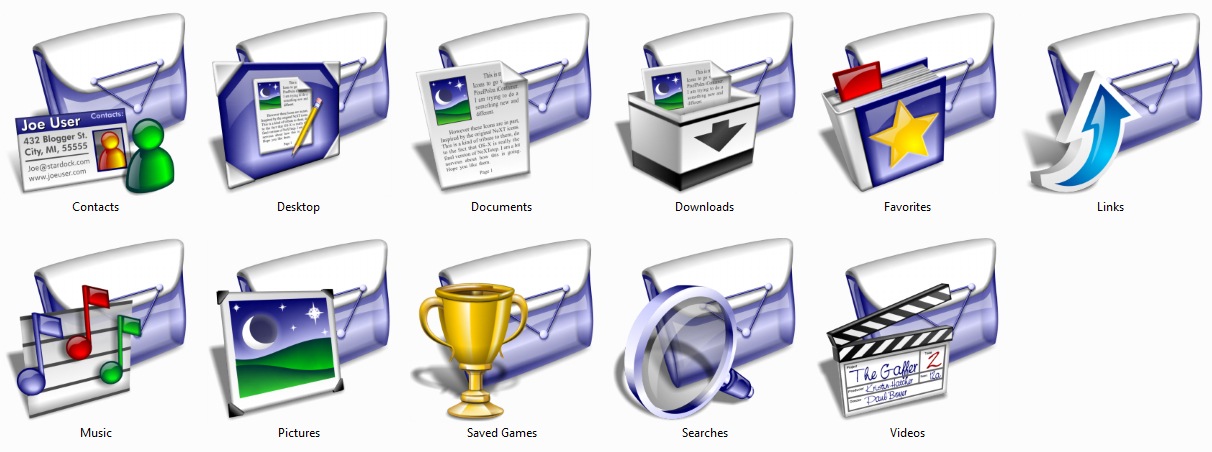 | ||
| Live Folders: The Live folders were the biggest obstacle in updated this iconpack, since the folder form factor is so non-traditional. So I had to do some tweaks, and I ended up simply creating a version of the Last folder on its side. With a few more tweaks I was able to make the Live folders work, though they obscure a bit more of the thumbnails than I like, but because the folder is translucent it still worked out ok. 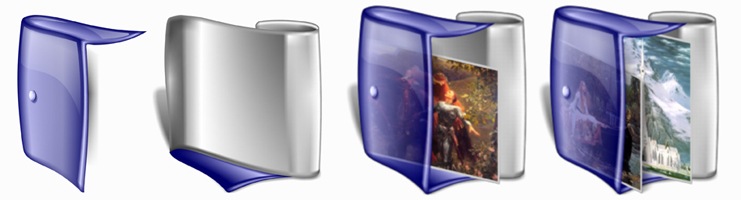 | ||
 Bringing along the rest of our friends: The original LaST icons we designed for a Mac icon contest, and then brought over to 9x, and XP, so it contains many icons that are not used by default in Windows Vista. But since I have all the original icons saved in nice, clean 384x384 PNGs. I was able to create new Vista style icons of even the most obscure Windows 98 icon. I can say that this new pack includes every LaST icon I was able to fit in it. Even though I stuffed this iconpack with all the LaST icons I could, I there are still many more miscellaneous icons, that I currently have posted over in the Object Dock Library. I will be updating them to the new Vista standard soon. | ||
| Wrap Up: Since I created these icons I have learned a great deal, including ways to automate many of the steps required to create sub-packs. I have always wanted to create some other color versions of these icons; Black, Ruby, and such. I am considering putting these together, but I am going to wait to see if people use these. I know they are a bit dated in style. Let me know weather you would like to see a few more LaST Iconpacks, and if so what colors you would like. About Me: You can find all my skins, tutorials, and articles, on my Wincustomize Homepage, at http:\\mormegil.Wincustomize.com. Questions on icon use and techniques, can be emailed to [email protected]. Twitter users can find me with the user name: Mormegil. | ||
| Download the LaST 2.0 Iconpack: |  |