









































February Desktop Screenshots
Wednesday, February 1, 2006 by Jafo | Discussion: WinCustomize Talk

ThemeName "Mac OS X RC XII.5"
ThemeAuthor "Joshhh"
[it's Litestep]
 |
|
Page 1 of 2 | |
|
|---|

Reply #2 Wednesday, February 1, 2006 10:26 AM





Reply #5 Wednesday, February 1, 2006 7:50 PM
more than a dozen lists so far), K-trash, KTek radio OMNI mail
checker, OMNI Time (dx widgets) All done by Tiggz
Wall is my own photography


Reply #6 Thursday, February 2, 2006 8:39 PM

WindowBlinds = 5imple https://www.wincustomize.com/ViewSkin.aspx?SkinID=5306&LibID=1
Icons = Apogee https://www.stardock.com/products/iconpackager/premium.asp
Wall = TigerBlue modified by me
As always - plain, simple, and practical. 

Reply #7 Friday, February 3, 2006 3:06 AM
WB is Cyclops by Mikeb314
Wall is Peaceful by Lantec


Reply #8 Friday, February 3, 2006 5:55 PM
i cant believe i have been coming to this site for a long time but never posted any pics.....
if someone could tell me that would be great!!!!
peas
cityboy

Reply #9 Friday, February 3, 2006 6:15 PM
1. Image must be on the net, not your harddrive.
2. Right-click the image...choose 'properties'
3. Highlight and copy the Address
4. Paste into dialog window opened when you click 'picture' icon on the 'Add Your Comments' bar.
5. Voila....
Reply #10 Friday, February 3, 2006 6:19 PM
i know this is the wrong place to ask........but all i need to know is how to post a screeny?
the pic is on my HD because its a screenshot......
thanx a ton
cityboy
Reply #11 Friday, February 3, 2006 6:27 PM
Firstly just upload the screenshot to Wincustomize....we have a section just for that reason.
Then you 'link' to it in the same way...and add it to your thread requesting help, whatever...

Reply #12 Saturday, February 4, 2006 10:09 AM

Luna-HoE
Simple Bliss
Apogee icons
Minimal and loving it.

Reply #13 Saturday, February 4, 2006 10:30 AM
Feb. 2006
Window Blind "UltraViolet" by Boxxi
Wallpaper "Pedwar Abstractus" by Iben [thank you]
Icon package "CrystalMX" by Mavis
CursorXP "Sky blue light" by Iben
Widgets: Konfab; calender, world weather, picture frame
["Friends" by Webdiod, in picture frame]
Feed Bar - Newsplorer



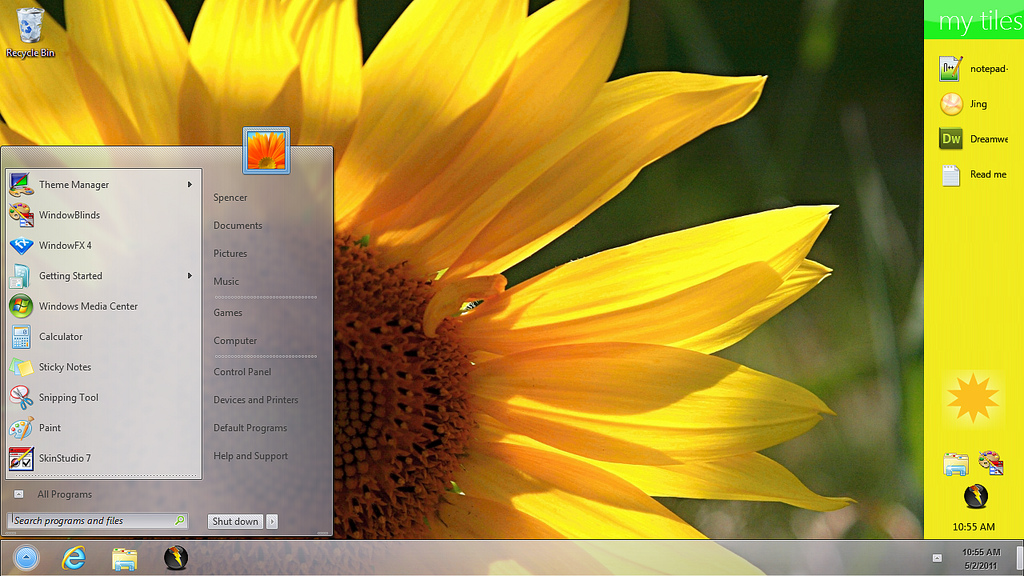

Reply #17 Sunday, February 5, 2006 12:46 PM
- WB: iFlex by danilloOc Link
- Icons: Apogee by mormegil Get 'Em Here (Definitely a Must Have)
- Wall: Sunset Bliss III by kalphegor Link
- DX Widget 1: Silica Weather (installed with DX)
- DX Widget 2: SD System Navigator by Vad_M Link
- Winamp: Multipass 1.3 by rpeterclark Link


Reply #18 Monday, February 6, 2006 2:15 PM
WB Lemmon Vista by MAX Classic Studio N'Kol
Sidebar Opus OS Black
Yahoo Widgets
Icons Sonix Media- Jazlan Bodin


Reply #19 Tuesday, February 7, 2006 2:01 PM
Reply #20 Tuesday, February 7, 2006 2:27 PM
now i think just these wallpapers that dont move are going to go out of date with people moveing over to the Animated Wallpapers i have just found some Animated Wallpapers and i think it would be nice if you all started to look at makeing some thing like it beacuse myself i am moveing over to these Animated Wallpapers desktop themes and i shall still use the ones that just stay still but i like these that are Animated Wallpapers and have the sound to go with them but will still use the taskbar and all the other things but not the wallpaper.
come on time to take WIN CUSTOMIZE to a new level in desktop themes and wallpaper let's get them Animated
thank you
alan charity

Please login to comment and/or vote for this skin.
Welcome Guest! Please take the time to register with us.
There are many great features available to you once you register, including:
- Richer content, access to many features that are disabled for guests like commenting on the forums and downloading skins.
- Access to a great community, with a massive database of many, many areas of interest.
- Access to contests & subscription offers like exclusive emails.
- It's simple, and FREE!
|
|
Page 1 of 2 | |
|
|---|
Reply #1 Wednesday, February 1, 2006 6:26 AM