

































StartPanel.ProgList
Monday, December 5, 2005 by Spagnacious | Discussion: WindowBlinds
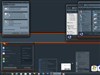
I have not been able to get any response to font changes in the XP Start Panel, menu items. The color changes come through just fine but the font settings don't make it react at all. I am beginning to think that the font information is coming from somewhere outside of startpanel.proglist even though the parameters are allowed in there. The StartPanel.MorePrograms section works excatly as expected BTW.
Any thoughts or suggestions?
Any thoughts or suggestions?
Spagnacious
Reply #2 Monday, December 5, 2005 1:01 PM

Reply #2 Monday, December 5, 2005 1:01 PM
Very Cool! Thank you! I knew there were some shinanigans afoot. How sad to have one of the areas you NEED to look at so much every day be so hamstrung in its clarity. Oh Well!
This brings up another area of mis/non understanding for me. Are 'classic' parameters in effect even when an area is skinned and Windows is NOT in classic mode? I always leave the (WB3.x) fonts and colors inactive because I never run in Classic mode. How deep is this classic hole?
This brings up another area of mis/non understanding for me. Are 'classic' parameters in effect even when an area is skinned and Windows is NOT in classic mode? I always leave the (WB3.x) fonts and colors inactive because I never run in Classic mode. How deep is this classic hole?
Spagnacious
Reply #3 Monday, December 5, 2005 4:11 PM
Reply #3 Monday, December 5, 2005 4:11 PM
Night Train, I tried your suggestion but it seems they have deactivated that section. The parameters are there but greyed out and when you try to modify the parm...you can't.
PLEASE, Stardock, could we have some decent documentation!
PLEASE, Stardock, could we have some decent documentation!
NightTrainthedark
Reply #4 Monday, December 5, 2005 4:52 PM

Reply #4 Monday, December 5, 2005 4:52 PM
It works fine with Skinstudio pro. If it is a trial version thing, you can edit it using notepad. 

Daiwa
Reply #5 Monday, December 5, 2005 6:52 PM

Reply #5 Monday, December 5, 2005 6:52 PM
Clyde -
If you go to Wincustomize.com & scroll down a little ways on the R side of the home page you'll find some links to the kind of documentation you're looking for. For SkinStudio in particular, go to adam.joeuser.com - he's the SKS developer & has lots of great information there in his blog.
Cheers,
Daiwa
If you go to Wincustomize.com & scroll down a little ways on the R side of the home page you'll find some links to the kind of documentation you're looking for. For SkinStudio in particular, go to adam.joeuser.com - he's the SKS developer & has lots of great information there in his blog.
Cheers,
Daiwa
Spagnacious
Reply #6 Wednesday, December 7, 2005 7:36 PM
Reply #6 Wednesday, December 7, 2005 7:36 PM
Once again, thanks Daiwa.
I am really not trying to give the Stardock folks a bad time....I am begging! This is complicated stuff and "documentation" like blogs and HTML pages that won't expand all the way so they can be searched and other kind folks' out of date tutorials as substitutes is very frustrating. I would think they would want new users to be able to get the hang of it so that the skin base would grow and give support for increased sales.
PS Daiwa, I haven't forgotten about getting you the parms I twiddled to get the Program List fonts to change. Just can't find them again....I feel like the guy from Medicine Man!
I am really not trying to give the Stardock folks a bad time....I am begging! This is complicated stuff and "documentation" like blogs and HTML pages that won't expand all the way so they can be searched and other kind folks' out of date tutorials as substitutes is very frustrating. I would think they would want new users to be able to get the hang of it so that the skin base would grow and give support for increased sales.
PS Daiwa, I haven't forgotten about getting you the parms I twiddled to get the Program List fonts to change. Just can't find them again....I feel like the guy from Medicine Man!
Daiwa
Reply #7 Thursday, December 8, 2005 12:20 AM
Reply #7 Thursday, December 8, 2005 12:20 AM
For better or worse, WB's skinning capabilities have expanded so fast the documentation hasn't been able to keep pace. I'm sure the experienced/professional WB skinners share a lot information about the new capabilities in an ad hoc fashion and that some of them have access to alphas we never see. SD have, probably correctly, made the decision to focus on the app at the expense of tutorials & how-to documentation.
Having been skinning as a hobby since before SkinStudio was developed, I have the sense that detailed tutorials would have been just as hard to fathom as simply loading up a skin and going to work in SKS to see how it's put together. My biggest hurdle initially was figuring out what the images should be like & what sizes they should be - painfully simple once I understood the concepts of tiling vs. stretching images & using sizing & content margins. With SKS, you can load up an entire template skin & simply select & edit the default images as an exercise in skinning. I admit there are some obscure tricks and tips that ought to be collected into a single location or set of documents and Adam has done a fair amount of that on his blog.
Cheers,
Daiwa
Having been skinning as a hobby since before SkinStudio was developed, I have the sense that detailed tutorials would have been just as hard to fathom as simply loading up a skin and going to work in SKS to see how it's put together. My biggest hurdle initially was figuring out what the images should be like & what sizes they should be - painfully simple once I understood the concepts of tiling vs. stretching images & using sizing & content margins. With SKS, you can load up an entire template skin & simply select & edit the default images as an exercise in skinning. I admit there are some obscure tricks and tips that ought to be collected into a single location or set of documents and Adam has done a fair amount of that on his blog.
Cheers,
Daiwa
Daiwa
Reply #8 Friday, December 9, 2005 7:24 PM
Any luck rememberin, Clyde?
Cheers,
Daiwa
Reply #8 Friday, December 9, 2005 7:24 PM
| PS Daiwa, I haven't forgotten about getting you the parms I twiddled to get the Program List fonts to change. Just can't find them again....I feel like the guy from Medicine Man! |
Any luck rememberin, Clyde?
Cheers,
Daiwa
Please login to comment and/or vote for this skin.
Welcome Guest! Please take the time to register with us.
There are many great features available to you once you register, including:
- Richer content, access to many features that are disabled for guests like commenting on the forums and downloading skins.
- Access to a great community, with a massive database of many, many areas of interest.
- Access to contests & subscription offers like exclusive emails.
- It's simple, and FREE!
Reply #1 Monday, December 5, 2005 11:44 AM
In most cases you need to reboot to see the changes.