








































How do I do this?
Tuesday, February 15, 2005 by westie17 | Discussion: ObjectDock
I want to make my Object desktop look like this: 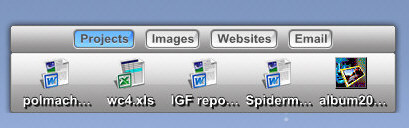
westie17
Reply #2 Tuesday, February 15, 2005 5:27 PM
Reply #2 Tuesday, February 15, 2005 5:27 PM
But how i have found themes and stuff like this and i want to use them but i dont know how to install them.
Koasati
Reply #3 Tuesday, February 15, 2005 6:41 PM

Reply #3 Tuesday, February 15, 2005 6:41 PM
If you have ObjectDockPlus (tabbed docks aren't supported in the free version), you extract the backgrounds to the Backgrounds folder, and icons (png, and ico files) to a folder of your choice, in the OD directory. You select the background from the Dock Properties dialog, icons from the Dock Entry Properties dialog.
westie17
Reply #4 Wednesday, February 16, 2005 7:25 AM
Reply #4 Wednesday, February 16, 2005 7:25 AM
Ah thanks i have done it now, looks very cool.
Please login to comment and/or vote for this skin.
Welcome Guest! Please take the time to register with us.
There are many great features available to you once you register, including:
- Richer content, access to many features that are disabled for guests like commenting on the forums and downloading skins.
- Access to a great community, with a massive database of many, many areas of interest.
- Access to contests & subscription offers like exclusive emails.
- It's simple, and FREE!
Reply #1 Tuesday, February 15, 2005 5:21 PM