






































Trouble with WC
Takes forever
Friday, February 13, 2026 by Sed | Discussion: WinCustomize Talk
I have been having a few days in a row that WC is acting up. Not anywhere else
just WC. ANYONE else having probs?? 
 |
|
Page 4 of 6 | |
|
|---|

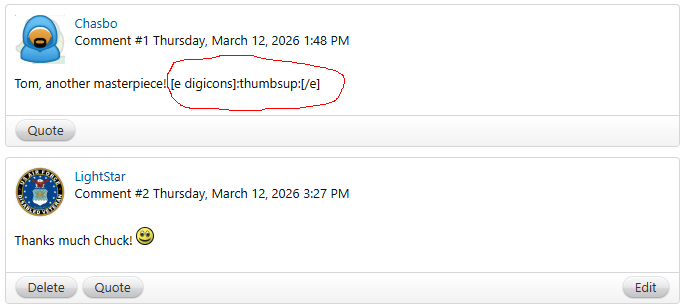
Reply #63 Saturday, March 14, 2026 8:49 AM
Is this one showing? I am feeking this mess all started with me! PARANOID??
Reply #65 Saturday, March 14, 2026 9:29 AM
Probably this is related to my issues with DeskScapes, doesn't show any backgrounds/wallpapers, everything is just blank. Uninstalled/reinstalled, used the DSPurge script, etc. no luck.

Reply #66 Saturday, March 14, 2026 10:05 AM
Probably this is related to my issues with DeskScapes, doesn't show any backgrounds/wallpapers, everything is just blank. Uninstalled/reinstalled, used the DSPurge script, etc. no luck.
I can confirm that the Latest Backgrounds are missing from DeskScapes.
Reply #67 Saturday, March 14, 2026 10:34 AM
Probably this is related to my issues with DeskScapes, doesn't show any backgrounds/wallpapers, everything is just blank. Uninstalled/reinstalled, used the DSPurge script, etc. no luck.
I can confirm that the Latest Backgrounds are missing from DeskScapes.
I think all these problems are related to T-Man's reply #52 in this thread. This would happen in DNS problems and faulty connections to the Gallery...along with Lightstar's/Sed' preview problems, etc.

Reply #68 Saturday, March 14, 2026 12:01 PM
Keeping on eye on this, we are in the middle of some large upgrades for our infra and moving things around but it's not expected that this would break as we migrate.
Reply #69 Saturday, March 14, 2026 5:50 PM
Just cleaned my cache Smileys still missing too I will try uploading another wall since it will be AFTER my cache clean see if it has fixed mine
Reply #70 Saturday, March 14, 2026 6:04 PM
Just cleaned my cache Smileys still missing too
I will try uploading another wall since it will be AFTER my cache clean see if it has fixed mineSED, they're aware of the issues and working on a fix , until then I would think just upload like normal and when its fixed you'll know it
Reply #71 Saturday, March 14, 2026 8:18 PM
Just found that out Mike -- They upload OK so  I will leave it at that
Reply #73 Saturday, March 14, 2026 9:20 PM
,@,,cyberslober
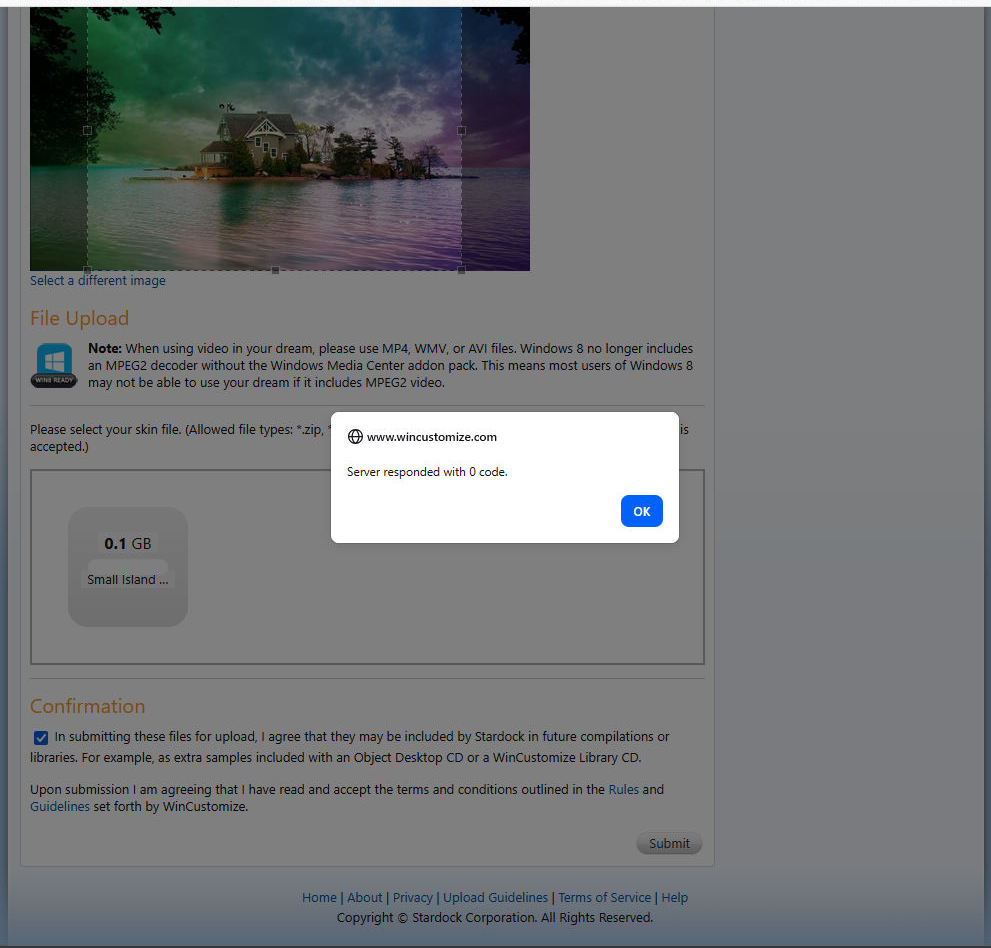
Right now dream files 100 - 150 mb won't upload.
Dream flies in the 90's mb and below will.
They know about this and are looking into it for the fix, so for now limit your
Files sizes below 100mb
Reply #74 Saturday, March 14, 2026 10:44 PM
Looks to me like uploading walls is back to normal. As for Dreams, there looks to be a file size problem as Az has noted. Thanks, Mike. 
Patience is a virtue.
Reply #75 Sunday, March 15, 2026 5:13 AM
Thank you AZ and Doc, not a problem, I just didn't know what was going on! I am a old fisherman, so Patience is my middle name (Actually its Dale) but thank you both once more it is much appreciated!

Reply #76 Sunday, March 15, 2026 6:08 AM
Preview image issue is back, I tried absolutely everything to get it to show up. Nothing worked. https://www.wincustomize.com/explore/wallpapers/58948/
Reply #77 Sunday, March 15, 2026 10:23 AM
This should now be fixed.
The background (see what I did there) on this is we are working on trying to stop all the bots that are hitting the site at an extremely high rate.
Reply #78 Sunday, March 15, 2026 11:15 AM
Still not showing bdsams: Wallpapers - Prismatic (FREE DOWNLOAD) | WinCustomize.com
Just edited my upload and put the screenshot in again, all is well now.
Reply #79 Sunday, March 15, 2026 2:34 PM
Still not showing bdsams: Wallpapers - Prismatic (FREE DOWNLOAD) | WinCustomize.com
Just edited my upload and put the screenshot in again, all is well now.
Unfortunately the smilies are still off.


Please login to comment and/or vote for this skin.
Welcome Guest! Please take the time to register with us.
There are many great features available to you once you register, including:
- Richer content, access to many features that are disabled for guests like commenting on the forums and downloading skins.
- Access to a great community, with a massive database of many, many areas of interest.
- Access to contests & subscription offers like exclusive emails.
- It's simple, and FREE!
|
|
Page 4 of 6 | |
|
|---|
Reply #61 Saturday, March 14, 2026 4:44 AM
Now there are coding issues, code is showing on every wallpaper or anything else I have looked at.
Started yesterday.