CursorFX is a utility which allows you to have much more flexibility in the cursors
you use to interact with Windows. CursorFX users can create and use cursors that
look and feel far superior to anything you've ever seen before! Best of all, it's
really easy to create your own super-charged cursors!
Stardock DeskScapes extends Windows 10 with the ability to run spectacular animated wallpapers (Dreams) on your desktop. Choose your Dream from our extensive library to personalize your pc.
IconPackager is a program that allows users to change nearly all of their Windows
icons at once by applying "packages" of icons. A package of icons contains
icons to replace most of the common icons on your Windows PC.
Rainmeter allows you to display customizable skins on your desktop, from hardware usage meters to fully functional audio visualizers.
You are only limited by your imagination and creativity.
Rainmeter is open source software distributed free of charge under the terms of the GNU GPL v2 license.
Show off your favorite desktop configuration by uploading a screenshot of your desktop!
SoundPackager brings customization of your auditory experience to Object Desktop!
Users can now choose from "sound packages" to enhance their Windows desktop
experience. Over 30 different system sounds are supported; unique new Stardock Design
sound packages are included with the package.
Microsoft Windows® 8 is shipped without the "Start" menu. Stardock heard the cries from Windows 8
users. We put the "Start" menu back in Windows 8. We accurately recreated the most used desktop
feature billions of users depend on every day and packed it with additional functionality.
The finest collection of desktop backgrounds on the Internet!
Publisher:
Stardock Corporation
Developer:
Stardock Corporation
Genre:
Object Desktop
WindowBlinds changes the look and feel of your Windows desktop by applying visual
styles to your entire Windows environment. When a visual style is applied, they
change nearly every elements of the Windows GUI such as title bars, push buttons,
the Start bar, menu and more.
Winstep Extreme is a powerful suite of applications that merge incredible usability and performance with breathtaking eye candy. Add your own Menus, Docks, Tabbed Docks, Taskbar and Widgets with this Windows User Interface Replacement!
View a list of all of the different galleries available in WinCustomize, which you
can then browse individually.
Explore All
Explore all available galleries on WinCustomize.
Customize This Menu
This option is only available for subscribers of WinCustomize. If you are a subscriber
it will allow you to select which categories you would like to see in this menu
from a list of all galleries available on the site. This information will be stored
on your account for all your future visits.
For a deep dive into the expected changes to Windows 11, here's an excellent article sent to me by my trusty source Hankers of the Frozen North. Thanks, buddy. You've inspired me in many ways, and have been a great mentor. I expanded on your tip because of the appearance of subsequent additional important articles quoted here.
The Windows 11's 24H2 Update will require hardware that supports POPCNT (SSE4.2 or SSE4a). I remember predicting in a prior article regarding W12, just this kind of turn of events just as W11 upgrade from W10 had requirements re chip, etc.
From the title, it's clear what that requirement is. If you update to 24H2 without your chip having the required instructions, your computer will crash on boot.
So, how to check if your computer's CPU can handle the 24H2 Update? Neowin published an article dealing with just that, although the gHacks article linked goes through the same explanation.
"Option 1: CPU-Z
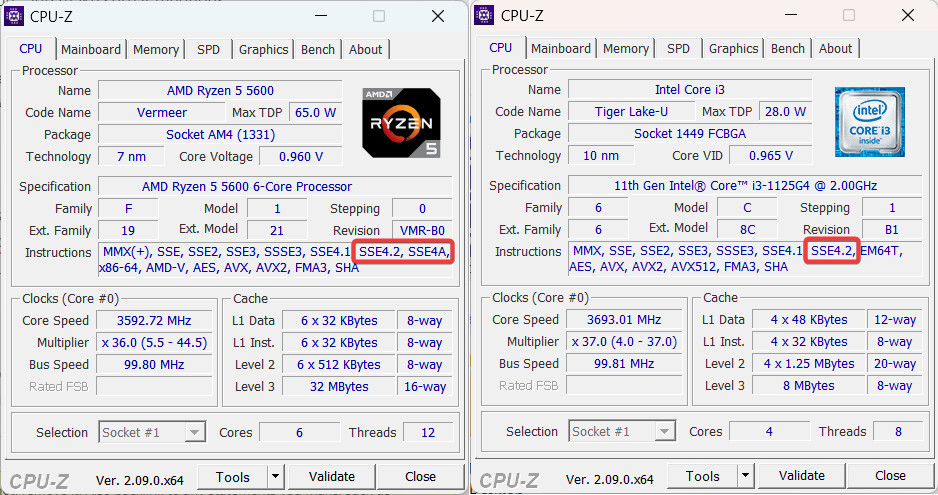
Download CPU-Z from the official website, run it, and check the Instruction box. Look for SSE4A if you use an AMD processor and SSE4.2 if you use an old Intel chip.
Option 2: Official websites
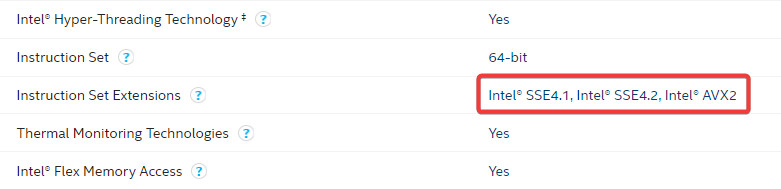
Go to Settings > System > About and check the "Processor" box. If you use Intel, go to this website and search for your processor model. See the "Instruction Set Extension" and make sure it mentions SSE4.2.
AMD does not have a single page where you can find specs for every chip the company ever released. Therefore, use third-party websites for CPU tracking, like TechPowerUP. Look for SSE4A in the list of supported instructions or instruction extensions.
Option 3: A simple third-party tool
Enthusiasts have already created apps that can let you run checks and see what specs are missing in your computer. This open-source utility with a witty name, WhyNotWinAI, can show you if your chip supports the POPCNT instruction. You can download it from GitHub for free. Look for the "CPU supports POPCNT instruction" line.
If your computer does not support the necessary instruction, this is the end of the road for you. With that said, we will have to wait for the official Windows 11 24H2 release to see if the change sticks around. Meanwhile, you can learn how to install Windows 11 on unsupported hardware using our guide."
- Taras Buria, Neowin
If your computer's CPU does not fulfill the POPCNT demand, I'd strongly advise not doing the update. Of course, we can expect hackers to try to bypass this requirement, but I would not place much faith in assurances (theirs or others) that their hack will work, because this requirement is quoted as being not bypassable.
Have a great weekend, folks. Here's mine...with the required SSE4.2 as my CPU is Intel.
Page 2 of 2
DrJBHL
Reply #21
Sunday, February 18, 2024
12:09 PM
Too many times on the net and in forums, the phrase "It Can Not Be Done" is bandied around
Bob Pony is a recognized Windows expert.
Again: This PopCnt instruction problem (which is not bypassable) affects very old CPUs - 14 years old or more. The vast majority of computers in use today won't have problems updating to 24H2.
3java3
Reply #22
Sunday, February 18, 2024
2:34 PM
Uh oh. Decided to update to 22H2, but it seems to be stuck at 94% installed. I sure hope I don't get that "loop" problem, and have to take this pc to a computer store to fix. Not blaming anyone else, ok? It was my decision to upgrade.
pelaird
Reply #23
Sunday, February 18, 2024
2:55 PM
Uh oh. Decided to update to 22H2, but it seems to be stuck at 94% installed. I sure hope I don't get that "loop" problem, and have to take this pc to a computer store to fix. Not blaming anyone else, ok? It was my decision to upgrade.
Hopefully it will finish, However it shouldn't take more than an hour. You are updating from 1903 to 22H2 which will require a lot of changes. Sometimes Cumulative updates seem like they're stuck, but at 94% it's probably writing all your info from 1903 so you can roll back if you decide.
If it takes longer than an hour, it's probably stuck. Try rebooting and see if it finishes. If not, cancel the update and use the Windows 10 - 22H2 ISO.
Here is a link to the Windows 10 - 22H2 Media Creation Tool from which you can create an ISO.
3java3
Reply #24
Sunday, February 18, 2024
3:39 PM
The update is done. I am now running Windows 10 22H2, and everything is working fine, as before. So far I don't notice much of a change, other than having news and interests on the taskbar. That and Edge is different, and Edge is not as nice looking as before, but oh well. I wasn't even using the old Edge very much. I tend to go back and forth between Vivaldi and Brave. Thanks, DrJBHL for your input. The update was long overdue!
pelaird
Reply #25
Sunday, February 18, 2024
4:38 PM
Glad everything worked out for you. Vivaldi is my main browser also. I’ve been using it since version 1.
My pc is new enough to run 24h2.. But I am tempted to get a new pc anyways. The AI chipped processor might actually be the future afterall.
It is capable of doing a lot more then just copilot, it is technology that runs AI processes in general. One of the interesting new things Microsoft just announced is ai powered super resolution for games.
I definitely will be watching this tech pretty close... It may actually be a good year to by a new pc even without Microsoft gimmick to sell hardware.
DrJBHL
Reply #27
Sunday, February 18, 2024
11:02 PM
Too many times on the net and in forums, the phrase "It Can Not Be Done" is bandied around
Bob Pony is a recognized Windows expert.
Again: This PopCnt instruction problem (which is not bypassable) affects very old CPUs - 14 years old or more. The vast majority of computers in use today won't have problems updating to 24H2.
I do not doubt your source Doc, but my Dilemma is my source, not just a computer Expert, but an Actual Dev Working For MS, who informs me "All System Files Can Be Edited". Time will tell on this one, like it did with the last big MS screw up that was not liked, and the one before that too.
DrJBHL
Reply #29
Monday, February 19, 2024
11:38 AM
"Pony's findings confirm that this new instruction is not only required, but it is vital to 24H2's functionality. This is the first major requirement that apparently cannot be bypassed by any means. TPM and Secure Boot can still be bypassed, but not PopCnt." - Tom's Hardware.
SD also is strongly opposed to "edited"/hacked/pirated, etc. software. So again, don't pursue that topic.
DivineWrath
Reply #30
Monday, February 19, 2024
12:55 PM
Another reason to switch to linux...
DrJBHL
Reply #31
Monday, February 19, 2024
1:47 PM
Does anyone actually believe that a PC that is over 10 years old is worth salvaging? That seems like a pretty frustrating build to work off of to me.
I agree with you PhoenixRising1, but its like a Sport to those kind of users. You will see posts on Reddit etc.. from peeps just showing how MS changes can be negated. It would be crazy to put 22H4 on a PC as old as the hills, but those peeps like to Prove A Point and always rise to the challenge when they hear "It Can Not Be Done".
DrJBHL
Reply #35
Thursday, February 22, 2024
1:32 AM


















































Reply #21 Sunday, February 18, 2024 12:09 PM
Too many times on the net and in forums, the phrase "It Can Not Be Done" is bandied around
Bob Pony is a recognized Windows expert.
Again: This PopCnt instruction problem (which is not bypassable) affects very old CPUs - 14 years old or more. The vast majority of computers in use today won't have problems updating to 24H2.