








































WindowBlinds 11 planning
Friday, December 25, 2020 by Frogboy | Discussion: WindowBlinds
We are putting together the schedule to make WindowBlinds 11.
Customization is a lot harder now than it used to be. Microsoft, for reasons unknown, has actively encouraged developers to take care of their own client and even non client (border, frame) painting rather than using standard Windows controls.
Microsoft's baffling decision to throw away trying to provide a standard set of in-app controls for developers and instead provide vague, often conflicting standards (cough, Fluent) has resulted in having less and less of the OS we can even touch.
Which is unfortunate because WindowBlinds, in theory, could actually give Windows users a consistent, OS-wide Fluent if apps weren't handling the drawing of their own UIs these days.
Still, with that in mind, there are things we can do such as skin the standard OS controls and then handle apps on a case-by-case basis. Keep in mind though, the more non-standard apps we have to handle, the harder it is for us to keep compatibility.
Earlier this year we released Curtains which doesn't even hook into the OS. This means it is 100% compatible. Skins, even the weirdest ones, won't break a given app. Of course, the price is that it doesn't skin nearly as much (no client area GUI controls like scrollbars, push buttons, radio buttons, etc.). It's done quite well. However, we know there are still plenty of people out there who would like to have more full control over how their Windows desktop looks.
That's where this thread comes in: What would you like to see in WindowBlinds 11?
 |
|
Page 19 of 34 | |
|
|---|

Reply #362 Friday, November 26, 2021 11:12 PM
No. It's called delegation of duty and/or confidence/trust in others to manage what's needed.
Please desist....

Reply #363 Saturday, November 27, 2021 11:36 AM
Agree with JCurie , yes we have finally have a post from Bradsams, but even though his post says he will answer questions, the most important question "When will WB 11 be ready" was not, although he did confirm WB 11 would come at some point. To know something will be coming, really does not do it for a lot of us.

Reply #366 Sunday, November 28, 2021 10:41 AM
Question: Does the current WindowsBlinds work on Windows 11?


Reply #369 Sunday, November 28, 2021 2:23 PM
OK, then I misspoke -- as I realize that OD includes lots of apps.
What I should have said is that I cut back to only Startxx and WB.
I did, but no longer do, use the other OD apps.
Reply #370 Friday, December 17, 2021 8:28 PM
I have an Object Desktop subscription that is expiring and currently costs $20 to renew. The Retail price is $50.
When it first came out, with Win7, I subscribed to OD because I could download and run nearly a dozen different apps.
Over time, this has cut back to Startxx and Windowblinds -- which means they cost me $10 each, more than the $5 (?) for Startxx alone but not enough to matter for me.
But I don't really want to keep paying the OD renewal year after year, hoping that WB 11 will eventually be released.
And there is the dilemma -- if I let OD subscription die, then it will cost me (at least) $50 to get it down the road when WB11 gets released. Or, I keep paying $20 a year for basically Start11 -- which while not a LOT, is bothersome because as some have pointed out here, there are NOW some really good Start Menu alternatives that are free.
And then, we get a post claiming the 2023 for Windowblinds was a "typo" and it is really 2022. So, as long as it really does come out next year, then my $20 renewal will get me WB 11. But, as beaten to death here in this thread, there are no fine-grained accurate predictions of WB 11 availability.
An yeah, I know it's not a lot of money, I just don't like paying for something I'm not going to get.
Like you I only really use a few of the OD programs. Now it's just these 4 since updating to Windows 11: Start 11, Deskscapes, Fences 4 and I started using Object Dock again. Object Dock says it's not compatible with Windows 11 but it is working fine for me. I believe Tiles and Groupy work in Windows 11 as well but I am not a big fan of those apps.
Heck I'm paid up on Object Desktop for a few years, lol! Stardock runs renewal specials for $14.99 a couple of times a year. I always forget when I see it that I really don't need to add another year, and yet I do. My current subscription runs until 7/20/25 so I would assume they will have a compatible version of WIndowblinds by then! If you find you do use more than 1 or 2 OD components it's worth keeping the subscription active. Just enable email updates from Stardock in your account and they will let you know when they run a renewal price special next

Reply #371 Friday, December 17, 2021 9:10 PM
"My current subscription runs until 7/20/25" Your subscription will probably last longer than Windows 11.
Reply #372 Saturday, December 18, 2021 9:54 AM
To all those interested in having a working WB10 and using it on the latest build of Win 11 Enterprise, check out the topic "Windows 11 - Not For Me"
Follow the lead from "PhoenixRising1" and install explorerpatcher from the link provided and as long as you follow one more step
"In the explorerpatcher options under file explorer options
Disable the windows 11 command bar* absolutely needs to check marked to yes."
Once this is done you will have a working WB10 on Windows 11 (in my case Win 11 Enterprise Latest Build)
No Explorer crashing WOW, i have one simple issue which i will iron out later connected to transparency, but i am sure it is a simple setting in Start11.
PhoenixRising1 great work man.
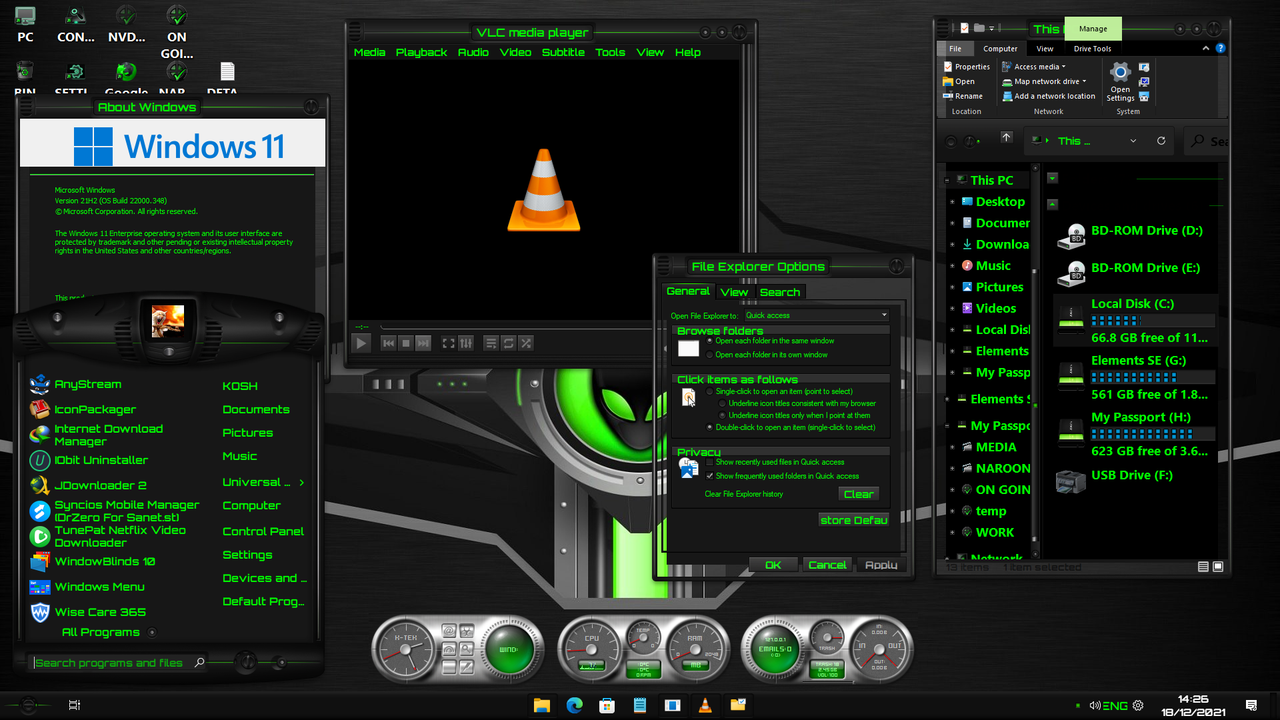
Reply #373 Saturday, December 18, 2021 10:21 AM
That screenshot shows windows with no frames, or should I say transparent frames. That skin shouldn't be that way.
I don't call that working.
Reply #374 Saturday, December 18, 2021 10:52 AM
This is the biggest move forward in the ability of using WB10 on a fully updated Windows 11, not even the company have gotten this far yet (no beta or any kind of early stage development, i guess there is no pleasing some peeps)
I am sure the transparent issue in borders will be solved as it will be a setting in either Start 11 or the explorer Patcher .
You say " I Don't call that working"
Before this development, it was just Explorer crash after explorer crash , and based on that NOTHING WORKED BEFORE.
Instead of a complaint, why not a pat on the back for getting this far when we do not even have a Beta of a working Windows 11 WBs.
Really 1 little fault which i am sure can be solved, before this we had nothing as a community, i have used Stealth Drone for several years, and beside that little error it looks like it should.
The Stealth Drone skin i am using has been modded by me to be dark with Electric Green Text and trimmings, so i am sure it should not look like that.
But beside what i have done changing system colours, and the one fault you have pointed out, there are NO explorer crashes.
Would it really be too much for you to say "good Effort" making something that did not work before, work now.

Reply #375 Saturday, December 18, 2021 12:55 PM
That screenshot shows windows with no frames, or should I say transparent frames. That skin shouldn't be that way.
I don't call that working.
I have noticed that issue as well. It is actually a funny bug, because if you actually go to modify transparency in any way it starts to work. It just doesn't in the default middle for whatever reason
Reply #376 Saturday, December 18, 2021 1:13 PM
I like to think of the explorer patcher method more as a backwards compatability for peoples favorite windows 10 themes. I do look forward to windows blinds 11 for several reasons.
1. Make themes based off of windows 10 or 11 theme for start 11. Huge selling point for me.
2. I don't actually hate the command bar. It would be nice to have themes that go with it
Reply #377 Sunday, December 19, 2021 9:15 AM
However you spin the description PhoenixRising1, you have made something work and that is a big step forward for many i am sure , i for one appreciate your testing and experimentations to make this possible.

Reply #378 Sunday, December 19, 2021 12:11 PM
I just think everyone should continue to use Windows 10 and Windowblinds 10 until Windowblinds 11 is released by Stardock. But if you want to use Windows 11, just use Start 11 for now if you're happy with that. I personally don't think hacking things in your system using software no one has ever heard about before is not a good idea.
Reply #379 Sunday, December 19, 2021 1:08 PM
I just think everyone should continue to use Windows 10 and Windowblinds 10 until Windowblinds 11 is released by Stardock. But if you want to use Windows 11, just use Start 11 for now if you're happy with that. I personally don't thin hacking things in your system using software no one has ever heard about before is not a good idea.
Reply #380 Sunday, December 19, 2021 1:12 PM
I just think everyone should continue to use Windows 10 and Windowblinds 10 until Windowblinds 11 is released by Stardock. But if you want to use Windows 11, just use Start 11 for now if you're happy with that. I personally don't thin hacking things in your system using software no one has ever heard about before is not a good idea.
I totally understand that sentiment lightstar. I even agree with you to a point.
Obviously this whole thing got started on how windows 11 has been hard to migrate to for various reasons and how people want to stick with windows 10. There are a lot of reasons to dislike windows 11, but also there has been reasons to like windows 11.
Start 11 has been huge for me. I actually bought and paid for this program day one of its beta release. That is how much I disliked windows 11's start menu.
Explorer patcher has been mention so often on this site though that it is hard to not be curious as to what it is and what it does. So, I defenetly did not find this program on my own.
Please login to comment and/or vote for this skin.
Welcome Guest! Please take the time to register with us.
There are many great features available to you once you register, including:
- Richer content, access to many features that are disabled for guests like commenting on the forums and downloading skins.
- Access to a great community, with a massive database of many, many areas of interest.
- Access to contests & subscription offers like exclusive emails.
- It's simple, and FREE!
|
|
Page 19 of 34 | |
|
|---|
Reply #361 Friday, November 26, 2021 10:31 PM
That may be true. But it would be nice for his paying customers to actually hear that from the CEO himself. Don't you think?
No.
LOL
YES