






































@$#%&*@%#&@#&* Updates!!
Microshit strikes again.
Tuesday, November 15, 2016 by Uvah | Discussion: Personal Computing
Yesterday Win 10 updated itself. New feature added plus a cumulative update a d a security update. Hours it took to download. So I put my laptop to sleep for the night figuring the download would proceed. It did. Woke it up and for some time it was stuck on 8% install for the new feature. Finally the install happen. And do did Windows. Working on updates.....from seven am to noon time to finish working on updates. Then rin disk cleanup to remove all...all of the left overs. I gained 19 gigs on the hard drive. Time to run ASC. It found, supposedly...9 gigs of junk files. I have automatic fix ticked. Ok...all done. System still running slow. I open up iobit's defrag and run that. More than one gig of fragmented files and stuff. It did run faster though. Now that's done. I open up CCleaner to run that. No buttons on top. I open up Malwarebytes...no buttons on top. Somehow Windowblinds was affected and is no longer skinning these apps. Explorer...no problem. Now I got to change stuff around to see whether or not it's WB or did MS screw up again. This is gettin' old.

Reply #2 Tuesday, November 15, 2016 8:17 PM
Had no problem with the November 8th update. This latest update included a new feature plus those other two. I'll put up a screenshot tomorrow so you can see.
Reply #3 Wednesday, November 16, 2016 5:51 AM
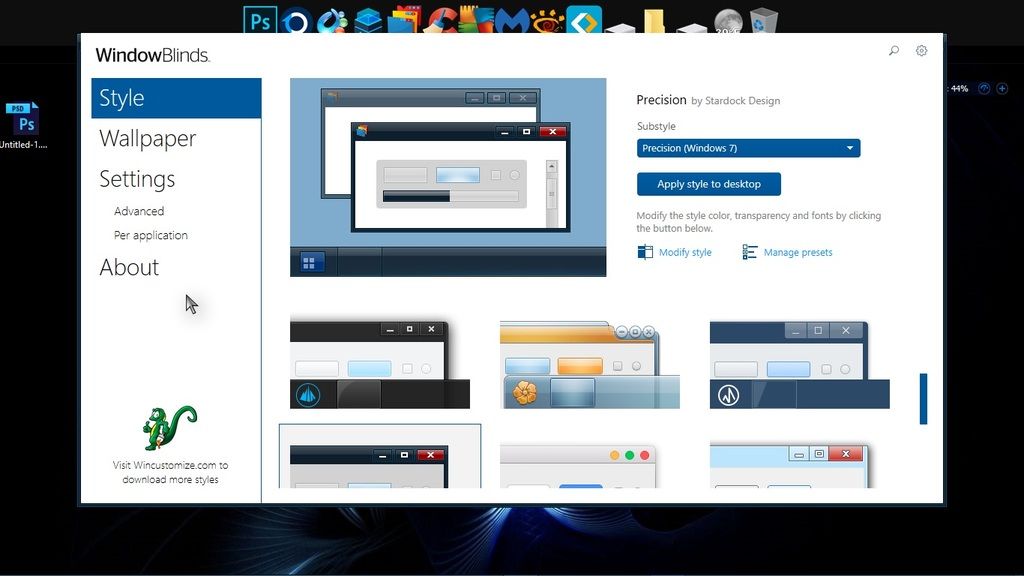
Did this screenshot in paint which was skinned like explorer. The screenie shows WB config open but its unmovable with no top buttons on top and only the frames showing on the sides.
Reply #4 Wednesday, November 16, 2016 12:08 PM
Apparently WB's made for Win 7 don't work. Changed skin to Ice and all is well. Hopefully...

Reply #5 Wednesday, November 16, 2016 12:36 PM
Apparently WB's made for Win 7 don't work. Changed skin to Ice and all is well. Hopefully...
Ross. Do you really think there isn't something wrong with your computer. Not one other person is saying that they can only use one Windowblind. Ice. My Win7 computer and win 10 computer are both fully up to date with "0" problems.
I would suggest you look elsewhere for what is causing your situation.

Reply #6 Wednesday, November 16, 2016 12:52 PM
I'd have to agree with Dave.
Again, could something you have on your computer be causing the problem with WB exe?
I hope you'll avail yourself of the services Support offers. Also, Once again, I'd like to suggest rolling back updates and re-installing via WU.
Reply #7 Thursday, November 17, 2016 10:48 AM
Ok folks...this should settle it. After changing several skins, installed from backups, the ones made for Win 7, it appears the update created a minor hiccup in WB. Sorry for the confusion. As for something wrong with my PC...its running smooth, boots up in 42 seconds, no black and blue screens lol. Actually its a bit faster now that I eliminated some gloat after the reinstall of Win 10. Deleted Windows.old with disc cleaner and cleaned up Win SxS. Got rid of Avast and went back to AVG. Updated all my apps and stuff so there's no problem there. Oh...and WB is now showing the pop up that tells you a new skin has been installed. That hasn't happened in a while thanks to WB updating itself to version 10.5. I'm a happy camper again and thanks for the feedback. That always helps. 
Please login to comment and/or vote for this skin.
Welcome Guest! Please take the time to register with us.
There are many great features available to you once you register, including:
- Richer content, access to many features that are disabled for guests like commenting on the forums and downloading skins.
- Access to a great community, with a massive database of many, many areas of interest.
- Access to contests & subscription offers like exclusive emails.
- It's simple, and FREE!
Reply #1 Tuesday, November 15, 2016 3:24 PM
I got no update.
But you can check updates here: https://support.microsoft.com/en-us/help/12387/windows-10-update-history