






































Jafo's OK PC Build of 2015
Tuesday, February 3, 2015 by Jafo | Discussion: Personal Computing
Following on with ID's thread re new PC build.... and I'd only hijacked Starkers' one to describe what I'd been doing to date...so here's my own thread with the ins and outs of what's what.
My old machine [also home-grown] was a [then] reasonably OK machine....
Lian Li PC-A6010 case [black]
Antec TruePower Quattro 1000w PSU
ASUS P6T-se X58 i7 MoBo
Intel i7 920 2.66Ghz LGA1366 CPU
12G OCZ Triple [6x2G] PC12800 DDR3 Gold Ram
CoolerMaster V8 CPU Cooler
Vantec EZ2 Sata hot-swap racks [x2][black]
1TB Seagate Sata2 7200 HD [x2] [redundancy backup/data]
2TB Western Digital Caviar Green Sata2 HD [x2]
500G WD Sata2 7200 HD [game backups]
250G Seagate Sata2 7200 HD [x2] [secondary/alternate OS installs in racks]
240G SanDisk SDSSDX240GG25 [for OS]
ACR-105 Multi card reader
LG Sata DVD-RW [x2][black]
ASUS GTX590 3GB GPU
Windows 7 Ultimate 64bit RTM.
That was its final specs...having doubled the ram from 6 and adding a 'faster' GPU.
The stumbling block was really 'just' the CPU. For FSX it's a case of 'the faster the better' - so just before Xmas I started researching....
More to come...
 |
|
Page 7 of 12 | |
|
|---|

Reply #122 Sunday, May 31, 2015 9:54 AM
Currently running 2 mice....got the new one but I'm finding it hard to drag myself away from the old Explorer...after all these years it's too familiar....especially when 'drawing'.
The new one has the 'bling'....but the old one's just comfy....

Reply #123 Sunday, May 31, 2015 8:58 PM
The new one has the 'bling'....but the old one's just comfy..
Yeah, it gets like that... the old gear you've had for years just fits bettet. I have a Logitech mouse that's my first preference for that very reason, it just fits my hand so perfectly that other mice I have rarely get used.
I have a set of old [wired] headphones that are a bit tatty these days, but I usually turn to those despite having newer ones with Bluetooth, etc. Apart from the great sound quality, they are a snug fit and sssooooo comfortable to wear.
Reply #124 Sunday, August 16, 2015 10:10 PM
Took long enough...but finally came across a hotfix for the DDR4 recognition for the WEI test....
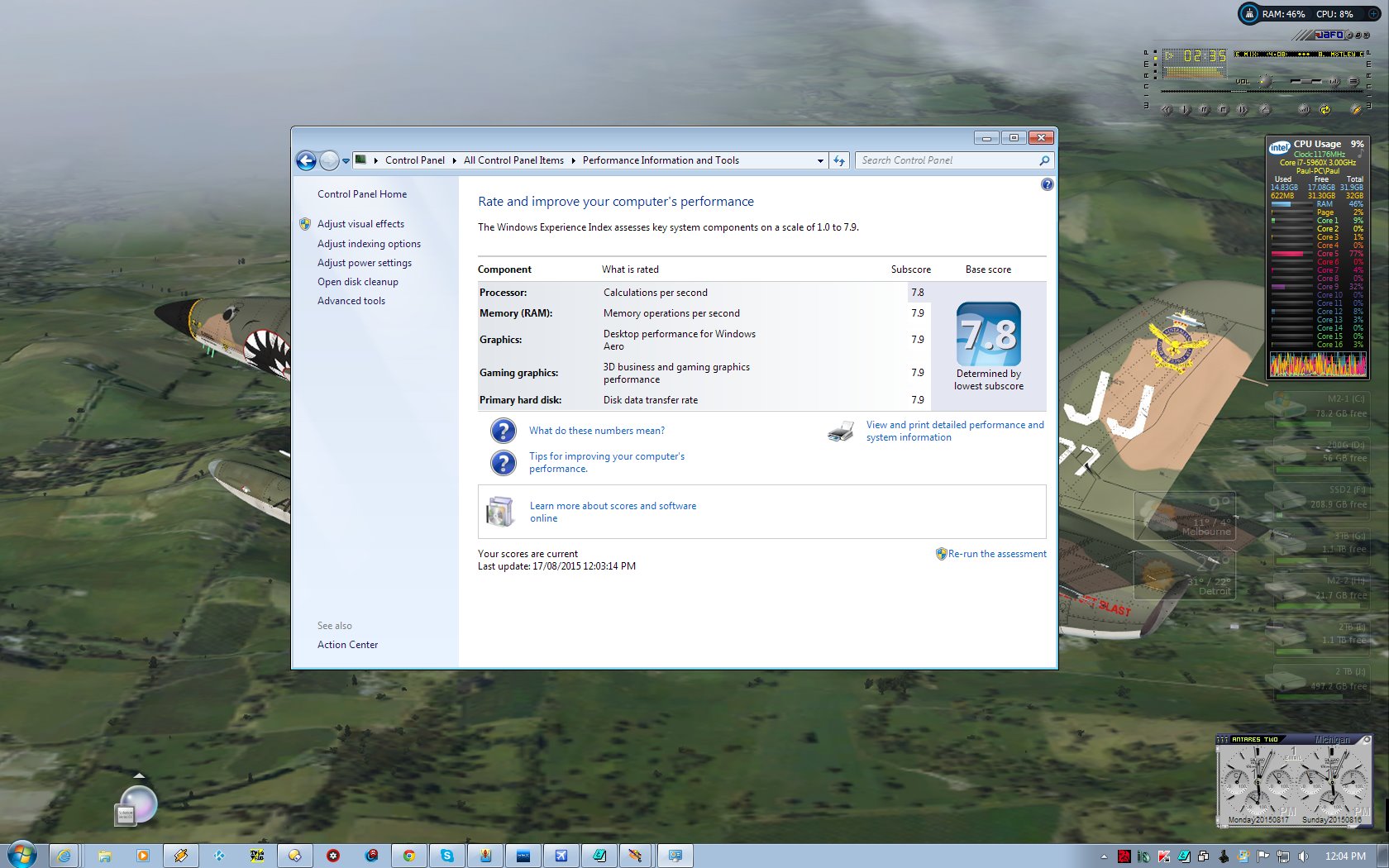
Probably should have shut everything down in the background first.....

Reply #125 Sunday, August 16, 2015 11:18 PM
Benchmarking....
Previously I had used the Resident Evil 5 Benchmark Demo to test my i7-920 with the GTX285 and achieved a handy 106.0 fps at my default 1680x1050x32 DX10.
The GTX590 got to 144.4 fps. ....a 40% increase.
This thing gets 250.8 fps. ...
Reply #126 Monday, August 17, 2015 10:04 AM
http://thehotfixshare.net/board/index.php?showtopic=16924
The link to get Win 7 to recognise DDR4 and thus finish a WEI test correctly....
It's kb2619497
Reply #127 Monday, August 17, 2015 10:32 PM
Just looking at this machine's file system..... there's over 7600 Gig of Harddrive space with an excess of 2 million 4 hundred thousand files....

Reply #128 Friday, August 21, 2015 12:31 PM
I calculated the cost of having several external drives and 2-3 internal HDD´s aswell as the 2 SSD´s running and thought it might be better to replace some of the externals and the internal HDD drives with one BIG GUY, to save a little money when it comes to energy consumtion overtime.
Thinking about buying the Seagate 8TB internal HDD it has 5400rpm and 128MB cache so i guess it will live long enough and will be fast enough also.
R/W is also decent for a HDD
It would replace a Western Digital external 1TB
Toshiba External 1TB (everything that has Toshiba written on it is dead for me, due bad support and incorrectly advertised Items)
It would also replace a 1 TB seagate and another Western digital Drive E which is quite new actually, may push that one into the other rig.
Reply #129 Friday, August 21, 2015 1:13 PM
Unless you're getting two of them to mirror, I would avoid that 8TB HD like the plague if you're going for reliability. The cutting edge of capacity is often flaky and prone to having issues, and 8TB of stuff is a whole hell of a lot of lost data when it flakes out six months in.

Reply #130 Friday, August 21, 2015 1:54 PM
If you're looking for speed, 5400rpm is not what you want. this is just one example. if you google 5400rpm vs 7200rpm you'll be able to check out other test comparisons.
Reply #131 Friday, August 21, 2015 8:40 PM
Unless you're getting two of them to mirror, I would avoid that 8TB HD like the plague if you're going for reliability. The cutting edge of capacity is often flaky and prone to having issues, and 8TB of stuff is a whole hell of a lot of lost data when it flakes out six months in.
psychoak's quite right. It's why I have my 8TB in 6 separate drives...3 platters, 2 SSDs and a M.2x4.
The OS and important-to-me-for-speed FSX [game] are on the M.2x4 and it's auto-imaged as well as backed up to separate platters via Acronis and Syncback.
Speed-wise I'm not to fazed by what the platters do or don't do...as they're for data backup, not for proggy loading...and I have the two SSDs for more proggy/game space as needed....
Biggest issue I have is the overly-redundant redundancy backups I've managed to accumulate...eg essentially 4 full installs of FSX [now whittled to 3] as each is over 200gig...
Reply #132 Saturday, August 22, 2015 7:24 AM
Did you guys miss the point where i said i would replace the drives i have with that single one?
No data will be lost when it breaks since it will remain on the other drives.
5400rpm doesnt mean the drive is slow it actually does R/W of 150MB/s which is good enough.
http://www.storagereview.com/seagate_archive_hdd_review_8tb
Since this is for large data, like ZBrush files, I do not need to be concerned about the 20MB that i would get more out of a 7200RPM drive eventually.
Reply #134 Saturday, August 22, 2015 8:47 AM
Did you guys miss the point where i said i would replace the drives i have with that single one?No data will be lost when it breaks since it will remain on the other drives.
Nope...it's still eggs in one basket ....whatever is added to it can be lost en-masse unless you're doing current backups from it to the other drives as well....something you didn't mention...
Reply #135 Saturday, August 22, 2015 12:32 PM
i know your drive is fast, i have a supertalend RDIIP with 480GB 
Yes indeed i did not mention that, the drive will only hold the data from those drives, no data will be added once everything is transfered.
Eliminating the power consumtion of 4-5 drives actually, since it will hold all of the data stored on my externals.
I will be replacing them with one and that will be great for me.
Especially since those externals consume up to 45watts i have 2 older ones that use to run non stop, these still have a power adapter, the other two are USB drives i intend on keeping one (not the toshiba since that shit consumes 36watts and doesnt even work on USB3) but it is a USB3 drive Toshiba logic.
Does not work on this rig and does not work on the other and did not at work.
While replacing 2 of the internals aswell i´ll have room for one power savy internal that will be used as data muncher for new data.
This will ultimately clean up my desk and save me money on the long run.
And if the drive breaks as mentioned i have all of the data still in the cupboard.
Backups: well i use to make backups from my OS drive but not of all my data since that would require to many drives or like in this case one huge BIG BOY.
There is - always was simply to much data to make copys from it all.
Also a reason why i intend on getting it now.I must say i had lots and lots of faith in all of my drives and they didnt dissapoint me luckely. 
Personal Data like Fotos Dokuments and stuff like that did get burned on DVD´s.
Reply #136 Saturday, August 22, 2015 10:45 PM
The best way to store data is to develop a photographic memory.... which would be great for letters and such.
Mightn't be so good if you lost your photos, however.... but you'd remember what they looked like. 
Reply #137 Sunday, August 23, 2015 12:36 AM
That's a terrible way to store data, people have accidents all the time!
Reply #138 Sunday, August 23, 2015 4:16 AM
That's a terrible way to store data, people have accidents all the time!
Uhm i feel like im Hijacking Jafo´s topic here, which was not my intention.
It isnt as terrible as you think, the way i run this rig atm however should seem terrible to you.
I have about 6,7 Terrabytes to transfer and no additional drive to do that.
That one drive has a consumtion of about 10W while the 4-5 drives are close 150-170W in total.
My PC runs a endless marathon it gets turned off to do neccessary updates and restarts right after.
It is on all of the time and the lower consumption alone will make a difference.
I know that people do run into Hardware failure at a certain point, but so far all of my drives served me well, even my externals which are not rated to run constantly survived over some years.
I just think its worth a shot for 250USD and if it fails after 2 years, i´ll have all of the data on the other drives, while i will be able to buy a new one because i saved enough money on my electricity bill.
Reply #139 Sunday, August 23, 2015 10:21 AM
benmanns....psychoak was probably replying to starkers' comment...
My platters are set to spin down when not being accessed so they're green enough....but the 'real crap' is on the drive no platter could match anyway.
Every now and then I access those platters and I can literally listen to them spin up before they are read....
Reply #140 Saturday, October 3, 2015 9:58 PM
After 3 weeks away in the sunny US of A, it was the first time since the build that the machine had been turned off longer than 3 days [That was for the Superbikes at Philip Island].
It was shut down on the 3rd Sep...and fired up again on the 28th.
Apart from the usual 2 or 3 cold boots to get to the Win Flag logo it was quite painless....only had to deal with the 360+ emails.....
Meanwhile, the old machine now Terry's also fired up OK the first time [about the 1st of Oct] and got its 100+ emails....
...but not now.
Looks like something fundamentally is screwed....most likely with Comodo IS ... as that's not showing up at all.
I had left it with the notification icon for Win 10 upgrade...and assume it's been downloading in the background [and using me as a torrent mule] as it'll be the 4th machine I move to Win 10 [eventually].
Looks like I'm spending the next few days sorting out an OS that's been live [as my primary] since 2009 - 6 years of abuse at the hands of an 'expert' [at abuse].
Should be 'entertaining'.....define 'entertaining'....oh, god we're all gonna die? ...
Please login to comment and/or vote for this skin.
Welcome Guest! Please take the time to register with us.
There are many great features available to you once you register, including:
- Richer content, access to many features that are disabled for guests like commenting on the forums and downloading skins.
- Access to a great community, with a massive database of many, many areas of interest.
- Access to contests & subscription offers like exclusive emails.
- It's simple, and FREE!
|
|
Page 7 of 12 | |
|
|---|
Reply #121 Tuesday, May 26, 2015 7:30 AM
As an example the surround sound system cost me less than $30.00. A DVD player for $8.00 and a 27 inch LCD TV for $50.00. Not bad for just under $100.00. It can ale only dowso double as a monitor. The only downside is it doesn't have audio outputs.