





































Edge8- First WB Theme
Wednesday, February 6, 2013 by SimplexDesigns | Discussion: Skinning
I have been messing with an app for windows vista all the way to 8 called Windows style builder. That tool allowed me to create custom themes for a patched system. Although it was great, there are in fact flaws that prevent me from doing certain things. Owning object desktop for 2 years now, I realized that I could try my hands at making a windowblinds skin. This windowblinds theme features a custom roll up button on the top right of each window. I still have much to do; Start menu, Drop boxes, Storage bars etc... I also have designed a dock Background to match the theme: https://www.wincustomize.com/explore/objectdock_backgrounds/429/
What do you think so far?

~Incomplete start menu

 |
|
Page 2 of 2 | |
|
|---|

Reply #22 Thursday, February 7, 2013 11:15 PM
Quoting xxinightxx, reply 7Do you know where this is located in the Win8 theme?
The aero like overlay on the control panel
Edit Vista / 7 Control Panel and Navigation Parts
Control Panel
Side bar.
(branding is the glyph or image you can add over the side bar image)
You can also change the text colours of that area too.
Change skin colours/Edit colours/ when the edit colours window opens, down the bottom you will see a button that says "Edit vista/7 part colours"
click on that button.
a new window pops up. and the first section is called "control panel"
that is where you change the colours for that area.
close and apply when you are done to see results.
sorry for all the questions. lol Im just use to the other app I used to develop themes have a good help section. Anyways, is there a way to shift the whole start menu to the right a little so that it lines up better with my taskbar?

Reply #23 Thursday, February 7, 2013 11:23 PM
Quoting Wizard1956,
reply 18
If you plan on uploading the WindowBlind on WC, you'll need to rename it. Edge is taken. LINK
It will be on deviantart then. I'm not renaming just because someone has the same name. Lol. I had the name for my edge theme for a long time. I'm too attached to its name. Plus I did upload the dock here and it seemed to vanish from my uploads. Not to happy with how uploads are handled here.
Uploading here with the same skin name isn't the issue. The issue arises when someone downloads it/installs it and they already have a WB of the same name installed.
Whether you distribute via Deviantart or Wincustomize will make no difference to someone in that position...
Reply #24 Thursday, February 7, 2013 11:26 PM
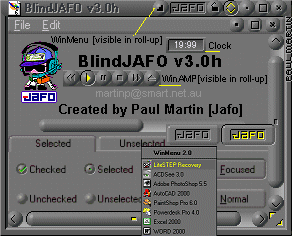
Mine tended to have 'unique' names....
Also, a simple grey gradient can be pretty commonplace.....this one dates back before both Deviantart or Wincustomize were founded ...and the 3.0h' indicates it'd already been old in 2001...
Reply #25 Thursday, February 7, 2013 11:35 PM
Mine tended to have 'unique' names....
Also, a simple grey gradient can be pretty commonplace.....this one dates back before both Deviantart or Wincustomize were founded ...and the 3.0h' indicates it'd already been old in 2001...
Wow, thats a really old one  yeah, I updated the Theme name just so no issues arise.
Quick q, do sounds still work in windowblinds. I remember using a mac theme that had custom caption button sounds.

Reply #26 Thursday, February 7, 2013 11:48 PM
Quoting xxinightxx,
reply 19
Quoting Wizard1956,
reply 18
If you plan on uploading the WindowBlind on WC, you'll need to rename it. Edge is taken. LINK
Uploading here with the same skin name isn't the issue. The issue arises when someone downloads it/installs it and they already have a WB of the same name installed.
Whether you distribute via Deviantart or Wincustomize will make no difference to someone in that position...

Reply #27 Friday, February 8, 2013 4:00 AM
Yes on the sounds.
The start menu can be changed, some during layout and cutting, some wth margins, some with size of parts. No magic move all left or right button though.Did you use Vamps tutorials?
Reply #28 Friday, February 8, 2013 4:07 AM
By the screen shot, if you shift your start menu image that far to the right, you will have to adjust text settings and margins to compensate, could be difficult for you. Have you considered just altering the taskbar. You can push it left or right or just extend it.
Reply #29 Friday, February 8, 2013 4:09 AM
FYI, everything is slightly different on the vert taskbar, don't know if you have messed with that yet.
Reply #30 Friday, February 8, 2013 5:23 AM
The start menu can be changed, some during layout and cutting, some wth margins, some with size of parts. No magic move all left or right button though.Did you use Vamps tutorials?
what do we type in in the code editor for the sounds to work? I have a roll.wav in the skin folder that I would like to use
Reply #31 Friday, February 8, 2013 3:34 PM
I am not positive, but I believe the sound support is just for buttons.
Go to the usi2 frame section, under extra settings enable button sound support. from there you should be able to figure the rest, if not ,throw another post up.Hope it helps,DT1
Please login to comment and/or vote for this skin.
Welcome Guest! Please take the time to register with us.
There are many great features available to you once you register, including:
- Richer content, access to many features that are disabled for guests like commenting on the forums and downloading skins.
- Access to a great community, with a massive database of many, many areas of interest.
- Access to contests & subscription offers like exclusive emails.
- It's simple, and FREE!
|
|
Page 2 of 2 | |
|
|---|
Reply #21 Thursday, February 7, 2013 11:11 PM
It will be called that once windowblinds for win8 comes out