







































CursorFX 2.11 Update Available
Monday, June 18, 2012 by Island Dog | Discussion: WinCustomize News
We have released an update to CursorFX 2 with fixes for some issues that some users were experiencing. CursorFX lets users change their bland default Windows cursor with one of thousands available for download.
CursorFX 2.11 update:
- Fix for Flip3D mode
- Windows 8 installation is not recommended
Current customers can update via Stardock Central or download via their account downloads page.
Get CursorFX here - https://www.stardock.com/products/cursorfx/

 |
|
Page 1 of 8 | |
|
|---|

Reply #3 Monday, June 18, 2012 1:37 PM
You certainly got that right. 
Thanks for the heads up. 
BTW, when SDC updates itself, the "Updating Stardock Central" text runs off the window slightly.

Reply #4 Monday, June 18, 2012 1:46 PM
Not showing up yet in SDC or my accounts download page yet for me. 

Reply #5 Monday, June 18, 2012 1:48 PM
@ Carl and Bryan -
Did you guys install it (CFX) with Impulse and not uninstall it the same way? It shows up in mine...
Reply #6 Monday, June 18, 2012 1:54 PM
This is on my XP laptop: Installed and running, still shows as version 2.10 in SDC. Relaunching SDC shows the update as still available.
From the CFX UI, check for updates opens the SDC folder, but doesn't launch SDC. Is this normal?
Update: Just ran SDC from Win7/64 with the same results with the exception that it prompted for a reboot with Win7.

Reply #7 Monday, June 18, 2012 1:55 PM
Not showing up on my SDC either, and I installed it stand alone. Also, v2.10.023 is showing up in the store. not 2.1.1. 

Reply #8 Monday, June 18, 2012 2:13 PM
I ran the update from SDC, it went through the install, but upon opening SDC again the update still shows available and the version installed shows 2.10 
If I open CFX it shows version 2.11 in the "about" screen. 


Reply #10 Monday, June 18, 2012 2:29 PM
Carl, did you install with Impulse [originally]? If so, you can uninstall with Impulse or with CCleaner. It should then show up in sdc.
Mine shows CFX 2.11 in the 'About' screen as well as in sdc.
Reply #11 Monday, June 18, 2012 2:55 PM
Okay, I cleaned out my browser history and cookes thinking maybe that might be the problem, it wasn't.
SDC and My Accounts, Download page is still not showing the update.
I'm using IE9 if that will makes a difference.
Guess I will just keep checking back.
Reply #12 Monday, June 18, 2012 2:56 PM
Tom... I think sdc works to track stuff installed through it (and not yet installed). I wonder what would happen if you uninstalled with CCleaner (backup your CFX skins) and then opened sdc?
Reply #14 Monday, June 18, 2012 3:32 PM
But then, it still shows as available in SDC. Maybe I do need to reboot. I wasn't prompted to.
Reply #15 Monday, June 18, 2012 3:44 PM
No reboot necessary, Jim... not on my system, anyway.
Reply #16 Monday, June 18, 2012 5:17 PM
Rebooted, still shows as not installed. The cursor I was running is still running, but I can't open config to change cursors. I can't get the shortcut in start panel all progs to run. I can only launch by going to program files and launching CursorFX Control Panel.
Still shows as not installed.
Reply #17 Monday, June 18, 2012 5:27 PM
OK, thought I'd uninstall, roll back to the last version.....got this.
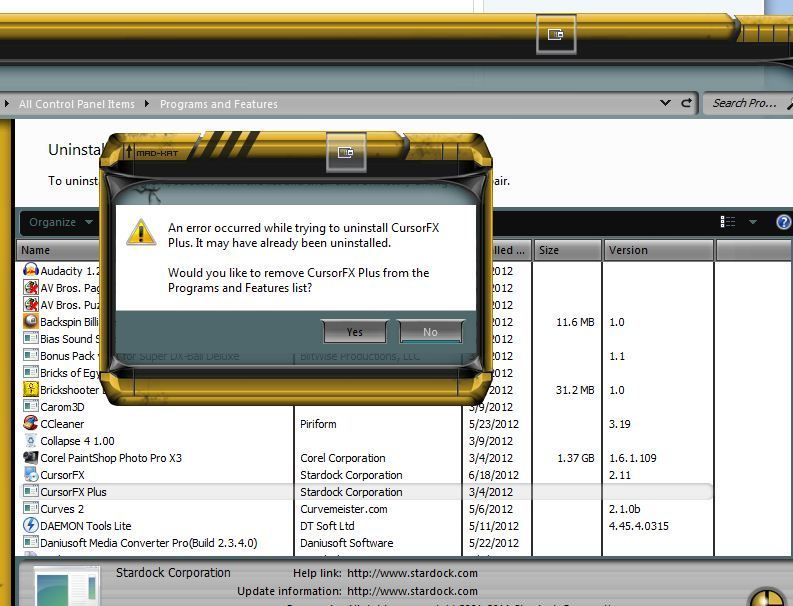
Reply #18 Monday, June 18, 2012 5:30 PM
Looks like a bug thread is in order? I'm gonna roll back.
Reply #19 Monday, June 18, 2012 5:31 PM
Still shows as not installed.


Please login to comment and/or vote for this skin.
Welcome Guest! Please take the time to register with us.
There are many great features available to you once you register, including:
- Richer content, access to many features that are disabled for guests like commenting on the forums and downloading skins.
- Access to a great community, with a massive database of many, many areas of interest.
- Access to contests & subscription offers like exclusive emails.
- It's simple, and FREE!
|
|
Page 1 of 8 | |
|
|---|
Reply #1 Monday, June 18, 2012 12:02 PM
Don't see it in SDC.