













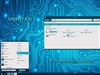












logon screens help
Saturday, January 26, 2002 by kat be | Discussion: WinCustomize Talk
i've downloaded a few logon screens and none of them will work except for liquid. i've tried wicked, the cat, & stop! they only have the logonxp file in their zip while liquid has a bunch of files (all of which i extracted into logon studio). none of the others will load into logonstudio. anyone have a clue what could be wrong?
Invincible13
Reply #2 Sunday, January 27, 2002 3:07 PM
Reply #2 Sunday, January 27, 2002 3:07 PM
Also go into LogOn Studio and load the files, then refresh the list and they should show up...
DJ_Inferno
Reply #3 Sunday, January 27, 2002 9:57 PM
Reply #3 Sunday, January 27, 2002 9:57 PM
when i load the files and refresh, nothing happends? what am i doing wrong? what logonxp dir are you talking about?
Invincible13
Reply #4 Monday, January 28, 2002 6:41 PM
Reply #4 Monday, January 28, 2002 6:41 PM
You should put them into C:/Program Files/Wincustomize/LogonStudio/templates
Then go onto Logon Studio and go to the same place and they should be there...
Then go onto Logon Studio and go to the same place and they should be there...
1Renegade
Reply #5 Monday, January 28, 2002 6:48 PM

Reply #5 Monday, January 28, 2002 6:48 PM
Does anyone happen to know what the name of the skin is being used on the screenshot for the LogonStudio website? Sharp! A real eye catcher!
Someone please help me investigate...thanx!
Someone please help me investigate...thanx!
Please login to comment and/or vote for this skin.
Welcome Guest! Please take the time to register with us.
There are many great features available to you once you register, including:
- Richer content, access to many features that are disabled for guests like commenting on the forums and downloading skins.
- Access to a great community, with a massive database of many, many areas of interest.
- Access to contests & subscription offers like exclusive emails.
- It's simple, and FREE!
Reply #1 Saturday, January 26, 2002 8:23 PM