




































DesktopX 4 BETA Now Available!
Wednesday, October 19, 2011 by GunslingerBara | Discussion: WinCustomize News
A new DesktopX 4 BETA is available for DesktopX 3.x & Object Desktop customers. This BETA release is focused on streamlining the interface and configuration options. Visit the DesktopX Themes library on WinCustomize.com to select from hundreds of choices to change your desktop look and feel.
This BETA can be downloaded from your products download page on the Stardock store. Logon with your Stardock account at https://store.stardock.com/myaccount/products. Please note this beta update is only downloadable via the Stardock store and not available via Impulse.

Create and use a complete new desktop environment specifically designed for your needs.

Custom sidebars can contain all types of information including system information, weather, clocks, and much more.
 |
|
Page 3 of 5 | |
|
|---|
Reply #42 Thursday, October 20, 2011 10:00 AM
Don't want to lose my Pro............. I'll wait....... 

Reply #43 Thursday, October 20, 2011 10:42 AM
I just installed it.. worked fine (2nd time).
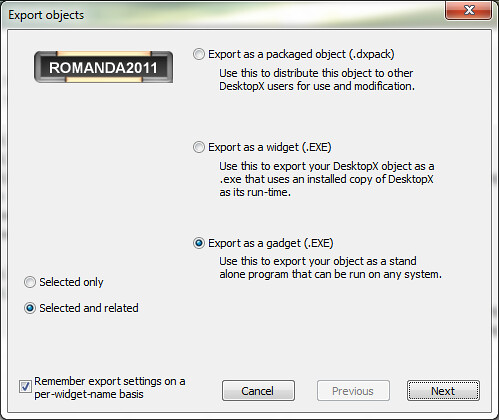
Opened up my last widget, saved the .dexktop then exported it to a gadget (i have pro), and it exported just fine.
Open the exe and run it, seems to be working.. but back to one of the issues i have had since 3.x changed the pref's to "always on top" and "run at startup" (via default dialog), this time, it just vanished. Use to leave "pieces" on the screen.
Reloaded the EXE and the pref's had been saved, and all the "pieces" were there and looked correct. So maybe just a bug in the saving of the preferences.
Will have to try it on a few more machines.
LOVE the idea of DX being looked at again, in ANY fashion.
PLEASE stop all the BS, they are doing US the favor by working on this, its not a money maker, unless everyone here is willing to put up 1k or more for a PRO license? and i doubt that would even cover a minor upgrade.
BTW: this is the most excited i have been about WC/Dx in about 4 years.. might actually need to start playing with some new things.




Reply #46 Thursday, October 20, 2011 2:27 PM
Was abou to ask the same and maybe an official can jump in here : CAN PRO USERS UPDATE, TOO WITHOUT LOOSING PRO FUNCTIONALITY ?
Reply #47 Thursday, October 20, 2011 2:46 PM
All I know, Carl, is that I installed this version and it overwrote my Pro version. So I can't see how David still has pro.

Reply #49 Thursday, October 20, 2011 6:32 PM
I've seen this behaviour when closing a widget/gadget and then reopening it again immediately afterwards (old post). I think the folder 'cache' is still being 'used' by the system when the widget is reopened too quickly.
Changing those settings (on top, autostart) possibly prompts an immediate close/reopen of the gadget with the new settings? This would instigate the same problem.

Reply #50 Friday, October 21, 2011 12:05 AM
Well, that was unpleasant.
The download link doesn't show the correct version until the install window, as Phoon said.
I'm on Vista 32 and had DX Pro 3.5 (just plain ol' 3.5, not the other updated versions of 3.9x etc.) installed already, and on the first try, I installed the update on top of it.
Results:
Try #1 (without uninstalling)
Created in - C:\Program Files\Stardock\DesktopX
Welcome screen borked (background doesn't appear.)
DLL Error - DXBuilder won't load (This procedure entry point DG_PngFromResource could not be located in the dynamic link library DirectGUI.dll)
Try #2 (after uninstall of 3.5 and CCleaner)
Created in - C:\Program Files\Stardock\Object Desktop\DesktopX Pro
DesktopX doesn't seem to be installed on machine
Welcome screen won't run at all (see above)
Themes run (without included wallpapers or scripts)
Widgets and gadgets run
Objects don't run
DXBuilder: All scripts removed, no script editor
Export Gadget option still available
Themes, objects, widgets location - C:\Users\Public\Documents\Stardock\DesktopX
Try #3 (after uninstall, CCleaner, reinstall of 3.5, and one more attempt to install update)
Created in - C:\Program Files\Stardock\Object Desktop\DesktopX Pro
More created in - C:\Users\Public\Public Documents\Stardock\DesktopX\
Welcome screen borked.
DLL Error DXBuilder won't load
Themes, objects won't load (same DLL error)
Existing widgets comprised of more than one object are borked, scripts don't work.
Gadgets work, obviously
Then I spent the rest of the day restoring my PC. Maybe I'm just unlucky, but this doesn't appear to work on Vista 32. Have any other Vista users tried it? Everyone seems to be on W7.
Reply #51 Friday, October 21, 2011 12:36 AM
Totally unrelated question, as I use my Pro at the moment and have to skip the Beta: What is the WindowBlinds skin used in the 1st screenshot ?

Reply #52 Friday, October 21, 2011 1:49 AM
I'm another person who's grateful that DesktopX is being worked on. It doesn't appear to be justified financially to spend any resources on the program for Stardock, so they are doing those of us who admire/use/make things with the program a big favour. It's too bad it isn't working out yet, but I'm hoping for the best.
I pay close attention to what's going on with DesktopX, and it's become obvious to me that there are some very skilled and clever people here who have a great deal of admiration for the program, and also have the best wishes for it's success, but are frustrated with the unsolved problems.
I'll be cheering all of you on from the sidelines, hoping it gets sorted out. Thanks for all the trouble Stardock and the dedicated users are taking, and the best of luck to you.
Reply #53 Friday, October 21, 2011 1:55 AM
I think it goes without saying how I feel about it. 
Reply #54 Friday, October 21, 2011 10:21 AM
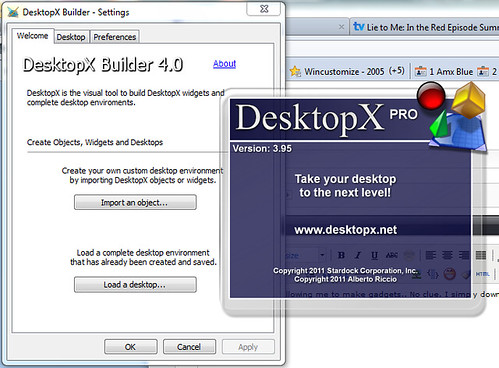
As for how mine is allowing me to make gadgets.. No clue. I simply downloaded the file from the link in this thread, installed it.
I run DESKTOPX PRO from my start menu, then when i go to export i see:
As for my previous comment about stopping the bashing, im simply trying to keep the updates coming, and i know (as a programmer) if the first time i take it to work on something and get based to death, id just quit, or move on to something else. Not my intent to piss anyone off.
Reply #55 Friday, October 21, 2011 12:27 PM
Well, I wonder why I lose Pro when I install it? Maybe I should alter the install directory?
Also, I see above that export as windows sidebar gadget isn't there. I want to keep that ability.
Reply #57 Friday, October 21, 2011 6:49 PM
Well, looks like...lol. But I still have it and may keep what I have because of it. 
Reply #58 Friday, October 21, 2011 7:13 PM
This is aimed at Gunslinger I guess, but any DesktopX staff really: Where to next?
Do you want us to just keep posting bugs etc. here?
What about using one of those websites which tracks issues separately so you can see what's been reported and indicate status or how you might address them.
What should we focus on?
Is there some particular change or feature that needs testing by those of us that managed to get it installed and (mostly) functional?
Ta.

Reply #59 Friday, October 21, 2011 8:25 PM
I too am grateful that it is getting attention, but I would at least like to be able to get what I've paid for without having to use impulse to get it.
It's going on months that one has not been able to download a workable version of Pro without using Impulse. FIX IT... PRETTY FUCKING PLEASE!!!
Thank you for the attention to DX4 and I DO look forward to continued progress 

Reply #60 Tuesday, October 25, 2011 10:29 PM
Running just fine right now on Win7 x64 here, downloaded this evening. Currently using the Steampunk theme.
Please login to comment and/or vote for this skin.
Welcome Guest! Please take the time to register with us.
There are many great features available to you once you register, including:
- Richer content, access to many features that are disabled for guests like commenting on the forums and downloading skins.
- Access to a great community, with a massive database of many, many areas of interest.
- Access to contests & subscription offers like exclusive emails.
- It's simple, and FREE!
|
|
Page 3 of 5 | |
|
|---|
Reply #41 Thursday, October 20, 2011 8:51 AM
Thanks. [e digicons]:'([/e]