





































WindowBlinds 7.3 Released!
Wednesday, October 12, 2011 by Island Dog | Discussion: WinCustomize News

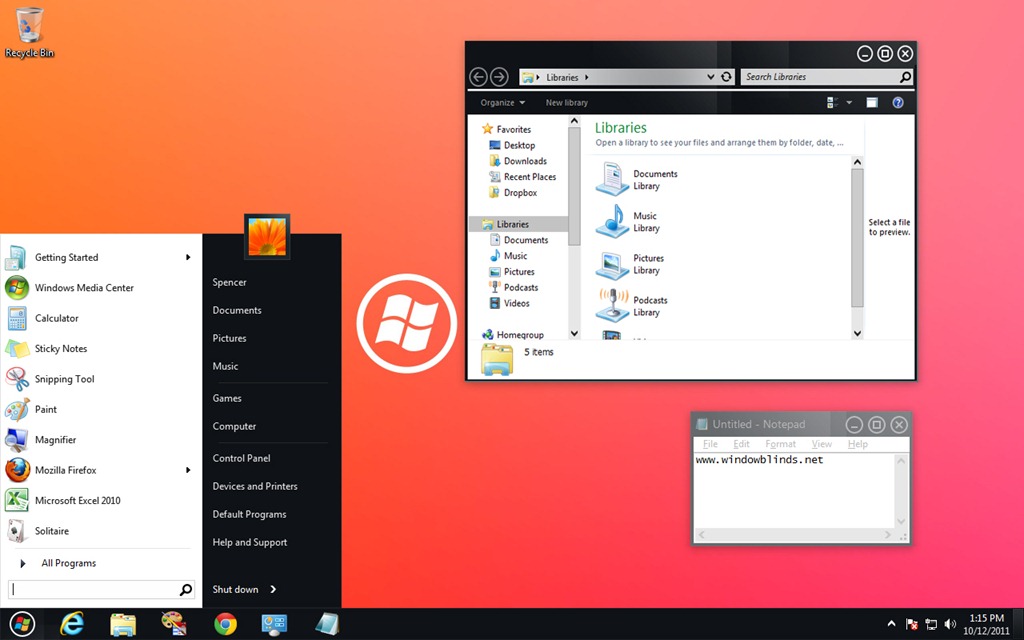
WindowBlinds is a program that allows users of Windows 7, Vista, and XP to totally change the look and feel of the Windows GUI to anything they'd like by applying any of the thousands of free skins available. WindowBlinds 7.3 adds a Windows 8 skin along with a Metro skin (for registered users) as well as enhancing skinning support for Office 2010, bug fixes, and a number of other updates.
The enhanced version, which allows on-the-fly recoloring of skins and access to more enhanced skins is $19.95 or can be purchased as part of Object Desktop, Stardock's flag-ship suite of desktop experience utilities for $49.95.
Users can download WindowBlinds 7.3 at www.windowblinds.net.
 |  |
 |
|
Page 1 of 4 | |
|
|---|



Reply #5 Wednesday, October 12, 2011 2:55 PM
I´ve updated my WB today, but the new WB works not correct with deskscapes 3.
Every time i apply a WB skin, my animated background freeze and i must open deskscapes and apply my dream again.
Sorry for my bad english.

Reply #6 Wednesday, October 12, 2011 3:02 PM
Though it has to be install without Impulse now right ? though can you give the link to D/L the installation file for subscribers users ??
Thanks

Reply #7 Wednesday, October 12, 2011 3:15 PM
neophil78 - ici - https://store.stardock.com/login.aspx?ReturnUrl=/myaccount/products

Reply #8 Wednesday, October 12, 2011 3:29 PM
Impulse told me the update was available, and to install through Impulse. Is it safe to try this method?

Reply #10 Wednesday, October 12, 2011 3:35 PM
Thanks DrJBHL for the link. Everything I ever purchased is right there. Impulse  .
.
I'm planning to renew my subscription for Object Desktop. I've been having strong fear that Windowblinds will not be a front runner when windows 8 is out, even worse, may not survive. Then again, my new subscription will end before windows 8 is out. 
I'll go for the renew No goodbye to Windowblinds yet

Reply #11 Wednesday, October 12, 2011 3:54 PM
Thanks a bunch for the link , I think I will go back and close my support ticket now.
Reply #12 Wednesday, October 12, 2011 4:00 PM
Thanks DrJBHL
More generally, how Object Desktop subscribers (with Impulse expired) who are not Wincustomize subscribers and/or who who are Wincustomize subscribers but don't come or don't see annoucements for new updates for OD products will be informed that there's updates avaible ?? 
Reply #13 Wednesday, October 12, 2011 4:04 PM
As Impulse is over (it's just working till the end of current subscription period) i think you'd better download and install with self installer which you can find at the link given ... (as same as all your OD products ...)
P.S: what a pity ...

Reply #14 Wednesday, October 12, 2011 4:18 PM
Not sure what caused this but...I just updated WindowBlinds and when my pc rebooted my screen brightness was reduced a bunch...almost like I just put on sunglasses...I rolled it back to the previous version and my brightness was restored.

Reply #15 Wednesday, October 12, 2011 4:24 PM
downloaded the file, will probably wait for a few days before installing to see what transpires. (33 second download) 

Reply #16 Wednesday, October 12, 2011 4:24 PM
Hi Steve, didn't see that problem here, wonder if something else that you are running didn't like the WBs update. 

Reply #17 Wednesday, October 12, 2011 4:30 PM
Every time i apply a WB skin, my animated background freeze and i must open deskscapes and apply my dream again.
Sorry for my bad english.

Reply #18 Wednesday, October 12, 2011 4:49 PM
Until our new app is ready, either by visiting WinCustomize, Twitter, or Facebook. 

Reply #19 Wednesday, October 12, 2011 4:57 PM
I updated mine to version 7.3 without a hitch. When I went to my account I was told to go to the Stardock Store, login and get the download from there. No problem.

Reply #20 Wednesday, October 12, 2011 5:03 PM
just updated with Impulse . No problem. 
I'll see in the future...
PS: not very fan of W8 look..
Please login to comment and/or vote for this skin.
Welcome Guest! Please take the time to register with us.
There are many great features available to you once you register, including:
- Richer content, access to many features that are disabled for guests like commenting on the forums and downloading skins.
- Access to a great community, with a massive database of many, many areas of interest.
- Access to contests & subscription offers like exclusive emails.
- It's simple, and FREE!
|
|
Page 1 of 4 | |
|
|---|
Reply #1 Wednesday, October 12, 2011 1:58 PM
to find again