








































Stardock's Tiles Beta for Object Desktop Subscribers
Thursday, March 10, 2011 by Island Dog | Discussion: WinCustomize News
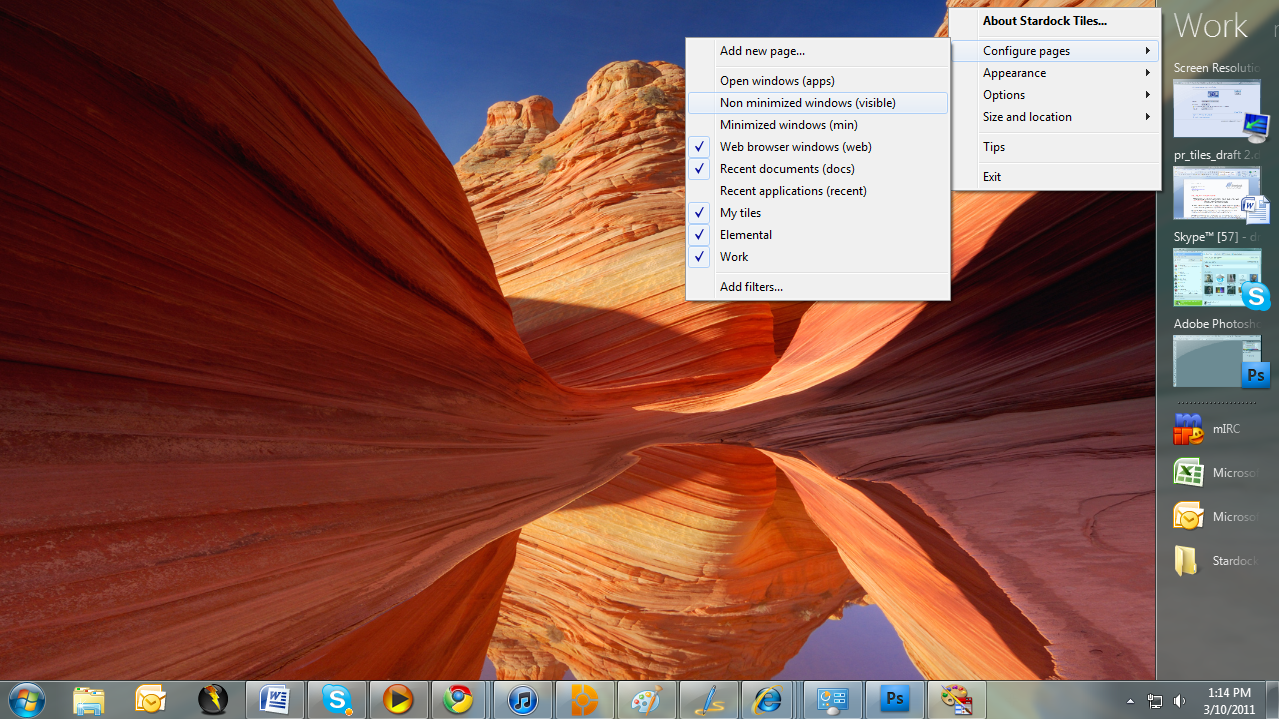
Today we are excited to release the first beta for a new desktop app called Tiles.
https://forums.wincustomize.com/406240
“The current PC task management metaphor hasn’t really changed in over 18 years,” said Brad Wardell, President & CEO of Stardock. “In recent years, mobile devices have been able to introduce users to more modern metaphors of arranging their digital life. Tiles has been designed to update that metaphor to the PC experience.”
Tiles works by taking advantage of the wider aspect ratios of today’s desktops. On the right side of the screen, a page of tiles is displayed. Users may have multiple pages that they organize as they see fit or make use of several sample page filters such as displaying only active windows or only web pages. Users can then switch between pages either by clicking on the page title or on touch systems by sweeping their finger across the page to “turn the page”.
Also check out the getting started guide: Getting Started with Stardock Tiles
Tiles is available via Impulse for current Object Desktop subscribers!
 |
|
Page 1 of 3 | |
|
|---|

Reply #2 Thursday, March 10, 2011 2:55 PM
Neat application. Fun to play with at start, but I do not see it taking over the default in my case. 
Reply #3 Thursday, March 10, 2011 3:11 PM
Jeff, this was a stroke of genius. Watch the trade journals for reviews on this!
Actually this wasn't developed by Jeff.




Reply #6 Thursday, March 10, 2011 4:05 PM
Why the option to hide taskbar without providing a start button/menu option?
Reply #7 Thursday, March 10, 2011 4:11 PM
Because you can still access the startmenu using the windows key (or by clicking at the top right / left of the tiles bar)
Reply #8 Thursday, March 10, 2011 4:21 PM
can't seem to make that work..

Reply #9 Thursday, March 10, 2011 4:25 PM
nice one. the "match current system skin" option is pretty cool.
Reply #10 Thursday, March 10, 2011 4:31 PM
or by clicking at the top right / left of the tiles bar
can't seem to make that work..
You need to go the very top edge, so if the bar is on the left then top left of the screen, on the right then top right of the screen.
Reply #11 Thursday, March 10, 2011 4:54 PM
Reply #12 Thursday, March 10, 2011 5:08 PM
Click on the "make desktop visible" and drag whichever icon you want into Tiles.
Reply #13 Thursday, March 10, 2011 5:41 PM
You need to go the very top edge, so if the bar is on the left then top left of the screen, on the right then top right of the screen.
Not very functional on multi-monitor systems. You have 2 monitor, set up with primary monitor on the right (2-1) and put Tiles on the right side of monitor 2. (I have it there)
It's virtually impossible to hit the right spot to open the startmenu.

Reply #14 Thursday, March 10, 2011 5:48 PM
Pretty cool guys! Nice to see you coming up with new stuff! 
Reply #15 Thursday, March 10, 2011 6:22 PM
Agree with #13. If you have it positioned anywhere but the outer edge of either monitor.. you cannot hit the magic spot to trigger start menu. It shouldn't have to be a mystery spot to do this IMO.
I did have a couple of snafu's.
Open browser and go to a site. Drag the URL from the address bar to any tile page. Now try to unpin it. I can't! I had to find it in the registry and delete the key to do it.
If I repeat the process and use a program instead of a url I CAN unpin it just fine.
Had one instance where I set the taskbar to hide. It would not come back until I rebooted.

Reply #16 Thursday, March 10, 2011 6:22 PM
Okay I have tried it and it works, like the fact that it is skinable or you can use the current WB theme.
Now I just have to see where and how it fits in with ObjectDock, Fences and even the Windows 7 Taskbar. I'm seeing a little duplication here now between some of the software.
How are the rest of you thinking about this, switch to using Tiles only or a combination of the software?
Reply #17 Thursday, March 10, 2011 6:31 PM
Seems to me that if I dragged my taskbar to the right hand side of the screen and made it double size, I would achieve more or less the same thing........... 
Maybe I'm missing something? 
Reply #18 Thursday, March 10, 2011 6:38 PM
Isn't necessarily an either/or for me. It's a work application, and groups my apps. I had been using sub-docks in winstep, but this is easier.
Looks good too. It's parallel is WorkShelf... in some ways, and if I wish to use WinStep then I use WorkShelf and add a tab for "Work" and put the same apps there. BUT, if I'm working from browsers, then it's a hassle.
Reply #20 Thursday, March 10, 2011 6:51 PM
I did have a couple of snafu's.
Open browser and go to a site. Drag the URL from the address bar to any tile page. Now try to unpin it. I can't! I had to find it in the registry and delete the key to do it.
If I repeat the process and use a program instead of a url I CAN unpin it just fine.
Had one instance where I set the taskbar to hide. It would not come back until I rebooted.
You should be able to unpin by holding shift and dragging it back off or using the right click menu.
The startmenu feature is just something that was added as a test feature.
Please login to comment and/or vote for this skin.
Welcome Guest! Please take the time to register with us.
There are many great features available to you once you register, including:
- Richer content, access to many features that are disabled for guests like commenting on the forums and downloading skins.
- Access to a great community, with a massive database of many, many areas of interest.
- Access to contests & subscription offers like exclusive emails.
- It's simple, and FREE!
|
|
Page 1 of 3 | |
|
|---|
Reply #1 Thursday, March 10, 2011 2:44 PM
This is one fantastic app. Couldn't have asked for a better work organizer, SD.... Thank you so very much for this!
Jeff, this was a stroke of genius. Watch the trade journals for reviews on this!