








































Stardock's Tiles Beta for Object Desktop Subscribers
Thursday, March 10, 2011 by Island Dog | Discussion: WinCustomize News
Today we are excited to release the first beta for a new desktop app called Tiles.
https://forums.wincustomize.com/406240
“The current PC task management metaphor hasn’t really changed in over 18 years,” said Brad Wardell, President & CEO of Stardock. “In recent years, mobile devices have been able to introduce users to more modern metaphors of arranging their digital life. Tiles has been designed to update that metaphor to the PC experience.”
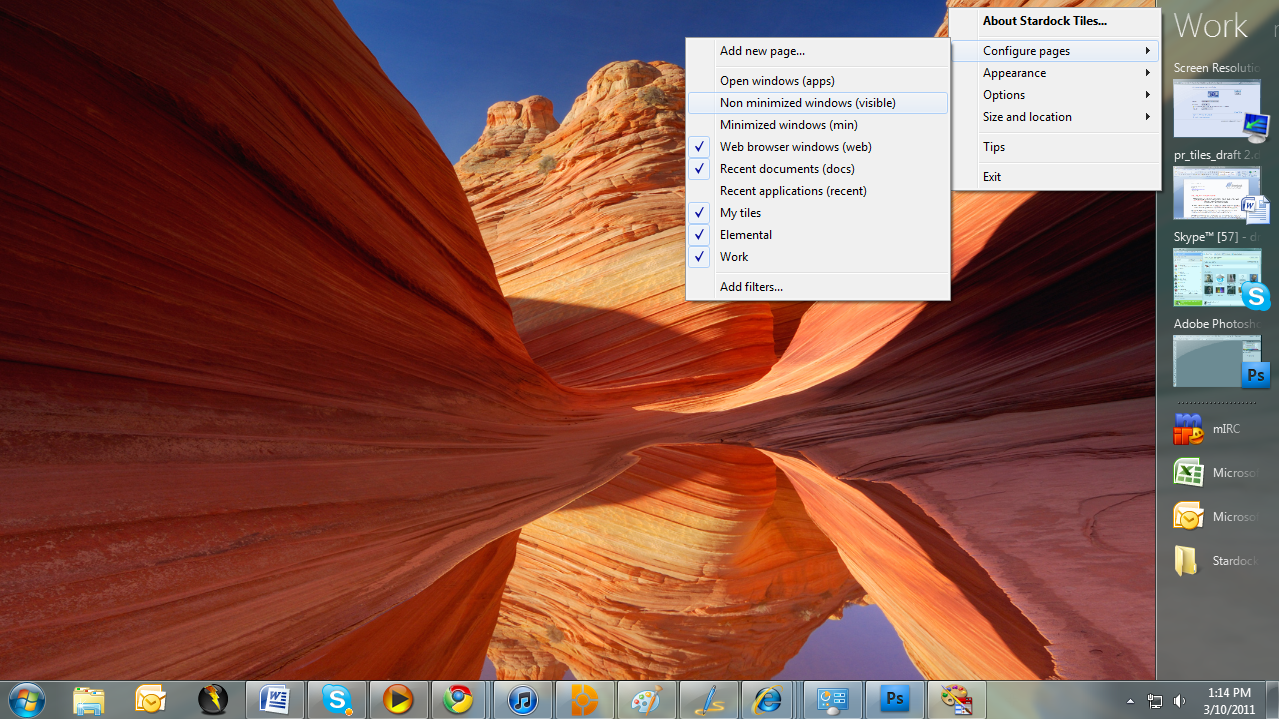
Tiles works by taking advantage of the wider aspect ratios of today’s desktops. On the right side of the screen, a page of tiles is displayed. Users may have multiple pages that they organize as they see fit or make use of several sample page filters such as displaying only active windows or only web pages. Users can then switch between pages either by clicking on the page title or on touch systems by sweeping their finger across the page to “turn the page”.
Also check out the getting started guide: Getting Started with Stardock Tiles
Tiles is available via Impulse for current Object Desktop subscribers!
 |
|
Page 2 of 3 | |
|
|---|
Reply #22 Thursday, March 10, 2011 7:44 PM
That will be a limitation of fences.. You would need to move them first.

Reply #23 Thursday, March 10, 2011 8:14 PM
Is there a way of keeping programs or files/folders on one of the pages if they are closed, or is this app just for programs that are currently open?

Reply #24 Thursday, March 10, 2011 8:50 PM
Funny how something new comes out right when my subscription expires.
I smell a conspiracy.

Reply #25 Thursday, March 10, 2011 9:23 PM
should.. yes. The right click menu option doesn't do it though.
Shift-Drag does work.
Reply #26 Thursday, March 10, 2011 9:38 PM
I smell a conspiracy.
It took a lot of careful planning to arrange it that way too you know...
Reply #27 Thursday, March 10, 2011 9:39 PM
You should be able to unpin by holding shift and dragging it back off or using the right click menu.
should.. yes. The right click menu option doesn't do it though.
Shift-Drag does work.
Good to know. Dragging URLs to it was a quite late addition so I guess that didn't get noticed. I will look into it for the next update.
Reply #28 Thursday, March 10, 2011 9:42 PM
You can drag shortcuts to apps or documents or URLs to pages and they will be there regardless of if the app is running.
Reply #29 Thursday, March 10, 2011 9:57 PM
Does for me.
But when I right click and choose configure pages, and recent apps, the thing locks up and crashes.


Reply #31 Friday, March 11, 2011 2:47 AM
So far I love it! I got Object Desktop just to get this so now I've got lots to play with! 
Reply #32 Friday, March 11, 2011 4:13 AM
Playing with tiles now.......one impression is: The end of Object Dock? Tiles seems to do everything that Object Dock does for me and more......we will see....... 
Reply #33 Friday, March 11, 2011 6:04 AM
AHA!

Reply #34 Friday, March 11, 2011 6:13 AM
This program is freakin' awesome. fun to play with it. but, is it possible to add a filter in the tab "apps"? I added a new one for my messenger and i do not wnat my messenger in the "apps" tab.
Reply #35 Friday, March 11, 2011 6:45 AM
The apps page is designed to include all windows.
Based on feedback we may add in the ability to exclude apps from a given tab.

Reply #37 Friday, March 11, 2011 7:24 AM
I like that option (of being able to filter out apps)...although I also like the ability to see all running apps.
Reply #38 Friday, March 11, 2011 8:46 AM
I assume that you would be interested in constructive feedback since this is a beta? Is there any preferred feedback channel?
I really like where this app seems to be going. I imagine that it could replace the "multiple desktops for multiple contexts" paradigm that seems to be difficult to get working well in windows.
I've run into a few problems so far:
* I want to be able to pin shortcuts to folders that are related to the programs in certain tiles. Currently this leads to all Explorer windows being included in the programs listing of that tile and since I often have a good number of Explorer windows open this leads to clutter. There really should be some filtering based on the title of the window or similar so that only the relevant Explorer windows are included in a tile.
* The next problem is related. I run several applications that are java-based and with the current filtering Tiles cannot distinguish between them since the process-name is the same. Again, filtering based on the window title would solve this problem.
* Shortcuts should be copied when added to a tile. As it is, if you e.g. move a link from you quicklaunch toolbar to a tile and then remove it from the quicklaunch toolbar the link in Tiles will break!
Good work and good luck! 
/Daniel

Reply #39 Friday, March 11, 2011 8:59 AM
I have opened a beta feedback thread so issues can more easily be contained.
https://forums.wincustomize.com/406271
Reply #40 Friday, March 11, 2011 9:03 AM
Oh, and some further suggestions that would be really helpful:
* Support for sorting and organizing the shortcuts. It's nice to be able to add all related shortcuts to a tile but some are more relevant than others and I'd like to be able to decide which ones are listed first.
* Faster switching between tiles. E.g., have the mouse-wheel change tile when hovering over the tile-names. And/or enabling keyboard shortcuts for switching, e.g., as is common with "virtual desktops".
/Daniel
Please login to comment and/or vote for this skin.
Welcome Guest! Please take the time to register with us.
There are many great features available to you once you register, including:
- Richer content, access to many features that are disabled for guests like commenting on the forums and downloading skins.
- Access to a great community, with a massive database of many, many areas of interest.
- Access to contests & subscription offers like exclusive emails.
- It's simple, and FREE!
|
|
Page 2 of 3 | |
|
|---|
Reply #21 Thursday, March 10, 2011 7:10 PM
hmm fences that are at the edge of the screen when tiles is active are not moved towards the centre of the screen so they are stuck underneth when reserve desktop space is enabled