






































Microbe: Red (BETA)
Saturday, May 2, 2009 by sViz | Discussion: Sneak Previews
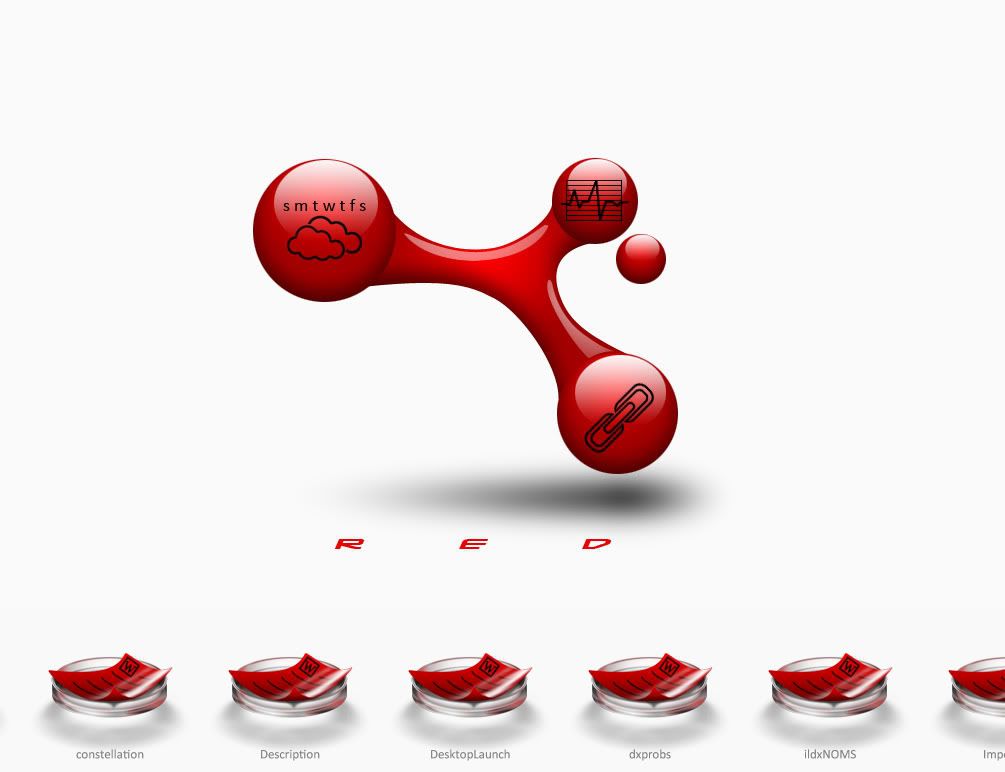
Experimenting with this one. Trying my hand at a bunch of new functions. Desktop icons arrange in the petri dishes at the bottom. It scrolls on hover. I'm hoping to have several custom file icons.
The large molecule in the middle is the wall. I centered it on a 2560x2048 canvas so it's rez independent. That allows me to position the black icons on top of them in DX. The smaller red orb moves in a circular perspective effect. At the very least, I expect to make a few more templates from this theme.
*** UPDATE 6/16/09: BETA 1.3 DOWNLOAD LINK ***
 |
|
Page 4 of 4 | |
|
|---|

Reply #62 Sunday, June 7, 2009 1:51 PM
you uploaded your copy huh? that's why the extra titles are there but no icons (since I don't have those)?

Reply #63 Sunday, June 7, 2009 2:22 PM
Ah, dang! One minor oversight on line 703. It should be an .ini file instead of the old .txt file.
Yeah, that's what was on my desktop, but the theme would have cleared all that if not for the error on 703.
On startup, the theme will copy the clean ini file to the DesktopX folder, so the first-time end user will start with a clean theme even if it's been previously set up.
I'll fix the error and re-up in a bit. Thanks for your help!
Reply #64 Sunday, June 7, 2009 3:17 PM
Updated. Also added a "Clear all settings" option to the theme; just click on the rotating molecule and select it from the popup menu. This will save you the trouble of having to find the ini file and delete it manually.
Reply #65 Sunday, June 7, 2009 4:54 PM
the clear all seems to clear all except weather zip code
had no trouble this time running it and creating a new
color change - the icons change, the weather/cpu text changes, the calender text on the center molecule doesn'
will the wall eventually change to a different color too?
I don't think the FF hanging is strictly due to Microbe even though it appears to only happen when it's running...
I still get a hang with FF clicking on any of the window buttons - I get the glow on mouse over, I click and nothing happens except the glow stays - using motoXP b1
IE is fine as are regular folder window, wb config, etc - seems to just be FF - have waited over 60 secs = nada
hmmm... just switched skins a couple of times - vienna2, xenomorph, antares - checking a few with/without those extra (midi?) buttons - FF is fine with those - but even though Antares has the keep on top switch it doesn't have the others moto has...
have to find another.....
gotta be the buttons...
Alien Technology has extra buttons (pin on top & media player on top left, winamp bottom left plus calc and notepad bottom right)
initially had about an 8 sec delay from pressing min to actually minimizing - tried several times same delay - after a few minutes, no more delay
clicking calc or notepad on the ff window either had no effect or ff went dead until minimizing/restoring from the taskbar
unload microbe everything works
clicking calc or notepad on the IE window worked with microbe running
motoxp has a transparency button - thought AT had one too, but I can't find it if it does... need to find another that does to see what happens...
gonna have to test some more themes out now...
Reply #66 Sunday, June 7, 2009 6:06 PM
huh... AT's desription says it has a transp button - coulda sworn the bottom right had 3 button, now there's only 2
Reply #67 Sunday, June 7, 2009 6:21 PM
Fixed now. Defaults to New York.
will the wall eventually change to a different color too?
The calendar text remains black. You have to change the wallpaper manually (click on the rotating molecule and choose 'Wallpaper'); forgot to mention the Microbe wallpaper pack can be downloaded HERE
Microbe is a busy theme (behind the scenes), so maybe that's causing some hang time . It's got seven scripts running, but save for the weather, RAM meter, and rotating molecule, most don't do anything until interacted with.
Reply #68 Sunday, June 7, 2009 6:29 PM
figured that... but why the hang and only on FF and only with what appears to be so far those skins with midi buttions (and possibly it's only the transp which may be what caused the initial hang with AT even though I can't find the button)
I don't expect you to answer that... (something for me to mull over later...)
Reply #69 Sunday, June 7, 2009 8:07 PM
suggestion...
what about some left/right scroll buttons? [e digicons]:karma:[/e]
kinda distracting seeing it zip left/right everytime I move my mouse towards the taskbar
Reply #70 Sunday, June 7, 2009 11:48 PM
kinda distracting seeing it zip left/right everytime I move my mouse towards the taskbar
It's got a half-second delay before scrolling on mouseover. I might make the delay longer or add an option to choose how the menu scrolls.
Reply #71 Sunday, June 7, 2009 11:56 PM


Reply #74 Tuesday, June 16, 2009 12:16 PM
Added hover/click to scroll option in addition to a few other fixes. The option is available in the theme options menu (click on the rotating molecule).
Hopefully, I got all the kinks worked out, and I can upload this weekend. I've been informed that it's buggy on Win7 so if that's what you've got, don't use the theme. If you're on Vista or XP let me know if you run into anymore problems.
Thanks. 

Reply #76 Tuesday, June 16, 2009 8:39 PM
yeah! buttons!!
(can't help it, I'm a Troll... pushing buttons is in my nature  )
)

Reply #78 Wednesday, June 17, 2009 2:34 PM
Hey, DrJ. I'm trying to narrow down what is causing the problem (whether it's something I changed or if it's in the original.) Try running the base widget, Base Weather and let me know if the same thing happens.
Please login to comment and/or vote for this skin.
Welcome Guest! Please take the time to register with us.
There are many great features available to you once you register, including:
- Richer content, access to many features that are disabled for guests like commenting on the forums and downloading skins.
- Access to a great community, with a massive database of many, many areas of interest.
- Access to contests & subscription offers like exclusive emails.
- It's simple, and FREE!
|
|
Page 4 of 4 | |
|
|---|
Reply #61 Sunday, June 7, 2009 1:47 PM
I get the misplace message when clicking 'desktop' also