





































Help Requested: HP Pavilion Laptop Is Rather Warm
Can anyone offer advice other than "Get a different one next time!"
Tuesday, December 30, 2008 by DrJBHL | Discussion: Personal Computing
Well, in short: My laptop gets pretty warm after a while and I'm turning to the Community in hopes that someone has had these problems and has found a good (and hopefully cheap) way of solving it.
Also, are there any practical and inexpensive heat sinks around?
Thanks ahead of time to all who give this post a glance and think about it.
 |
|
Page 2 of 2 | |
|
|---|

Reply #22 Tuesday, December 30, 2008 4:46 PM
Just out of curiosity what model number is your laptop?
Reply #23 Tuesday, December 30, 2008 5:30 PM
I recently have this problm with my 17 inch Toshiba Satellite laptop. Well when i first bought it 1.5 years ago, the internal fan was very loud and the laptop were heating up easily and frequently, i bought a fan, but a year later, the problem came back because the number of apps i used for the laptop increased, as in i used a lot of apps at the same time.
Anyays, it became to the point where the laptop was so hot that it shuts itself down. I thought it was the fan problem, but then i tried having lots of space between the fan and the table it rests on, as welll as the backwall, the problem persisted.
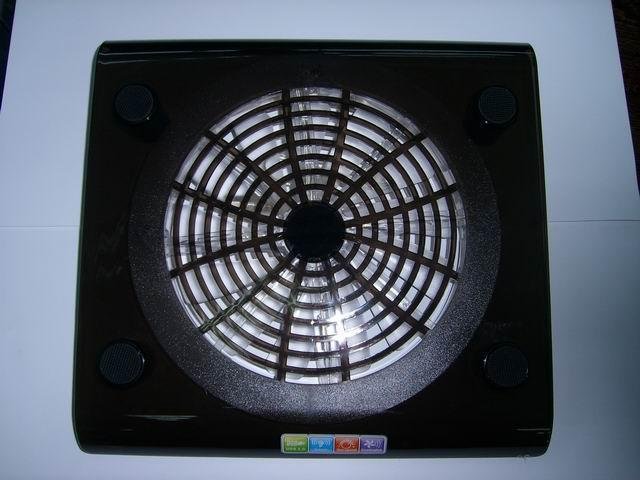
I went to a local computer shop, the guy gave me a notebook fan to try, and it solved the problem. The only difference between this fan i have and the previous one is that..well you know most notebook fan has like 2/3 fans distributed at sort of the back of the stand. this one is just one big fan which spins very fast. The guy at the shop told me to get a notebook stand with the biggest fan there is, perferably a stand with just one big fan. It helped to cool my laptop a lot.
Here is the pic and the link of the fan i am speaking about.
http://www.diytrade.com/china/4/products/4609158/Laptop_cooling_pad.html


Reply #25 Tuesday, December 30, 2008 7:22 PM
Glad I could be of some assistance.....
....glad I found someone to pass my flu on to.
...yes, am beginning to feel better now....

Reply #26 Tuesday, December 30, 2008 7:27 PM
Get one of those massive fans Doc, you know the ones I mean, the turbine powered ones planes use

Reply #27 Tuesday, December 30, 2008 8:05 PM
so....... Bigger IS better?? 


Reply #29 Tuesday, December 30, 2008 8:44 PM
I had a similar problem. My laptop(a Dell Inspiron 1501.) would overheat and turn off afterless than 30 minutes. I got some bottled air sprayed it through the vents and It worked fine. Dust had accumulated in the vents. Hope this helps.
Samurye.
Please login to comment and/or vote for this skin.
Welcome Guest! Please take the time to register with us.
There are many great features available to you once you register, including:
- Richer content, access to many features that are disabled for guests like commenting on the forums and downloading skins.
- Access to a great community, with a massive database of many, many areas of interest.
- Access to contests & subscription offers like exclusive emails.
- It's simple, and FREE!
|
|
Page 2 of 2 | |
|
|---|
Reply #21 Tuesday, December 30, 2008 4:38 PM
If it's the Nvidia problem, don't download HP bios patch, as it only adjusts fan speed to simply cool the laptop enough to delay the symptoms until after the warranty expires.