































Widget Request
Tuesday, April 29, 2008 by RPGFX | Discussion: Skinning
ok, if any of you expert widget makers out there would be willing to make me a very specific widget, let me know. What I'm looking for is this...
An age widget, which simply uses some kind of script to calculate someone's age based on me entering their date of birth or something like that, and displays just their name and age. And the age would change automatically when the person has a birthday. Is that possible? I'm sure one of you amazing widgeteers out there can do this. I've got alot of cousings and nephews and uncles who's age I can never remember. And rather than having to look up birthdays all the time, then figure out their age from that, I'd like my computer to do it for me... Ok, now here's the annoying part. I want it to be pretty simple looking... just a basic white background, with a little shadowing and bevelling on the edges, but not much. The width needs to be 138, (the width of all my other widgets I use) and the height of course would/could expand depending on how many names are on the list... And 8 pt Seogue for the font, in black. And just a simple little button that brings up a dialog to add names and birthdates...
I know I'm being kind of annoying and specific, but hey, if I'm going to request a widget, I might as well take all the guess work out of it, right?
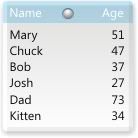
Below is a mock up that I came up with...
Thanks so much ahead of time if anyone decides to give this a go...
An age widget, which simply uses some kind of script to calculate someone's age based on me entering their date of birth or something like that, and displays just their name and age. And the age would change automatically when the person has a birthday. Is that possible? I'm sure one of you amazing widgeteers out there can do this. I've got alot of cousings and nephews and uncles who's age I can never remember. And rather than having to look up birthdays all the time, then figure out their age from that, I'd like my computer to do it for me...
 Ok, now here's the annoying part. I want it to be pretty simple looking... just a basic white background, with a little shadowing and bevelling on the edges, but not much. The width needs to be 138, (the width of all my other widgets I use) and the height of course would/could expand depending on how many names are on the list... And 8 pt Seogue for the font, in black. And just a simple little button that brings up a dialog to add names and birthdates...
I know I'm being kind of annoying and specific, but hey, if I'm going to request a widget, I might as well take all the guess work out of it, right?
Below is a mock up that I came up with...
Thanks so much ahead of time if anyone decides to give this a go...
 |
|
Page 1 of 3 | |
|
|---|
RomanDA
Reply #2 Tuesday, April 29, 2008 1:41 PM

Reply #2 Tuesday, April 29, 2008 1:41 PM
that one is REALLY tuff.. LOL
1. use DX.. make a new TEXT object:
'Called when the script is executed
Dim Person(10),Age(10)
Sub Object_OnScriptEnter
'setup a counter for the # of people
Cnt = 0
'increment the counter, Set the name, and birthday:
' Add more of these lines to add more people
Cnt = Cnt + 1 : Person(Cnt) = "RomanDA" : Age(Cnt) = "11/20/1964"
Cnt = Cnt + 1 : Person(Cnt) = "Alex" : Age(Cnt) = "9/5/1995"
object.text = "Current Ages: "& vbCRLF
For x = 1 To Cnt
'--- get the month difference between the dates
vMonths = DateDiff("m", Age(x), date)
'-- \ 12 = ' integer division (no decimals!!)
vYears = vMonths \ 12
object.text = object.text & Person(x) & ": " & vYears & vbCRLF
Next
End Sub
Thats it,
im sure there is a lot more to make it PERRRDY
1. use DX.. make a new TEXT object:
'Called when the script is executed
Dim Person(10),Age(10)
Sub Object_OnScriptEnter
'setup a counter for the # of people
Cnt = 0
'increment the counter, Set the name, and birthday:
' Add more of these lines to add more people
Cnt = Cnt + 1 : Person(Cnt) = "RomanDA" : Age(Cnt) = "11/20/1964"
Cnt = Cnt + 1 : Person(Cnt) = "Alex" : Age(Cnt) = "9/5/1995"
object.text = "Current Ages: "& vbCRLF
For x = 1 To Cnt
'--- get the month difference between the dates
vMonths = DateDiff("m", Age(x), date)
'-- \ 12 = ' integer division (no decimals!!)
vYears = vMonths \ 12
object.text = object.text & Person(x) & ": " & vYears & vbCRLF
Next
End Sub
Thats it,
im sure there is a lot more to make it PERRRDY
RPGFX
Reply #3 Tuesday, April 29, 2008 2:21 PM

Reply #3 Tuesday, April 29, 2008 2:21 PM
that's a different language to me, Rom...
thanks SirSmiley!
thanks SirSmiley!

SirSmiley
Reply #6 Tuesday, April 29, 2008 6:24 PM
No guarantees on that one.
Edit: Here's picture. These aren't the graphics that will be used just got sick of looking at red/white masks.

You will be able to disable the tooltip & set font type, color, size in widget preferences.
To add a person you click on the name header, to toggle the list you click on the age header.
Still figuring out where to put the delete button/function. This should be done Friday

Reply #6 Tuesday, April 29, 2008 6:24 PM
im sure there is a lot more to make it PERRRDY
No guarantees on that one.

Edit: Here's picture. These aren't the graphics that will be used just got sick of looking at red/white masks.

You will be able to disable the tooltip & set font type, color, size in widget preferences.
To add a person you click on the name header, to toggle the list you click on the age header.
Still figuring out where to put the delete button/function. This should be done Friday
RPGFX
Reply #7 Wednesday, April 30, 2008 7:16 PM
Reply #7 Wednesday, April 30, 2008 7:16 PM
that's fantastic! Thanks so much! Looking forward to it.
Philly0381
Reply #9 Wednesday, April 30, 2008 7:37 PM

Reply #9 Wednesday, April 30, 2008 7:37 PM
Now that is something that should find it's way to the gallery library, don't you think?
RPGFX
Reply #10 Wednesday, April 30, 2008 8:15 PM
Reply #10 Wednesday, April 30, 2008 8:15 PM
well I'm hoping he doesn't make it just for me... I was assuming it would be uploaded here...
SirSmiley
Reply #11 Wednesday, April 30, 2008 9:31 PM
Reply #11 Wednesday, April 30, 2008 9:31 PM
Thanks guys. 
It's definitely going in the gallery just like the Easy Button.
Have some more preferences coding and maybe some additional sort options for display. Right now it sorts by name but, will see about adding a sort by age and by birth date. Also, a reverse sort for those.
Actually this may have solved an issue with a CSV Parser object that got rejected a while back. And here I thought it was just Zubaz!

It's definitely going in the gallery just like the Easy Button.
Have some more preferences coding and maybe some additional sort options for display. Right now it sorts by name but, will see about adding a sort by age and by birth date. Also, a reverse sort for those.
Actually this may have solved an issue with a CSV Parser object that got rejected a while back. And here I thought it was just Zubaz!


SirSmiley
Reply #14 Saturday, May 3, 2008 1:43 PM
Reply #14 Saturday, May 3, 2008 1:43 PM
Update, warts and all.
The goal is to make this simple to skin by merely replacing the images.
All adjustments should be made automatically by the script
Features Implemented:
- Titles, List and Tooltip have separate text/font settings
- Simple ascending/descending sort by name or age. Click on column title.
- Height is resized automatically.
- Width is sizeable via a sizing control.
- Enable/Disable Tooltip option
To Do:
- Tooltip Date Format
- Add alarm option to script/widget preferences.
- Get regclean function to work directly from script.
- Skin graphics and icon
Screenshot Info:
First is sorted on name descending order
Second, is sorted on age descending.

The goal is to make this simple to skin by merely replacing the images.
All adjustments should be made automatically by the script
Features Implemented:
- Titles, List and Tooltip have separate text/font settings
- Simple ascending/descending sort by name or age. Click on column title.
- Height is resized automatically.
- Width is sizeable via a sizing control.
- Enable/Disable Tooltip option
To Do:
- Tooltip Date Format
- Add alarm option to script/widget preferences.
- Get regclean function to work directly from script.
- Skin graphics and icon
Screenshot Info:
First is sorted on name descending order
Second, is sorted on age descending.



SirSmiley
Reply #18 Monday, May 5, 2008 11:56 PM
Reply #18 Monday, May 5, 2008 11:56 PM
Late Sunday, I breakd it. Not because of DX or the script persay but, cloning 200 text objects for 100 records brought it down.
Have switched over to three text columns, just complicates some other features.
Hopefully you will be able to enable/disable the age and/or birth date column. The birth date for sure.
Oh, it's sizable now and will be pageable as in goes up or down a page of names at a time.
Quick Pic:

Have switched over to three text columns, just complicates some other features.
Hopefully you will be able to enable/disable the age and/or birth date column. The birth date for sure.
Oh, it's sizable now and will be pageable as in goes up or down a page of names at a time.
Quick Pic:

RPGFX
Reply #20 Tuesday, May 6, 2008 11:43 AM
Reply #20 Tuesday, May 6, 2008 11:43 AM
you're getting 2 more karma points from me today, Sir... thanks so much for putting so much into this. You rock.
BTW, are those random people, or do you actually know 2 people over the age of 100. That would be pretty incredible.
BTW, are those random people, or do you actually know 2 people over the age of 100. That would be pretty incredible.
Please login to comment and/or vote for this skin.
Welcome Guest! Please take the time to register with us.
There are many great features available to you once you register, including:
- Richer content, access to many features that are disabled for guests like commenting on the forums and downloading skins.
- Access to a great community, with a massive database of many, many areas of interest.
- Access to contests & subscription offers like exclusive emails.
- It's simple, and FREE!
|
|
Page 1 of 3 | |
|
|---|
Reply #1 Tuesday, April 29, 2008 1:05 PM