
































Widget Request
Tuesday, April 29, 2008 by RPGFX | Discussion: Skinning
ok, if any of you expert widget makers out there would be willing to make me a very specific widget, let me know. What I'm looking for is this...
An age widget, which simply uses some kind of script to calculate someone's age based on me entering their date of birth or something like that, and displays just their name and age. And the age would change automatically when the person has a birthday. Is that possible? I'm sure one of you amazing widgeteers out there can do this. I've got alot of cousings and nephews and uncles who's age I can never remember. And rather than having to look up birthdays all the time, then figure out their age from that, I'd like my computer to do it for me... Ok, now here's the annoying part. I want it to be pretty simple looking... just a basic white background, with a little shadowing and bevelling on the edges, but not much. The width needs to be 138, (the width of all my other widgets I use) and the height of course would/could expand depending on how many names are on the list... And 8 pt Seogue for the font, in black. And just a simple little button that brings up a dialog to add names and birthdates...
I know I'm being kind of annoying and specific, but hey, if I'm going to request a widget, I might as well take all the guess work out of it, right?
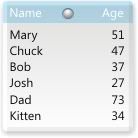
Below is a mock up that I came up with...
Thanks so much ahead of time if anyone decides to give this a go...
An age widget, which simply uses some kind of script to calculate someone's age based on me entering their date of birth or something like that, and displays just their name and age. And the age would change automatically when the person has a birthday. Is that possible? I'm sure one of you amazing widgeteers out there can do this. I've got alot of cousings and nephews and uncles who's age I can never remember. And rather than having to look up birthdays all the time, then figure out their age from that, I'd like my computer to do it for me...
 Ok, now here's the annoying part. I want it to be pretty simple looking... just a basic white background, with a little shadowing and bevelling on the edges, but not much. The width needs to be 138, (the width of all my other widgets I use) and the height of course would/could expand depending on how many names are on the list... And 8 pt Seogue for the font, in black. And just a simple little button that brings up a dialog to add names and birthdates...
I know I'm being kind of annoying and specific, but hey, if I'm going to request a widget, I might as well take all the guess work out of it, right?
Below is a mock up that I came up with...
Thanks so much ahead of time if anyone decides to give this a go...
 |
|
Page 3 of 3 | |
|
|---|
SirSmiley
Reply #42 Tuesday, June 10, 2008 9:24 PM

Reply #42 Tuesday, June 10, 2008 9:24 PM
Take it for a test run.
Head these warnings or perish in a pit of fire.
When you first run, you'll get a message box asking for the folder and the data file.
I've included one that has 25 names/birthdays. Browse to the folder in the folder dialog
and type "birthday" in the file name.
- Uncheck Use settings file if you want to use the registry to store all of the settings
- Make sure to check the "Use Existing file" since there is one provided
- The widget will close and you'll have to restart it.
- Two of the default font settings for some reason don't show up, so you'll have to edit the Title and Page Status Text settings
- Drag the bottom sizer to resize the height and hit the toggle button (bottom right corner) to shrink/grow the widget.
- Page Navigation buttons are in the header and footer at the right side
Things to know
- I'm not sure if the sort function will work for everyone as it uses ado.
- The cleanup selection in the menu generates a vbscript file in the directory and will remove all entries created. This is needed even if you use a settings file.
[email protected]
Head these warnings or perish in a pit of fire.
When you first run, you'll get a message box asking for the folder and the data file.
I've included one that has 25 names/birthdays. Browse to the folder in the folder dialog
and type "birthday" in the file name.
- Uncheck Use settings file if you want to use the registry to store all of the settings
- Make sure to check the "Use Existing file" since there is one provided
- The widget will close and you'll have to restart it.
- Two of the default font settings for some reason don't show up, so you'll have to edit the Title and Page Status Text settings
- Drag the bottom sizer to resize the height and hit the toggle button (bottom right corner) to shrink/grow the widget.
- Page Navigation buttons are in the header and footer at the right side
Things to know
- I'm not sure if the sort function will work for everyone as it uses ado.
- The cleanup selection in the menu generates a vbscript file in the directory and will remove all entries created. This is needed even if you use a settings file.
[email protected]
RPGFX
Reply #43 Wednesday, June 11, 2008 12:08 AM

Reply #43 Wednesday, June 11, 2008 12:08 AM
well, unfortunately, this widget is not working for me in a number of ways. the resize won't work... the only way I could close it was with ctrl/alt/del and end it there. and when I move one part of the window, both parts move together. I can't make them work independently. And most importantly, I get no menu on right click at all.  Has anyone else tried it out? Are you getting any of these problems too?
Has anyone else tried it out? Are you getting any of these problems too?
SirSmiley
Reply #44 Wednesday, June 11, 2008 10:54 AM
Reply #44 Wednesday, June 11, 2008 10:54 AM
Good to know. Looking for usability issues like this because of the animation/paging features.
The normal right click menu should a appear wherever the "move" cursor is but, you should also have access to it in the system tray.
The widget menu is a a left click menu at the top left just above the name title and your cursor will change to a hand when you hover it plus show a tooltip called "menu".
Want to know more about the resize issue. There are only two sizers, one on the right side (left-right arrow) and one on the bottom (up-down arrow). The bottom right corner (toggle button) has no resizing and I know the button is too close to the page down button. If you drag the bottom sizer beyond the list it should snapback to the bottom of the list.
Did you try the column sort yet? Click on the Name or Age Column Title.
It shouldn't matter but, what version of DesktopX are you using?
PS. I know there needs to be documentation but, I'm using you guys as guinea pigs because the majority of people ignore the documentation.
The normal right click menu should a appear wherever the "move" cursor is but, you should also have access to it in the system tray.
The widget menu is a a left click menu at the top left just above the name title and your cursor will change to a hand when you hover it plus show a tooltip called "menu".
Want to know more about the resize issue. There are only two sizers, one on the right side (left-right arrow) and one on the bottom (up-down arrow). The bottom right corner (toggle button) has no resizing and I know the button is too close to the page down button. If you drag the bottom sizer beyond the list it should snapback to the bottom of the list.
Did you try the column sort yet? Click on the Name or Age Column Title.
It shouldn't matter but, what version of DesktopX are you using?
PS. I know there needs to be documentation but, I'm using you guys as guinea pigs because the majority of people ignore the documentation.

zakai1369
Reply #45 Wednesday, June 11, 2008 11:26 AM

Reply #45 Wednesday, June 11, 2008 11:26 AM
Using DX 3.50.060 and XP SP2
First time I loaded it up it said Loading... and the alarm kept going off and it resized itself a few times lengthwise. I let it go for a few minutes to see if it would fix itself and it didn't.
Second time it stayed the small box and still said Loading... and had the alarm going off. When trying to click the menu area a few different times it would show the hand and say menu about 50% of the time and when I clicked it it made the sound effect for the menu but didn't show a menu.
Third time had same results as the second.
First time I loaded it up it said Loading... and the alarm kept going off and it resized itself a few times lengthwise. I let it go for a few minutes to see if it would fix itself and it didn't.
Second time it stayed the small box and still said Loading... and had the alarm going off. When trying to click the menu area a few different times it would show the hand and say menu about 50% of the time and when I clicked it it made the sound effect for the menu but didn't show a menu.
Third time had same results as the second.
RPGFX
Reply #46 Wednesday, June 11, 2008 12:43 PM
Reply #46 Wednesday, June 11, 2008 12:43 PM
Well, as far as the resizing, when I hover over the right/bottom I would get the resizing cursor, but dragging simply didn't do anything.
As far as trying the sort feature, the widget opened at a height of which I only could see the borders, not even the name/age columns. That's why the lack of resizing kind of shut me down completely...
I could get no right click menu of any kind, whether it be the normal one, or the widget one, or whatever. Right clicking anywhere on the widget did nothing.
I'm running Desktop X version 3.50.060
Hope I answered your questions. I'm not on my computer right now, but I'll open it and try to mess with it some more later today.
As far as trying the sort feature, the widget opened at a height of which I only could see the borders, not even the name/age columns. That's why the lack of resizing kind of shut me down completely...
I could get no right click menu of any kind, whether it be the normal one, or the widget one, or whatever. Right clicking anywhere on the widget did nothing.
I'm running Desktop X version 3.50.060
Hope I answered your questions. I'm not on my computer right now, but I'll open it and try to mess with it some more later today.
SirSmiley
Reply #47 Wednesday, June 11, 2008 5:17 PM
Reply #47 Wednesday, June 11, 2008 5:17 PM
Thanks for trying out guys.
This should fix some of the issues and I'm probably going to do away with the widget close when you first run it. It was suppose to fix the text issue.
zakai, I'm wondering if the menu issue isn't the button itself. It may be too small and perhaps should be sent over to the upper left corner. The other thing with the menu is it is quite large and takes a few seconds to build itself.
Get the hot potato here
This should fix some of the issues and I'm probably going to do away with the widget close when you first run it. It was suppose to fix the text issue.
zakai, I'm wondering if the menu issue isn't the button itself. It may be too small and perhaps should be sent over to the upper left corner. The other thing with the menu is it is quite large and takes a few seconds to build itself.
Get the hot potato here
zakai1369
Reply #48 Wednesday, June 11, 2008 7:03 PM
Reply #48 Wednesday, June 11, 2008 7:03 PM
Well I tried the new version and it's loading the actual widget easier and doesn't stay saying Loading... anymore and it didn't resize itself like last time. I was able to resize it myself in both directions but when I resized the inner colums a couple of them disappeared on me. The menu button shows up fine on mouseover but when I click it I still get no result. I tried clicking and holding it and tried clicking it and then not moving the mouse. Neither worked. I get the click sound effect and I get a small spike in cpu usage as if it is trying to do something but I never actually get the menu.
SirSmiley
Reply #49 Wednesday, June 11, 2008 8:07 PM
Reply #49 Wednesday, June 11, 2008 8:07 PM
Really appreciating the feedback.
Haven't been able to recreate the menu issue but, will see if I can streamline it somehow.
There are a lot of statements in it.
As for the columns did you get message box warning before they disappeared? I know what the main issue is with the columns and was trying to save a bunch of extra settings/variables.
Will have a work at those tomorrow.
Haven't been able to recreate the menu issue but, will see if I can streamline it somehow.
There are a lot of statements in it.
As for the columns did you get message box warning before they disappeared? I know what the main issue is with the columns and was trying to save a bunch of extra settings/variables.
Will have a work at those tomorrow.
zakai1369
Reply #50 Wednesday, June 11, 2008 9:33 PM
No.
Reply #50 Wednesday, June 11, 2008 9:33 PM
As for the columns did you get message box warning before they disappeared?
No.
SirSmiley
Reply #51 Saturday, June 14, 2008 12:07 PM
Reply #51 Saturday, June 14, 2008 12:07 PM
This should fix the column issue.
*Cough* I've done away with the widget closing but, you most likely will have to close it by the close button or from the tray icon. It will loop sliding up/down...for some reason this strikes me as funny and I'm sure anyone who's scripted something knows how it goes. Everything works perfectly, then for no apparent reason BAMMM.
Anyways, it's great to get the feedback especially on something this size.
Through the rabbit hole lies the treasure
*Cough* I've done away with the widget closing but, you most likely will have to close it by the close button or from the tray icon. It will loop sliding up/down...for some reason this strikes me as funny and I'm sure anyone who's scripted something knows how it goes. Everything works perfectly, then for no apparent reason BAMMM.
Anyways, it's great to get the feedback especially on something this size.
Through the rabbit hole lies the treasure
zakai1369
Reply #52 Saturday, June 14, 2008 1:18 PM
Reply #52 Saturday, June 14, 2008 1:18 PM
Ok deleted the old one and cleared it out of the DesktopX cache.
Downloaded this one and fired it up. This picture shows what I got from that. I'll write more below it.

The top image is the message that I got upon starting it up. It never actually exited though.
Right below that is what it looked like after click Ok.
Below that is what it looked like after hitting the toggle list button. Also in that shot is what I see when mousing over the menu button.
Hitting the menu button still didn't have any effect though.
Also I noticed after getting the error message it actually created a settings.ini file which contained the following:
[BirthdayTracker]
PageFormat=
WidthMinMax=135,919
HeightMinMax=44,563
PositionSize=761,487,199,432
Open=True
Visible=True
[Columns]
SortMethod=
SortColumn=
DateFormat=
ColPosSize=12,58,28,1
Col3Visible=0
Col2Visible=0
StatusBarDate=
[TextFont]
AlarmFont=
PgStatusFont=
TooltipFont=
ContentFont=
TitleFont=
[Tooltip]
DateFormat=
Enabled=
[Alarm]
LoopTime=
LoopSound=
Position=
Timer=
AlarmMute=
Enabled=
[Sounds]
Close=
Minimize=
Delete=
Add=
RecordSelect=
MenuSelect=
SlideDown=
SlideUp=
PageDown=
PageUp=
Alarm=
Enabled=
Tried closing it out and restarting figuring that maybe it would change something since it had the settings.ini already present. But everything worked the same.
Hope some of this helps.
Downloaded this one and fired it up. This picture shows what I got from that. I'll write more below it.

The top image is the message that I got upon starting it up. It never actually exited though.
Right below that is what it looked like after click Ok.
Below that is what it looked like after hitting the toggle list button. Also in that shot is what I see when mousing over the menu button.
Hitting the menu button still didn't have any effect though.
Also I noticed after getting the error message it actually created a settings.ini file which contained the following:
[BirthdayTracker]
PageFormat=
WidthMinMax=135,919
HeightMinMax=44,563
PositionSize=761,487,199,432
Open=True
Visible=True
[Columns]
SortMethod=
SortColumn=
DateFormat=
ColPosSize=12,58,28,1
Col3Visible=0
Col2Visible=0
StatusBarDate=
[TextFont]
AlarmFont=
PgStatusFont=
TooltipFont=
ContentFont=
TitleFont=
[Tooltip]
DateFormat=
Enabled=
[Alarm]
LoopTime=
LoopSound=
Position=
Timer=
AlarmMute=
Enabled=
[Sounds]
Close=
Minimize=
Delete=
Add=
RecordSelect=
MenuSelect=
SlideDown=
SlideUp=
PageDown=
PageUp=
Alarm=
Enabled=
Tried closing it out and restarting figuring that maybe it would change something since it had the settings.ini already present. But everything worked the same.
Hope some of this helps.
RPGFX
Reply #53 Thursday, July 17, 2008 12:04 PM
Reply #53 Thursday, July 17, 2008 12:04 PM
any new updates on this widget? This forum seems to have gone dead...
SirSmiley
Reply #54 Thursday, July 17, 2008 12:27 PM
Reply #54 Thursday, July 17, 2008 12:27 PM
Hey, thanks for the bump because I missed zakai's last post.
I'm not going to get to this for a few days as I'm on some groovy pain & muscle relaxants as my right side is acting up.
What I think I'll do is remove the resizing feature, leave auto sizing based on the list and the page navigation/scrolling. That way if someone wants to put it in their sidebar it should ber esier I thnik?
I'm not going to get to this for a few days as I'm on some groovy pain & muscle relaxants as my right side is acting up.
What I think I'll do is remove the resizing feature, leave auto sizing based on the list and the page navigation/scrolling. That way if someone wants to put it in their sidebar it should ber esier I thnik?
Please login to comment and/or vote for this skin.
Welcome Guest! Please take the time to register with us.
There are many great features available to you once you register, including:
- Richer content, access to many features that are disabled for guests like commenting on the forums and downloading skins.
- Access to a great community, with a massive database of many, many areas of interest.
- Access to contests & subscription offers like exclusive emails.
- It's simple, and FREE!
|
|
Page 3 of 3 | |
|
|---|
Reply #41 Friday, May 30, 2008 11:48 PM