





































WB & DX Can we combine the best of both?
Saturday, March 24, 2007 by RomanDA | Discussion: Skinning
I know this has been going around here as far as DX being "skinned".
I have begun working on a widget that will be able to change based on the WB skin you are running. I have the code i need to make this work as far as finding the info... but its KNOWING the right info im looking for, THAT is the hard part.
The idea (for this one) is to make a "FRAME" that would pull the info from the current WB skin.
Please understand i know DX, NOT WB, I have never skinned anything in WB, so im asking q's of those who know the UIS file format.
The "FRAME" would be made up of multiple images, look below.
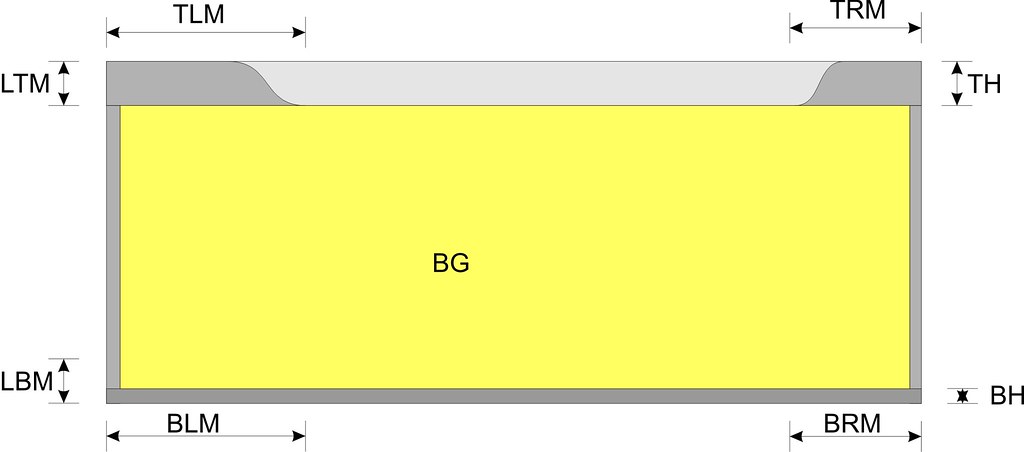
The INFO I need is:
TOP Image Left Margin (TLM)
TOP Image Right Margin (TRM)
Top Height (TH)
Left/Right Top/Bot Margins: LTM/LBM (same for right side)
Left right WIDTH as well.
Bottom Left/Right Margins BLM/BRM - Bottom Height
Also would need to know how to figure out what kind of BG (Background image) to use, image, or some color?
What I need is to know what "KEY" in the UIS file points to these items.
IE: TLM = TopTopHeight
TRM = TopBotHeight
If those are correct. I think this could really be kind of cool if it can be worked out. But since i know zippo about WB, im hoping one of you WB MASTERS will help me.
Is there anything else that we might be able to use? Buttons would be good to. I love it idea of making the widget look like a normal window, skinned of course. But if you have other ideas on how to do that to, please let me know. Lets make this a great community project!!
Thanks in advance!
RomanDA
I have begun working on a widget that will be able to change based on the WB skin you are running. I have the code i need to make this work as far as finding the info... but its KNOWING the right info im looking for, THAT is the hard part.
The idea (for this one) is to make a "FRAME" that would pull the info from the current WB skin.
Please understand i know DX, NOT WB, I have never skinned anything in WB, so im asking q's of those who know the UIS file format.
The "FRAME" would be made up of multiple images, look below.
The INFO I need is:
TOP Image Left Margin (TLM)
TOP Image Right Margin (TRM)
Top Height (TH)
Left/Right Top/Bot Margins: LTM/LBM (same for right side)
Left right WIDTH as well.
Bottom Left/Right Margins BLM/BRM - Bottom Height
Also would need to know how to figure out what kind of BG (Background image) to use, image, or some color?
What I need is to know what "KEY" in the UIS file points to these items.
IE: TLM = TopTopHeight
TRM = TopBotHeight
If those are correct. I think this could really be kind of cool if it can be worked out. But since i know zippo about WB, im hoping one of you WB MASTERS will help me.
Is there anything else that we might be able to use? Buttons would be good to. I love it idea of making the widget look like a normal window, skinned of course. But if you have other ideas on how to do that to, please let me know. Lets make this a great community project!!
Thanks in advance!
RomanDA
 |
|
Page 1 of 2 | |
|
|---|
vStyler
Reply #2 Saturday, March 24, 2007 5:05 PM

Reply #2 Saturday, March 24, 2007 5:05 PM
I dont know zippo about DX but I'd be willing to help you in anyway I can 


PurrBall
Reply #4 Saturday, March 24, 2007 7:29 PM

Reply #4 Saturday, March 24, 2007 7:29 PM
Here's a snippet with some comments..
[Personality]
; how many titlebar buttons do we have
BUTTONCOUNT=10
; are we custom color aware
ColourAware=0
; frame images
Top=NoiX\NoiXWindowFrameTopUis2.bmp
Left=NoiX\NoiXWindowFrameLeftUis2.bmp
Right=NoiX\NoiXWindowFrameRightUis2.bmp
Bottom=NoiX\NoiXWindowFrameBottomUis2.bmp
; maximised clip
TopFrame=2
LeftFrame=2
RightFrame=2
BottomFrame=2
; stretching.. 1 = stretch
TopStretch=1
LeftStretch=1
RightStretch=1
BottomStretch=1
; text
TextAlignment=0
TextShift=13
TextShiftNoIcon=-3
TextShiftVert=0
TextRightClip=76
; margins
TopTopHeight=5
TopBotHeight=5
BottomTopHeight=1
BottomBotHeight=1
LeftTopHeight=23
LeftBotHeight=5
RightTopHeight=23
RightBotHeight=5
[Metrics]
; titlebar height
CaptionHeight=23
[Personality]
; how many titlebar buttons do we have
BUTTONCOUNT=10
; are we custom color aware
ColourAware=0
; frame images
Top=NoiX\NoiXWindowFrameTopUis2.bmp
Left=NoiX\NoiXWindowFrameLeftUis2.bmp
Right=NoiX\NoiXWindowFrameRightUis2.bmp
Bottom=NoiX\NoiXWindowFrameBottomUis2.bmp
; maximised clip
TopFrame=2
LeftFrame=2
RightFrame=2
BottomFrame=2
; stretching.. 1 = stretch
TopStretch=1
LeftStretch=1
RightStretch=1
BottomStretch=1
; text
TextAlignment=0
TextShift=13
TextShiftNoIcon=-3
TextShiftVert=0
TextRightClip=76
; margins
TopTopHeight=5
TopBotHeight=5
BottomTopHeight=1
BottomBotHeight=1
LeftTopHeight=23
LeftBotHeight=5
RightTopHeight=23
RightBotHeight=5
[Metrics]
; titlebar height
CaptionHeight=23
vStyler
Reply #5 Saturday, March 24, 2007 7:33 PM
Reply #5 Saturday, March 24, 2007 7:33 PM
Im not gonna be much coding help Roman, any other capacity, let me know.
RomanDA
Reply #6 Saturday, March 24, 2007 8:35 PM
Reply #6 Saturday, March 24, 2007 8:35 PM
Thanks PurrBall.... just what the DR ordered!!
I have the frame working, sorta.. gotta work out bug and issues in different skins, etc.
Still need to know how it does the Background image/color, etc.
I have the frame working, sorta.. gotta work out bug and issues in different skins, etc.
Still need to know how it does the Background image/color, etc.
I.R. Brainiac
Reply #7 Saturday, March 24, 2007 9:19 PM

Reply #7 Saturday, March 24, 2007 9:19 PM
dl a windowblind skin and change the extension to .zip...extract and open the UIFiles in notepad.
vStyler
Reply #8 Saturday, March 24, 2007 9:21 PM
The desktop color \ image?
Reply #8 Saturday, March 24, 2007 9:21 PM
Still need to know how it does the Background image/color, etc.
The desktop color \ image?
canmandeco
Reply #9 Saturday, March 24, 2007 9:29 PM
You could try using this color:
[Colours]
ButtonFace=176 165 141 <----rgb values

Reply #9 Saturday, March 24, 2007 9:29 PM
Still need to know how it does the Background image/color, etc.
You could try using this color:
[Colours]
ButtonFace=176 165 141 <----rgb values
ZubaZ
Reply #10 Saturday, March 24, 2007 9:40 PM

Reply #10 Saturday, March 24, 2007 9:40 PM
I.R., He know HOW to read them . . just not WHAT he's reading all the time.

RomanDA
Reply #12 Sunday, March 25, 2007 6:23 AM
Reply #12 Sunday, March 25, 2007 6:23 AM
Thanks everyone..
1. Got the frame working -- sorta.. some skins are not right.
2. Have to try the background info provided above
3. Still have to work out the title text area.
I have to find what images/items are used for the area around the title
4. Also, need to work out the buttons for close/min/help, have to see how i can do that with the way the buttons are made in WB.
Thanks to all that have helped, here is a simple screen shot of 2-3 skins in "action"

As you can see there are issues with the text size, and the blue box is for the background, have to work that out too. Also some skins don't seem to work, have to see what they are missing or have different. This could be a pain if different skins have problems. Wonder if its WB5 skins that work right, and the older ones that dont. Have to work on it.
Any help is appriciated.
1. Got the frame working -- sorta.. some skins are not right.
2. Have to try the background info provided above
3. Still have to work out the title text area.
I have to find what images/items are used for the area around the title
4. Also, need to work out the buttons for close/min/help, have to see how i can do that with the way the buttons are made in WB.
Thanks to all that have helped, here is a simple screen shot of 2-3 skins in "action"

As you can see there are issues with the text size, and the blue box is for the background, have to work that out too. Also some skins don't seem to work, have to see what they are missing or have different. This could be a pain if different skins have problems. Wonder if its WB5 skins that work right, and the older ones that dont. Have to work on it.
Any help is appriciated.
c242
Reply #13 Sunday, March 25, 2007 7:11 AM

Reply #13 Sunday, March 25, 2007 7:11 AM
David : You are always welcome to send me a copy of the object/code as You know I am very interested in this and am willing to help...
Vad_M
Reply #14 Sunday, March 25, 2007 8:05 AM

Reply #14 Sunday, March 25, 2007 8:05 AM
Hey David! I have already done this a several month ago for SD Desktop. This is a little tool which can change current WB skin and(or) Toolbar Icons. It uses Shutdown dialog box and these icons for a simple preview. Let me know if you need this code and I'll send it for you (as a code because it is not a widget).
RomanDA
Reply #15 Sunday, March 25, 2007 10:19 AM
Reply #15 Sunday, March 25, 2007 10:19 AM
VAD,
Sure, id like to see what you did for this one.
C242,
I will be happy to share this once i get it working, or if i hit a wall.
Thanks for the help everyone!
I think its something that could be really cool, but it all depends on how easy it is to get things working right.
Sure, id like to see what you did for this one.
C242,
I will be happy to share this once i get it working, or if i hit a wall.
Thanks for the help everyone!
I think its something that could be really cool, but it all depends on how easy it is to get things working right.
thomassen
Reply #18 Sunday, March 25, 2007 11:52 AM

Reply #18 Sunday, March 25, 2007 11:52 AM
hey, this sounds neat.
But what happends if the suer don't have WB?
But what happends if the suer don't have WB?
RomanDA
Reply #19 Sunday, March 25, 2007 12:43 PM
They go home.. LOL they GET IT!!
I will have to make some kind of default "state" to each item, as it would also be the same when someone changes to "standard" skin (IE no WB skin).
Reply #19 Sunday, March 25, 2007 12:43 PM
But what happends if the suer don't have WB?
They go home.. LOL they GET IT!!
I will have to make some kind of default "state" to each item, as it would also be the same when someone changes to "standard" skin (IE no WB skin).
I.R. Brainiac
Reply #20 Sunday, March 25, 2007 1:02 PM
Reply #20 Sunday, March 25, 2007 1:02 PM
Have a look at CerebroJD's Skinnable WMP skin...it uses whatever WB skin you are running to skin the player.
He could help you I bet.
He could help you I bet.
Please login to comment and/or vote for this skin.
Welcome Guest! Please take the time to register with us.
There are many great features available to you once you register, including:
- Richer content, access to many features that are disabled for guests like commenting on the forums and downloading skins.
- Access to a great community, with a massive database of many, many areas of interest.
- Access to contests & subscription offers like exclusive emails.
- It's simple, and FREE!
|
|
Page 1 of 2 | |
|
|---|
Reply #1 Saturday, March 24, 2007 4:59 PM
On the TOP, it would be good to put in the text like "CALENDAR" "WEATHER".. i would need to know what the offsets are for that too, im sure its in this file..
Thanks!!