






































WB & DX Can we combine the best of both?
Saturday, March 24, 2007 by RomanDA | Discussion: Skinning
I know this has been going around here as far as DX being "skinned".
I have begun working on a widget that will be able to change based on the WB skin you are running. I have the code i need to make this work as far as finding the info... but its KNOWING the right info im looking for, THAT is the hard part.
The idea (for this one) is to make a "FRAME" that would pull the info from the current WB skin.
Please understand i know DX, NOT WB, I have never skinned anything in WB, so im asking q's of those who know the UIS file format.
The "FRAME" would be made up of multiple images, look below.
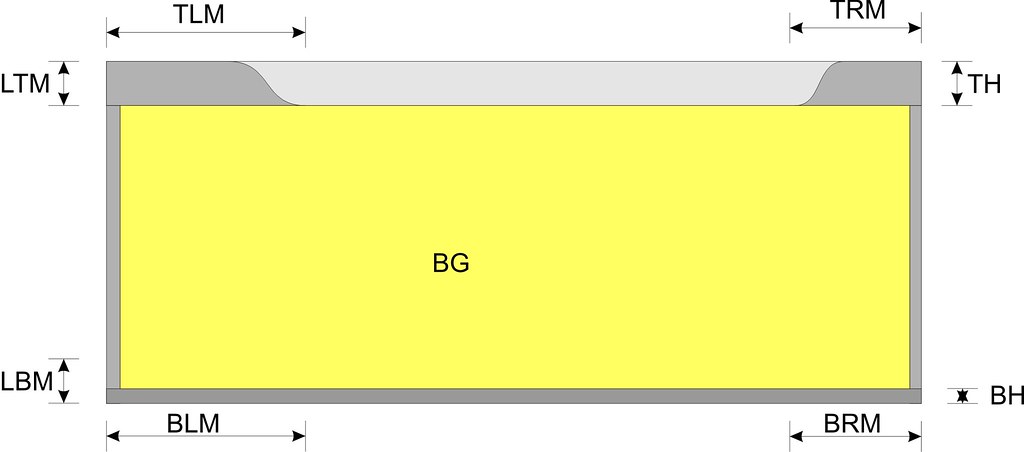
The INFO I need is:
TOP Image Left Margin (TLM)
TOP Image Right Margin (TRM)
Top Height (TH)
Left/Right Top/Bot Margins: LTM/LBM (same for right side)
Left right WIDTH as well.
Bottom Left/Right Margins BLM/BRM - Bottom Height
Also would need to know how to figure out what kind of BG (Background image) to use, image, or some color?
What I need is to know what "KEY" in the UIS file points to these items.
IE: TLM = TopTopHeight
TRM = TopBotHeight
If those are correct. I think this could really be kind of cool if it can be worked out. But since i know zippo about WB, im hoping one of you WB MASTERS will help me.
Is there anything else that we might be able to use? Buttons would be good to. I love it idea of making the widget look like a normal window, skinned of course. But if you have other ideas on how to do that to, please let me know. Lets make this a great community project!!
Thanks in advance!
RomanDA
I have begun working on a widget that will be able to change based on the WB skin you are running. I have the code i need to make this work as far as finding the info... but its KNOWING the right info im looking for, THAT is the hard part.
The idea (for this one) is to make a "FRAME" that would pull the info from the current WB skin.
Please understand i know DX, NOT WB, I have never skinned anything in WB, so im asking q's of those who know the UIS file format.
The "FRAME" would be made up of multiple images, look below.
The INFO I need is:
TOP Image Left Margin (TLM)
TOP Image Right Margin (TRM)
Top Height (TH)
Left/Right Top/Bot Margins: LTM/LBM (same for right side)
Left right WIDTH as well.
Bottom Left/Right Margins BLM/BRM - Bottom Height
Also would need to know how to figure out what kind of BG (Background image) to use, image, or some color?
What I need is to know what "KEY" in the UIS file points to these items.
IE: TLM = TopTopHeight
TRM = TopBotHeight
If those are correct. I think this could really be kind of cool if it can be worked out. But since i know zippo about WB, im hoping one of you WB MASTERS will help me.
Is there anything else that we might be able to use? Buttons would be good to. I love it idea of making the widget look like a normal window, skinned of course. But if you have other ideas on how to do that to, please let me know. Lets make this a great community project!!
Thanks in advance!
RomanDA
 |
|
Page 2 of 2 | |
|
|---|
RomanDA
Reply #22 Sunday, March 25, 2007 2:03 PM

Reply #22 Sunday, March 25, 2007 2:03 PM
Ok.. some more problems/issues.
Some skins have areas at the top for the title that are things like Rounded area, or Blocked out areas. Based on what i can see of the skins and the UIS file this is in the:
[Headerbar]
Image=

You can see the smaller images under them that seem to match the Image in the HEADER section. The problem is some have 3 images, some have 5, etc. How can i pick what one is the right one?
Its really confusing.
Vad,
I looked at the code, very similar to what i came up with, but I was "trying" to make this use a frame, that could be resized, and the "Shutdown" window image i dont think is what im after. Thats why this is so much more complicated.
Also,
The fonts still dont seem to match. The font (I Guess) I want to match is the one u see in the previews above. The one in just about any other window. But the font seems to be to large, etc. Im not sure, I really dont know all the details on how this works.
Any more suggestions on how to get the "right" font, Header, etc? Thanks all!!
Some skins have areas at the top for the title that are things like Rounded area, or Blocked out areas. Based on what i can see of the skins and the UIS file this is in the:
[Headerbar]
Image=

You can see the smaller images under them that seem to match the Image in the HEADER section. The problem is some have 3 images, some have 5, etc. How can i pick what one is the right one?
Its really confusing.
Vad,
I looked at the code, very similar to what i came up with, but I was "trying" to make this use a frame, that could be resized, and the "Shutdown" window image i dont think is what im after. Thats why this is so much more complicated.
Also,
The fonts still dont seem to match. The font (I Guess) I want to match is the one u see in the previews above. The one in just about any other window. But the font seems to be to large, etc. Im not sure, I really dont know all the details on how this works.
Any more suggestions on how to get the "right" font, Header, etc? Thanks all!!
XX
Reply #23 Sunday, March 25, 2007 2:05 PM

Reply #23 Sunday, March 25, 2007 2:05 PM
Maybe you could try Windows 2 by myself. It used all features (other than animation) found in version that was out during the year I uploaded that skin. 

RomanDA
Reply #24 Sunday, March 25, 2007 2:25 PM
Reply #24 Sunday, March 25, 2007 2:25 PM
XX,
The GOAL here is to make this work with any WB skin, the problem is i know little to nothing about WB. As i have stated, im trying to find parts of these skins, and implement them into DX.
Im not 100% thrilled with a frame, but i dont know.. maybe this was just a bad idea, and the right idea is/was the skinnable DX widget where the format is setup for DX not WB. Who knows.
The GOAL here is to make this work with any WB skin, the problem is i know little to nothing about WB. As i have stated, im trying to find parts of these skins, and implement them into DX.
Im not 100% thrilled with a frame, but i dont know.. maybe this was just a bad idea, and the right idea is/was the skinnable DX widget where the format is setup for DX not WB. Who knows.
PurrBall
Reply #25 Sunday, March 25, 2007 4:15 PM

Reply #25 Sunday, March 25, 2007 4:15 PM
Headerbar is not the titlebar text background. 
; titlebar fonts
[Fonts]
Fontname=Segoe UI
; titlebar font size.. PIXELS (WB likes negatives)
FontHeight=-12
; we're bold..
FontWeight=700
; titlebar text background.. if there is none, this section does not exist
[TopBorder.TextBack]
; different images for inactive and active states = 2, same = 1
FrameCount=2
; image
Image=NoiX\textbg.bmp
; margins
LeftWidth=12
RightWidth=12

; titlebar fonts
[Fonts]
Fontname=Segoe UI
; titlebar font size.. PIXELS (WB likes negatives)
FontHeight=-12
; we're bold..
FontWeight=700
; titlebar text background.. if there is none, this section does not exist
[TopBorder.TextBack]
; different images for inactive and active states = 2, same = 1
FrameCount=2
; image
Image=NoiX\textbg.bmp
; margins
LeftWidth=12
RightWidth=12
RomanDA
Reply #26 Sunday, March 25, 2007 4:32 PM
Reply #26 Sunday, March 25, 2007 4:32 PM
Thanks Purrball... those are the ones I'm using for the font.
Bold is 700? 600 is normal?
Thanks for the info on the TextBack.. i have to work on that one too.
Bold is 700? 600 is normal?
Thanks for the info on the TextBack.. i have to work on that one too.
DigitalCHET
Reply #27 Sunday, March 25, 2007 11:51 PM

Reply #27 Sunday, March 25, 2007 11:51 PM
Sounds interesting RomanDA.  Lemme know if you need a hand with anything.
 Lemme know if you need a hand with anything.
RomanDA
Reply #28 Monday, March 26, 2007 7:52 AM
Reply #28 Monday, March 26, 2007 7:52 AM
To be honest, this isnt working out that great.
The "look" just isnt all that great. Its just a frame that looks like any other window.
here is what i have come up with so far:
WB SKINNED FRAME
Try it out, see what it does.. I dont know what else im going to do with it.
The "look" just isnt all that great. Its just a frame that looks like any other window.
here is what i have come up with so far:
WB SKINNED FRAME
Try it out, see what it does.. I dont know what else im going to do with it.


c242
Reply #30 Monday, March 26, 2007 9:16 AM

Reply #30 Monday, March 26, 2007 9:16 AM
This is the reason I mainly took parts of the startmenu or the please wait screen.
c242
Reply #31 Monday, March 26, 2007 9:18 AM
Reply #31 Monday, March 26, 2007 9:18 AM
What this coult be of use for is browser windows inside dx or picture frames.


RomanDA
Reply #33 Monday, March 26, 2007 9:55 AM
Reply #33 Monday, March 26, 2007 9:55 AM
c242.... yeah.. i dont like the frame... Im not sure where it needs to go from this point.
ArileenDesign
Reply #34 Monday, March 26, 2007 10:04 AM
Roman you should enable this option (sorry it's in french ) to display frame transparency i guess that runs good in all WB
Reply #34 Monday, March 26, 2007 10:04 AM

Roman you should enable this option (sorry it's in french
 ) to display frame transparency i guess that runs good in all WB
Please login to comment and/or vote for this skin.
Welcome Guest! Please take the time to register with us.
There are many great features available to you once you register, including:
- Richer content, access to many features that are disabled for guests like commenting on the forums and downloading skins.
- Access to a great community, with a massive database of many, many areas of interest.
- Access to contests & subscription offers like exclusive emails.
- It's simple, and FREE!
|
|
Page 2 of 2 | |
|
|---|
Reply #21 Sunday, March 25, 2007 1:31 PM
But what happends if the suer don't have WB?
What need would he/she have for a fitting Gadget then ?