





































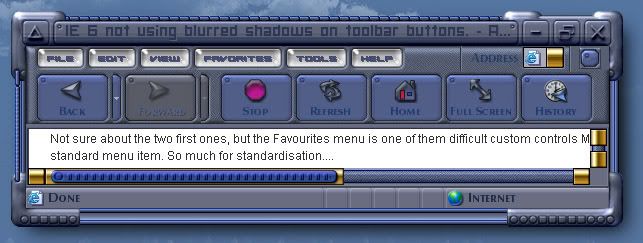
IE 6 not using blurred shadows on toolbar buttons.
I so want this to work.
Friday, February 16, 2007 by I.R. Brainiac | Discussion: WindowBlinds
Is there a reason for this behavior?


 |
|
Page 1 of 3 | |
|
|---|
I.R. Brainiac
Reply #2 Friday, February 16, 2007 4:30 AM

Reply #2 Friday, February 16, 2007 4:30 AM
Favorites menu...cant move text or icons?...and what is that grey line cutting across the bottom of the menu?(I see it in other skins as well) 


thomassen
Reply #3 Friday, February 16, 2007 5:41 AM

Reply #3 Friday, February 16, 2007 5:41 AM
Not sure about the two first ones, but the Favourites menu is one of them difficult custom controls MS has implemented. It's not a standard menu item. So much for standardisation....
I.R. Brainiac
Reply #4 Friday, February 16, 2007 4:20 PM
Reply #4 Friday, February 16, 2007 4:20 PM
I redesigned the menu background...no biggie,but whats with the grey line?
I.R. Brainiac
Reply #5 Friday, February 16, 2007 4:31 PM
Reply #5 Friday, February 16, 2007 4:31 PM
Status bar not using text effect either(blurred shadow again) 


I.R. Brainiac
Reply #6 Friday, February 16, 2007 11:31 PM
Reply #6 Friday, February 16, 2007 11:31 PM
Also,why does the vertical toolbar divider still show if I skinned it with magic pink?The horizontal one works fine.
NightTrainthedark
Reply #7 Saturday, February 17, 2007 12:28 AM

Reply #7 Saturday, February 17, 2007 12:28 AM
email the skin to me I.R. I'll find the problem.
craig at cdoman dot com
craig at cdoman dot com
NightTrainthedark
Reply #9 Saturday, February 17, 2007 12:08 PM
Reply #9 Saturday, February 17, 2007 12:08 PM
Posting here so anyone can correct my mistakes. 
dont forget to turn off the "please wait" text.
The gray line can be changed. It is a common problem with favorite menus. Go to Classic colors/Menus/Background-menu. You can change it to match the menu background. Because you built the skin for 4.6 frames the menu background shouldn't come into play. I haven't run into any issues yet while running the skin with the color changed. It might be a shadow on some odd menu text but I can't be sure.
Favorites menu icons and text don't move. I think that's why they gave the option for it's own menu.
try assigning a shadow to your font at Controls/Menus/Bar background/Bar items. Do the same for Bar items - toolbar like. Does that fix it? Those fonts are picky. I use per pixel framed skins so I'm not up to speed on those buttons in 4.6. changing the fonts I said made a difference but I got the skin all screwed up now. I'm gonna have to redownload and start over. LOL
I don't see any problem with the vertical divider so I will assume you fixed that.
Awesome skin. Love your style. Working out the text colors and fonts is gonna be a bumpy road. I'll be around if you need a tow.

dont forget to turn off the "please wait" text.
The gray line can be changed. It is a common problem with favorite menus. Go to Classic colors/Menus/Background-menu. You can change it to match the menu background. Because you built the skin for 4.6 frames the menu background shouldn't come into play. I haven't run into any issues yet while running the skin with the color changed. It might be a shadow on some odd menu text but I can't be sure.
Favorites menu icons and text don't move. I think that's why they gave the option for it's own menu.
try assigning a shadow to your font at Controls/Menus/Bar background/Bar items. Do the same for Bar items - toolbar like. Does that fix it? Those fonts are picky. I use per pixel framed skins so I'm not up to speed on those buttons in 4.6. changing the fonts I said made a difference but I got the skin all screwed up now. I'm gonna have to redownload and start over. LOL
I don't see any problem with the vertical divider so I will assume you fixed that.
Awesome skin. Love your style. Working out the text colors and fonts is gonna be a bumpy road. I'll be around if you need a tow.
I.R. Brainiac
Reply #10 Saturday, February 17, 2007 5:58 PM
Reply #10 Saturday, February 17, 2007 5:58 PM
DOH!I think I sent you the wrong version Craig...I gotta check Skinstudio and package you the one with the fonts assignrd correctly...
I.R. Brainiac
Reply #11 Saturday, February 17, 2007 6:18 PM
Reply #11 Saturday, February 17, 2007 6:18 PM
Headed your way...check the two fonts closely,one is not a truetypebut a type 1,you may need to install it to your fonts folder.It should appear LMOST SYSTEM WI like it a lot,it looks like I print...All caps just different heights for capitals. 

I.R. Brainiac
Reply #12 Saturday, February 17, 2007 6:20 PM
Reply #12 Saturday, February 17, 2007 6:20 PM
That should say'almost system wide'
The please wait is left over from the old skin...will be redesigned.
Thanks for the tip on the grey line...I will look into that and the button font settings closer.
The please wait is left over from the old skin...will be redesigned.
Thanks for the tip on the grey line...I will look into that and the button font settings closer.


I.R. Brainiac
Reply #14 Saturday, February 17, 2007 10:00 PM
Reply #14 Saturday, February 17, 2007 10:00 PM
Craig,do you not see the vertical divider on your system?
NightTrainthedark
Reply #15 Saturday, February 17, 2007 10:34 PM
Reply #15 Saturday, February 17, 2007 10:34 PM
I need the skin again I.R. I deleted the other version in prep for the latest version.
I.R. Brainiac
Reply #17 Monday, February 19, 2007 1:27 AM
Reply #17 Monday, February 19, 2007 1:27 AM
So what do you know amigo?Did you get it,or would you like an even newer version?
I.R. Brainiac
Reply #18 Monday, February 19, 2007 4:49 AM
Reply #18 Monday, February 19, 2007 4:49 AM
While I have you all hanging on my every word...
Start menu item buttons display incorrectly...you can see the actual image pasted just above the SkinStudio mouseover.Looks like its not using translucency correctly.

Start menu item buttons display incorrectly...you can see the actual image pasted just above the SkinStudio mouseover.Looks like its not using translucency correctly.

I.R. Brainiac
Reply #19 Monday, February 19, 2007 4:51 AM
Reply #19 Monday, February 19, 2007 4:51 AM
And when are we ever going to get content margins for that graphic...the icons are always pushed up against the left edge.
I.R. Brainiac
Reply #20 Monday, February 19, 2007 5:02 AM
Reply #20 Monday, February 19, 2007 5:02 AM
3 days and I have fixed only one prob...by redesigning the favorites menu(it still has the line ,I just blended it the best I could)...but not a clue about any of the others.
Please login to comment and/or vote for this skin.
Welcome Guest! Please take the time to register with us.
There are many great features available to you once you register, including:
- Richer content, access to many features that are disabled for guests like commenting on the forums and downloading skins.
- Access to a great community, with a massive database of many, many areas of interest.
- Access to contests & subscription offers like exclusive emails.
- It's simple, and FREE!
|
|
Page 1 of 3 | |
|
|---|
Reply #1 Friday, February 16, 2007 3:38 AM