





































OK BRANIAC NOW WHAT??
Monday, February 5, 2007 by ToxicTranceChamber | Discussion: WindowBlinds
K I downloaded it  so now what should I do?
 so now what should I do?
 |
|
Page 2 of 7 | |
|
|---|
I.R. Brainiac
Reply #22 Monday, February 5, 2007 5:41 PM

Reply #22 Monday, February 5, 2007 5:41 PM
May want to bump your resolution up as far as you can stand it,gives you more room to work(1360x1080 here,hehe)
So it is saved now as a new name?Reopen it and do the normalise image filenames I mentioned above,apply and see how its working.
So it is saved now as a new name?Reopen it and do the normalise image filenames I mentioned above,apply and see how its working.
I.R. Brainiac
Reply #23 Monday, February 5, 2007 5:51 PM
Reply #23 Monday, February 5, 2007 5:51 PM
After you normalise,hit the browse button on the toolbar,it will open that skins folder and you can see all the file names have been changed.
Here is a neat plugin so you can see thumbnails of .tga's http://greggman.com/pages/thumbplug_tga.htm
typing the new name for the image files is wierd,it dosnt like spaces,and you kinda have to get clever with the typing...you will see...
My new name for this skin Neutroniumgrey.Wouldnt allow for a space,probably for the best.
Here is a neat plugin so you can see thumbnails of .tga's http://greggman.com/pages/thumbplug_tga.htm
typing the new name for the image files is wierd,it dosnt like spaces,and you kinda have to get clever with the typing...you will see...

My new name for this skin Neutroniumgrey.Wouldnt allow for a space,probably for the best.
ToxicTranceChamber
Reply #24 Monday, February 5, 2007 5:59 PM

Reply #24 Monday, February 5, 2007 5:59 PM
oK THE SKIN STILL WORKS AND i DOWNLOADED THE PLUG IN... OOps caps
by the way I &hearts your brain guy, lol I seen him be4 I joined I thought he was cute
by the way I &hearts your brain guy, lol I seen him be4 I joined I thought he was cute
I.R. Brainiac
Reply #25 Monday, February 5, 2007 6:07 PM
Reply #25 Monday, February 5, 2007 6:07 PM
THATS GREAT oops That plugin helps a lot when browsing for a .tga image.Skinstudio will take .png's that you make and auto convert them to .tga's and viceversa when you click edit in skinstudio(thats also why you set photoshop as the default editor,so images open directly in PS)
As you edit .tga files you will see in the skin folder you have 2 of some images...1 .tga and 1 .png...Skinstudio only uses the .png and I think when you finally finish,it only zips the files it needs...if not,when you get thru,just select all .png's and delelete,then zip for distibution(we have a ways to go for that yet 
You can see the difference between a .tga thumbnail and a .png.
That plugin helps a lot when browsing for a .tga image.Skinstudio will take .png's that you make and auto convert them to .tga's and viceversa when you click edit in skinstudio(thats also why you set photoshop as the default editor,so images open directly in PS)As you edit .tga files you will see in the skin folder you have 2 of some images...1 .tga and 1 .png...Skinstudio only uses the .png and I think when you finally finish,it only zips the files it needs...if not,when you get thru,just select all .png's and delelete,then zip for distibution(we have a ways to go for that yet

You can see the difference between a .tga thumbnail and a .png.
ToxicTranceChamber
Reply #26 Monday, February 5, 2007 6:08 PM
Reply #26 Monday, February 5, 2007 6:08 PM
When my 30 days is up and if I decide not to purchase photoshop can I use the others that I have? What filters and things are a must have when making skins?
I.R. Brainiac
Reply #27 Monday, February 5, 2007 6:12 PM
Reply #27 Monday, February 5, 2007 6:12 PM
the avatar?Yeah he's a real lady killer...Mutant of Metaluna from This Island Earth. 
Sometime before you publish the WB,you gotta make sure any info relating to me is changed to your stuff.(the exception being the toolbar icons,they may be used by anyone...feel free to make your own if you want,theres only about 100. )

Sometime before you publish the WB,you gotta make sure any info relating to me is changed to your stuff.(the exception being the toolbar icons,they may be used by anyone...feel free to make your own if you want,theres only about 100.
)
ToxicTranceChamber
Reply #28 Monday, February 5, 2007 6:14 PM
Reply #28 Monday, February 5, 2007 6:14 PM
Ok, so now how/where in the world do I start?
I.R. Brainiac
Reply #29 Monday, February 5, 2007 6:17 PM
Reply #29 Monday, February 5, 2007 6:17 PM
Gaaaah!I've got post lag.
other editors can open PS files but they will never do it perfectly.
I'm using PS7,upgrading is out of the question for now.
Some people swear by Paintshop pro,its probably the closest to PS and cheaper.
If you dl'd the start menu file you will see its not filters...its all layers and styles.
other editors can open PS files but they will never do it perfectly.
I'm using PS7,upgrading is out of the question for now.
Some people swear by Paintshop pro,its probably the closest to PS and cheaper.
If you dl'd the start menu file you will see its not filters...its all layers and styles.
I.R. Brainiac
Reply #30 Monday, February 5, 2007 6:22 PM
Reply #30 Monday, February 5, 2007 6:22 PM
You open photoshop and design your start menu.  You can see how I do them,a single image that gets cut into 5 sections(more on that later)
This gives your graphics an integrated look instead of parts stacked all together.
So...got any ideas for a theme?A well designed Start menu will give you all the image ideas you need for the rest of the skin.(and make it look professional and consistent as a whole)
OH,what did you name your new skin?
 You can see how I do them,a single image that gets cut into 5 sections(more on that later)
This gives your graphics an integrated look instead of parts stacked all together.
So...got any ideas for a theme?A well designed Start menu will give you all the image ideas you need for the rest of the skin.(and make it look professional and consistent as a whole)
OH,what did you name your new skin?
I.R. Brainiac
Reply #31 Monday, February 5, 2007 6:25 PM
Reply #31 Monday, February 5, 2007 6:25 PM
You can do amazing things with just a few simple shapes and styles.
Keep in mind,the middle part of the programs and places graphics will stretched or tiled depending on how many programs someone has in their start menu.If you get too crazy in the middle it aint gonna look good.
Keep in mind,the middle part of the programs and places graphics will stretched or tiled depending on how many programs someone has in their start menu.If you get too crazy in the middle it aint gonna look good.
ToxicTranceChamber
Reply #32 Monday, February 5, 2007 6:48 PM
Reply #32 Monday, February 5, 2007 6:48 PM
Sorry about that I stepped away a min....
ToxicTranceChamber
Reply #33 Monday, February 5, 2007 6:48 PM
Reply #33 Monday, February 5, 2007 6:48 PM
Um I named it pratice lol
Oh and maybe flames or blood dripping
Oh and maybe flames or blood dripping
ToxicTranceChamber
Reply #34 Monday, February 5, 2007 7:01 PM
Reply #34 Monday, February 5, 2007 7:01 PM
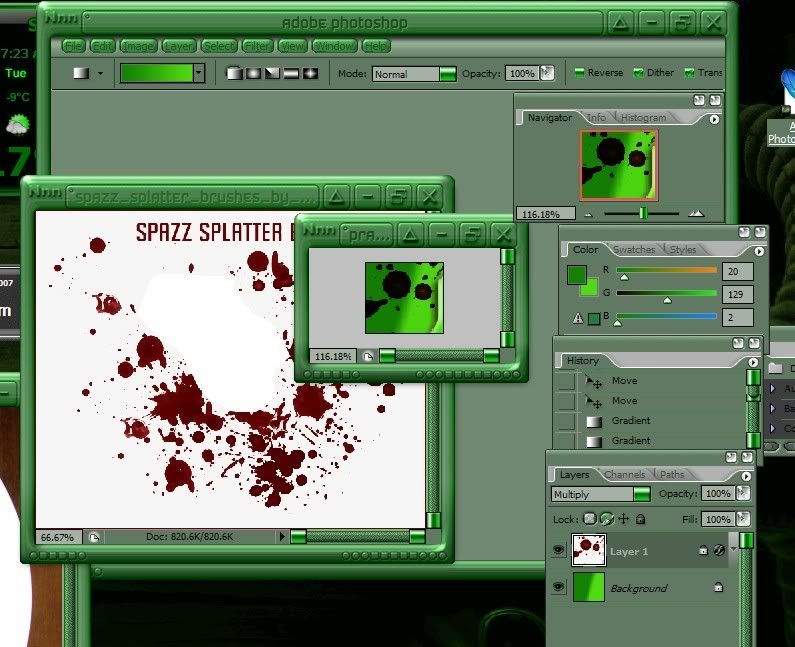
Um how the heck do I change the color of a splatter after I click on layers then multiply?
I.R. Brainiac
Reply #35 Monday, February 5, 2007 7:08 PM
Reply #35 Monday, February 5, 2007 7:08 PM
If you mean the layer style dialog(double clicking the layer)you can do a color overlay...play with the opacity and blend modes...many neat effects are available with blend modes. Plus you make as many changes as you like while there and even save them as a new style.AND you can always go back and edit them later.
Plus you make as many changes as you like while there and even save them as a new style.AND you can always go back and edit them later.
ToxicTranceChamber
Reply #36 Monday, February 5, 2007 7:11 PM
Reply #36 Monday, February 5, 2007 7:11 PM
Ok so is this what I do then....
I just basically click on what part I wanna change in skin studio, then once it open in ps, do whatever with it? I'm a little confused, what if I wanns use a certain piece of a picture in one area but something else in another? Not sure what yet lol, but I think I got some splatter going lol
I just basically click on what part I wanna change in skin studio, then once it open in ps, do whatever with it? I'm a little confused, what if I wanns use a certain piece of a picture in one area but something else in another? Not sure what yet lol, but I think I got some splatter going lol
I.R. Brainiac
Reply #37 Monday, February 5, 2007 7:11 PM
Reply #37 Monday, February 5, 2007 7:11 PM
While that dialog is open,no matter how many changes you try,your history section dosnt fill up with extra states.
ToxicTranceChamber
Reply #39 Monday, February 5, 2007 7:21 PM
Reply #39 Monday, February 5, 2007 7:21 PM
So I took a part of a pic removed the bg and added it to the piece of wb how do I change the color of just the splatter?
I.R. Brainiac
Reply #40 Monday, February 5, 2007 7:22 PM
Reply #40 Monday, February 5, 2007 7:22 PM
That depends,are you just replacing the individual pieces or do you have an entire start menu to cut up(the best way)
Once you have a whole start menu,your gonna slice it into the sections you want.User pane,Programs,Places More Programs and Logoff area.
Easiest way to slice a graphic is to make new image with all layers from the start menu merged.
ctrl a(select all),edit>copy merged>ctrl n(new document),ctrl v(paste)
Now you have a single layer...Use the select tool to select the User pane area of your image,right click and choose layer by cut.Repeat for all 5 sections and you have your pieces.(once cut you can turn on and off each section easily to copy to the image you opened from Skinstudio)
Image size of the original must be changed to the size of your new graphic first.
Once you have a whole start menu,your gonna slice it into the sections you want.User pane,Programs,Places More Programs and Logoff area.
Easiest way to slice a graphic is to make new image with all layers from the start menu merged.
ctrl a(select all),edit>copy merged>ctrl n(new document),ctrl v(paste)
Now you have a single layer...Use the select tool to select the User pane area of your image,right click and choose layer by cut.Repeat for all 5 sections and you have your pieces.(once cut you can turn on and off each section easily to copy to the image you opened from Skinstudio)
Image size of the original must be changed to the size of your new graphic first.
Please login to comment and/or vote for this skin.
Welcome Guest! Please take the time to register with us.
There are many great features available to you once you register, including:
- Richer content, access to many features that are disabled for guests like commenting on the forums and downloading skins.
- Access to a great community, with a massive database of many, many areas of interest.
- Access to contests & subscription offers like exclusive emails.
- It's simple, and FREE!
|
|
Page 2 of 7 | |
|
|---|
Reply #21 Monday, February 5, 2007 5:40 PM
Oh ok those buttons did it, its not skinned now