




































Alienware and Stardock Corporation Partner to Deliver Xenomorph Desktop
Extra Alien-Goodness, Now Without The Probe!
Friday, October 13, 2006 by Zoomba | Discussion: WinCustomize News
 Alienware has teamed up with Stardock Corporation, the world’s leading desktop enhancement company, to create the new Xenomorph desktop theme. This theme allows Windows PC users to download and apply a slick new look to their desktop with just a few clicks.
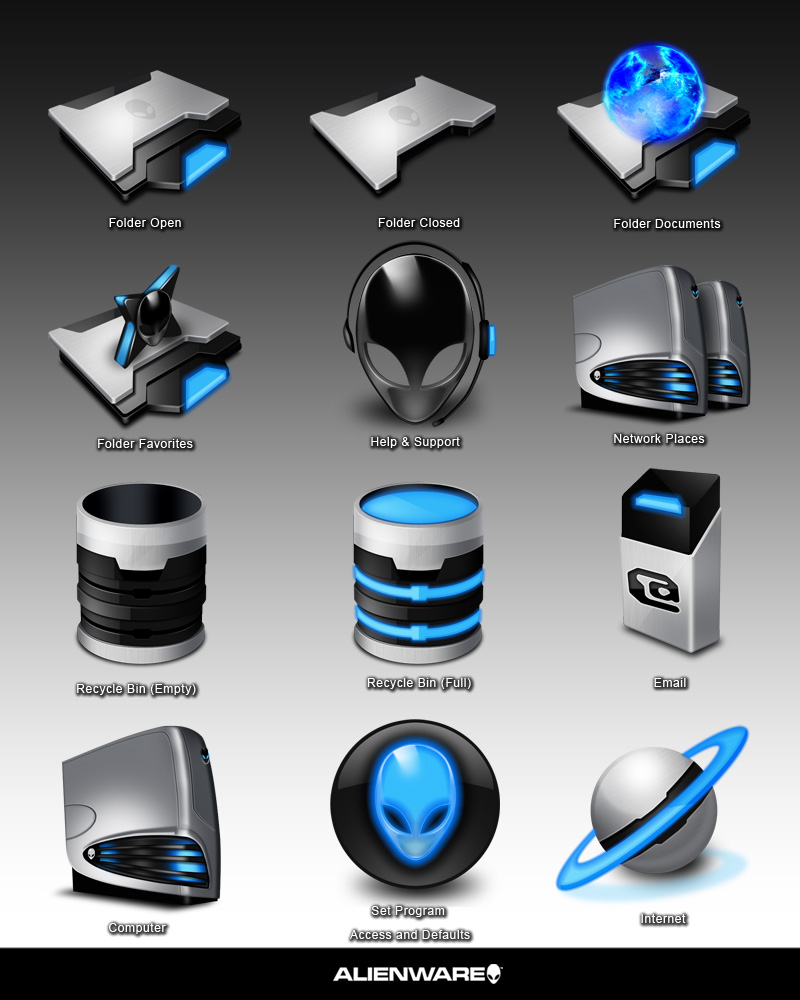
 Created for Alienware by Stardock Design and powered by Stardock's Theme Manager software, this is the most complete theme ever created for an OEM partner. The Theme includes:
• WindowBlinds Visual Style
• Custom Icon Set
• Wallpaper
• Desktop Gadget RSS Reader (requires a separate download)
• ObjectDock OEM
• Installer and all software needed to transform your desktop.
Xenomorph, the most recent of many themes developed jointly, is available as a free download from the Alienware site at http://www.alienware.com/intro_pages/invader.aspx. Registration is required. This theme can be used by anyone, regardless of whether or not you own Stardock software.
Already own Stardock software? Then you can get the suite right here on WinCustomize:
Suite: https://www.wincustomize.com/ViewSkin.aspx?SID=1&SkinID=575&LibID=22
RSS Gadget: https://www.wincustomize.com/ViewSkin.aspx?SID=1&SkinID=926&LibID=34

 |
|
Page 1 of 2 | |
|
|---|
bmetelsky
Reply #2 Friday, October 13, 2006 6:28 PM

Reply #2 Friday, October 13, 2006 6:28 PM
Wonderful suite - thanks all who were involved in the making of this one!
StevenArt
Reply #4 Friday, October 13, 2006 7:06 PM
Reply #4 Friday, October 13, 2006 7:06 PM
Awesome designs; however, it took F-O-R-E-V-E-R to download data from Alienware. I have broadband cable and downloaded Alienware data at 38 KB/sec???. Typically, I download at 2-3 MB/sec!! I'm surprised that Alienware has such a small download speed capability. 

BoddhiC
Reply #5 Friday, October 13, 2006 7:30 PM

Reply #5 Friday, October 13, 2006 7:30 PM
Absolutely love the window and start menu animations, just stellar. The previous Alienware WindowBlinds were very "heavy" in style. This is really nice, much "lighter" with all the WB5 goodies. I have an Alienware laptop and it looks wonderful on it. I changed the wall to "Inovation" (available on alienware.com) - that combo goes really well also. Thank you to Alienware and to the skinners for sharing this one 


Astyanax
Reply #6 Friday, October 13, 2006 8:39 PM

Reply #6 Friday, October 13, 2006 8:39 PM
Its great, but the lack of WB5 per pixel frames bugs me.

whiterabbit007
Reply #8 Friday, October 13, 2006 9:31 PM

Reply #8 Friday, October 13, 2006 9:31 PM
So now that Alienware is Dell's bi... property, will you guys be providing similar packages to Dell's computers? That would really bring skinning to the masses.
Island Dog
Reply #9 Friday, October 13, 2006 9:59 PM

Reply #9 Friday, October 13, 2006 9:59 PM
Between this and the GUI Champs, there is too much to choose from.
TYCUS
Reply #10 Friday, October 13, 2006 10:27 PM

Reply #10 Friday, October 13, 2006 10:27 PM
i have just one issue with almost all Alienwire suites.., when u apply a suite it automaticaly change the user avatar; now, this time i cant even disable the option using WB setup(User Over..something)., the alien pick is ok., but is not my...
..other issue that i find out is that there are no toolbar icons! there are the defoult system icons.., look:

but well., the suite is good.., i give u 4 1/2 stars
..other issue that i find out is that there are no toolbar icons! there are the defoult system icons.., look:

but well., the suite is good.., i give u 4 1/2 stars

LittleBearJason
Reply #11 Saturday, October 14, 2006 12:37 AM

Reply #11 Saturday, October 14, 2006 12:37 AM
Well, I finally have the the suite even though I have WB 5 already loaded. I like this one the best by far. I just run a computer with Intel i865g graphics and it looks excellent at 1280x1024 on my dell 17in flat panel monitor. BTW.... I too noticed the slow 38kb download speed. Maybe its so popular that speeds are slowing to a crawl.
Z71
Reply #12 Saturday, October 14, 2006 2:53 AM

Reply #12 Saturday, October 14, 2006 2:53 AM
Has anybody noticed that there's not one single "file type" in the Iconpack?
What's in the iconpack looks nice but it's not usable...for me!
What's in the iconpack looks nice but it's not usable...for me!

c242
Reply #14 Saturday, October 14, 2006 10:36 AM
I think, that most people, who are not so "deep" into skinning don't care much for "under the hood" skinning, so a nice desktop does it for them. For me personally I want to have suites most complete (which includes as much fitting icons and other skins as possible, even when I have to do some more myself). But hey, it's free.

Reply #14 Saturday, October 14, 2006 10:36 AM
| Has anybody noticed that there's not one single "file type" in the Iconpack? |
I think, that most people, who are not so "deep" into skinning don't care much for "under the hood" skinning, so a nice desktop does it for them. For me personally I want to have suites most complete (which includes as much fitting icons and other skins as possible, even when I have to do some more myself). But hey, it's free.
Robbie_Boy
Reply #15 Saturday, October 14, 2006 10:43 AM

Reply #15 Saturday, October 14, 2006 10:43 AM
Well i love the skin but not the icons....
but still 5 stars from me great Windowblind.......
but still 5 stars from me great Windowblind.......
KiloKrash
Reply #16 Saturday, October 14, 2006 1:33 PM
I agree with Carl on this one. I too noticed the IconPackager, but didn't really care because hey it's free. If you don't have "AlienMorph" or "Alienware Invader" I suggest d/l and using some of their file icons. Yangee's Alien 2006 is also a nice choice.

Reply #16 Saturday, October 14, 2006 1:33 PM
| Has anybody noticed that there's not one single "file type" in the Iconpack? |
| For me personally I want to have suites most complete (which includes as much fitting icons and other skins as possible, even when I have to do some more myself). |
I agree with Carl on this one. I too noticed the IconPackager, but didn't really care because hey it's free. If you don't have "AlienMorph" or "Alienware Invader" I suggest d/l and using some of their file icons. Yangee's Alien 2006 is also a nice choice.
Koasati
Reply #17 Saturday, October 14, 2006 2:43 PM

Reply #17 Saturday, October 14, 2006 2:43 PM
Really nice WindowBlinds skin, but with a few head scratchers.
Why include the Windows Default toolbar icons as part of the skin? If you use the Toolbars setting "If the skin has a toolbar icon defined then use it, otherwise use the icon set selected below", you get the default icons, which ruins the look of the skin. Same with File Animations.....
Tweaked, and fixed!
Since this skin does not use per-pixel titlebars, why not replace the system titlebar icon with an alien head? Personal preference, I know..... but it looks so much better now.
Rollup set to 92 pixels?? That's just crazy!
I'm having a little trouble filling in the blank left bottom corner when set to a more reasonable 36 pixel rollup, but I'll eventually get that fixed too.
Why include the Windows Default toolbar icons as part of the skin? If you use the Toolbars setting "If the skin has a toolbar icon defined then use it, otherwise use the icon set selected below", you get the default icons, which ruins the look of the skin. Same with File Animations.....
Tweaked, and fixed!
Since this skin does not use per-pixel titlebars, why not replace the system titlebar icon with an alien head? Personal preference, I know..... but it looks so much better now.
Rollup set to 92 pixels?? That's just crazy!
I'm having a little trouble filling in the blank left bottom corner when set to a more reasonable 36 pixel rollup, but I'll eventually get that fixed too.

StephanA
Reply #18 Saturday, October 14, 2006 3:06 PM

Reply #18 Saturday, October 14, 2006 3:06 PM
I concur with Koasati. We are peasants, thank you for the bowl of rice. 

Hapkido
Reply #19 Saturday, October 14, 2006 7:31 PM

Reply #19 Saturday, October 14, 2006 7:31 PM
I concur with the previous comments re: Toolbar icons, otherwise a very nice looking WB skin. However, after using it for a little while I experienced programs freezes. At first, I thought it was just IE 6, but then another program froze. So, I rebooted thinking that would resolve the issue but no go. Changing skins and then back again also did not resolve the problem. Thus, unfortunately, I cannot use this skin.  This is on a newly built system which is perfecto in every way and using WB 5.1 (latest beta build).
 This is on a newly built system which is perfecto in every way and using WB 5.1 (latest beta build).
TYCUS
Reply #20 Saturday, October 14, 2006 9:08 PM
i thought it was only me but it seems that not.., i also have that issue., i guess that the main problem is at the Theme Manager..., maybe not...
Reply #20 Saturday, October 14, 2006 9:08 PM
| after using it for a little while I experienced programs freezes. |
i thought it was only me but it seems that not.., i also have that issue., i guess that the main problem is at the Theme Manager..., maybe not... Please login to comment and/or vote for this skin.
Welcome Guest! Please take the time to register with us.
There are many great features available to you once you register, including:
- Richer content, access to many features that are disabled for guests like commenting on the forums and downloading skins.
- Access to a great community, with a massive database of many, many areas of interest.
- Access to contests & subscription offers like exclusive emails.
- It's simple, and FREE!
|
|
Page 1 of 2 | |
|
|---|
Reply #1 Friday, October 13, 2006 6:04 PM
*Actually, i take that back, you can just rename the suite to a .zip and dig out the windowblind - and it's gorgeous!