






































 |
|
Page 1 of 3 | |
|
|---|
lucas15
Comment #2 Tuesday, November 21, 2006 5:03 PM
Comment #2 Tuesday, November 21, 2006 5:03 PM
Very nice job but this no work for my i want glass clear sub and I follow yours instrutions but is imposible. I need help. 
Thanks

Thanks
Phoon
Comment #3 Tuesday, November 21, 2006 5:52 PM

Comment #3 Tuesday, November 21, 2006 5:52 PM
Just out of the box, using the sub-styles you've included, this theme works great and is quite a simplistic looker.
You've put a great deal of thought and effort in to this. Great job.
Tiggz has a blind out there that had some special coding done in it. I think you could use those ideas with this or create a DesktopX widget to handle the image replacements instead of the batch files. The average user isn't going to relate well to batch files.
You've put a great deal of thought and effort in to this. Great job.
Tiggz has a blind out there that had some special coding done in it. I think you could use those ideas with this or create a DesktopX widget to handle the image replacements instead of the batch files. The average user isn't going to relate well to batch files.

DrJBHL
Comment #7 Wednesday, November 22, 2006 8:52 AM

Comment #7 Wednesday, November 22, 2006 8:52 AM
Great skin. Wonderful directions. The links given in the instructions didn't work. As a desktop, the Grass theme at interfacelift.com works beautifully with your skin, and provides many resolutions not present at wincustomize.com.
General grade? 10/10
General grade? 10/10
culticwand
Comment #8 Wednesday, November 22, 2006 9:13 AM
Comment #8 Wednesday, November 22, 2006 9:13 AM
Ok, a great looking skin...but only from the preview in WB.  This is not a very user friendly skin at all. Your video tutorial doesn't seem to exist, so that didn't do me much good. If you need to include directions on how to use your skin, then you need to have second thoughts. Users should only have to select Pictotea in the WBconfiguring window, select the sub-style, and then finally select apply. That's all they should have to do.
So, PLEASE HELP! That video would be a great start.
AND HOW DO I CHANGE THE FLIPPIN TOOLBAR???
 This is not a very user friendly skin at all. Your video tutorial doesn't seem to exist, so that didn't do me much good. If you need to include directions on how to use your skin, then you need to have second thoughts. Users should only have to select Pictotea in the WBconfiguring window, select the sub-style, and then finally select apply. That's all they should have to do.
So, PLEASE HELP! That video would be a great start.

AND HOW DO I CHANGE THE FLIPPIN TOOLBAR???
DrJBHL
Comment #9 Wednesday, November 22, 2006 9:46 AM
Comment #9 Wednesday, November 22, 2006 9:46 AM
To Culticwand: To change it, just go into the pico skin file as described above (use windows explorer....right click on the start button, choose "explore" and drill down after Program Files) then you'll see the .bat files about half way down. Choose the use taskbar .bat you want, then MAKE SURE you're using another skin at the time you're doing this, and double click on that .bat file.
Actually, this is fun...I never played around with those type of files. It allows you tremendous freedom in creating subskins, which you couldn't really do using the regular method.
Then, just go back and select pico....the skin modifications should be displayed right there, and select "Apply". Good luck, and have fun!

Actually, this is fun...I never played around with those type of files. It allows you tremendous freedom in creating subskins, which you couldn't really do using the regular method.
Then, just go back and select pico....the skin modifications should be displayed right there, and select "Apply". Good luck, and have fun!


dinhle
Comment #10 Wednesday, November 22, 2006 10:43 AM
Comment #10 Wednesday, November 22, 2006 10:43 AM
Not as straight forward as other blinds but a does give windows a very nice clean look.. Interesting.. Nice work.
Threi
Comment #11 Wednesday, November 22, 2006 1:42 PM

Comment #11 Wednesday, November 22, 2006 1:42 PM
its here...great job
uh i already told you on DA but there is a problem using this and office 2007...other than that this is the perfect skin
uh i already told you on DA but there is a problem using this and office 2007...other than that this is the perfect skin

rrawlins
Comment #13 Wednesday, November 22, 2006 3:09 PM

Comment #13 Wednesday, November 22, 2006 3:09 PM
i apologize everyone, my normal distribution contains readme.txt and faq.txt BUT WinCustomize only accepts WBA file. nor was I able to edit the main description once I realized the links were missing. DeviantArt allows a zip file which contains styler toolbars, yz doc backgrouns and readmes. the full distribution is here:
http://www.deviantart.com/deviation/43228398/
the video tutorial is here: http://www.deviantart.com/deviation/39837707/
styler tutorial is here: http://www.deviantart.com/deviation/39843690/
i hope i don't get in trouble for link to deviantart
http://www.deviantart.com/deviation/43228398/
the video tutorial is here: http://www.deviantart.com/deviation/39837707/
styler tutorial is here: http://www.deviantart.com/deviation/39843690/
i hope i don't get in trouble for link to deviantart
rrawlins
Comment #14 Wednesday, November 22, 2006 3:30 PM
Comment #14 Wednesday, November 22, 2006 3:30 PM
I'll have to read up on desktopX, I see it in Stardock Central. I don't like installing too many utilities though. If there's no run time then I'll consider it. If I went that route, I could simply write a .NET utility to make it easier then I wouldn't have to learn another programming language
sarf2k4
Comment #15 Wednesday, November 22, 2006 4:22 PM
Comment #15 Wednesday, November 22, 2006 4:22 PM
rrawlins, i got a suggestion, how about you make the minimize, close and maximize button customizable too?
Phoon
Comment #16 Wednesday, November 22, 2006 5:10 PM
Comment #16 Wednesday, November 22, 2006 5:10 PM
rrawlins
DesktopX uses vbscript. If you understand programming (which I do very very slightly only) then you won't have a problem at all.
Do yourself a favor and check it out!!
DesktopX uses vbscript. If you understand programming (which I do very very slightly only) then you won't have a problem at all.
Do yourself a favor and check it out!!
rrawlins
Comment #17 Wednesday, November 22, 2006 5:39 PM
Comment #17 Wednesday, November 22, 2006 5:39 PM
uuuugh VBSCript, back to my old ASP days. better than batch files though i'll check it out.
i'll check it out.
sarf2k4
Comment #19 Thursday, November 23, 2006 1:16 PM
can you make these one too?
Comment #19 Thursday, November 23, 2006 1:16 PM
| make the minimize, close and maximize button customizable |
can you make these one too?
LittleBearJason
Comment #20 Thursday, November 23, 2006 4:12 PM
Comment #20 Thursday, November 23, 2006 4:12 PM
I like this skin a lot but its too confusing to use. With the ability to color downloaded skins to our liking through another program, I feel you included too many sub-styles which makes it complicated for some to use.
Either this or I am very stupid and need to read more
Either this or I am very stupid and need to read more

Please login to comment and/or vote for this skin.
Welcome Guest! Please take the time to register with us.
There are many great features available to you once you register, including:
- Richer content, access to many features that are disabled for guests like commenting on the forums and downloading files.
- Access to a great community, with a massive database of many, many areas of interest.
- Access to contests & subscription offers like exclusive emails.
- It's simple, and FREE!
|
|
Page 1 of 3 | |
|
|---|

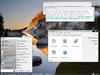
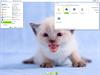



Comment #1 Saturday, November 18, 2006 1:51 AM
Top Left:
glass clear sub, use-taskbar-glass-clear, use-panel-full-white, use-start-button-squares, pico tea styler
Top Right:
luna blue gloss sub, use-taskbar-white, use-panel-full-black, use-start-button-squares, pico tea styler
Bottom Left:
green darker gloss sub, use-taskbar-green-yellow-gloss, use-panel-full-white, use-start-button-drop, pico leaves styler
Bottom Right:
black gloss sub, use-taskbar-orange, use-start-button-circle, use-panel-full-black, use-start-button-circle, pico tea styler