






































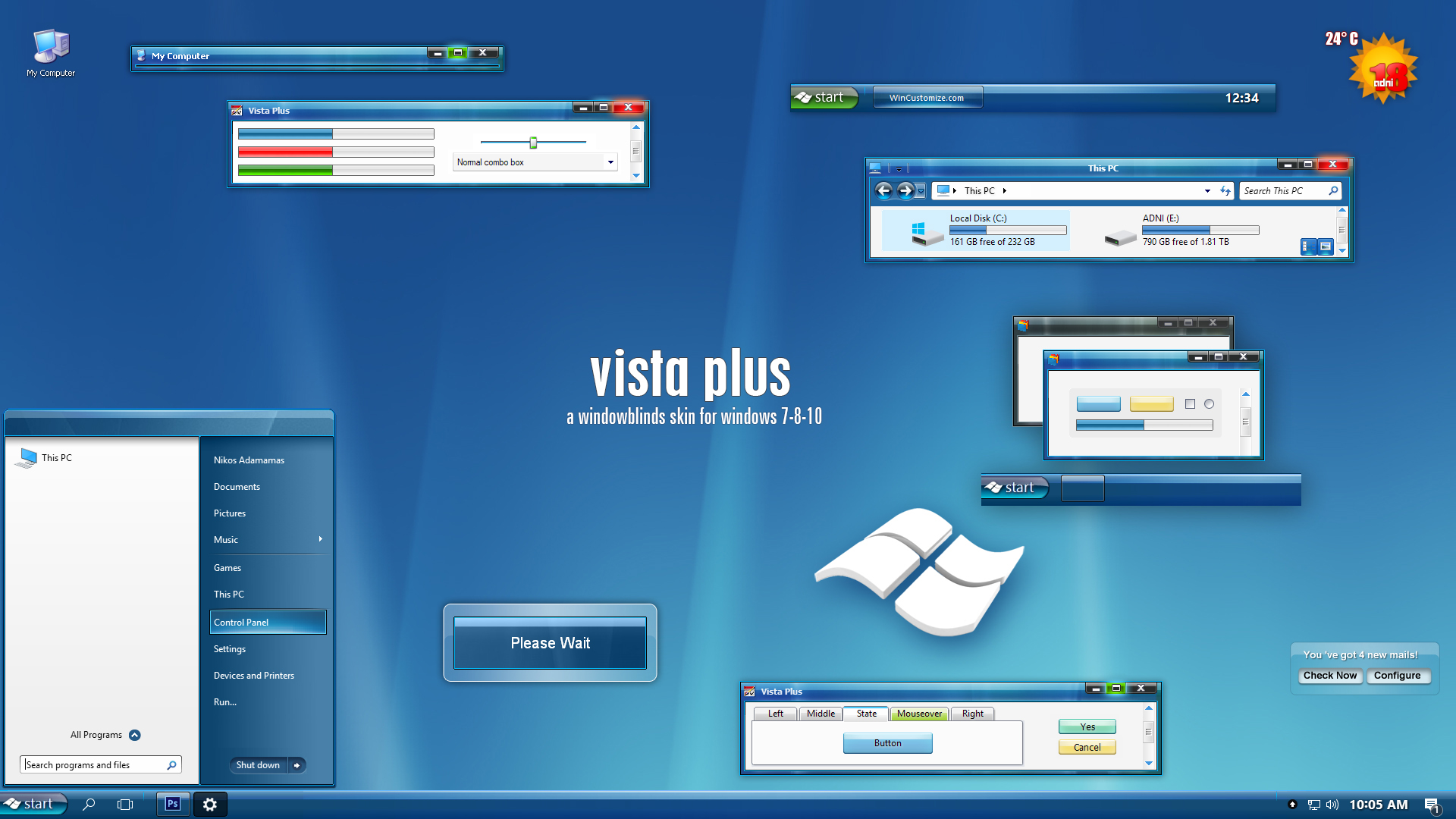
 |
|
Page 11 of 22 | |
|
|---|
adni18
Comment #202 Friday, December 1, 2006 7:37 AM
Comment #202 Friday, December 1, 2006 7:37 AM
Thanks aravaioli 
It shouldn't have problem with any resolution, I wonder why you have problem...
Thank you very much NapsterMTY

It shouldn't have problem with any resolution, I wonder why you have problem...
Thank you very much NapsterMTY
aravaioli
Comment #203 Saturday, December 2, 2006 12:36 PM
Comment #203 Saturday, December 2, 2006 12:36 PM
This is what happens on my 2 computers (1680 x 1050 and 1280 x 800)
[url=http://entertainment.webshots.com/photo/2900828820070784529exEECh]
[url=http://entertainment.webshots.com/photo/2900828820070784529exEECh]
suniart
Comment #204 Wednesday, December 6, 2006 7:10 PM

Comment #204 Wednesday, December 6, 2006 7:10 PM
It would be nice if there was a Christmas version! But either way fabulous! 

adni18
Comment #205 Thursday, December 7, 2006 2:43 AM
Comment #205 Thursday, December 7, 2006 2:43 AM
The "start" button and the rest taskbar buttons should be fine with any resolution, I don't understand why this happen to you aravaioli . Unlock the taskbar and play with it, make it double or whatever, I guess by doing this will help to correct the look of the taskbar buttons. 
Thanks rkk03
You can change the color of the skin to red or green, the traditional Christmas colors, it needs only few seconds to do it your self within the Windowblids configuration.
In Windowblinds Configuration window, right click on this skin and choose from the popup menu �Change skin colour�. That's all!

Thanks rkk03
You can change the color of the skin to red or green, the traditional Christmas colors, it needs only few seconds to do it your self within the Windowblids configuration.
In Windowblinds Configuration window, right click on this skin and choose from the popup menu �Change skin colour�. That's all!


JeffBDVS
Comment #208 Friday, December 29, 2006 7:57 PM
Comment #208 Friday, December 29, 2006 7:57 PM
Great skin, Nikos. You took Vista and put just enough of a twist on the idea to make it quite original. The look and feel of the skin, and the suite you created is very appealing.
I'm having some trouble with the images for dialog and menu backgrounds, and with long menu items. Usually I can fix issues like this in SS by changing the fonts or duplicating the settings from similar elements in other skins, but this one has me stumped.
I will email you some screenshots along with the system info from the WB config utility, if that's OK. Or, I can post them here if you prefer.
Again, very nice work on this!
-Jeff
I'm having some trouble with the images for dialog and menu backgrounds, and with long menu items. Usually I can fix issues like this in SS by changing the fonts or duplicating the settings from similar elements in other skins, but this one has me stumped.
I will email you some screenshots along with the system info from the WB config utility, if that's OK. Or, I can post them here if you prefer.
Again, very nice work on this!
-Jeff
adni18
Comment #209 Tuesday, January 2, 2007 7:12 PM
Comment #209 Tuesday, January 2, 2007 7:12 PM
Thanks zxcvbnm123
Thanks Jeff, as I answered you with email, it was not a skin problem, but Windows XP - Windowblinds problem.
The solution for many problems you or other people may have, with this or another skin is:
Apply the default Windows XP skin and then reboot,
after that apply this skin and you will have no problem.
It works in most of the cases
Thanks Jeff, as I answered you with email, it was not a skin problem, but Windows XP - Windowblinds problem.
The solution for many problems you or other people may have, with this or another skin is:
Apply the default Windows XP skin and then reboot,
after that apply this skin and you will have no problem.
It works in most of the cases
PurrBall
Comment #210 Saturday, January 20, 2007 7:44 PM

Comment #210 Saturday, January 20, 2007 7:44 PM
Adni, a great job (as usual!)
Thank you very much for sharing. I must admit that I overlooked this at first!
Thank you very much for sharing.
I must admit that I overlooked this at first!
adni18
Comment #211 Sunday, January 21, 2007 2:23 AM
Comment #211 Sunday, January 21, 2007 2:23 AM
You are welcome PurrBall and thanks for your comment ��
�
gigopiko
Comment #212 Saturday, January 27, 2007 8:28 PM
Comment #212 Saturday, January 27, 2007 8:28 PM
how to make it work on the computer i dont know how ????

RossDagley
Comment #213 Thursday, February 1, 2007 11:15 AM
Comment #213 Thursday, February 1, 2007 11:15 AM
IE7 (tabbed browsing) looks terrible. Dirty great black bar at the top, buttone with black bits round them - other than that, very nice
adni18
Comment #214 Thursday, February 1, 2007 12:36 PM
Hi gigopiko, you need Windowblinds to make it work in your computer
Check this link: http://www.windowblinds.net/
I guess you need some more memory dear RossDagley, there is nothing wrong with this skin and the IE7 tabs
Comment #214 Thursday, February 1, 2007 12:36 PM
Hi gigopiko, you need Windowblinds to make it work in your computer
Check this link: http://www.windowblinds.net/
I guess you need some more memory dear RossDagley, there is nothing wrong with this skin and the IE7 tabs
MrBobBarker
Comment #215 Tuesday, February 13, 2007 1:13 PM
Comment #215 Tuesday, February 13, 2007 1:13 PM
My tab bar on IE7 looks bad to anyway to fix this?

adni18
Comment #218 Thursday, February 15, 2007 12:18 PM
Comment #218 Thursday, February 15, 2007 12:18 PM
MrBobBarker I don't use any more IE, but Firefox, therefore I don't know if IE7 has change anything, last September 2006 when I have done this skin, I was using IE7 with no problem at all. Sorry I can't help you more.
Darimar
Comment #219 Monday, February 19, 2007 11:44 AM
Comment #219 Monday, February 19, 2007 11:44 AM
Very nice skin! But I'm still seeing the issue with the black in the toolbar and menu areas.
Crivens
Comment #220 Wednesday, February 21, 2007 3:30 AM

Comment #220 Wednesday, February 21, 2007 3:30 AM
Yeah, me too. It doesn't always happen, and is much rarer in IE7 (more often in normal explorer when browsing your own drive) but it does happen now and again.
On a side note I also noticed that the start menu will make the "root" menu disappear when you go to a sub-menu. So, for example, if you move the mouse to the applications sub-menu then it shows the sub menu, but the main menu (with applications menu on it) goes away. Only happens on the first menu from the start menu. And if you go to do it again it always works the second time. Is only the first time if you haven't used the start menu in a while. Happens on two PC's I have.
Cheers
On a side note I also noticed that the start menu will make the "root" menu disappear when you go to a sub-menu. So, for example, if you move the mouse to the applications sub-menu then it shows the sub menu, but the main menu (with applications menu on it) goes away. Only happens on the first menu from the start menu. And if you go to do it again it always works the second time. Is only the first time if you haven't used the start menu in a while. Happens on two PC's I have.
Cheers
Please login to comment and/or vote for this skin.
Welcome Guest! Please take the time to register with us.
There are many great features available to you once you register, including:
- Richer content, access to many features that are disabled for guests like commenting on the forums and downloading files.
- Access to a great community, with a massive database of many, many areas of interest.
- Access to contests & subscription offers like exclusive emails.
- It's simple, and FREE!
|
|
Page 11 of 22 | |
|
|---|




Comment #201 Thursday, November 30, 2006 10:35 PM