






































 |
|
Page 10 of 22 | |
|
|---|
adni18
Comment #182 Saturday, November 18, 2006 3:08 AM
Comment #182 Saturday, November 18, 2006 3:08 AM
Thanks vorxaw I guess it is depending of the conditions of your computer memory 
Thank you very much Leo

Thank you very much Leo

onukiddo
Comment #183 Saturday, November 18, 2006 9:46 PM
Comment #183 Saturday, November 18, 2006 9:46 PM
Mine still causes blackening from accumulating text/graphics and not updating in the bottom of some windows including Windows Task Manager and Diskeeper 10. Am I missing something? Does it matter that I only have WB 4.2? Thanks.
onukiddo
Comment #184 Saturday, November 18, 2006 9:47 PM
Comment #184 Saturday, November 18, 2006 9:47 PM
Mine still causes blackening from accumulating text/graphics and not updating in the bottom of some windows including Windows Task Manager and Diskeeper 10. Am I missing something? Does it matter that I only have WB 4.2? Thanks.
adni18
Comment #185 Sunday, November 19, 2006 2:04 AM
Comment #185 Sunday, November 19, 2006 2:04 AM
Hi onukiddo
Yes, it does mater that you are using older version of Windowblinds, you should use version 5 and above
Yes, it does mater that you are using older version of Windowblinds, you should use version 5 and above
Akuwizard
Comment #186 Sunday, November 19, 2006 1:56 PM
Comment #186 Sunday, November 19, 2006 1:56 PM
It's absolutely great! Do you have the smae one as a visual style?
I'd love to have the visual style...
I'd love to have the visual style...

SupreE
Comment #187 Sunday, November 19, 2006 4:16 PM
Comment #187 Sunday, November 19, 2006 4:16 PM
Hey,
This might sound stupid, but I'm asking anyway.
How do you make the skin work. I thought it was by right-clicking on the screen, browse for themes, and then choose Vistaskin 2. But it did'nt work. What do I have to do?


This might sound stupid, but I'm asking anyway.
How do you make the skin work. I thought it was by right-clicking on the screen, browse for themes, and then choose Vistaskin 2. But it did'nt work. What do I have to do?


adni18
Comment #188 Sunday, November 19, 2006 5:43 PM
Comment #188 Sunday, November 19, 2006 5:43 PM
Thanks Akuwizard
I never have done any "visual style", only Windowblinds skins and Aston themes, sorry
Hi SupreE, it is not stupid question, we all have been beginners, we understand
You need to install Windowblinds and then just a double click on it is enough
Download Windowblinds from this link: http://www.download.com/WindowBlinds/3000-2326-10026826.html?part=dl-WindowBli&subj=dl&tag=button
I never have done any "visual style", only Windowblinds skins and Aston themes, sorry
Hi SupreE, it is not stupid question, we all have been beginners, we understand
You need to install Windowblinds and then just a double click on it is enough
Download Windowblinds from this link: http://www.download.com/WindowBlinds/3000-2326-10026826.html?part=dl-WindowBli&subj=dl&tag=button
JunkyardEngineer
Comment #189 Sunday, November 19, 2006 10:14 PM
Comment #189 Sunday, November 19, 2006 10:14 PM
Sorry to say that I still get the blacks in IE7 toolbars (WinXP pro SP2)
Hippie
Comment #191 Monday, November 20, 2006 2:50 PM

Comment #191 Monday, November 20, 2006 2:50 PM
I had it, but when it said updated the other day, I deleted it, and installed the new one. Now I don'thave either. It willnot come up in WB cofig.
onukiddo
Comment #192 Monday, November 20, 2006 10:25 PM
Comment #192 Monday, November 20, 2006 10:25 PM
I have upgraded my version of WB and your work is now beautifying my laptop! Thank you, I appreciate it.
adni18
Comment #193 Tuesday, November 21, 2006 4:02 AM
Comment #193 Tuesday, November 21, 2006 4:02 AM
You are welcome SupreE and onukiddo
I am sorry to hear that, but it is really strange why this happening to you JunkyardEngineer
Try again Hippie, there is nothing wrong with this version
I am sorry to hear that, but it is really strange why this happening to you JunkyardEngineer

Try again Hippie, there is nothing wrong with this version
Jeison Iyasu
Comment #194 Tuesday, November 21, 2006 3:03 PM
Comment #194 Tuesday, November 21, 2006 3:03 PM
How come I still cannot get the Windows Vista background like in the picture? How to I set up the looks on my Windows XP login window?
What are the requirements? Please be informative as possible.
Thanks in advance.
Jeison Iyasu
What are the requirements? Please be informative as possible.
Thanks in advance.
Jeison Iyasu
jmb190
Comment #195 Friday, November 24, 2006 9:56 AM
Comment #195 Friday, November 24, 2006 9:56 AM
Hi, i am a total noob when it comes to customizing my desktop and i need some help. I chose this to be my first customized skin for my desktop. I downloaded it but now i have no idea what to do.
adni18
Comment #196 Saturday, November 25, 2006 1:27 PM
Comment #196 Saturday, November 25, 2006 1:27 PM
Dear Jeison Iyasu and jmb190 I understand, we all have start from zero once.
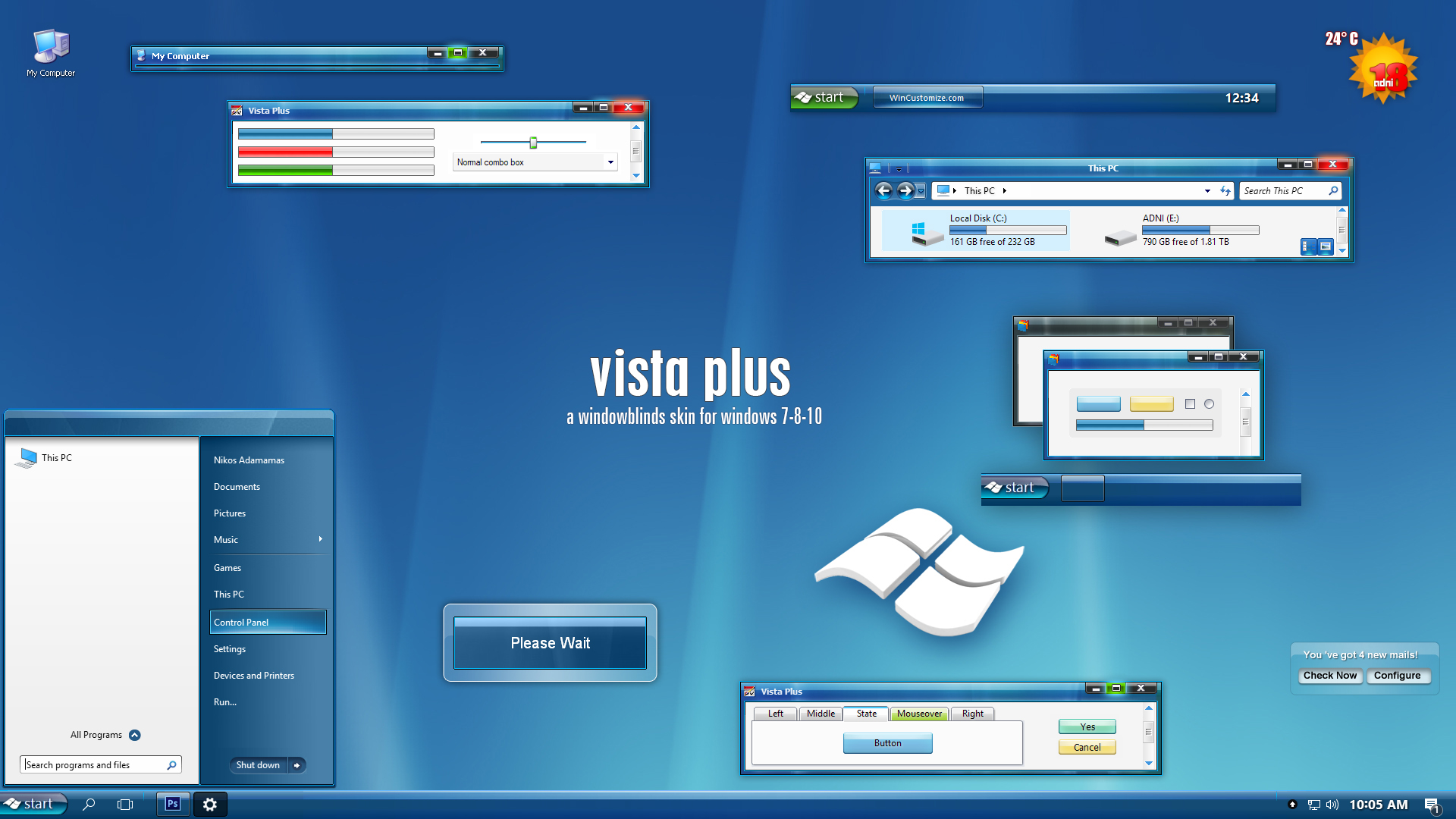
To have what you see in the preview and a logon screen, you need:
1. Windowblinds: http://www.download.com/WindowBlinds/3000-2326-10026826.html?part=dl-WindowBli&subj=dl&tag=button
-(after the instalation just double click on the file you have download from here VistaPlusv2.wba )
2. The wallpaper: http://www.adni18.com/gallery/details.php?image_id=252
3. The logon screen:
Logon Studio: http://www.download.com/LogonStudio/3000-2344_4-10328444.html?tag=lst-0-1
-(after the instalation just double click on the file you will download from the link bellow )
Logon screen: https://www.wincustomize.com/ViewSkin.aspx?SID=1&SkinID=7199&LibID=26
Good luck!
To have what you see in the preview and a logon screen, you need:
1. Windowblinds: http://www.download.com/WindowBlinds/3000-2326-10026826.html?part=dl-WindowBli&subj=dl&tag=button
-(after the instalation just double click on the file you have download from here VistaPlusv2.wba )
2. The wallpaper: http://www.adni18.com/gallery/details.php?image_id=252
3. The logon screen:
Logon Studio: http://www.download.com/LogonStudio/3000-2344_4-10328444.html?tag=lst-0-1
-(after the instalation just double click on the file you will download from the link bellow )
Logon screen: https://www.wincustomize.com/ViewSkin.aspx?SID=1&SkinID=7199&LibID=26
Good luck!
Xythe
Comment #197 Tuesday, November 28, 2006 6:15 AM

Comment #197 Tuesday, November 28, 2006 6:15 AM
M. Adni, all I can say is thank you ssoooo much!
aravaioli
Comment #199 Thursday, November 30, 2006 5:34 PM
Comment #199 Thursday, November 30, 2006 5:34 PM
Great. Only one issue: the Start button does not display properly at my resolution 1680x1050.
Other than that it's excellent indeed.
Other than that it's excellent indeed.
NapsterMTY
Comment #200 Thursday, November 30, 2006 10:35 PM
Comment #200 Thursday, November 30, 2006 10:35 PM
Exellent Skin, Perfect Shape And Color!!, Absolute The Best, keep up the exellent work boddy!! 

Please login to comment and/or vote for this skin.
Welcome Guest! Please take the time to register with us.
There are many great features available to you once you register, including:
- Richer content, access to many features that are disabled for guests like commenting on the forums and downloading files.
- Access to a great community, with a massive database of many, many areas of interest.
- Access to contests & subscription offers like exclusive emails.
- It's simple, and FREE!
|
|
Page 10 of 22 | |
|
|---|




Comment #181 Saturday, November 18, 2006 12:45 AM