








































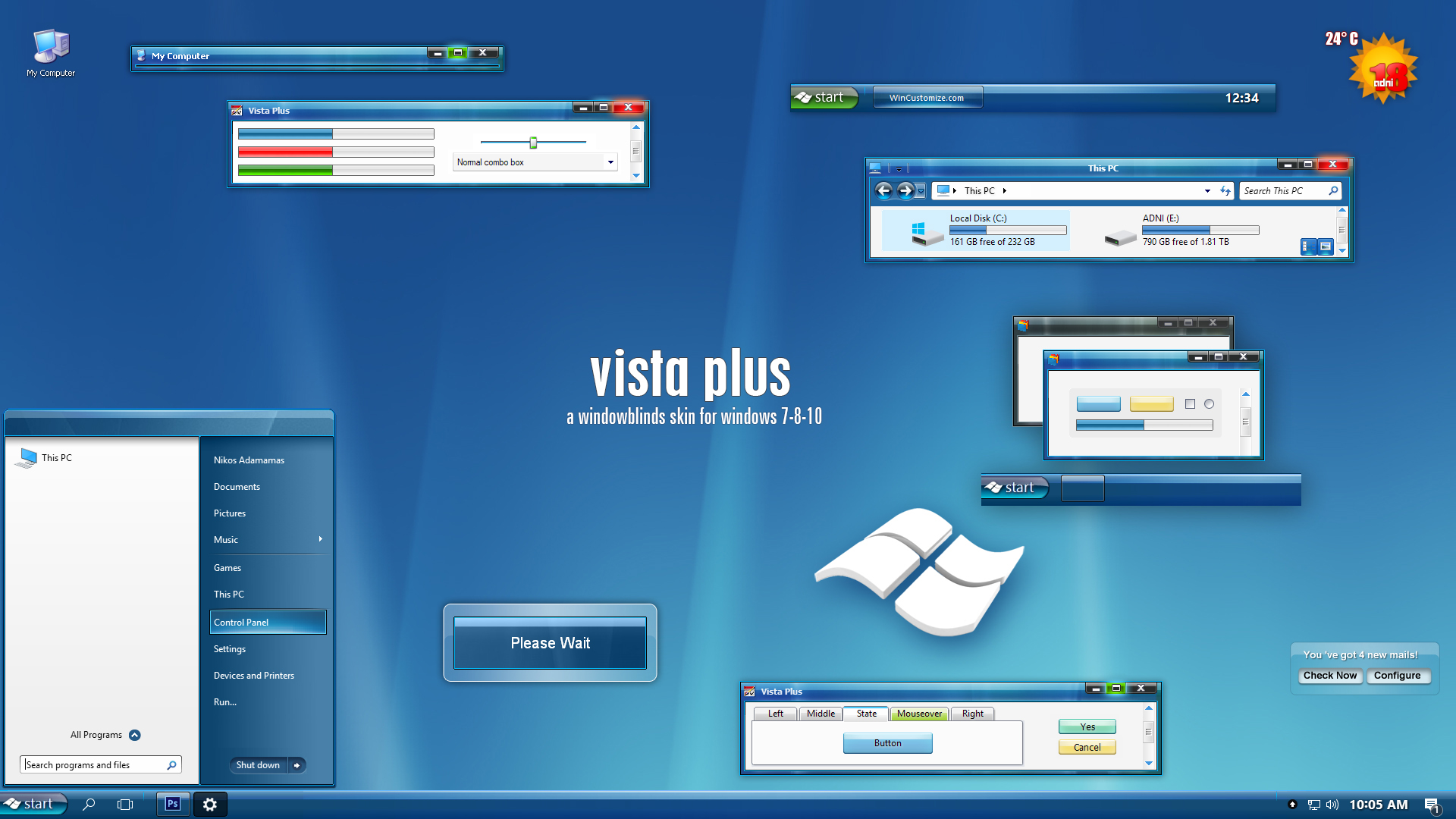
 |
|
Page 12 of 22 | |
|
|---|
adni18
Comment #222 Thursday, February 22, 2007 1:28 AM
Thanks Darimar
About the issue with IE7 I have answer above.
Never happen to my PC what you are saying Crivens �Cheers�
Thank you Metalbuster
You can get the user icon from this link:http://www.adni18.com/WEB/usericon.jpg
Comment #222 Thursday, February 22, 2007 1:28 AM
Thanks Darimar

About the issue with IE7 I have answer above.
Never happen to my PC what you are saying Crivens �Cheers
�Thank you Metalbuster
You can get the user icon from this link:http://www.adni18.com/WEB/usericon.jpg
Darimar
Comment #223 Thursday, February 22, 2007 6:06 PM
I'm not sure which answer you are eluding to, so I'll guess it's the one about the memory? I've got 2 gig, so I don't think that's the issue. Also, in SQL Server 2005, mousing over the bottom portion of the window causes a .NET exception, saying there's something wrong with the visual style. Neil at Stardock suggested that there might be an image missing in the theme. Anyway, good luck! I hope this is resolved soon, as this is my favorite skin! � �
�
Also, I do not have the problem with the black tab bar in IE7 with other skins.
Comment #223 Thursday, February 22, 2007 6:06 PM
Thanks Darimar
About the issue with IE7 I have answer above.
About the issue with IE7 I have answer above.
I'm not sure which answer you are eluding to, so I'll guess it's the one about the memory? I've got 2 gig, so I don't think that's the issue. Also, in SQL Server 2005, mousing over the bottom portion of the window causes a .NET exception, saying there's something wrong with the visual style. Neil at Stardock suggested that there might be an image missing in the theme. Anyway, good luck! I hope this is resolved soon, as this is my favorite skin! �
 �
�Also, I do not have the problem with the black tab bar in IE7 with other skins.
dug_98304
Comment #224 Friday, February 23, 2007 11:33 PM

Comment #224 Friday, February 23, 2007 11:33 PM
MY wife bought a new notebook with Vista, looked it over,i'll keep XP ,thankyou and no need to have a look-a- like enjoy ,i guess
kelvinc2
Comment #225 Sunday, February 25, 2007 10:46 PM
Comment #225 Sunday, February 25, 2007 10:46 PM
Beautiful! I keep browsing every theme, and your's still the best!!!
adni18
Comment #226 Monday, February 26, 2007 8:14 AM
Darimar,
Strange, I am sure that I have solved the problem of some black areas in IE toolbar, read the description above, a graphic was missing then... but now I don't know...
Thank you very much dug_98304 and kelvinc2
Comment #226 Monday, February 26, 2007 8:14 AM
Darimar,
Strange, I am sure that I have solved the problem of some black areas in IE toolbar, read the description above, a graphic was missing then... but now I don't know...
Thank you very much dug_98304 and kelvinc2
Crivens
Comment #227 Wednesday, February 28, 2007 3:16 AM

Comment #227 Wednesday, February 28, 2007 3:16 AM
Doubt the black bars is memory as I also have 2gb. One thought is that I also use WindowFX set to have random transistions when opening a window. Except I don't have this problem with the Azenis2 skin that I also use a lot of the time (also with WindowFX with random transistions when opening a window). Well, I haven't noticed it yet and Vista2 happens quite a lot.
As for the start bar problem I get, it happens with other skins too, so must be a problem with Blinds and my setup I guess.
Cheers
As for the start bar problem I get, it happens with other skins too, so must be a problem with Blinds and my setup I guess.
Cheers
Freeyayof50
Comment #228 Wednesday, February 28, 2007 1:51 PM

Comment #228 Wednesday, February 28, 2007 1:51 PM
How great this skin is can't even be explained. Great work.
Joe the user
Comment #229 Wednesday, March 14, 2007 1:42 PM
Comment #229 Wednesday, March 14, 2007 1:42 PM
great, but if you could ad the Vista startbutton, it would be better...
squelart
Comment #230 Thursday, March 15, 2007 12:00 AM
Comment #230 Thursday, March 15, 2007 12:00 AM
Excellent skin!
Would love to use it... BUT... Selection disappears when a window loses focus. This makes it unusable for me in my everyday activities.
Would love to use it... BUT... Selection disappears when a window loses focus. This makes it unusable for me in my everyday activities.

Juli1000
Comment #231 Saturday, March 17, 2007 7:50 AM
Comment #231 Saturday, March 17, 2007 7:50 AM
When I am actiavting it in Windows Blind it frezze!
edk01
Comment #232 Sunday, March 18, 2007 11:10 AM
Comment #232 Sunday, March 18, 2007 11:10 AM
best way to get vista on xp - better than the real thing. 

kreate
Comment #233 Wednesday, March 21, 2007 12:58 AM
Comment #233 Wednesday, March 21, 2007 12:58 AM
i want to use this skin too but after i download the skin. how do
i use it so i can change my xp to the new skin i've
downloaded?
i use it so i can change my xp to the new skin i've
downloaded?
Jeffyg3
Comment #234 Thursday, March 22, 2007 7:48 PM
Comment #234 Thursday, March 22, 2007 7:48 PM
This is seriously the first skin I've been completely satisfied with with. Outstanding job! Though, would have been a nice small touch if the start button looked just like the one on Windows Vista, but none-the-less, excellent skin.
eMCee1
Comment #235 Saturday, March 24, 2007 7:17 AM
Comment #235 Saturday, March 24, 2007 7:17 AM
Hi i want to ask something
How can I use this? Dont have to explain so good, just where I can put this on? I handle computer usually pretty good but this going over my head. Please tell me, this looks good.
How can I use this? Dont have to explain so good, just where I can put this on? I handle computer usually pretty good but this going over my head. Please tell me, this looks good.
adni18
Comment #236 Saturday, March 24, 2007 11:56 AM
Comment #236 Saturday, March 24, 2007 11:56 AM
Thank you very much all for your good comments, appreciate them
Joe the user and Jeffyg3 I have choose a different look for the start button, that's all
kreate and eMCee1 Download "Windowblinds" from the link above and then just double click on the file " VistaPlusv2.wba " and you will have it in your monitor!
Joe the user and Jeffyg3 I have choose a different look for the start button, that's all
kreate and eMCee1 Download "Windowblinds" from the link above and then just double click on the file " VistaPlusv2.wba " and you will have it in your monitor!

Evolut1on
Comment #240 Saturday, April 28, 2007 3:46 PM
Comment #240 Saturday, April 28, 2007 3:46 PM
Best skin i've EVER seen, I always wanted the transparent Vista theme, but this is soooooooooooooooo much better!! Thanks soooo much!
Please login to comment and/or vote for this skin.
Welcome Guest! Please take the time to register with us.
There are many great features available to you once you register, including:
- Richer content, access to many features that are disabled for guests like commenting on the forums and downloading files.
- Access to a great community, with a massive database of many, many areas of interest.
- Access to contests & subscription offers like exclusive emails.
- It's simple, and FREE!
|
|
Page 12 of 22 | |
|
|---|




Comment #221 Wednesday, February 21, 2007 5:10 PM
But when you click on start the small avatar waht you got behind your name "Nikos" that pencil maybe you can also upload that picture for us so we can get it ?