






































 |
|
Page 9 of 22 | |
|
|---|
kongthai
Comment #162 Thursday, October 26, 2006 10:57 PM
Comment #162 Thursday, October 26, 2006 10:57 PM
hi! i love ur theme.
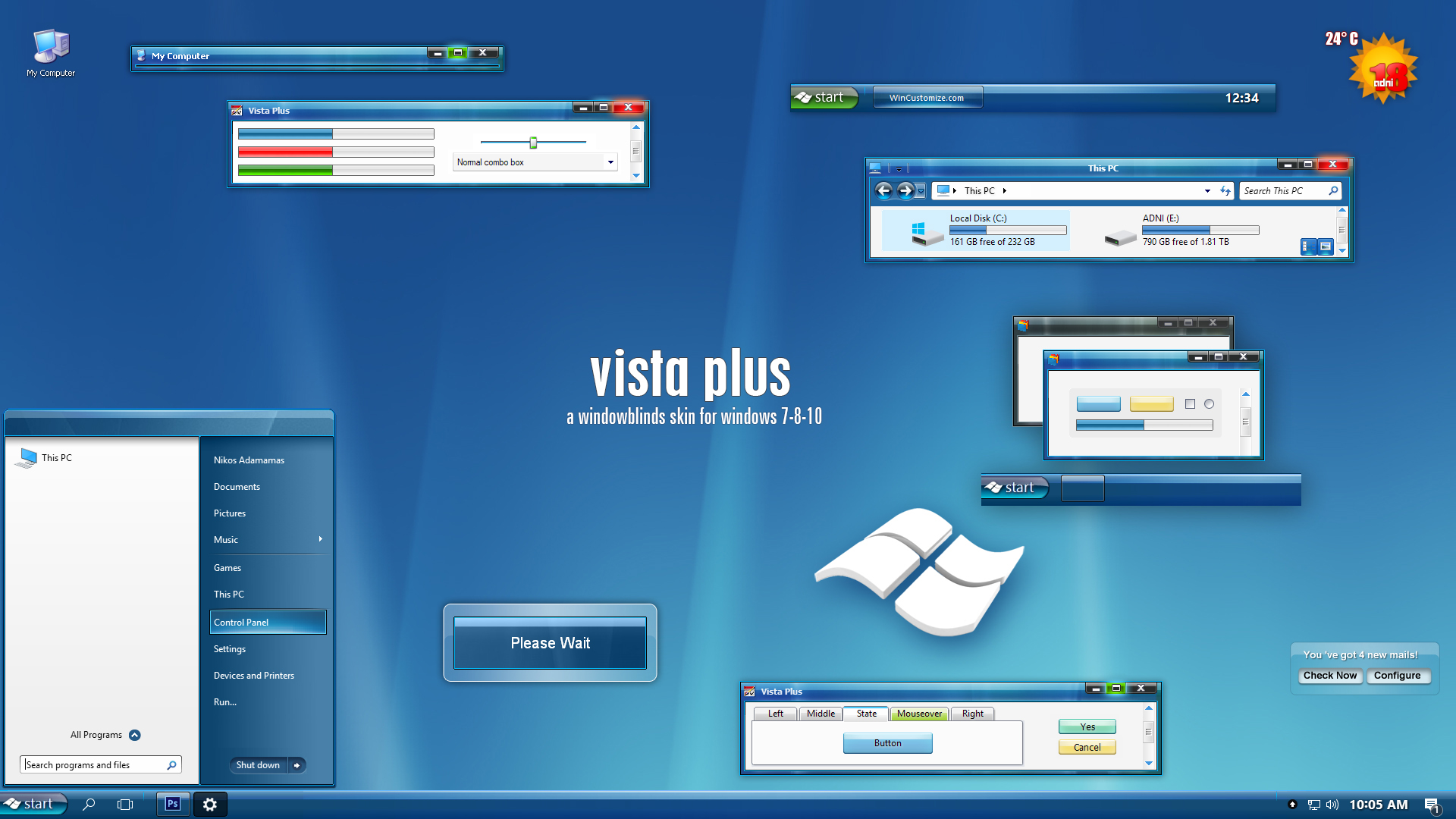
but when i apply the theme, it doesn't show correctly. (in the pic)
[URL=http://imageshack.us] [/URL]
what's wrong with that?
but when i apply the theme, it doesn't show correctly. (in the pic)
[URL=http://imageshack.us]
 [/URL]
what's wrong with that?
adni18
Comment #163 Friday, October 27, 2006 1:22 PM
Comment #163 Friday, October 27, 2006 1:22 PM
Thank you Kyanar
Are your sure that you are using the "Vista Plus version 2 " ?
This was an issue with the first version.
Thank you kongthai
Please send me the link with email, [email protected]
because I can't see anything with the above link, it is not accessible...
Are your sure that you are using the "Vista Plus version 2 " ?
This was an issue with the first version.

Thank you kongthai
Please send me the link with email, [email protected]
because I can't see anything with the above link, it is not accessible...
kongthai
Comment #164 Saturday, October 28, 2006 1:05 PM
Comment #164 Saturday, October 28, 2006 1:05 PM
ok. can i post the link here because the mail says it cannot be delivered. here's the link:
http://img239.imageshack.us/img239/6498/untitled1copysf4.jpg
wsee at my taskbar. it's white, not blue
http://img239.imageshack.us/img239/6498/untitled1copysf4.jpg
wsee at my taskbar. it's white, not blue
adni18
Comment #165 Saturday, October 28, 2006 6:53 PM
Comment #165 Saturday, October 28, 2006 6:53 PM
Hello kongthai ,
You should exclude Photoshop and Adobe software in general from skinning, they don't like Windowblinds
Those programs are causing general problems when they are skinned.
I never saw something similar with your screenshot in my computer , your taskbar is not skinned at all...
You should exclude Photoshop and Adobe software in general from skinning, they don't like Windowblinds

Those programs are causing general problems when they are skinned.
I never saw something similar with your screenshot in my computer , your taskbar is not skinned at all...
Taun Deverill
Comment #166 Sunday, October 29, 2006 2:04 AM
Comment #166 Sunday, October 29, 2006 2:04 AM
I am getting the same symtoms. Black toolbar. I deleted and reinstalled v2 but same result on both IE6 and IE7. And on two separate machines. I wish it wasn't so, I do like this skin very much.
adni18
Comment #167 Sunday, October 29, 2006 2:22 AM
Comment #167 Sunday, October 29, 2006 2:22 AM
This weird Taun Deverill
The problem with black toolbars is fixed , many people who were complaining about it, they have thanked me for the fix...
Doesn't happen to my computer after the version 2.
The problem with black toolbars is fixed , many people who were complaining about it, they have thanked me for the fix...
Doesn't happen to my computer after the version 2.
serpente91
Comment #168 Sunday, October 29, 2006 8:44 AM
Comment #168 Sunday, October 29, 2006 8:44 AM
kk deres onli 1 error with it and thats when ur on msn u can't read when it says "this person cannot replie cause he/she is busy" its jus blank. can u fix it and other than that i tink its a perfect skin. O and 1 mre ting could u make the icons on internet explorer look beta if u can thats all i ask thank u 4 taking time 2 read dis

Taun Deverill
Comment #170 Tuesday, October 31, 2006 1:48 AM
Comment #170 Tuesday, October 31, 2006 1:48 AM
I gave your skin one more chance after the deletion and reinstall. Things seem to be ok. I think it might be because the computer had been restarted more than once since then. It apparently took more than one restart to clear and set things right in the system. So I will keep my fingers cross as the skin looks very good. Thanks.
adni18
Comment #171 Tuesday, October 31, 2006 3:16 AM
Comment #171 Tuesday, October 31, 2006 3:16 AM
You are welcome Taun Deverill , I am glad to hear that you have no problem 
Thanks serpente91 , the problem you mention doesn't happen to my computer, it shows black text on white...

Thanks serpente91
, the problem you mention doesn't happen to my computer, it shows black text on white... 
William Mcauley
Comment #173 Saturday, November 4, 2006 11:16 AM
Comment #173 Saturday, November 4, 2006 11:16 AM
This is a great skin. I only have a slight problem, in that when a notification balloon is displayed from the taskbar, the 'close' button graphic for the balloon seems to be missing. I have tried to find where in the skin this graphic is defined (using skinstudio) but not having much luck. (I have a screen print, but don't know how to include it in this comment. Can you tell it's my first ever attempt at this sort of thing ? . Thanks to the author for a great design, though.
. Thanks to the author for a great design, though.
adni18
Comment #174 Saturday, November 4, 2006 12:54 PM
Comment #174 Saturday, November 4, 2006 12:54 PM
You are welcome cymru
Thank you William Mcauley
The close button you are mentioning is not missing in my computer, maybe it was a temporary problem in your computer...
Thank you William Mcauley
The close button you are mentioning is not missing in my computer, maybe it was a temporary problem in your computer...
Bash2cool
Comment #175 Sunday, November 5, 2006 2:15 PM

Comment #175 Sunday, November 5, 2006 2:15 PM
Man you've been the best for over 5 YEARS..........I think you should get something rewarding!
adni18
Comment #176 Monday, November 6, 2006 2:23 AM
Comment #176 Monday, November 6, 2006 2:23 AM
Thank you so much dear Basheer
Appreciate your comment and the favourite
Appreciate your comment and the favourite
Kyanar
Comment #177 Monday, November 6, 2006 10:25 PM
Indeed I am, and still under random circumstances the toolbars all turn black. Apparently though, this MIGHT be a problem with WindowBlinds itself.
Comment #177 Monday, November 6, 2006 10:25 PM
| Thank you Kyanar Are your sure that you are using the "Vista Plus version 2 " ? This was an issue with the first version. |
Indeed I am, and still under random circumstances the toolbars all turn black. Apparently though, this MIGHT be a problem with WindowBlinds itself.

adni18
Comment #179 Wednesday, November 8, 2006 2:35 PM
Comment #179 Wednesday, November 8, 2006 2:35 PM
Maybe it is a memory problem Kyanar, not sure though...
Thanks BX
Thanks BX
vorxaw
Comment #180 Friday, November 10, 2006 6:42 PM
Comment #180 Friday, November 10, 2006 6:42 PM
Hi adni
love the theme, i just have one question
i often get these pink lines that develope under my min/max/close buttons on the right of my window bar
any idea why?
thanks a lot
love the theme, i just have one question
i often get these pink lines that develope under my min/max/close buttons on the right of my window bar
any idea why?
thanks a lot
Please login to comment and/or vote for this skin.
Welcome Guest! Please take the time to register with us.
There are many great features available to you once you register, including:
- Richer content, access to many features that are disabled for guests like commenting on the forums and downloading files.
- Access to a great community, with a massive database of many, many areas of interest.
- Access to contests & subscription offers like exclusive emails.
- It's simple, and FREE!
|
|
Page 9 of 22 | |
|
|---|




Comment #161 Thursday, October 26, 2006 10:04 AM
This skin is absolutely awesome! Except... in Internet Explorer 7, black toolbars are still rife which unfortunately are irritating me enough that I will soon change skins. Pity, because apart from that it is very nice. Elegant, stylish (and pretty true to form as well, it is quite similar to Vista itself)
That said, if it helps you any, when you attempt to reproduce the issue on your install, try installing Windows Live Toolbar and/or Google Toolbar - you might be, well, unpleasantly surprised.