







































WebGizmos
Comment #2 Friday, October 21, 2005 8:53 PM

Comment #2 Friday, October 21, 2005 8:53 PM
Thanks! Glad you like my work!  And I wish I did wall paper this good...I could quit my job and just do wallpapers!
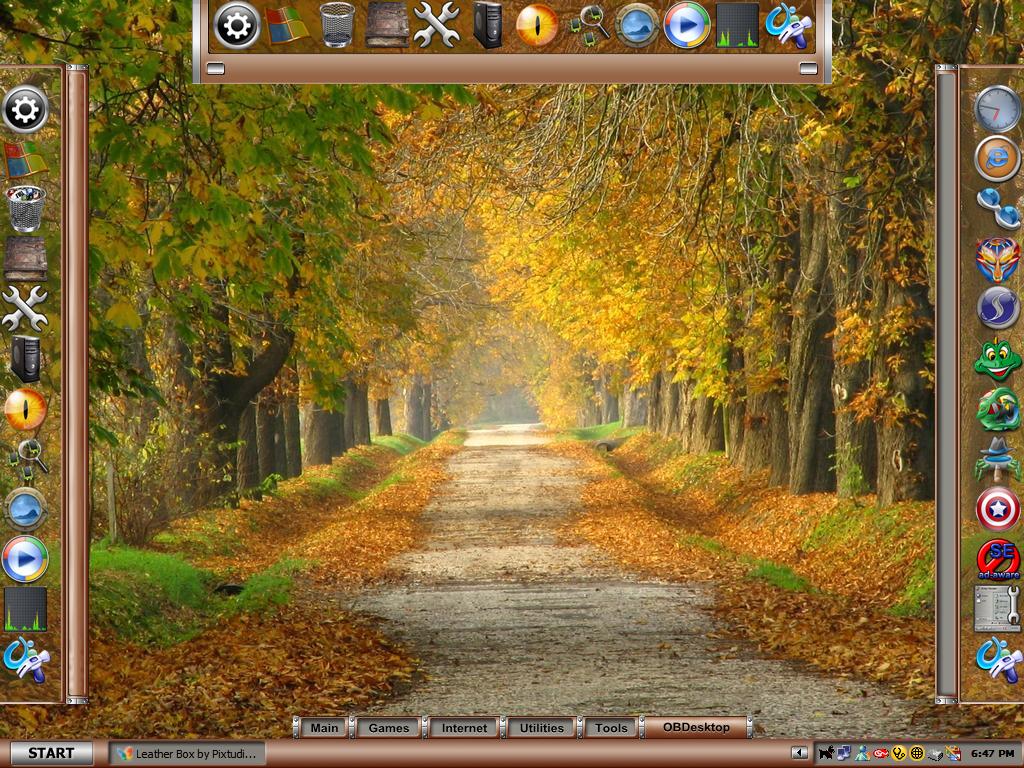
  But I get all my wallpapers at webshots.com The wallpaper in the screenshot can be found here http://community.webshots.com/album/219448948cdMsBA and you will see the same shot taken at 3 or more different times of the year.
 And I wish I did wall paper this good...I could quit my job and just do wallpapers!
  But I get all my wallpapers at webshots.com The wallpaper in the screenshot can be found here http://community.webshots.com/album/219448948cdMsBA and you will see the same shot taken at 3 or more different times of the year.
Asound
Comment #3 Thursday, February 2, 2006 10:33 AM
Comment #3 Thursday, February 2, 2006 10:33 AM
How do i install those Object Dock skins? I only can use the standard skin. Please help me.
WebGizmos
Comment #4 Thursday, February 2, 2006 2:21 PM
Comment #4 Thursday, February 2, 2006 2:21 PM
All you have to do is unzip the file and place them in your ObjectDock Backgrounds folder. What version of ObjectDock are you using..Free or paid?
Asound
Comment #5 Friday, February 3, 2006 7:01 PM
Comment #5 Friday, February 3, 2006 7:01 PM
Well, i use the free version. It still doesnt work, because i cant choose them if i have unzipped them into the backround folder
WebGizmos
Comment #6 Saturday, February 4, 2006 12:24 AM
Comment #6 Saturday, February 4, 2006 12:24 AM
Do you see other dock backgrounds in the folder?
Asound
Comment #7 Saturday, February 4, 2006 11:49 AM
Comment #7 Saturday, February 4, 2006 11:49 AM
Do you mean, if i see a skin with the name backround? I only can see it, if i had copy the backround file into the themes folder and if I chosse the backround skin, there stands "You have chossen nothing to aply" and iI cant choose anything to aply.
WebGizmos
Comment #8 Saturday, February 4, 2006 2:56 PM
Comment #8 Saturday, February 4, 2006 2:56 PM
Ok...lets try this. Navigate to your "stardock" folder...then "Objectdock"...then you should see a "backgrounds" folder. In there is where your background skin should be sent. Once its in there you should be able to apply it. Now, since I have never used the free version of Objectdock I have no idea if it allows you to do what your trying to do.
Asound
Comment #9 Sunday, February 5, 2006 12:23 PM
Comment #9 Sunday, February 5, 2006 12:23 PM
Well i cant choose it, i only can choose the default skin.
WebGizmos
Comment #10 Sunday, February 5, 2006 2:58 PM
Comment #10 Sunday, February 5, 2006 2:58 PM
Once you see a dock on your desktop....if its tabbed...right click on a tab and choose "Tab Settings" and the click the arrow in the style choices. Hopefully you'll see your skins there. If its a zoomer...choose configure...then "appearance" and then you should see "backgrounds" listed...from there you can choose a skin as well.
Asound
Comment #11 Sunday, February 5, 2006 4:42 PM

Oh, know i now what i made wrong. I always wanted to go to, dock settings, than themes and than, load dock themes.
Ok, it works now and looks very god.
Thank you for your help .
.
Damn was I stupid.
Comment #11 Sunday, February 5, 2006 4:42 PM

Oh, know i now what i made wrong. I always wanted to go to, dock settings, than themes and than, load dock themes.
Ok, it works now and looks very god.
Thank you for your help
 .
.Damn was I stupid.

Please login to comment and/or vote for this skin.
Welcome Guest! Please take the time to register with us.
There are many great features available to you once you register, including:
- Richer content, access to many features that are disabled for guests like commenting on the forums and downloading files.
- Access to a great community, with a massive database of many, many areas of interest.
- Access to contests & subscription offers like exclusive emails.
- It's simple, and FREE!





Comment #1 Friday, October 21, 2005 6:44 PM
but i have to ask where did you get the wallpaper ? are you doing wallpaper now ?
keep up the super work !